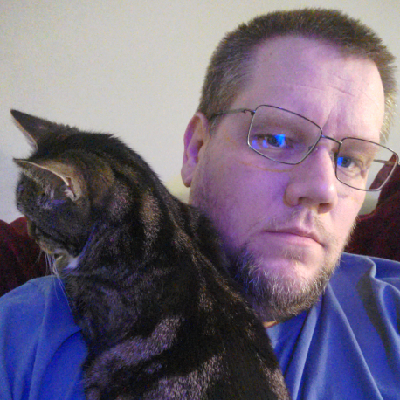
This cat just stood on what turns out to be a poorly placed power button on top of my PC, turning the machine off... and deleting a whole bunch of interview quotes I'd spent the last two hours transcribing in the process.

No, I don't know why I hadn't clicked save in that time either.

Regularly backup your data, kids!

@dannyjpalmer beware Advanced Persistent Cats too I guess
@dannyjpalmer your cat warmer was running too hot
@dannyjpalmer that's bad. Mine logged my working hours last week. I didn't notice she'd checked me back in after dinner. I had to explain the extra late night shift the next day...
@dannyjpalmer I remember when MS Word would auto save to a hidden shadow file every few minutes. It doesn't do that anymore, and autosave only works if you save your document to OneDrive. Which is an _improvement_.
@dannyjpalmer catastrophic hardware error.
@dannyjpalmer Ah man just like the old G4 Cube Macs!

@dannyjpalmer that sucks, my cat used to do that too.

If it's likely to be a repeat occurrence, lots of notetaking tools have autosave/recovery options. Mine does, and I've never lost text data because of it.

@sagefault It's my own fault. I tend to use Libre Office to initially draft and transcribe things before backing it up elsewhere. But yeah, maybe need to look at something with an autosave. Although what Google Docs would do with that data is another question entirely... especially when in some cases I'm dealing with embargoes and the like. 😅

@dannyjpalmer @sagefault

Beautiful cat!

#LibreOffice has an auto save option:
https://help.libreoffice.org/latest/en-GB/text/shared/guide/doc_autosave.html

Since I know cats: It might be a good idea to somehow protect that button from your cat ... it probably won't be the last time, if it got interesting reactions.

Saving Documents Automatically

@dannyjpalmer You should thank That Cat with an extra treat for teaching you a valuable lesson, and allowing you to grow.
@dannyjpalmer CatDoS strikes again

@dannyjpalmer People made so much fun for putting the power button on the underside of the latest Mac Mini.

Maybe the designer just owns cats.

@dannyjpalmer @catsalad And make your cats back up.

Back *waaaay* the fuck up.

@dannyjpalmer You should interview the cat instead.

@dannyjpalmer forgive me if you aren’t looking for advice but if you want, you can make the power button do nothing while the machine is turned on.

In settings: Power Options > Choose what the power button does > Nothing

If the machine is off, the power button will turn it on, but then the button will be ignored while on.

@arcadus @dannyjpalmer, which desktop environment is that for?

The one setting which I specifically hate is instant-off. Fortunately, there are usually BIOS/UEFI settings for that.

@dannyjpalmer If your threat model doesn't include cats, it should.

My kitty has discovered countless "features" and bugs in my laptop's handling of unexpected inputs, some of which I haven't yet been able to reproduce.

I wish I could get her a job doing QA.
@AnachronistJohn Standing on my desk between me and my keyboard/monitor while I was trying to focus on a Final Fantasy XIV raid is another recent 'test' here.
@dannyjpalmer
Top facing buttons always make me sad. That right there was invented by a person neither loved nor hated by a cat.
@dannyjpalmer @lisamelton I have a strategically placed clipboard sitting on top of my air filter for this reason. Dunno why, but #RipleyAndJonesy LOVE getting on top of it and changing its speed and/or on–off status. 🤦‍♂️
@dannyjpalmer
Whoever thought putting unshielded power/reset buttons and usb ports atop cases clearly never had cats in their lives. I've had to fashion a molly guard from a bit of leftover packaging plastic from an sd card over my case's buttons to stop my cats doing just this.
@dannyjpalmer
Power-button cat iz pressing buttons.
@dannyjpalmer wait, isn't this 2025? don't word processors auto-backup every eleventy minutes? 😳 (I'm not sure my kid even knows about backups, despite my efforts!)
@acm_redfox I tend to use an open source, offline application for writing (makes it easier to focus) - which doesn't have this, it turns out! 😆
@dannyjpalmer also, cute cat. little fuker!

@dannyjpalmer

Been there. Done that. Hated it too.

@dannyjpalmer for a cat the attack surface is infinite

@dannyjpalmer

I have decorated the top of my PC with some whiteboard magnets.
They effectively screen the power button from the cats' butts and paws.

Also, the power button should only invoke the sleep function.

@dannyjpalmer if only you had Microsoft recall lol
@dannyjpalmer this is why my user name and web site are Puss Reboots.
@dannyjpalmer I really struggle to save things until I've finished them, which means I lose hours of time in destroyed projects. I'm sorry it happened.
@dannyjpalmer" oh mayyyyayaayiaiaiaiaiaouw!" oof. you poor bugger. yes, makes me remember my power button is on the top of my tower. strange to put it there.
@dannyjpalmer I was cat sitting a cat at some point and I swear it figured out how to turn my PC off just to get attention
@dannyjpalmer oh that is frustrating.
@kimlockhartga At least when I did my redo, I knew which bits I didn't need to include!
@dannyjpalmer I been there... had a similar case. I printed a "flap" that I inserted into one of the USB ports near the power button that would cover it and prevent these types of things.
@dannyjpalmer you could also make it so you power button puts your PC to sleep.
@dannyjpalmer the cat knew what It was doing
@dannyjpalmer my computer's the same. Such a stupid design!

@dannyjpalmer

Oh no D:
This is why my otherhalf has made a lid over the power button because our little gremlin did the same thing. No data loss though.

@dannyjpalmer

And it might depend on the cat whether a lid works xD

@fox Sneaky little bugger. 😁
@dannyjpalmer you should do both though. Always backup, 1-2-3, Local backup (NAS/USB Drive), Online, Offsite.
@dannyjpalmer I learned to disable power and sleep buttons in options. Kids on lap: what's this shining button for? Tap, tap, tap.... Afterwards, when they learned that it "does nothing" they stopped "using it" 😁. But I learned that it is enough that the button is only for power on/wake up.

@dannyjpalmer

I was a kid in the '90s.

The longer I go without mashing Ctrl+S, the more anxious I get.

Mostly because of BSODs and power failures, though, not cat butts. Computers in my day had the power button on the side, where it was safe from cats.

@argv_minus_one My previous desktop PC case had a big red button on the front, making it cat proof. Alas, this seemingly wasn't considered with this one!

@dannyjpalmer

A computer case with a big red button of doom to turn it on/off? Where do I sign?!?