 cm0002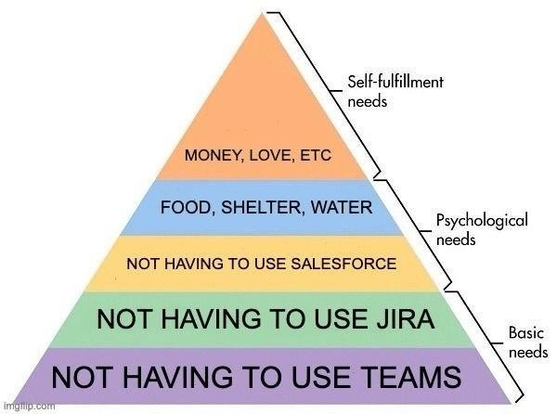
 BatmanAoD
I’ve never understood the hatred for Teams. I don’t particularly like Slack, and Teams doesn’t seem that much worse.
I prefer the way Slack groups threaded conversations within a channel. Teams channels are clunky enough that we just end up using group chats instead.
On a 4k monitor you can still only get about 80 characters of monospaced font per line, because of the “negative space” fetish UX designers have.
Something dead simple like posting a stack trace, and then having someone able to, you know, read it… It’s just not something teams really does well.
I can understand how the tooling probably does a ton of stuff that corporate users want (integrating with calendars, tons of access controls for spaces for important people to talk, etc) but for a dev working primarily with a handful of other devs and qas, there is a feature set mismatch. I can’t begin to tell you how badly I don’t give a shit about 99% of its features.
How long has it been since you used Teams? I’m no apologist, I have plenty of gripes with that piece of crap software, but this seems like a crazy stretch. Teams makes it almost trivial to embed code blocks with syntax highlighting for a wide array of languages, which can be easily copied out of Teams or opened in a separate viewer for easier reading.
It’s been about 36 hours?
Maybe we’re using an old version or something, but code blocks still don’t expand horizontally to fill the available space, so we just get a horizontal slider bar.
or opened in a separate viewer for easier reading.
Yes, that’s my beef. If I need to juggle content to external text editors to read them, then IMO it has failed the categorical imperative of the tool.
For the most part I like teams, but the notification system is horribly, horribly broken. Everytime i think if finally muted the inane chatter on a channel, I get spammed yet again. Then there are the email notifications… um Microsoft I, like most of your customers, check my email, in Outlook, you know… the email client designed for email, with all the email related features, that has it’s own notifications…
I swear, if I start getting teams notifications in outlook, I will fly to Redmond and start setting fires.
Teams is trash, I have to use it with certain clients, slack for everything else. Literally everything it does is like a wish.com fail version of slack. Like if you ordered slack on temu.
 DragonSidedD
Worse than Slack…
Now that is saying something
They are now finally putting some work in to improve it. I don’t remember much what I used to hate particularly, it was mostly UI related, bugs or the bad Mac implementation.
The new combined view with chats and teams is much better than the split sections.
It took them until just recently to have a basic code block format like everyone else, instead of this annoying editor-in-editor mess they had before (and still kept for some reason).
It used to be very buggy like you had to hunt down the source of some notification to mark it as read. It still doesn’t 100% sync with Outlook. If an event is cancelled and I click delete in Outlook, I also have to go to Teams and „read“ this update. You can set group events in Teams but they somehow don’t end up in Outlook.
What I really like are the clay-like emojis designs.
Bugs around read-notifications are pretty bad. Slack still has those, but they’re infrequent and transient, and often solvable with a hard-refresh.
the emojis would be fine, if they used standard naming schemes like everyone else does…but for some ungodly reason they don’t adhere to standard nomenclature, so good fuckin luck finding the one you’re looking for!
also: WHY is the shortcut for emojis a fucking parenthesis??? why isn’t it a colon like in damn near every other app???
this is the worst thing about teams:
it forces you to re-learn chat app standards that have been in place for well over a decade, and it does so for abso-fucking-lutely no good reason!
and it does so for abso-fucking-lutely no good reason!
Vendor lock-in. The next generation will demand teams because they cannot get used to other shortcuts.
i mean…that certainly is an explanation, but it’s a shit strategy:
there are a lot of objectively false names for emojis, you can’t expect people to get used to that…
“eyeroll” for example is called “bored”…which makes absolutely no sense. (at least in german, maybe it’s less bad in english)
I don’t see that ever leading to vendor lock-in, just perpetual frustration…
Saying the Mac implementation is bad when 99% of the apps ported from iOS to Windows are an unoptimized clunky mess is hypocritical as fuck.
How am I responsible for iOS to Windows ports?
You’re not responsible for anything. I’m just saying if you only require that Windows makes its apps compatible with iOS and smooth, you should require the same from Apple with regards to Windows. It’s a two-way street.
I never said it shouldn’t be the other way around, why would I need to? Should I mention everything that is going wrong in this world when I’m talking about one thing?
 Mr. Satan
Notification syncing between devices is nonexistent in Teams and there are no conversation threads.
In general teams is way more buggy with worse UX. I don’t know if it’s a thing on Teams that our workplace disabled, but there’s no decent notification management. If I take a day off, I can set my notifications in Slack as mute for that day and I can manage notifications for messages vs mentions vs mute per channel.
On Teams I can’t permanently set Enter as new line, I have to click that rich text editor icon for every single message.
On mobile Teams started doing this thing in group chats where, if I move the cursor with drag on space gesture and then move it back to the end of the message, Teams interprets this as a desire to “attach a program”, like power apps (whatever that is).
Pasting in code block also gets me every time. I’ll start a code block in Teams window, go to another window, copy the text and click back on my code block. Teams just drops the cursor to the end of message outside my code block and by the time I notice I already hit ctrl+v.
My last pet peeve is about formatted copy pasting and applies to Slack as well but Teams having more text formatting options shows more of an impact. Never, and I repeat, NEVER have I wanted to paste anything with formatting, especially if I grabbed it form a website, word, excel, pdf or a code editor. Why is it the default and nonnegotiable? I can change the default on Libre Office, why not on Teams? It’s a chat app why would I need headings like in a regular doc?
Every time it gets me, ctrl+c, ctrl+v, fuck ctrl+z, ctrl+shift+v…
Literally every week I encounter new bugs, it gets worse and worse. Many very basic features (like inline code with back ticks) just stopped working months ago and don’t work anymore. Scrolling in some channels is completely broken, jumping around wildly. Sometimes messages just don’t get sent (both on Android & Web). Sometimes calls work perfectly all day, then the next call just randomly changes audio device settings and I have to find what’s wrong again. Sometimes the video stream of a shared screen just doesn’t work, or stops working when switching to the small pop-up window while looking at chats, so the other person has to re-share. Sometimes the “available” state is just broken and keeps getting set to “away”. The search just doesn’t find many things, even when searching with fairly exact parameters.
It’s a daily source of frustration & literally gets worse by the week. I can’t remember a program that’s made me angry as much as Teams has.
 bleistift2
inline code with back ticks
Have you noticed that there are now three ways to enter block-formatted, monospace text?
Yep. “Code Snippets” recently stopped working for me (the overlay doesn’t open anymore), so I only have the two remaining ways. I can still do code blocks using three backticks, but inline code I can only do using the keyboard shortcut.
How they managed to fuck things up so badly is beyond me, and how they managed to keep them fucked up for so long is even further beyond.
Still works for me, are you sure?
Yes.
It works for some of my colleagues & doesn’t work for some others. You can also find bug reports in Microsofts trackers - they just don’t care.
Do you really use Teams? If you do, you should not be able to say that
I used it briefly when it first came out; otherwise no, I’ve been using Slack.
Just talking about Teams is annoying…
Having them name it after a core business organizational unit was just a bad idea. Then naming something in the app the same thing was even worse.
Please open Teams, then search for our team’s Team, then look for this Channel. Please post your question there.
Let’s not forget the absolute shit show that was the upgrade of Teams. The original Teams was rebranded Classic Teams because they wrote a new app that they called New Teams which is of course today just called Teams again.
Considering it’s still a slow clunky resource monster this shows you how bad Teams was originally.
Microsoft said that new Teams is twice as fast and uses half as much memory as Classic Teams
Definitely not gonna defend Microsoft’s naming here.
Definitely not gonna defend Microsoft’s naming, let alone their versioning!
Not having to use windows is the very basic
So basic it should be a human right.
The post isn’t even about OS.
 ssɐqɯnᗡ
next time my job asks me to install teams on my phone, I'm gonna hand them a list of rental costs for access to my phone/internet and to cover any security related issues.
I told them my os is non standard, Graphene, and if they need anything more than 2fa codes, it’d need to be on one of their devices.
I have been doing that too for years: I tolerate Gmail for my work account because I like having updates on my phone, and the 2FA go in my own Bitwarden account. I refuse anything else.
My company stopped allowing OTP and required Microsoft Authenticator on personal phones. I was one of the few to refuse, eventually they gave me a Fido key. While I also use a less Google version of Android, I didn't talk about that when it was happened, just the principal that this is my phone, not the companies.
One of my previous jobs required we updated our personal phones and ticked a box in a document every month so that the company chat app was “on a secure environment/device”.
I normally keep my phone up to date, but my employer shouldn’t be telling me what to do with my private phone. I removed the company chat app since I didn’t want to comply with them controlling my personal devices.
After that they couldn’t reach me after hours. Great. After about 6 months they allowed me to use the chat app on my private phone again without insight or control over it. It may sound petty, but I think it’s an important distinction.
I actually like the flexibility, but Teams is installed in a work profile that I created. This way I can turn it off when the work day is over. Very useful!
You know you can have that flexibility with a work phone, right? Without them monitoring, and controlling your device?
How are they monitoring and controlling my device when they don’t have MDM access to it? Again, I created the work profile myself. All my company IT could have access to are the Microsoft apps I’ve installed in the work profile which is separated & turned off when I don’t need it.
If I have a second phone, I need to keep it charged, remember to take it with me, and to turn it off after work. With everything integrated into my private phone it’s much easier for me.
 TJA!
TJA!Why would they ask to install something on my phone? It’s my phone, not theirs.
They could ask, but I think that’s all they can do with my phone.
What is the issue if you have it all under your work account and your IT team uses something like Meraki? Im also not at all worried about my work being malicious on my phone, it’s not a huge corporation. But I don’t see much issue there.
 cole
coleI’m fine with it, since they pay my phone bill if I have it installed ¯\_(ツ)_/¯
Why are you using your own phone for work?
I’ve had to write some automations using the Jira Cloud API. holy shit, is this an accurate pyramid
What happened? I also worked with the JIRA API (on-prem tho), and didn’t run into bigger troubles.
The only thing I really dislike is the “discovery” process. I don’t have much to compare it to, but going through /createmeta/ and what keys are allowed/work or not and how to get to the correct service, and what data is shown or not. Maybe I did it wrong.
I would prefer Jira over ServiceNow, my previous job had jira and it ran smooth, ServiceNow is just a clunky mess
what’s your feelings about freshservice?
Haven’t gotten to play with that one, but it looks clean.
As a ServiceNow dev/admin, I support this opinion so hard.
I’ve worked at a company that used both. One for development the other for support tickets.
The idea that people would use ServiceNow for development tasks is scary.
 Kjell
KjellMy company also uses both. We create support tickets in ServiceNow but it is also used for requesting access to different programs and network drives. It has been used for a couple of years and I have still not figured out how to see what I have access to, which feels like a basic feature.
I feel this so hard hell just looking for tasks assigned to me can be a challenge. And my workplace uses SN for everything, so we got STRY tickets for our agile development which we then create CHG tickets to deploy with CTASK tickets to associate with other teams when we need their help in a deployment which is almost all of them. Writing up a change is easily a 30 minute exercise in frustration
I was a vocal hater of Jurassic till I switched to a company that rolled their own ticketing system. Now I love Jira.
I had the opposite experience. Some in house devs are extremely talented and have (middle) management support.
(Upper management fires those groups and uses the savings to buy Atlassian)
Bit unpopular, but I actually prefer servicenows ticketing system over Jira. Although a big part of that comes down to how my team worked for a while
For a while I had to use Jira for any cloud work and ServiceNow for any dev work on that platform. Keeping track of 2 different boards is maddening
Yeah what’s worse than 1 task list to manage? 2 task lists in different platforms
I were unfortunate enough to get an assignment about sending messages to ServiceNow through a REST interface. The company had a team that managed ServiceNow, so I set up a meeting with one of the people there to get read access to the test environment so I could confirm that it worked. The person invited, then invited a coworker who in turn invited the manager of their department. During the meeting we got established how little they wanted my team to do anything that could affect the system due to how easy it was to make mistakes that took weeks or months to fix, how complicated it was and how many years it took to be proficient in. The whole thing was basically a lecture on how unequiped our team was to manage their system and how they didn’t want us to break it with changes we weren’t planning on making anyway. It took a few meetings after that to get credentials and when I got them I got admin access for some reason.
That experience left me wondering why ServiceNow was even being used as it sounded like a liability more than anything else.
Yeah that sounds about right, the ServiceNow config at my work also feels like a house of cards, I also feel like I lose at least an hour of work anytime I have to interact with the damn thing
My previous job was tech support for multiple companies. One of our clients was using Salesforce. Another client used Jira.
A handful of clients were using their own Teams to which I had to connect or run using Citrix and Pulse Secure/Ivanti. So sometimes I had to juggle between three or four Teams.