When I was young I had a #LEGO computer game called LEGO LOCO. It's a game where you can build a 2D LEGO city with train tracks running through it. I loved this game.

I've created an ISO image from the CD a few years back and now I've put it to work.

#games #pcgaming #trains

I've tried to run it under #Wine, but I could not make it work. The game only runs in some specific resolutions and color 16-bit color depth (which I managed to work around using Xephyr). I managed to install it under Wine and have it run. But I could not go farther than the initial screen.

So I installed #Windows 98 SE into a VM. Since I was at it, I created a #Vagrant image anyone can use. It has working display and audio drivers. Link below.

This way I (and whoever) can quickly launch a VM and install games from this era without having to deal with the quirks or Wine.

https://portal.cloud.hashicorp.com/vagrant/discover/goncalor/windows-98-se

#games #pcgaming #trains #linuxgaming

HashiCorp Cloud Platform

Now, other than playing the game, I wanted to try something.

See, I knew for long this game was playable on a LAN. I knew it had tunnels to where you could direct your trains and they would end up in someone else's computer. How cool is that?! 😁

But when I was young, I could never try it. Two computers in a room? That didn't happen at home, where I played.

So I want to try it now!

#games #pcgaming #trains

Let's refer to the manual to understand better what LAN features are available.

Wait what?! You could actually send your trains with postcards not only to your LAN, but to the Internet? Anywhere in the world?! 🤯

And on the LAN you could attack files to postcards! Up to 1 MB. Sharing files on the LAN by train. Amazing!
 

https://archive.org/details/LEGOLoco-manual-US-IB2G-LOC3/page/n1/mode/2up

#games #pcgaming #trains

So it seems there are three game modes. A summary:

  • Single User. You play by yourself and can send postcards to LOCO characters. They may reply. There's no network communication. This is the way I've always played.
  • International Postcards. Similar to Single User, but you can send postcards to/receive from the Internet. There's an "International Post Office Sorting Computer" sorting your mail. Amazing. I'm quite curious to see what the FQDN for that was. And if it's still up (highly doubt it).
  • National Mode. You play on a LAN with friends. The map extends beyond your computer and you can send trains with postcards and attachments to each other.

From the manual, full text on the modes:

"Single User

In single user mode (choosing the Single Station Master button on the start
screen) you will be able to create your own layout and help your mini-figs
travel around that layout.

By placing blue tunnels you can send Postcards to several LOCO characters,
(e.g. The Professor). A train carrying a card addressed to one of these
characters will leave through the Blue Tunnel and deliver a card to them…
who knows, they may even send you a reply!

International Postcards

If you have a MODEM and an Internet connection you can send random
postcards in Single User Mode to other LEGO LOCO users around the
world. Remember, for any train to leave your computer you must have
placed a Blue International Tunnel.

Trains carrying Postcards will leave your layout and travel to the LEGO LOCO
International Post Office Sorting Computer, from here it will travel around the world to who knows where. If you are lucky you may receive a Postcard
from someone from another country!

To send a postcard please ensure that your modem is switched on and
that you have connected to the Internet. Now start LEGO LOCO and
design your card. Address your card to ‘ANYONE’ (from the
pop down list) and make sure a postal train takes it out of a Blue Tunnel.

National Mode

In National Mode, up to nine people can connect to a huge LEGO LOCO
layout. Each individual can take control of a certain part of the National
Map, and can build layouts as normal.

The cool thing about National Mode is that you can send trains and e-mails
and attachments to anyone connected to your session."

#games #pcgaming #trains #postcard
I want to try the LAN mode between VMs and take a look at the protocol. There should be no encryption, so it should be easy to get a peek.

If the protocol is simple enough, I'm thinking it would be cool to inject trains into a map.

Regarding the international mode, I'm curious about the FQDN that was used, if it still resolves and if there's a server alive there.

If not, maybe we could reimplement the "International Post Office Sorting Computer". I don't think I will do it myself, but it would be cool. Maybe the actual code or executable is somewhere out there. Or LEGO or some former employee has it.

#games #pcgaming #trains #LEGO

Network errors delivered through postcards. Imagine that! 😁

"If the LOCO desktop fails to contact the Internet server it will place a
YELLOW postcard in your post office and the post office will animate to
attract your attention. The postcard will have text indicating that there was a
network error."

#games #pcgaming #trains #LEGO

From the main screen one player chooses to be the host, others are guests.

You can choose between TCP or IPX (I only have TCP to chose from in the VM).

The host chooses a grid size from a list of options.

#games #pcgaming #trains #LEGO

Thank you all for the comments and interest so far. I will continue the thread when I have the time. Don't miss the next episodes lol
@goncalor really looking forward to see if the servers are still online :-P

Good news is the network of the VM works, with DHCP. I wasn't really sure if that was the case or not for Windows 98. So the VM boots up and gets an IP automatically.

Now, because I want to capture packets to reverse engineer the protocol, I've set up the VM in bridged mode so that 1) each VM gets its own IP that I can filter easily in captures 2) I can send packets to each VM from the host without having to sep up NAT traversals.

I've done this and VMs get IPs just fine. Then I launched #Wireshark, pinged some host on the internet and I saw the ICMP traffic.

Then I pinged one VM from another... They pong just fine, but in the pcap... Nothing.

#games #pcgaming #trains #LEGO

So I tried a few things, namely switching Virtualbox network modes. But I could not see packets between the VMs.

I imagine when traffic is between VMs #Virtualbox is not putting the packets in the TCP/IP stack where #Wireshark on the host can see them. Only when the traffic crosses to the host or the network beyond does Wireshark (or #tshark) see it.

I don't want to capture traffic on the VMs themselves (having to install Wireshark or something else on Windows 98...).

So I searched around and found the article below in the Virtualbox wiki on network tracing.

You can essentially configure the NIC on each VM to capture all packets and log them to a pcap. So this is what I'll use.

https://www.virtualbox.org/wiki/Network_tips

#games #pcgaming #trains #LEGO

Network_tips – Oracle VirtualBox

Okay, if I start a game with John Doe as host (on 192.168.1.241) and Sarah Doe as guest (on 192.168.1.242) this is what Sarah sees when they pick the option to search hosts.

Protocol-wise, #Wireshark identifies (and decodes!) DirectPlay protocol, v6.1.

We see Sarah's machine asks for session enumeration and there's a reply from John's mentioning the "2 X 1.John Doe" session. Then Sarah requests a player ID (actually twice, one seems for a "system player" and the other not), gets an ID and then seems to ask for player creation on the server.

The "Add Forward Request" and "Super Enum Players Reply" are unclear to me.

#games #pcgaming #trains #LEGO

In the screenshots seen in the post above, Sarah has not yet confirmed they want to join that game (yet it seems their place on it has already been reserved by the game).

After the DirectPlay negotiation, UDP communication starts without any protocol Wireshark recognises. These are probably messages using the game's protocol. One of the first seems to include some info maybe on the map and other particulars from the involved players...? I'm thinking this because I see the player's names and "area13.sav" and "area15.sav", which may refer to the terrain the players are using (actually Sarah's screen hasn't even loaded at this point, so I don't know which map they have).

There's a set of four messages with are exchanged every ~20 seconds.

Anyway... None of this is traffic from trains going back and forth. That's what I really want to see!

#games #pcgaming #trains #LEGO

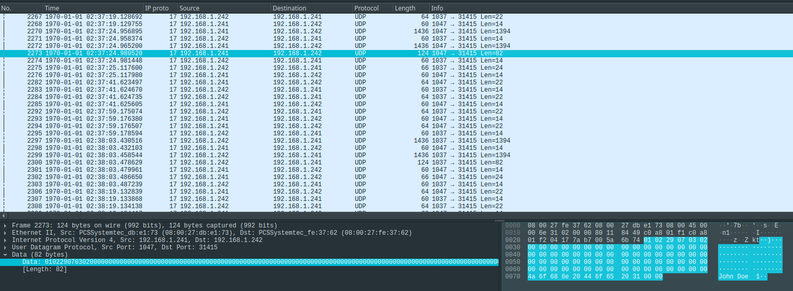
When a train crosses back and forth there's clearly a different message that's sent, with UDP data size of 82 bytes.

At the end of this packet is "John Doe" followed by two null bytes. John Doe was who sent the train.

The first six bytes of the message are non-null. I suspect they will relate to the types of train carriages and maybe directionality and speed of the train.

But it's too soon to understand the messages. I have to send more trains to figure this out! 😁

#games #pcgaming #trains #LEGO

In the screenshot you can also see there are some larger packets with payload size of 1394 bytes.

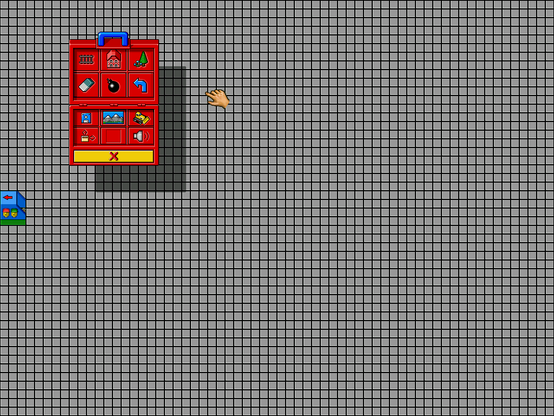
I suspect these may be related with the map configuration, since when you right click on the tunnel you get the track configuration on all maps and the train positions (which is really cool!). Actually, you also get the Post Office and Depot locations.

It seems normally packets with that size are sent in pairs. Sometimes from John to Sarah, sometimes the other way around. Maybe they relate to two map layers or something.

For reference, the playing area is of 48 x 48 tiles. 48x48 = 2304. 2304/2 = 1152 < 1394. So each each byte probably would have info for at least 2 tiles (if that's what this message contains at all).

#games #pcgaming #trains #LEGO

As a side note... I'm disappointed that clouds and bees don't cross over from one map to the other! 😆

#games #pcgaming #trains #LEGO

I've bounced the same train back and forth (with a blue signal on John's end, closed Depot on Sarah's) a number of times at full speed, them half. See the setup in the picture.

I've used tshark to get the UDP payloads for each packet send from John to Sarah so that I can then see commonalities/differences between the packets.

tshark -T fields -e udp.payload -r /tmp/loco_sarah.pcap 'len(udp.payload)==82 and ip.src==192.168.1.241'

Every two packets has the same contents, except for a single byte that seems to increment (by two) every time the train is sent through the Tunnel again.

My first definite conclusion from this experiment is that the train speed is not sent in this 82-byte message. Because there's no change in it from sending at full vs half speed.

#games #pcgaming #trains #LEGO

It seems that "John Doe x" is the name of the train, as possible to see on the interface.

After a few experiments I think the 82-byte packet does not contain carriage, speed and direction info at all. The only thing I'm sure it contains is the train's name.

It looks to me most of the bytes may contain uninitialised memory, so not meaningful data. I think so because I see the exact same train potentially start with many null bytes but some other times have data there, without any clear pattern.

The screenshot shows some division of the message with notes on what each part may be (probably wrong/imprecise).

It's clear I need to look at other messages next.

#games #pcgaming #trains #LEGO

I should also mention I tried to send some of these messages to Sarah's machine, but no train appeared there. The server replies with something though.

As I now think this message is not what actually "sends" the train that's reason enough for no train to appear. But another reason may be that perhaps the server checks if the player IP is the expected one (and I'm sending packets from a third IP). Curious to find later if that's the case or not.

#games #pcgaming #trains #LEGO

A problem I have is that since it's #Virtualbox saving the capture, I don't have it loaded in real time in #Wireshark. It would speed things up to see the captured packets and game side by side in real time...

#games #pcgaming #trains #LEGO

Ah! Solved it!

With the following I create a virtual interface that gets new packets as they are written to the file. File must be read from the start, so that #Wireshark considers it a valid pcap file, hence the -c +0.

wireshark -k -i <(tail -f -c +0 /tmp/loco_sarah.pcap)

#games #pcgaming #trains #LEGO

I've figured out the 1394-byte message!

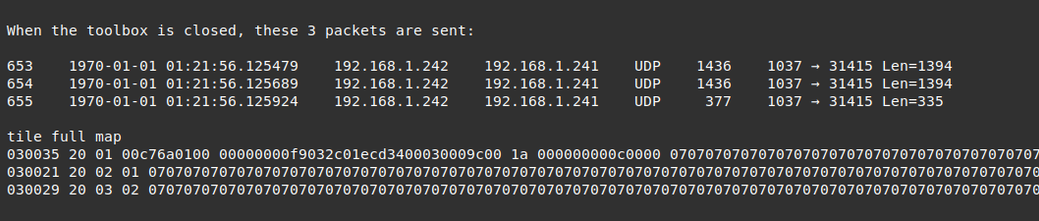
It's actually part of a set of three messages: two 1394-byte long and one 335.

As I suspected, those 1394 transmit map information. But the full map information is split across those 3 packets. Maybe because they're UDP and LEGO didn't want the packet to be too long not to cause problems..?

These 3 messages are sent every time the Toybox is closed by a player.

To figure out what the messages were and their structure, first I made Sarah destroy the full map with the bomb in the Toybox (the Blue Tunnel remains there though). Then I started adding elements such one track and one tile to coordinates (0,0), then the full first row, then the final row. Then the whole map.

Conclusions:

  • these 3 packets send the state of the map, split between the 3 packets
  • each tile is represented by one byte
  • last 10 bytes of the 3rd packet are not used (can be uninitialised memory)
  • tile data on 1st packet is from the [34th byte to 1393th]
  • tile data on 2nd packet is from the [ 6th byte to 1393th]
  • tile data on 3rd packet is from the [ 6th byte to 329th]
  • (1394−34) + (1394−6) + (330−6) = 3072 = 64 * 48 tiles. Checks out

PS: I had written previously that the map was 48 by 48 tiles, which is wrong.

#games #pcgaming #trains #LEGO

@goncalor I had that game! I think I was little confused about the gameplay (or lack thereof) as a child, but I remember the grandiose sound design. Is that ISO floating around somewhere? 😅
@jollysea I think I've seen copies online. Haven't checked them since I own a copy 😃
@goncalor technically, I own one, too. It's just somewhere in my parents basement, I guess 😅 internet archive got me covered.

@goncalor it’s been a long time back of my mind project to build a post office sorting server for this game so to make the post office work again.

I loved the game as a child and spend hundreds of hours building layouts and uncovering the hidden Easter eggs.

I still have my physical copy after all these years 

@carbontwelve I have it too! The big box, mini figures that came with it, everything.

I spent looots of hours too. Easter eggs were amazing. A joy to find.

@goncalor I remember writing to Lego asking if they would be creating a new version when XP came out and they wrote back saying no but gave me a list of all the Easter eggs. I was impressed to discover I had found all of them myself.
@goncalor a few years back the game dev group Sokpop created a small homage https://sokpop.itch.io/soko-loco I’ve wanted to take the original game and turn it into a browser based online experience but alas other projects have consumed my time.
soko loco by Sokpop Collective

start a railroad company

itch.io
@goncalor oh I remember this game. I would spend hours making postcards and putting them on s train to my siblings on the other computer. I think the nostalgia would kill me if I got Loco to run nowadays
@goncalor Malware delivered by #LEGO train. 🫠
@maehw yes! Great! Hack the planet! 😂
@goncalor I absolutely adored this game when I was younger. So glad to see some new life being given to it! ❤️🚂🚃🚃
@goncalor I wonder if the team bringing Lego Island back to life could help with Lego Loco?
https://github.com/isledecomp/isle
GitHub - isledecomp/isle: A decompilation of LEGO Island (1997)

A decompilation of LEGO Island (1997). Contribute to isledecomp/isle development by creating an account on GitHub.

GitHub
@jstangroome it has crossed my mind to reimplement LEGO LOCO. Of course it's a crazy ideia I won't have time to invest in 😅
@goncalor If it uses the same engine as Lego Island maybe porting it for modern operating systems may be possible
@goncalor @xssfox You've unlocked a core memory!
@goncalor If you reverse engineer Lego Loco, do all the trains roll backwards? 🤔