Personal review of project 3 of the #gameAccessibility course from #Unity, pt.1 Link: https://learn.unity.com/course/practical-game-accessibility/unit/project-pre-production

TLDR: In this part of the course I start with developing my own project, based on the knowledge of the prior chapters. I pick my idea and ask you for feedback on it (at the end!).

More details in the next posts 👇

#gamedev
#a11y

Introduction to ShaderGraph - Unity Learn

In this tutorial, you will learn to create a simple node-based Shader using Shader Graph and implement it in the Lightweight Render Pipeline

Unity Learn

This is how it went:

After a lot of theoretical input and research, I finally get to do some game development! Yeah!

I am surprised though that although I could play the example project with screenreader functionalities, I never got a chance to look inside it. So I guess I have to figure things out on my own - or use a completely different engine than Unity, if I want to make the game accessible to the screenreader.

👇

But first, I need an idea on what to develop. I want it to be a very small idea, so that there a realistic chance for me to finish the project at some point.

The course provides me with some genres that I could choose from and that are "easy" to do, but I already have an idea on my own.

👇

I also always wanted to use @kenney game assets in a project. So I will do that as well. There is even a low poly food package, but it does not feature a potato! So I will have to learn how to do model one in #Blender. A potato might be doable... right? At least I hope so. (edit: typo)

👇

Then I get some tips on how to do inclusive worldbuilding. My game will probably not feature any characters or societies, which feels a bit like cheating. But on the other hand, I won't get stuck in my own head overthinking everything, so I count that as a win.

I am supposed to set an accessibility focus, and I will go with making the game accessible for #blind players, since I did not do that before and since most games are not accessible to them yet.

👇

The next step is getting feedback on my #game idea before I continue - so I am asking you dear reader to give me feedback on my idea.

What do you think about: Minimalistic #SurvivalGame - a tongue in cheek story survival game. Can you survive on a deserted island with nothing but a potato? Let me know, I am curious!

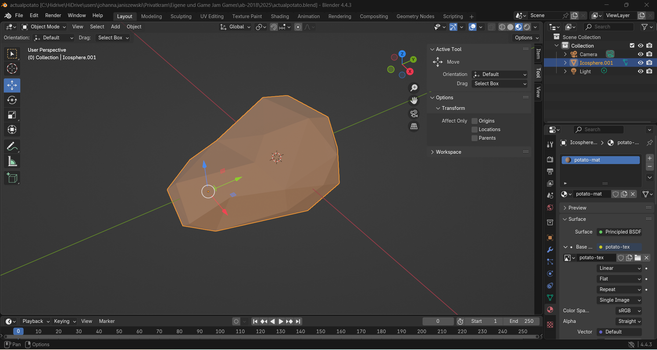
So in case you are wondering how things go with my #game idea of a minimalistic #survivalGame: not that great to be honest! I dipped my toes into 3d modeling in #Blender. I think its not for me. With the help of my artist husband, I managed to model a #lowPoly potato. 👇
But now that I put it into Unity with Kenney's low poly food assets, I realize that its a whole other story to make the assets look good in #Unity too. Since my goal is to not run into too many barriers with this project, I think I will switch to drawing instead.
@JohannaMakesGames I wouldn't give up on 3D yet. It's a big learning curve but if all you want to do is low poly stuff you can get comfortable faster than you would think. Then it's just learning new things as the need arises.
@ClutchAbuse thank you for the encouragement! I will not pursue it for this project though because I want to learn about how to make the project as accessible as possible and I think learning a whole new skillset on top of that is too much and might result in me dropping the project. I don't want to risk that, I have dropped enough hobby projects in the past.

@JohannaMakesGames love it

Edit: which is to say that I have no idea how that would work, but I'd be keen to find out

@ahchay fingers crossed for me to redo it! I am currently learning how to make something in Blender 
@JohannaMakesGames what do you mean when you say you "never got a chance to look inside it"?
@superpig I mean that I played the game but could not open it in Unity to see how its built and how the screenreader is adressed. Maybe it will happen at a later time in the course?
@JohannaMakesGames Did you miss that it has you set up the project on step 2 of the 'Explore the vertical slice' step? It's immediately after the 'download a build' section - perhaps you downloaded the build but then missed the rest of the step?
@superpig oh that is possible. Thanks for pointing it out, I will have a look again.