 Hraban (fiëé visuëlle)
Just found an old file with #filk songs from a GeoCities site…
🧵 🎶 ⚠️
Just found an old file with #filk songs from a GeoCities site…
🧵 🎶 ⚠️
YESTERDAY
Yesterday,
All those backups seemed a waste of pay.
Now my database has gone away.
Oh I believe in yesterday.
Suddenly,
There's not half the files there used to be,
And there's a milestone
hanging over me
The system crashed so suddenly.
I pushed something wrong
What it was I could not say.
Now all my data's gone
and I long for yesterday-ay-ay-ay.
Yesterday,
The need for back-ups seemed so far away.
I knew my data was all here to stay,
Now I believe in yesterday.
Write in C
(“Let it Be”)
When I find my code in tons of trouble,
Friends and colleagues come to me,
Speaking words of wisdom:
"Write in C."
As the deadline fast approaches,
And bugs are all that I can see,
Somewhere, someone whispers:
"Write in C."
Write in C, Write in C,
Write in C, oh, Write in C.
LOGO's dead and buried,
Write in C.
I used to write a lot of FORTRAN,
For science it worked flawlessly.
Try using it for graphics!
Write in C.
@seb321 @fiee There are so, so many ways for backups to fail.. 😬
The best cases are backups that fail to run, and let you know via an error message.
Sometimes backups run, but fail to write to the target location (or get deleted, which is effectively the same outcome).
Backups may also run, and write to the target properly, but were sadly configured to include the wrong data.
Sometimes the output is simply corrupt, and can't be restored.
You'll never know unless you test the backup.. 😅
@seb321 @fiee Beyond cloud storage, which can be fine of course:
Rotating a few USB drives would probably be a reasonable approach up to a certain scale. Just sync the files over.
If you've got multiple computers, SyncThing etc can be another low-effort approach (but only replicates, no protect against deletion etc).
Best, and most expensive - use backup software with separate NAS storage (HDDs are cheap). Keep old backups for at least a few weeks to have some protection from mistakes.
@seb321 @fiee Apparently, yes.. But it probably depends on the quality of the drive, just as for HDDs.
Still, putting all eggs in one basket won't give you longterm reliability. Your SSD might be the unlucky one. I'd definitely keep at least 2 copies on different physical drives, and replace the older drive every few years at least.
For true archival purposes, Blu-Ray seems to be the winner.
Great overview here:
https://appletoolbox.com/ssd-vs-hdd-vs-nas-vs-blu-ray-the-best-way-to-store-your-data/

Attached: 1 image Have you wondered what a holiday song about cyber scams would sound like? Well, then, this is the post for you! #cybersecurity #holidays #humor @[email protected] @[email protected] @[email protected] @[email protected] @[email protected]

 拔刀问路--经常截图评论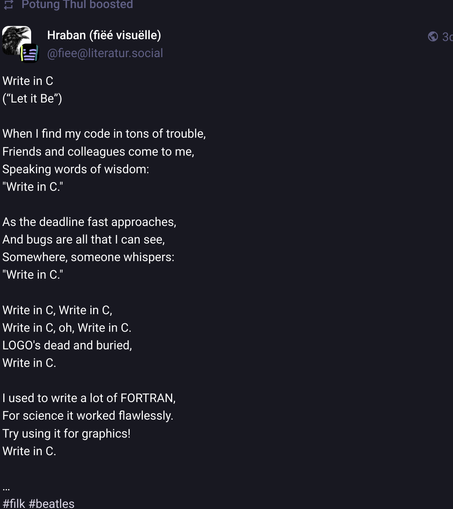
 Seb
Seb Johan Wärlander 🦀
 econads
 Maxim Weinstein
 Datendealerin 🎃☕
 Jesse
Jesse Andrew
 MėMėNTō MōRi📍🇪🇺🇩🇪
 John Breen
 Alexandre Oliva (moving to @