
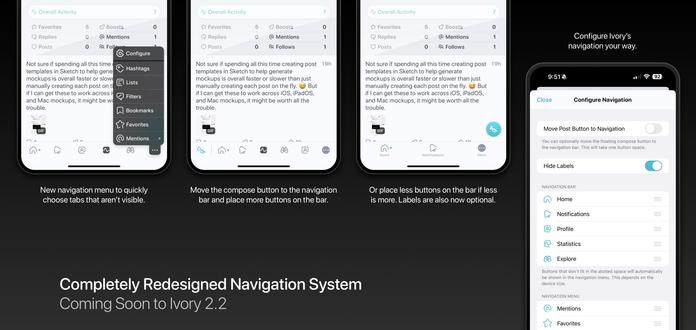
Ivory's upcoming new navigation design is currently available to test on TestFlight!

While the design of the navigation bar has changed over the years, the core concept of how it functioned has been the same since Tweetbot v1.0 way back in 2011! We've redesigned and rebuilt Ivory’s navigation system from the ground up to be faster, easier to use, and more configurable.

This will ship in Ivory v2.2 along with some other great new features!
@ivory i like what i've seen in the current beta
@ivory reading this i got very nervous but looking at the picture completely put me at ease as it seems to be a great improvement!
@ivory its brilliant. Thanks for this!
@ivory love it! Curious why y’all aren’t using a standard context menu for the overflow menu though
@timonus We love torturing ourselves with more complexity. 😅
@ivory Kudos for the post button move!
@ivory Nice! Those are some really good changes
@ivory Any chance of making expanding a post or opening a CW expand the post inline rather than pushing a new view controller? Reading a 10+-post thread each of which is in need of expansion gets a bit tiring after a while, and the VC push adds friction to the reading experience
@acb v2.2 will also auto expand all posts within a thread so that won't be an issue anymore.
@ivory It would still be nice if expanding a content warning would just show the content on the current screen. Saves one having to reach for the back button and all that. (I believe Ice Cubes does this.)
@acb yes, but that requires a ton of work on our end and there are currently so many more important things we need to do first. It's on our list to revisit how they expand, but for now we think this solution works well enough. We will get to details like this in time.
@ivory Fair enough. Glad to hear it’s on your list
@ivory I would pay a small fee for the option to use the old Tweetbot v1.0 design as the navigation bar theme :p
@ivory in trying it yesterday, I really wish I could tap and hold on the more icon to have the menu pop up, and then release on an item in the menu to go to it, like most other iOS context menus
@zmk Noted!
@ivory also, secondary unrelated suggestion: I wish there was a third tier besides being in the bar vs the in the menu for stuff I just want to hide. I don't need the mentions tab because I use the notifications one, and I never use lists, so it'd be nice to just hide those away.
@zmk We thought about that and might still consider it someday. The main reason we didn't is because many users tend to set and forget and one day look for something and think it doesn't exist at all. Not having that option was mainly to prevent future support headaches. 😅
@zmk @ivory Mona does it that way, and I agree, it’s very quick.
@ivory Thanks for this explanation. I’m on the TestFlight and couldn’t figure out how to turn the labels off because I thought they were under Settings -> Display. I didn’t realize the “…” menu had another Settings in it. Could we consolidate the Settings?
@joesteel We don't want too many settings in one place. It becomes a mess to find things. I can understand the initial confusion, but the configure button right in the menu of the navigation seems like the best and fastest place to make changes to this area.
@joesteel @ivory I had the same initial confusion. Went to settings first.
@ivory sad, the beta is full
@betaphish yes we currently have a bunch of testers. We tend to open it up when we need more testers to give feedback.
@ivory is there a mailing list for this? Would love to help test!
@codecat No we just post a link to join every once in awhile when we need some more testers. You can turn on notifications for when we post to try and catch them. We rarely post publicly (only about new features and updates for the most part) so it doesn't bother most users.

@ivory
Nice!

Is it expected that the beta does not recognise an actual current subscription?

@boxofrain Yes. Completely unrelated. You just have to subscribe in testflight (it's a fake sub).

@ivory I’d say this is moving a bit closer to Mona… And I love it! 🙌🏻

(Do full-width timeline content and reverse timeline next. ☺️🙏🏻)

@ivory est-ce qu’il y a une one-touch UI pour translate? (ha ha je parle français comme un bébé 👶)
@peterhoneyman You can configure the short right-swipe action on a post to translate in the behavior options.

@ivory I like the updated configurability! This is basically what I want from every app's bottom bar.

I think I may have asked before but for the lists view would it be possible to do the top drown down menu like the home view, or alternatively allow two home views in the navigation that each defaults to a different list in that drop down? I'm probably weird in wanting this kind of multi tab setup.

@ultranurd We will think about how to make improvements like that in the future, but don't want to make things too complex either. But we have some ideas to try in the future. We want to keep things simple for the initial release. 🙂
@ivory Makes sense! Literally the Slack discussion for my project this morning 😂

@ivory does this redesign mean the iPad’s nav bar finally catches up with the phone?

I read far more on this than on my phone, and it sucks feeling like a second class citizen, with nav items I can’t get rid of but never use. Most notifications show up twice as a result, and it’s laborious.

@lkanies Yes the iPad and Mac sidebars will work exactly the same. 🙂 But also remember the mentions tab will be going away as we plan to tackle our notifications tab update soon.
@ivory great, double thank you!
@ivory Hoping one day that more text slots will be available for European users..
@ivory great! that looks amazing
@ivory 👍 Are similar changes coming to the macOS App as well?
@bfo Yes the concept will be exactly the same on iPadOS and MacOS.
@ivory But not on Testflight, yet - right? On iOS I see build 21045 in Testflight, on macOS build 21000 is the newest version available.
@bfo Correct. We are still working on the Mac update.
@ivory Looking sharp! I like the changes a bunch — the existing nav always felt kinda like I had to make choices I shouldn't have to, and that don't stick well enough when I do. This is better.
@ivory Restoring subscription doesn’t work.
iPhone 15 Pro Max, iOS 18 Public Beta
(Yeah maybe it’s a beta bug)
@MacSnider Is that testflight? If so it's unrelated to your app store sub. just have to resub (it's fake).
@ivory ah okay, thx worked 👍
@ivory do you have any invites?
@jakeyounglol Not at this time.
@ivory if only apple would remove the tester limit
@jakeyounglol It's not that. If we let everyone test the app, we'd go out of business because very little would continue to support us. So it's completely based on how active our beta testers are when we release important new features. 🙂
@ivory oh yeah i forgot beta testers get free in app purchases

@ivory I'm on the TestFlight build and this is a wonderful change! I like having full control over what the bottom bar contains.

One thing - one of your promo photos from above kind of makes my teeth itch: "place less buttons on the bar" should really be "place fewer buttons on the bar".

I can feel my English teacher frowning from three states away...

@SnarkWasABoojum You aren't the first to report that. 😅
@ivory Will there be a way to hide the More button? It's been less than a day but it's driving me a bit mad. 😭