 ➴➴➴Æ🜔Ɲ.Ƈꭚ⍴𝔥єɼ👩🏻💻
Woohoo!
Finally got my NAS board. Now to figure out how to install Linux on it.
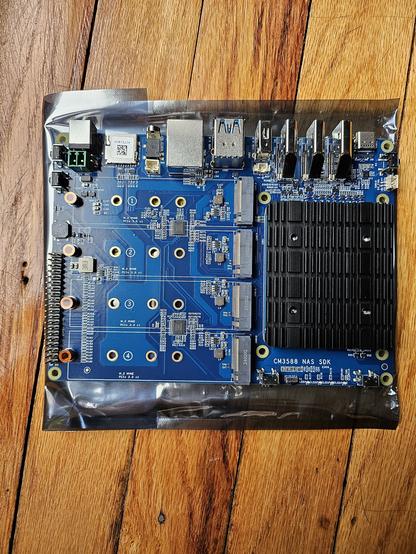
Woohoo!
Finally got my NAS board. Now to figure out how to install Linux on it.
@AeonCypher Let me guess:
It has a Denverton or Celeron J SoC ?
At worst some Server Installs boot with an enabled SSH server in live mode and allow you to remotely use the install on a headless machine...
And if this is using #ARM64 instead then your only option is a Linux image or #ARM+#UEFI bootable ISO.
@AeonCypher maybe check out if it has a #BIOS?
It does have a #MicroSD slot (or #nanoSIM I'm not shure) so you may find some boot settings...
@AeonCypher Also it's not #amd64 / #ix86 but #arm64...
Found some #documentation for it:
https://wiki.friendlyelec.com/wiki/index.php/CM3588_NAS_Kit
@kkarhan I'm going to use their Debian fork OpenMediaVault.
Balena -> Sd Card -> EMMC
Then install OpenVault and Jellyfin.
In theory it seems like it should all be easy.
It's never actually that easy...
I suspect dealing with my router and exposing it safely to the internet is going to take 10x the time as setting it up.
@AeonCypher personally I'd avoid that and if I can't use a #VPN, use #SSH to do so instead.
I may as a second step, or once I have anything important up on it.
I'm partly doing this for myself, and partly to teach others. A VPN will slow the throughput a lot, if I'm not mistaken, on already taxed upload speeds.
It might, however, be good to make it super easy to switch it from internet to intranet modes and back. The internet mode is not always important to have.
Of course, if there's only one exposed port and that has nothing but a login - that's pretty secure and is how a bunch of the darkweb is secured.
(I mean, technically it makes it a darkweb site - just not a nefarious one.)
@AeonCypher it depends, normally a #VPN adds at worst 1-2% in terms of overhead and on asymetric consumer lines, even the slowest of routers will outpace the encryption without hardware acceleration.
10.0.0.0 /8 then chances are this bricks all VPNs...I ise #SSH as a convenient way because I'll literally have that installed on every server and I'm too lazy to fiddle with #SMB or #NFS or got forbid #iSCSI if there's no reason to do so.
 Kevin Karhan