 nixCraft 🐧
Ten-character #Linux or #Unix command? Pshaw! Real Linux and Unix wizards summon their magic spells by mashing the up arrow a thousand times. It's the ancient ritual of command-line mastery. Lmao.
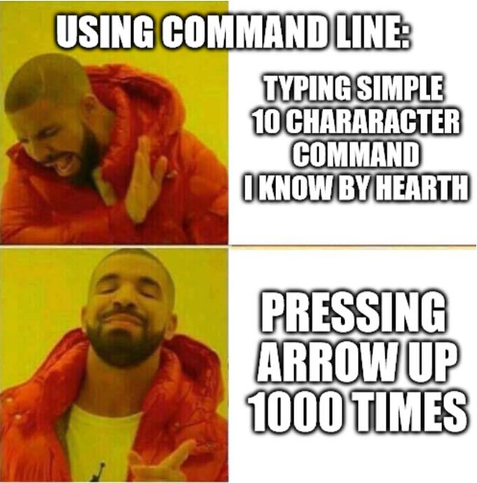
@nixCraft Again a faux CLI hacker. This avoids retyping the command, and it still works if the command is not in the history:
$((history | grep --only-matching ls || echo ls) | head --lines 1) 😅
People who know Ctrl+R when they hear that you can typecd */*/baz
to go tocd foo/bar/baz
@nixCraft
set -o vi
Your command line is now in Vim or actually in ed mode!
Been doing it for the past 30+ years and will never graduate from it.
@nixCraft
I mostly do
cat ./.bash_history | grep "stuff".
I know about the history command but it sometimes doesn't back far enough.
Reading the comments, I might want to try ctrl+r now too
@nixCraft Let me help you with this.
Make a file called ~/.inputrc with the following contents
set completion-ignore-case on
"\e[A": history-search-backward
"\e[B": history-search-forward
set show-all-if-ambiguous on
-- end of file ---
Logout and then log back in.
Then you can type the first letter of any previous command, and then, hit the Up Arrow key.
It will scroll through previous commands beginning with the what you typed.
One less key than Ctrl-R :)
@nixCraft this is why I default to #PowerShell as my shell on every OS. The predictor system is awesome!
Guilty as charged.

 6AL
6AL Mon
Mon Fabien Dupont
 ramona
 bananas_pizza
 Linky~
 Julien Palard
 StarkRG
 draNgNon
 Cyber Samurai
 Mark
Mark Michael Vilain
 Purgator
 illogical
 Nightlynx☕❄🌨☑
 Bonkers
 bazkie don't live here no more
 Hylke Bons 🥜
 Not a Spring Onion
 Ventor 🐧
  Lasse Marburg
 stippi
 Tito Swineflu
 Jeff Hobbs
 Sam Duede
 vandys
 Seth Brown
 Trev
Trev 
 Old Man in the Shoe
 Sass, David
 LacyGreenfelder
 🇺🇸 🇺🇦 🇮🇱 🐧 🥦
 Nimona RESISTS
 renegadespork
 Microfractal 🫖