 Froyok
Combined with the screen space fog blur it can give some really neat results:
The past few days I have been looking into optimizing the bloom downsamples, see if I could merge down into one texture and do it in one pass.
Writing compute shader is hard, I made some progress but I haven't reached my goal yet.
I'm shelving the idea for now and will go back to it at some point.
Instead I decided to finally look into rendering cubemaps.
Currently I'm not writing any code much, I'm trying to evaluate all my needs to properly build the architecture.
So far I only renderer a single point of view: the main camera. Cubemap introduce additional ones, and later I will have Portals too. So there are some rework needed in how I manage my rendering loop.
Quite a few days later and the refactoring is almost done. The engine is rendering again and this time in a more contained way, so I should be able to render cubemaps soon ! :D
I even made a neat image of my engine layout now:
With the post-process chain now working again, I thought I could try to add a depth of fieldpass as well, re-using some of the recent bokeh shader I used for my lens-flares.
It didn't go as planned, but it made some nice colors at least ! :D
I was able to get this far... using a separable filter (with Brisebois2011 method).
However I can't seem to find a good way to avoid foreground pixels to bleed into the background even when only computing the background blur.
So I decided to switch towards another method instead. That's really too bad because I really liked the simplicity of it.
Here is an example of the bleeding. I used pre-multiplied CoC but it's not enough and any kind of pixel rejection breaks the separable nature of the blur.
Here the bright lights are visible behind the limit of the character silhouette, showing the bleed into the foreground.
I'm currently looking at the Scatter & Gather approach, but I wonder if anybody tried an hybrid method. Like using S&G for small bokeh and sprites for large bokeh ? Or maybe using S&G for far DOF and sprites for near DOF ?
I wonder at which points sprites could help performance, but because large ones cause overdraw. 🤔
Progress !
Got Crytek kernel computation working, very fun to tweak on the fly ! (Generated CPU side then sent to the shader as a buffer of sampling positions.)
Focus range isn't yet working, that's the nest step.
A few days have passed and I finally got most of the DOF post-process working !
My hexagonal bokeh works well and is relatively cheap. I even got some nice additional effects like chromatic aberration on the bokeh itself.
My hexagonal bokeh works well and is relatively cheap. I even got some nice additional effects like chromatic aberration on the bokeh itself.
The effect is done at half-resolution, I haven't figured out yet a good way to blend in back to the main image so there is a slight bleed of colors.
The last detail I'm trying to figure out is how to properly fade the center of the bokeh pattern to make "holes" in the shape.
I have already something working, but it's not perfect yet:
I have already something working, but it's not perfect yet:
Bonus: for fun I'm trying to do an heart shaped bokeh.
First results are quite funny, but not really useful. 😅
(I currently rethinking how I should distributes the sample to fill the shape.)
First results are quite funny, but not really useful. 😅
(I currently rethinking how I should distributes the sample to fill the shape.)
I didn't make a lot of progress the pas few days, thx to Helldivers 2.
I managed to try out some optimization tricks this week however to improve my shadow volumes. One worked, the other didn't.
I tried to use a custom projection matrix with different clip planes to constrain the rendering to the light volume.
I even went with masking the depth buffer by the light radius to help discarding triangles/fragments via the depth test.
It didn't improve performance, it even made things slower on my old laptop. 😩
Like when I used the depth bounds extension at the time, this tricks had almost no impact and I presume the extra cost was coming from the depth buffer copy stuff.
So this is making me think that performance improvement will only come with smarter geometry setup.
I think I need to look in ways to subdivide the geometry but in a less taking way during the compute pass.
The optimization that actually worked meanwhile was the fact I was launching threads during my compute dispatch just to discard them afterward in the shader code.
Now instead I launch exactly the number I need and compute a better index for processing my geometry.
So just helping the GPU schedule things better gave me 0.04ms saving on around 140K meshes (went from 0.1ms to 0.065ms). That's on my beefy GPU, I presume on my old laptop this will be even better.
Confirmed: went from 0.6 to 0.22ms on my laptop in the same scenario ! :D
Ha, figured out the issue ! I was actually expanding the alpha radius during my fill pass, which created those gaps.
So it's mostly working okay now, trying to adjust how I tweak the focus range to make it easier to play with (I like the idea of a start/stop positions).
"Ho yeah, I will just use cmgen from Filament to prefilter my cubemap for Radiance"
This was me two days ago.
But cmgen only output either a single ktx file or all the individual mips of a cubemap as separate files.
So now the fun part is figuring out how to stitch everything together to get a working dds file.
The even funnier part: my framework cannot load dds cubemap file, only individual faces.
This means I need a tool allows me to write a dds with custom mips, so that I produce one file per face, with support for hdr files as input.
I found none. So I'm considering building something myself via my framework, but the best format I can see myself using is RG11B10.
Ideally I should use BC6h, but for that I need an encoder that allows custom mip and HDR files as input.
I have been banging my head quite a bit the past two days.
I know I'm in corner case, but I'm once again astonished at the lack of good tooling out there for writing in this kind of format.
I would really like avoid writing my own DDS encoder, because I feel it's one of those rabbit holes it will be difficult to get out of. But it's starting to feel like I won't have a lot of options.
Last silly idea I got: storing my RG11B10 cubemaps in RGBA8 with RGBM compression instead. That will require some on the fly decoding but that's might be tolerable.
Went with RG11B10 as expected to store my cubemap. Each mip as an individual file stored as a binary blob into a common zip file per probe.
Not the prettiest but it does the job for now. I don't have to deal with RGBM at least.
Not the prettiest but it does the job for now. I don't have to deal with RGBM at least.
Mipmap transitions are really nice now ! :D
I also had to do the pbr balls test !
No that I only take care of radiance here. There is no IBL irradiance. I will see if I do something for it or not via cubemaps.
No that I only take care of radiance here. There is no IBL irradiance. I will see if I do something for it or not via cubemaps.
here is what it looks like in my usual scene with the probe pushed in the back. Everything looks grayish because of the neon light in the background.
I need to rethink how I manage my lights (once again) because right now the light casting shadows are rendered as additive light, which means the IBL contributions is applied several times.
Until now I didn't have a notion of "ambient" lighting.
Working on my cubemap generation pipeline I was still puzzled on why the IBL would be so strong compared to the actual lights.
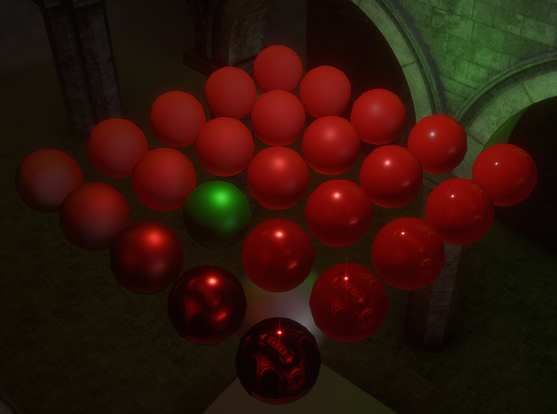
I decided to verify that my PBR wasn't broken by using red PBR balls this time and well...
Took me a day to figure out what was happening.
After checking my code a few times I isolated it out on being related to the DFG LUT.
Inverting its value (one minus) was somehow fixing the shading and brightness issue. This was very confusing.
Then I extracted the LUT from Filament and compared it from Learn OpenGL and mine.
Here is what they look like in Designer:
Notice what's wrong ?
Filament LUT use swapped Red and Green channels in its LUT.
My initial one minus trick was just a lucky fix. I'm glad I took the time to figure out what was happening.
In their doc, Filament doesn't mention that swap: https://google.github.io/filament/Filament.md.html#table_texturedfg
Anyway, once I figured this out, the fix was immediate and my shiny balls were now looking great:
I'm looking at ways to store my shadow volumes resulting binary mask in the form of a bit mask.
The goal is storing something like 32 shadows into an RGBA8 texture to sample it later when rendering object.
Doing so will allow me to render the lit object only once (while doing IBL + casting lights + other lights).
But today I played again with the idea of mesh based light shafts.
I asked a colleague for help and it got me some convincing results !
This is basic depth evaluation, no analytical formula yet.
Got my bitmask idea working !
The first few lights casting shadows are now stored in an RGBA8 texture.
I added a debug view mode to display them side by side which currently displays up to 16 lights (but 32 are possible in total).
I also converted my cubemaps into octahedral projections to be able to store them in 2D arrays, with the goal of being able to sample multiple of them easily for blending.
That new format also allowed we to compress them into BC6H more easily.
That new format also allowed we to compress them into BC6H more easily.
However, I'm not sure I will dive into the cubemap blending just yet. I think I need a break and I wanna play with other stuff for a while.
I'm thinking about portal/cell culling, actual portal rendering and maybe a physics engine integration.
I'm thinking about portal/cell culling, actual portal rendering and maybe a physics engine integration.
But first... I need to fix my lights. That shadow refactor broke a few things. Like my directional lights... 😅
I have been going slow on Ombre the past few days (mostly because I'm tired right now).
I got all my light masking working again, but for spot-lights I ended-up using once again my mesh vertices projection to compute the right bounds:
I got all my light masking working again, but for spot-lights I ended-up using once again my mesh vertices projection to compute the right bounds:
Projecting points has its limitation, since the mesh may not be accurate enough.
Here for example the screen bounds (gray rectangle) miss some edges of the spot light bounds (in orange).
Here for example the screen bounds (gray rectangle) miss some edges of the spot light bounds (in orange).
Trying to expand the light radius or angle to create some padding doesn't work, there are always angles where the mesh doesn't cover enough the actual spot light.
I know it's a partial/sliced sphere, but I have no idea how to analytically compute it (especially since I'm quite bad at math).
I know it's a partial/sliced sphere, but I have no idea how to analytically compute it (especially since I'm quite bad at math).
I think my next step will be to look into map building and most importantly occlusion culling and scene cell/portal splitting.
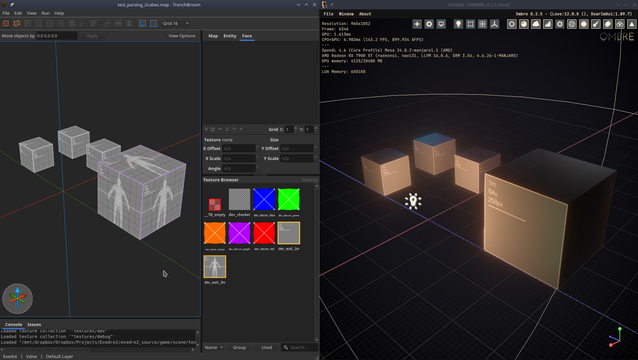
For that I started playing with TrenchBroom to build some map. I'm trying to see how I could build a pipeline around it to build meshes and import that in my engine.
Been a while, so here are some news.
I made some decent progress with Trenchbroom, I figured how to parse the map file format and output objs from it. Still have some details to iron out, but it's promising.
I also started testing custom textures and meshes:
Next I wanted to fix a bug I wasn't aware of until it was mentioned on the Graphic programming Discord: did you know that when computing the bitangent in your vertex shader you had to multiply it by an handness factor ? I didn't.
In order to fix this, I had to rework how I was writing some data in my mesh format. Took the time to split the regular geometry from the shadow volume one into separate files. (In anticipation of the geometry coming from TrenchBroom).
Fiddling around with my mesh format, I took the occasion to build a "missing mesh" warning... which is a fallback mesh for when another one will be missing. :D
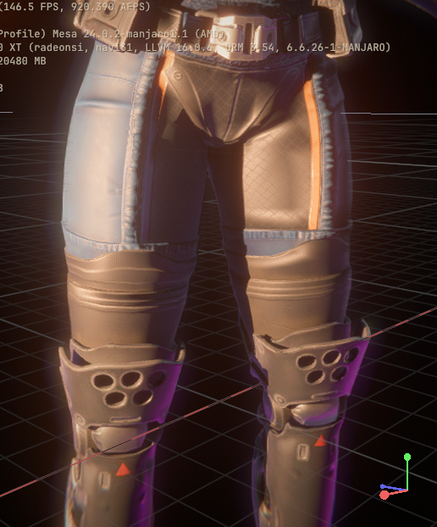
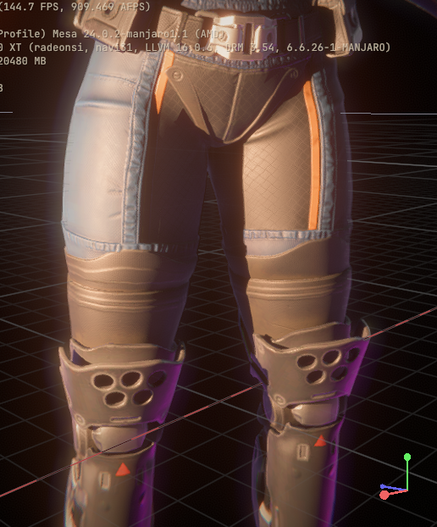
And finally tonight I fixed that bitangent stuff and the result are night an day. Here is a before vs after on one of my test mesh.
Today I finally got the TrenchBroom mesh conversion working and even a first in-engine ! :)
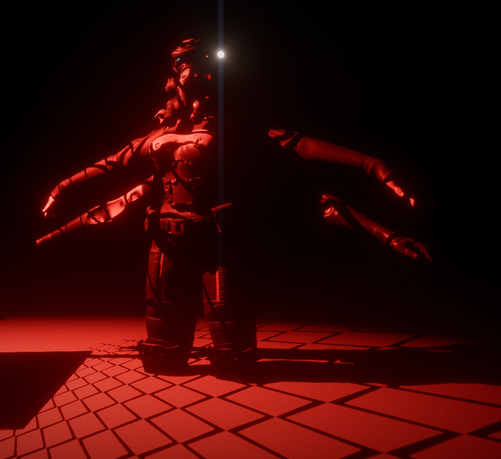
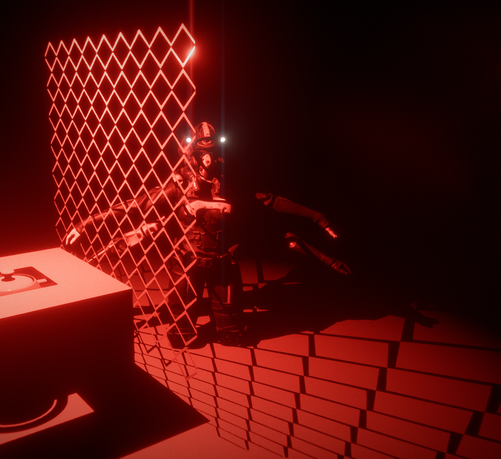
I also did a quick test with a non-closed mesh to see how far it was working well (or not). Notably I was thinking about how to cast shadows with meshes like fences.
...And one sided geometry actually works well !
I will have to think about a trick to make it work as two sided, but that doesn't seem impossible.
Little update:
- I'm now able to load meshes with different materials.
- Mesh are properly shifted and scaled during pre-processing, so that allows in-engine transformation more easily.
- I also added a "missing" material instead of crashing. 😄
- I'm now able to load meshes with different materials.
- Mesh are properly shifted and scaled during pre-processing, so that allows in-engine transformation more easily.
- I also added a "missing" material instead of crashing. 😄
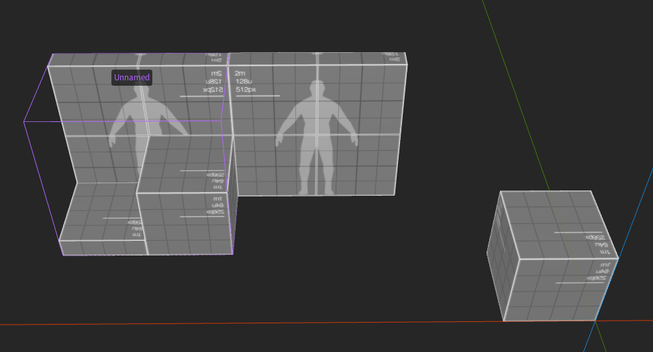
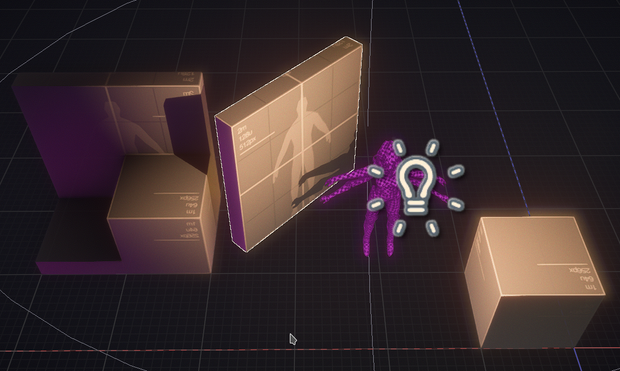
During pre-processing I also discard some materials, which allows to get rid of hidden faces.
I have been trying out more complex stuff to see if it was working well.
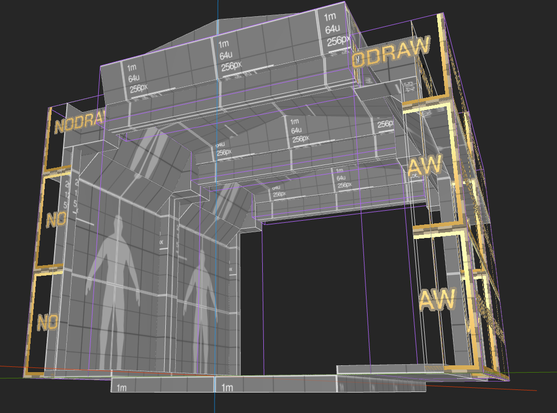
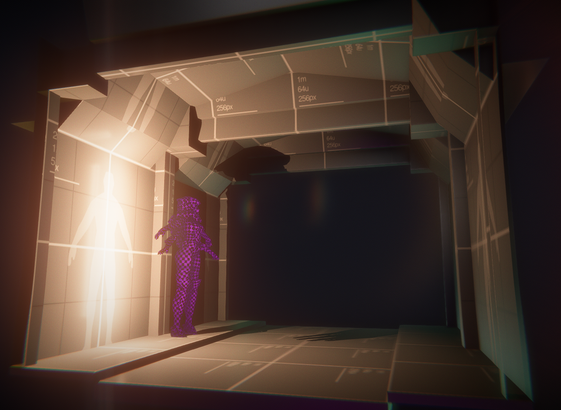
Another update: I got auto-reloading or the scene and meshes working.
(It works by simply monitoring the scene source file on the engine side.)
This means I can edit my scene in TrenchBroom and get live updates in-engine on the side.
I also took this opportunity to implement a framerate limiter, this way I can save on performance while the engine is out of focus.
Okay, it's really, really fun to have this auto-update. I need to expose more stuff (like lights and cubemaps) now ! :D
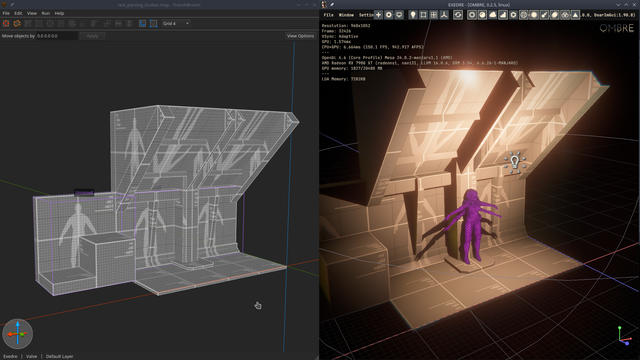
So two days ago I decided to look into Open Dynamic Engine (ODE), mostly to evaluate how much works it would represent to integrate.
I was wondering how much work was needed to compile it.
Well... Compiling it was very straightforward on Linux actually. So I spent the saved time into integrating.
So now I have a bouncing ball in my engine. 😍
As for why I choose ODE and not something else is mostly because I wanted an easy to build and use C API.
Bullet is starting to be a bit outdated and I haven't found a C wrapper. Jolt wrappers aren't super up to date nor complete so far.
ODE worked out of the box, so that should be good enough for now. Hopefully performance will follow for my use-case.
Well... Guess what ? ODE is gone. ODE is fine, but requires too much work to get good performance out of it. The price of its flexibility I guess.
I switched to Jolt instead, and while the C API versions out there aren't perfect, they do the job. Getting great performance out of it with minimal tweaking.
I even got cubes working. :)
Decided to get back on cubemaps and finally tackle the blending of several of them.
I'm using a brush in TrenchBroom as the bounds of the parallax correction. The advantage is that I can share the same brush across several cubemap capture points.
 Ronflaix
@froyok Yay, cubes!