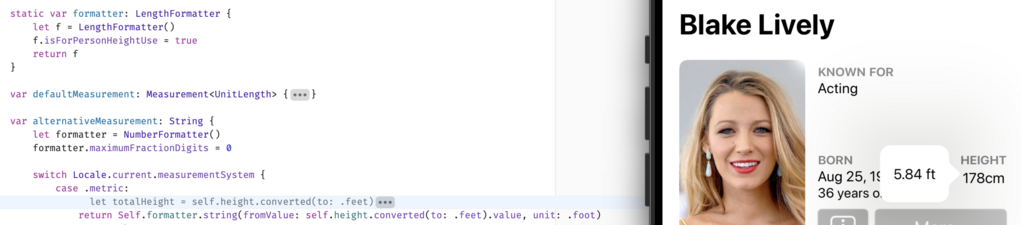
This one is for you, @hotdogsladies.

FAQ:
1) This is a proof-of-concept; no promises
2) I don't know when it'll ship, if I can even get it production-ready
3) Data coverage (Wikidata) is okay but not stellar; not all actors will have their heights shown
4) I'll try to use sensible units for countries that aren't idiots like us
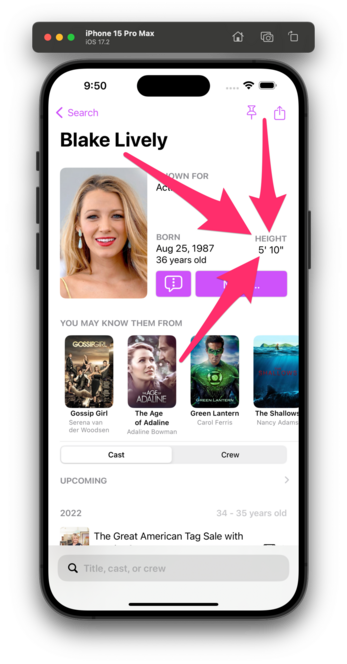
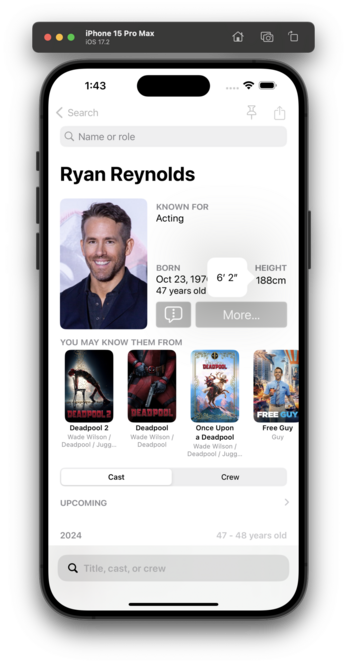
I think I've got units working for countries that make sense.

This is all based on your setting in Settings → General → Language & Region → Measurement System.

🇺🇸/🇬🇧 get feet/inches.
The rest of the world gets cm.

I genuinely don't know how this will play in 🇨🇦, so, uh, good luck, northern friends? 😬

Related: is there a way to force either Measurement or LengthFormatter to use feet/inches? I see that this is a thing, but I want to be able to override the default Locale.

https://developer.apple.com/documentation/foundation/lengthformatter/1416517-isforpersonheightuse/

I tried setting a unit of feet, but it still shows feet and fractional feet, rather than inches:

isForPersonHeightUse | Apple Developer Documentation

A Boolean value that indicates whether the resulting string represents a person’s height.

Apple Developer Documentation
Got there thanks to @vpsteinmann and @_nd_:
@caseyliss @vpsteinmann @_nd_ You are about using the locale of the phone instead of hardcoding the US one, aren't you? Are you? 
@gabriel Context here is the popover I've shown in screenshots. So in this case, the phone is metric (and it was shown by default). However, the user has just tapped the height and thus is trying to see an alternative unit. Which would be feet/inches.
@caseyliss Ah, right! Got it. It may sound stupid but I was hiding the cm with my finger when trying to zoom in.
@caseyliss @vpsteinmann @_nd_ I tip my hat to Apple for providing this. Very cool!
@caseyliss to localize for Britain I think you have to use `.innit()`

@caseyliss @vpsteinmann @_nd_ You can use ˋusage: .asProvidedˋ (without needing .locale()) to use the measurement unit you pass in the 1st place, independently of what the locale typically uses

https://fuckingformatstyle.com/measurement-style/#usage

Measurement Style

Print out your various measurements. Xcode 13+ The Measurement API inside of Foundation is a powerful toolkit for converting and displaying units. As of Xcode 14, this is the canonical list of Dimensions 1 that are supported: Unit Description Base unit Custom Usage? Unit Acceleration Unit for acceleration meters per second squared (m/s²) No Unit Angle Unit for planar angle and rotation degrees (°) No Unit Area Unit for area square meters (m²) No Unit Mass Unit for concentration of mass grams per liter (g/L) No Unit Dispersion Unit for dispersion parts per million (ppm) No Unit Duration Unit for duration of time seconds (sec) No Unit Charge Unit for electric charge coulombs (C) No Unit Current Unit for electric current amperes (A) No Unit Difference Unit for electric potential difference volts (V) No Unit Resistance Unit for electric resistance ohms (Ω) No Unit Energy Unit for energy joules (J) Yes Unit Frequency Unit for frequency hertz (Hz) No Unit Efficiency Unit for fuel efficiency liters per 100 kilometers (L/100km) No Unit Illuminance Unit for illuminance lux (lx) No Unit Storage Unit for quantities of information bytes (b) Yes 2 Xcode 14+ Unit Length Unit for length meters (m) Yes Unit Mass Unit for mass kilograms (kg) Yes Unit Power Unit for power watts (W) No Unit Pressure Unit for pressure newtons per square meter (N/m²) No Unit Speed Unit for speed meters per second (m/s) No Unit Temperature Unit for temperature kelvin (K) Yes Unit Volume Unit for volume liters (L) Yes Measurement is special in that the localized string output can vary significantly depending on the Locale used by the format style.

Fucking Format Style!
@tomn94 Ah, that's useful, but I need personHeight for usage.
@caseyliss i think you’ve been listening to too much Merlin!
Person height formatting in Swift

Person height formatting in Swift. GitHub Gist: instantly share code, notes, and snippets.

Gist
@vpsteinmann @caseyliss additionally, you can use Locale.Components kind of like a MutableLocale – you initialize it using a Locale, set specific properties and init a Locale from that.
@_nd_ @caseyliss Thanks for the hint, I updated the gist to show how to set a specific measurement system for a provided Locale. https://gist.github.com/vpsteinmann/959aa215608b6e2f0e9ae5446b621689
Person height formatting in Swift

Person height formatting in Swift. GitHub Gist: instantly share code, notes, and snippets.

Gist

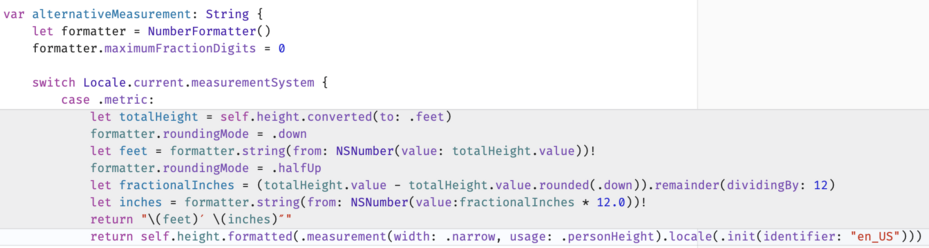
@vpsteinmann @_nd_ zomg I love you both. This is SO MUCH cleaner

(Diff shown so you can see why I was “😬" about my first crack at this)

@caseyliss
Sorry if this is a dumb question, but can’t we all just have both?
@caseyliss I thought users could override their preferences in System Settings anyway? I'd just ask the OS what units and stick with that. You can be sure millions of other apps do.
@caseyliss How do I change it so that it's measured in football fields?
@caseyliss Probably good to add Ireland to that list too
@caseyliss which API do you use to access the Dimension? Or did you hard-code that based on the Locale?

@caseyliss Any possibility of toggling the measure system? Say if I long press on cm I get feet/inches?

(As you probably know, Canada is inconsistently metric, and although our temps are Celsius and gas is in litres, our human heights are generally feet and inches.)

@caseyliss we 🇨🇦 measure things in amount of poutine
@caseyliss I'm as pro-metric as you can get, but even this Canadian still thinks of humans as feet and inches. Dealing with Canadian unit weirdness is a pain - here's what the dive log I use (MacDive) ended up doing:

@caseyliss The Apple Watch hiking units are tied to the same setting and it took me so long to work out why my walks were defaulting to yards and not meters.

I changed it ok, but now all my driving distances in CarPlay are in km 🥴. Kinda just wish the UK would finish the move to metric.

It’s the right choice for the app though. Is it something you could tap to switch between the units maybe?

@martinbuckler @caseyliss You can actually change the workout units independently in the watch app: Settings->Workout->Units of Measure
@caseyliss almost everyone in Canada uses feet and inches for heights of short things (but not for car driving distances where we use km!). I have no idea how tall I am in meters. You gotta understand, our (grand-)parents grew up in imperial, all our tv is US based, and Home Depot carries American measured products.
@caseyliss Canadians (at least this one) tend to use imperial for human heights. I’m 5’11”, I have no idea how many centimetres that is, except when I have to look it up for things like a passport application.
@caseyliss I've been told by a Canadian cyclist that they will (sometimes? often?) describe rides in terms of kilometers of distance and feet of climbing.
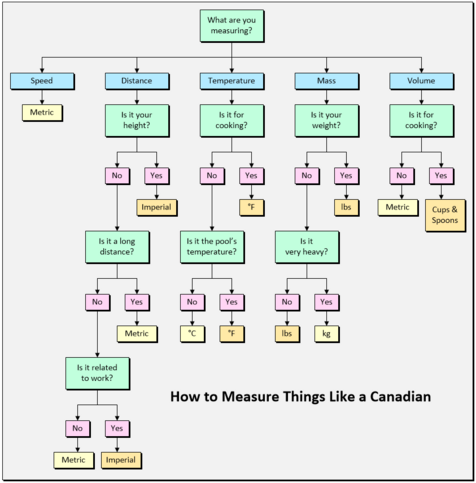
@caseyliss This should help, it’s very straightforward:
@miu @caseyliss was going to share this as well. It's very accurate
@miu @caseyliss Theres a better graph:
What are you measuring?
Anything -> Metric
@caseyliss It’s our fault for not concretely choosing
@christianselig @caseyliss At least the conversion is simple. Knowing someone is 73 inches… uh, math… (it would take some people entirely too long to do that conversion).
@christianselig @caseyliss We’re weird. km, °C - I adapted to those easily / quickly (I’m barely old enough to remember pre-metric) - and can move between those and the (barbaric) US measures easily.
Height/weight, though…it’s always “ok - I’m 5’11” = 180cm; RR is 188cm, so that’s 8cm diff, divided by 2.5 = ~3.x, so…he’s like 6’2”. “
🤦‍♂️
@caseyliss please introduce a movie’s hotness score in centigrade (the only worthwhile measurement) 👍🏻
@caseyliss if you want to get crazy, you could add a premium feature that gives height in crazy scales, à la websites describing near earth astroids…
@caseyliss Yeah, we’re kinda messed up up here.
@caseyliss Nice! There should be a (non-breaking) space between the number and the unit, though.
@eh take it up with Apple; that’s the string they send me. :)

@caseyliss After digging a bit more, it looks like you should consider using `.abbreviated` instead of `.narrow` since the latter attempts to show the unit “in the shortest form possible” and ends up omitting the space.

With the following code, I get the expected result, with a non-breaking space between the value and the unit :)

```
Measurement<UnitLength>(value: 1.89, unit: .meters).formatted(.measurement(width: .abbreviated, usage: .personHeight))
```

@eh Right, but then that makes American/British wider than desired.
@caseyliss Ah. D’oh! Should have checked that first. 🤦
That definitely tips the scale in favour of `.narrow`! :)

@caseyliss we use centimetres in the uk, Casey. Please don’t encourage the fascists from imposing Imperial measures. This is a thing they are doing.

(Shout out to all the Neoplatonist metrologists who know how to use inches, feet, various miles, and degrees, to engage in a humanistic, early antiquity world view.)

@grievousangel Tell Apple; their code specifies feet/inches.
@caseyliss gosh. The uk adopted the metric system in 1965.
@grievousangel based on anecdata it sounds like for people’s heights specifically, the generally accepted unit is feet/inches
@caseyliss for Americans you should propose measurements in Empire State Buildings or football pitch