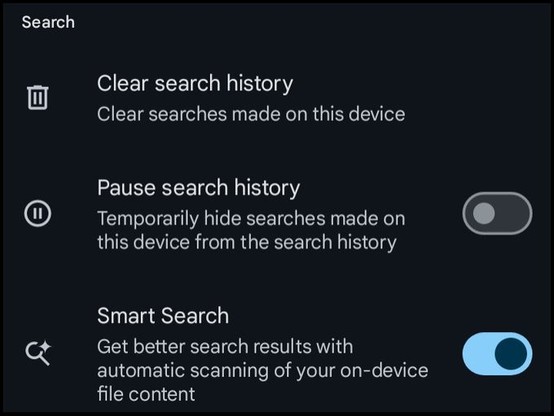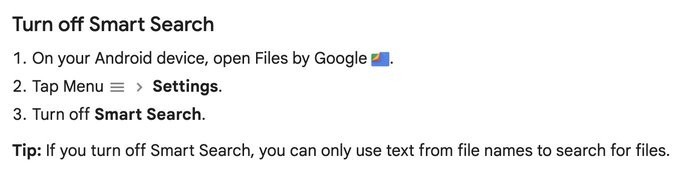
@protonmail
I know this platform, and the fact that Google has reported to the police different cases, but I do no see the precise point where it's linked to this feature of Google Files app.
From what I know, Google scans its services (mail, drive, etc.) but I had no clue that it includes CSAM via this feature of the app.
@sebsauvage
Yep, it would seem a *big* reach if they'd start to employ client-side scanning (Apple considered it, and were promptly shot down by privacy organizations). If they did, why would they do it in an optional file manager app, instead of a system framework?
The other option would be that Files uploaded local documents to the cloud for indexing. That doesn't seem super likely, either.
I, too, would like to see some evidence.
@protonmail
@osma @sebsauvage Indeed, what you're inferring @protonmail seems quite an accusation.
1) The existence of that API does not mean that it has been integrated with this app. The feature *could* legitimately index file content so that users would be able to search on contents.
2) If client-side scanning were to be added based on legal requirements, this probably wouldn't be a toggle-able feature. It would probably also be baked into the OS.
FUD without evidence reflects poorly on your brand IMO.
@ech
@eyalherlin found this:
https://mastodon.social/@eyalherlin/111263560408332798
"To power this experience, Smart Search scans the files in the background with device performance and privacy in mind. Scanning happens on your device so your information doesn’t leave your device. You can turn off Smart Search anytime in the app’s Settings."
https://support.google.com/files/answer/9765316?hl=en
Zero evidence has been presented that Google would be performing a CSAM scan during this process.
This option doesn't seem to be there on my Pixel 7a running Android 14 🫤🤷♂️
if it's part of a beta or phased rollout then we might not have that feature as yet.
@simonzerafa @protonmail @sebsauvage
I can't see it either. I can't find it in Google settings or Chrome settings (not that I'm using Chrome or the Google search app).
@Lazarou
That one is kind of old hat in some of the gaming groups I'm in on Facebook. Turns out when you're discussing military themed games where militaries like to name equipment after animals it can get confusing for Facebook's rather simplistic filters and it thinks you're trying to broker the sale of actual exotic animals instead of plastic tank miniatures.
@protonmail This is also no hypothetical.
Several cases have been recorded where #Google and #Microsoft automatically banned people and even called #Cops on them with the refusal of said #GAFAMs to admit they're wrong.
One case was peticularly astonishing of a parent sending photos of their child having skin irritation in the genital area and asking if they should get to the hospital now or book an appointment the next day.
One might assume that Google would've gotten the context right...
Here is one man’s nightmare: https://nytimes.com/2022/08/21/technology/google-surveillance-toddler-photo.html – don’t let that be you. Turn this feature off if you opted into the beta for Google Files today.
Thanks to BasicCatBR on Twitter for alerting us to this new feature so we could let our community know. (3/3)
Here's how to turn it off:
Didn't even know the app was on my phone in the first place. Came out of nowhere. Never opened it myself before.
I found a new app in the list, called "Files".
@protonmail this happened to a Swedish man too. He took pictures of him and his boyfriend in the act, and mailed them over Yahoo mail. It got screened by an American organisation and flagged, and shortly after he got assaulted by police, in his home, in bed, at like 4AM.
He was beaten and taken away, and only MUCH later when shown the pictures could he explain that they’d fucked up and mistaken his THIRTY year old BF for a minor.
@protonmail
I'm running Android 14 and I don't see this option. I presume it's just in the beta Files app. When it's out of beta, it might be a good idea to repost this.
Thanks for watching out for us!
@bananabob @protonmail There is this guy who says that Gboard still sent data even while disabled: https://xdaforums.com/t/disabled-and-data-blocked-apps-still-sending-data-in-the-background.3713495/
And according to this answer, a disabled app can still be run in the background if executed by another app: https://android.stackexchange.com/a/64953
So I personally wouldn't trust this feature too much. But I do agree that it's probably enough in most cases.
Edit: I posted this question two days ago in the general Q & A section of XDA, got no response. Since it is happening on my E4 plus, I am posting it here, hoping to get some insights. Long story short, I installed Net Monitor (from Play store)...
@protonmail Even for those not using Google Files, it turns out there's a sort-of-hidden "may we scour your device for search?" that can be turned off:
Settings
Google
Personalize using shared data
Turn everything off!
"Let Google apps use on-device data shared by these apps and other sources to improve your Android experience with things like better recommendations and suggestions."
@protonmail So that's another measure to take next to https://palant.info/2023/08/29/chrome-sync-privacy-is-still-very-bad/ by @WPalant
Thanks for sharing.
Using #Amaze as file browser on Android (and not tethered to Google on this #Fairphone)
I don't see this on my phone: