 Glenn Fleishman
@gruber An iPhone can transfer video over Wi-Fi at vastly higher rates than USB 2? Or am I missing something about that—Files or...?
 John Gruber
@glennf Not that much faster.
@gruber Damn, Daniel, am I going to have to test this now? Or wait for USB-C. BTW, the anger and frustration over USB-C seems to have settled—I no longer get the same volume of email about it or read the same frustration in bulk online. The reason? Cheaper cables and more of them. People were particularly angry when it was both *confusing* and *expensive*. Also, OWC has a quite affordable Thunderbolt 4/USB4 cable line-up: https://eshop.macsales.com/shop/owc-thunderbolt-4-cables

 David H. McCoy
 Chancerubbage
To be truthful, even FireWire had this issue. On top of that you get all sorts of wiggle room of compliance, and then the product cycle of peripherals never catching up and becoming compatible before the target moves.
 Geoff Duncan
 David Stein
@glennf @gruber I don't know if I believe that almost $60 for a 6ft/2m cable quite counts as affordable. I'm about to switch MBAs and I am pondering if the 2.6’/0.8m thunderbolt 4 cable I have will allow me to keep both side by side as I migrate (13” MBAs are 1ft wide, plus connector length and minimum curvatures), if not can i get away with a 1m cable, or will I need to pony up for a 2m if I don't want to do something goofy like having them face opposite directions and spin as necessary.
@perovskite @gruber The shorter tables are the sweet spots.
@glennf @gruber Definitely, and if i were sure the 1m cable would work for my purpose thats easy to justify. But if I just needed usb-c and not TB4 speeds, I would have bought a 2-pack of 2m anker cables for $16 immediately and not even thought about what is the smallest length I could get away with.
 Dirk KS
@perovskite @glennf @gruber Not marked as a Thunderbolt cable, but for 2m and faster-than-USB2-speeds, this Amazon Basics cable has worked well for me. https://www.amazon.com/dp/B08L85TDMX
Also it’s the third cable in that price range I’ve tried and the only one that hasn’t failed after a few weeks of use with a handheld iPad.
@glennf Wow, good prices indeed. And that 0.3m length might be perfect for the backpack.
 Peter Cohen
 Slaíne
@flargh i need to find a very short one. Great idea.
@flargh a quick google and it seems like a short cable for car play is a thing. Thanks 👍
@slaine 18 inches is usually long enough to connect the phone, seated in a dashboard mount, to connect to the USB data port, but YMMV. Works in my car, not in my wife's.
@flargh we’ve a little compartment with a Qi charger and usb port for car play ( no wireless CarPlay unfortunately). Ideally I’d have a 3 or 4 inch cable to keep it neat and tidy. I’ve a Velcro strap around my metre long one at the moment.
@gruber That issue you mention of the 480 Mbps USB speed over Thunderbolt cables…it's so maddening because there's no good way (no marking, no macOS/iOS/iPadOS alert) about the speed. Apple could have a simple interface speed presentation…which they do in Migration Assistant. Tell you what the throughput is.
 Don Whiteside
@glennf @gruber It shouldn’t be necessary but I’ve found it well worth having a little tester. This was cheap enough that it didn’t make me too angry. https://caberqu.com/home/20-c2c-caberqu-746052578813.html
This one seems more full featured - more plug types if nothing else - but it’s a bigger hassle to get. https://github.com/alvarop/usb_c_cable_tester

 sidb
sidb@glennf @gruber A great feature for any Mac with ≥2 USB C ports would be built-in cable testing. You plug both ends of one cable to the Mac, and the OS automatically detects that, no UI needed, and pops up a dialog saying “this cable supports x mbps and x Watts power delivery”. That’s it, there is no step 3!
 Jon Lasser is Hanging in there
 Nit
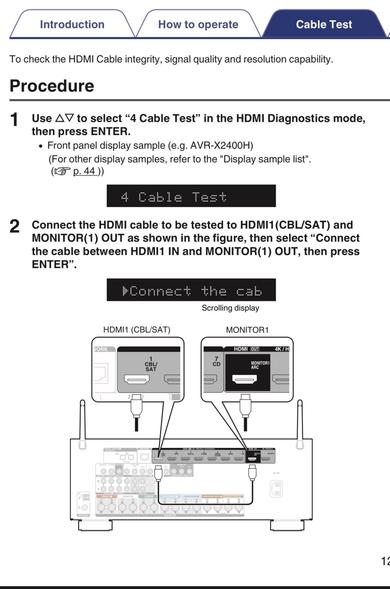
Nit@disappearinjon @sidb @glennf @gruber my Denon receiver, and many from the last few years do similar for HDMI cables. Handy when buying a new cable.
https://www.accessories4less.com/mas_assets/media/manuals/Denon/denonhdmi.pdf
 TK
TK@CrucialTK @disappearinjon @sidb @glennf @gruber mine’s a 2020 X3700H. The manual I linked to is for older models, page 4 has a list. I’m pretty sure newer models have the same functionality.
They don’t really advertise it though. Pretty sure it’s not in the standard user manual. I saw it mentioned in a forum years ago.
 Jeff Byrnes
@NitP yooooooo! Did NOT know about this and I have a Denon. Another reason to appreciate it!
 Gernot
 Bodo
Bodo Erik Ableson
@sidb @glennf @gruber while we’re waiting here’s an inexpensive version of this idea: https://caberqu.com
I bought a bunch and have given them to friends & family
@erik Didn't know it existed—thanks! Have purchased.
 smartwatermelon
@erik @sidb @glennf @gruber @davidrperry I bought one of these (the caberQU (https://www.tindie.com/products/petl/usb-c-cable-tester-c2c-caberqu/) recently. Lifesaver.
 farcaller
 Mike Rose
 WTL
WTL@glennf @gruber Carbon Copy Cloner does this now, it’s super helpful. https://bombich.com/kb/ccc6/disk-center (Mostly in case you used a USB-2 speed cable)
@MikeTRose @gruber I never thought of that as being useful for this—it is! I know my cables (I hope), so I don’t encounter this (???).
 Penguin
 Jay 🆘
Jay 🆘 Julian Gamble
@glennf would your test plan fit into a toot?
 (((Jann Gobble)))🏳️🌈
@gruber @glennf Well, I've had AirDrop go about 60mbps on transferring files between my iPhone 14 Pro Max and my MBP 13" Air (Apple Silicon)...granted they were only about 3ft apart...but that would be normal if you were plugging in to lightning, right?
(ps: measured by IStatistica Pro's menubar meters)