Thanks for all the suggestions to fix my issues on macOS. A few remarks:
- the option to always keep the menu bar visible in fullscreen wasn’t where people told me it was. I eventually found it in “missions control” for some reason.
- Three fingers drag to move a window is awesome, why is it not in the main touchpad settings?
- The “move” shortcut is the stupidest thing. Just use the command X feature that is IN THE MENU (why have it here if it’s greyed out all the time??)

The rest of my issues still stand, and even with these small things fixed, the OS just feels like it’s fighting me everytime I want to use more than 1 app at a time.

It’s not “getting used to it”. I get used to KDE or GNOME or elementary OS, or even MATE and Budgie in 15 minutes, and they are very different. I couldn’t get used to macOS in 30 days. This OS is made up of a bunch of disjointed features layered on top of each other without thought about how they solve window management.

@thelinuxEXP I use macOS both at work and home. I do like it, but at the same time I share nearly all your criticisms. It’s sometimes frustrating, and the glacially slow addition of productivity features to new versions of macOS sucks.

Also the seemingly stubborn refusal to add features that are tried and tested in other operating systems (ie corner snapping)….

@vfrunza @thelinuxEXP The fact that MacOS doesn't have window snapping/tiling genuinely blows my mind. For an OS that prides itself on ease of use, you'd think this would be a no-brainer.

@hughc @vfrunza @thelinuxEXP I was shocked by this recently too having been working on both win and Linux where this comes standard issue.

But then I saw a number of options in the App Store and it clicked… why dev the feature yourself when the longer you don’t implement it, the more App Store sales commissions you make? 🤑

@hughc @vfrunza @thelinuxEXP @vwbusguy i would guess the reason why it doesn’t have it is because it’s too easy, at least in the Windows implementation, to accidentally trigger, which i think is correct. i think they would say that the more important behaviour is that the OS remembers the size and position of windows so you’re not constantly janitoring them whenever you open an application. macOS does this pretty well, Windows at least utterly fails at it.
@poisonwomb @vfrunza @thelinuxEXP @vwbusguy Those are two separate issues, I think, although I can't say I've noticed either of them being a problem when using Windows.
@hughc @vfrunza @thelinuxEXP @vwbusguy i think it’s a philosophical thing of the computer not doing things you wouldn’t expect. it’s irritating to position a window round the top of the screen in Windows because the edges are ‘hot’ so to speak. and lucky you; every Windows PC i’ve ever used has spewed the windows whenever the display adapter changes, and it’s a crapshoot if window position persists between app launches.
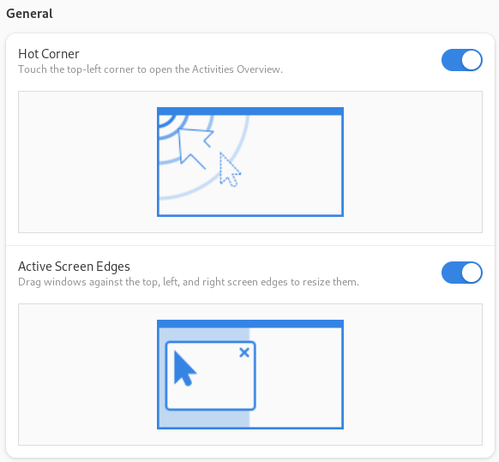
@poisonwomb @hughc @vfrunza @thelinuxEXP I don't know about Windows, but on #Gnome, those are easy to turn on or off in the settings. No need to get philosophical about it on Gnome at least :-) .
@vwbusguy @poisonwomb @vfrunza @thelinuxEXP Gnome's implementation is really good, IMO.
@hughc @poisonwomb @vfrunza @thelinuxEXP I agree! Pop_OS also adds some really nice polish and quality of life improvements to it as well.
@vwbusguy @poisonwomb @hughc @vfrunza @thelinuxEXP I havent used windows since 2010 or something but Plasma desktop also has this easily accessable.
@pixelspree @poisonwomb @hughc @vfrunza @thelinuxEXP Yeah, I specifically picked on Gnome because it has a reputation for "not being configurable", but these options are right there in the stock general Settings. Meanwhile, it's hard to imagine anything you can't tweak on #KDE.

@vwbusguy @poisonwomb @hughc @vfrunza @thelinuxEXP Yeah I hear that also all the time but I don't miss anything at all. People still whine about missing icons on the desktop as if it's 2010... It's weird.

Why would I go look for an icon when I can simply start typing the first letter of the program name and hit enter?

@pixelspree @poisonwomb @hughc @vfrunza @thelinuxEXP You can configure that, too, from Tweaks. Literally less effort to turn that on than to log into a website and complain about it on most distros.

@vwbusguy @poisonwomb @hughc @vfrunza @thelinuxEXP Yeah I know but I think gnomes workflow just makes sense. I love it.

I have extension only for custom themes because I like my gnome beautiful.

@pixelspree @poisonwomb @hughc @vfrunza @thelinuxEXP I switched to KDE when Gnome 3 first came out, but I came back around to it. I run both Gnome and KDE now and appreciate them both for what they bring to the table. I especially love the KDE experience from #Fedora #Kinoite.
@vwbusguy @poisonwomb @hughc @vfrunza @thelinuxEXP Yup I switch back and forth between them every time there is an new release. Because it's fun. ')

@vwbusguy

I've been sticking with Gnome for quite a while now, but I have to say, all these years trying to disable tracker-miner, et al, have made me tired. :)

I like the current rev Gnome interface well enough, but I took stock the other day and there are almost zero DE-bound applications that I use.

I suspect I could move straight to a DM/WM and be good with it. That is, if I could land on something that played well with Wayland. And allowed multiple monitors.

@thelinuxEXP

@pixelspree @vwbusguy @poisonwomb @hughc @vfrunza »Why would I go look for an icon when I can simply start typing the first letter of the program name and hit enter?«

Because I don't remember my freaking program names! MKVToolNix GUI, great name to require your average no0b to remember once a quartal. Yikes! I'm not in the desktop icons team, but constantly use Plasma's start menu categories to find my programs that aren't in the favorites or in a panel.

@frumble @pixelspree @vwbusguy @poisonwomb @hughc @vfrunza which reminds me that a #TUI-based #StartMenu / #Launcher is kinda needed.

Something that allows people to simply search for "editor" and they 'll get tools like ne, vim, nano or whatever..

@frumble @vwbusguy @poisonwomb @hughc @vfrunza Well maybe you remember some part of it, and that's enough. :)

I sometimes don't remember also but that's for infrequently used programs. Then I also look for them in my app history list or something like that.

@hughc @vfrunza @thelinuxEXP it is almost like linux and macos have two different *main* target audiences huh?