 angel
angel  Jeremy Rifkin
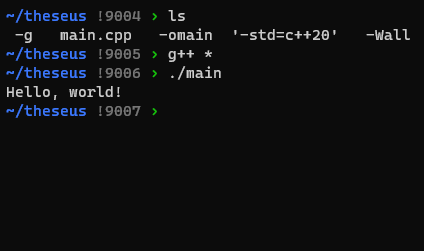
I’ve created a new C++ build system: g++ *
@rifkin maybe you could make it even more flexible by making a build system called * so it’s not bound to C++
ducks and hides
@rifkin
You've inspired me to write a new CI tool to go with it:
# nightly CI
0 0 * * * g++ /src/*
@rifkin I REBUKE YOU in the name of SATAN
lmao this is fucking incredible
I used to start quickie C programs with:
----------------------------
#ifdef notdef
gcc $0 -o $(basename $0 .c)
exit $?
#endif
int main....
---------------------------
Then I could compile by saying "sh foo.c"
This was especially useful if the compile line was complicated (e.g., the C program required linking with special libraries or something).
(Actually I used back-quotes instead of $(....), but this phone doesn't have back-quote on this keyboard.)
@lain_7 @rifkin @jef Basically same here:
────
#if 0
ctime -begin ${0%.*}.ctm
clang -g -fsanitize=address -std=c99 $0 -o ${0%.*}
ctime -end ${0%.*}.ctm
exit
#endif
────
That's the intro to all my new .c files. (ctime, by the way, times the build.) I got the idea from Won Chun, and like to think of it grandly as "The Won Build System".
"...as of C23, this technique no longer requires an extension...."
@rifkin this is awful. But funny.
In all seriousness I would like to refer everyone to the brilliant summary of this problem by David A. Wheeler:
This article explains how to correctly handle filenames in Bourne shells (the primary shell of Unix/Linux/POSIX systems), based on the issues discussed in 'Fixing Unix/Linux/Filenames'. Many programs fail to work properly on filenames that include spaces, begin with dash (-), include newlines, and so on, because developers don't know how to do it properly. Many texts, even good ones, get this wrong.
Screenshot of a terminal running three commands. First, ls shows the current directory contains files named "-g", "main.cpp", "-omain", "-std=c++20", and "-Wall". The second command is g++ *, passing every file name in the current directory as an argument to GCC's C++ frontend, which produces no output. Finally, ./main prints "Hello, world!" confirming the previous command did successfully create an executable.
@rifkin
Make your main.cpp executable, and add this as the first line:
///usr/bin/env -S g++ *cpp -* && exit 0
Then you can build your code just with:
$ ./main.cpp
And it will work even with backup files or executables in the directory.
Everytime you make a new buildsystem, kitten dies! Don't do it for sake of kittens!
 matt godbolt
 Carl Schwan
 Andrea Corbellini
 stair
stair Ursidinoj/The Bjornsdottirs
 Stefan Scholl
 koorogi
 mirabilos
 7331
7331 ctrl the gender goblin
 Andrew Barker
 Dr. Mattias Holm
 kandi3kan3
 Impossible Umbrella


 rhempel
 aburka 🫣
 Damien Sorresso
 [HANDMAIDEN] xan
 Ben Rosengart
 Oriel Jutty
 Alessandro Cominu
 SuperIlu
 David Mankins
 Matt Mascarenhas
 Alex Celeste, Princess Consort of Burnout
 @
@ Jeroen Baert
 the last heron
 traal
traal Noah Gibbs
 numerodix
 [17921] /bin/cat(girl)
 amos
amos Scott Williams 🐧
 Zoe
Zoe Mauve
Mauve groxx
groxx Janne Moren
 amy tech (bones)
 Sijmen
 серафими многоꙮчитїи
 Michael Melanson
 Haelwenn /элвэн/
 Bhushan Shah 🤖🥸🦹
 neko
neko LR
LR Oleg Endo
 Guillaume Racicot