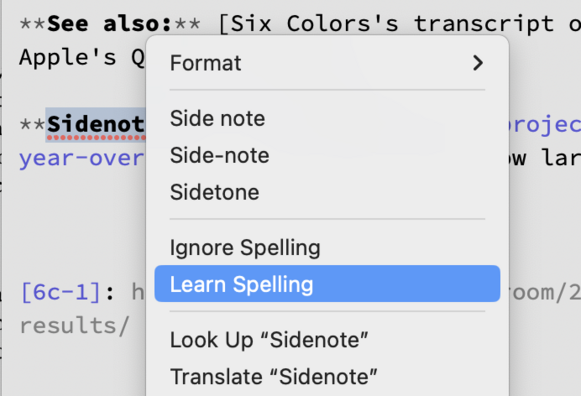
16 years in and iOS still doesn't have this feature that MacOS (née Mac OS X) has had since it launched 22 years ago: “Learn Spelling”.
@gruber Also, you can only run spellcheck as you type on iOS, rather than using "Check Document Now" after the fact—a small thing, but it's annoyed me for years.
@gruber So frustrating—and weird. Messages for Mac doesn’t have it either. Learned that the other day. Had to open Notes and do it there.
@gruber Not only that, but "just make a keyboard shortcut" does not work consistently. For years it has been trying to correct the word "jammies" as Jammie's, which I guess is the possessive of some guy named Jammie? Creating the shortcut doesn't fix. But even worse, it just now tried to correct the name without possessive to Jamie. The "smart" autocorrect system is inexcusably bad.
@middleclasstool @gruber I had to turn autocorrect off, it’s so bad.
@middleclasstool @gruber ever noticed that there seem to be competing autocorrect systems?
Not today, but sometimes the predictive corrections are laughably bad while the’ replace’ method has always seemed more reliable.
@applewise @middleclasstool The top one isn’t autocorrect. That’s the text system’s “Replace” feature. The difference is that autocorrect suggestions are based on exactly how you tapped on the keyboard. The Replace suggestions are just based on selected word. You can get Replace suggestions for words you’ve pasted. You don’t get autocorrect for pasted words.

@gruber @middleclasstool Hmm, makes sense that replace behaves differently being not based on letters actually typed. Still, my memory is that autocorrect never previously suggested such nonsense as it has the last couple of years and perhaps, despite my memory suggesting otherwise, I therefore never actually compared.

What do you make of autocorrect automatically and infuriatingly dropping in such phrases as ‘could of’ after perfectly typing ‘could’ve’?

Is it your experience that it’s mostly fixed?

@gruber I’ve found that in the Pages app on iOS/iPadOS, you can highlight a word you’ve typed and you will have a “Learn Spelling” option. The word will be remembered system wide.
@gruber as someone who confidently uses non-dictionary spellings that just make sense to me for voice/feel, this drives me crazy.
@gruber meanwhile, iOS seems to get worse at predictive autocorrect every year.
@gruber I must admit that I had my chance long ago. I had a hand in on adding spellcheck, the red squiggle, and the menu system to iOS, and of course, the text system too. Other things took priority and then I moved onto other projects. Sorry!
@kocienda Ugh. This one really hurts, Ken.
@gruber Yep. I had all the threads in my hands, Now as I think back, I stopped working on text-related things to begin a year-long project to add multitasking gestures to Springboard. It was a lot of work to decide quickly whether to handle touches in Springboard or dispatch those events to the frontmost app. Eventually, the descendant of that work allowed the iPhone to go without a physical home button.
@gruber A pedantic side note: the official spelling is SpringBoard, but I never liked that internal capital letter.
@gruber One last tidbit. Who did I collaborate with on those multitasking gestures? Imran Chaudhri. 😉

?!

Any idea why that was the official spelling? Because the app icons are… springs… and they're attached to the same… "board"?

@kocienda @gruber that’s a solid trade if that’s how we want to look at it. Learn spelling would be great, but not at the expense of having a home button again
@gruber @kocienda The really depressing thing is that Learn Spelling would probably break all the machine learning bullshit (or at least be hard to work side-by-side), so it’s unlikely to happen now.
@chockenberry @gruber @kocienda surely on MacOS the "learned" words are stored in some little file somewhere. I wonder which. I think it has indeed persisted across the decades.
@kocienda @gruber Thank you for the essential red squiggle!
@gruber and now the iOS keyboard is going to suggest “née” every time you try to say “new” for the next 2 years. Speaking from experience
@gruber or even the option to ignore spelling — so many iPhone Notes screenshots with half of it underlined in red
@gruber and vertical context menus
@gruber Pages on iOS has this feature. When used, it seems to apply system-wide. I used an example with gibberish below, including a before/after from the Messages app (hopefully that doesn’t come back to haunt me).
@gruber The spellchecking on iOS needs work.
@gruber It’s a ducking shame
@gruber You may already know, but you can go to Settings > General > Keyboard > Text Replacement, and add a word with no shortcut. This will stop the OS trying to replace it, and will keep it from getting underlined. Absolutely not ideal, but it’s an escape hatch for those chronic problem words.
@dmnelson I do know that but it’s a terrible solution to this problem.
@gruber I would pay for this, so that iPhones would stop spelling my first name wrong each time someone is writing me 🤦🏼‍♂️
@gruber which Markdown editor is that in your screenshot?
@capbri That’s @marsedit, one of my favorite and most used apps of my entire lifetime.
@gruber My thoughts exactly. Printing could be better too.
@gruber it’s ducking redicous.
@gruber Cheer up: they’ll remove it from macOS soon enough and then there’ll be feature parity.
@gruber I am looking for this in every major iOS release.
@gruber Because new Apple only keep chasing for new features, instead of stop for a while and look back and think whether is there any improvement/refinement can be done on existing features.
@gruber ahh - Pages has “Learn Spelling” but it may only apply to the open doucument
@gruber Learn Spelling would solve a lot of ducking problems.
@gruber I think about this all the time — it is remarkable that my iPhone miscorrects a term over and over and over and over...
@gruber if you keep dismissing autocorrection and keep using the same spelling of the word, iOS learns. It know my app and even correctly auto-capitalize its name as I type
@gruber In other news, hello Source Code Pro. Is that your current go-to monospace instead of Consolas?
@gruber Since you’re mentioning this kind of thing, for the last few years, macOS does give suggestions for misspelled words 50-70% of the time. Anyone else notice this?