Google has just updated its 2FA Authenticator app and added a much-needed feature: the ability to sync secrets across devices.

TL;DR: Don't turn it on.

The new update allows users to sign in with their Google Account and sync 2FA secrets across their iOS and Android devices.

We analyzed the network traffic when the app syncs the secrets, and it turns out the traffic is not end-to-end encrypted. As shown in the screenshots, this means that Google can see the secrets, likely even while they’re stored on their servers. There is no option to add a passphrase to protect the secrets, to make them accessible only by the user.

Why is this bad?

Every 2FA QR code contains a secret, or a seed, that’s used to generate the one-time codes. If someone else knows the secret, they can generate the same one-time codes and defeat 2FA protections. So, if there’s ever a data breach or if someone obtains access .... 🧵

#Privacy #Cybersecurity #InfoSec #2FA #Google #Security

.... if someone obtains access to your Google Account, all of your 2FA secrets would be compromised.

Also, 2FA QR codes typically contain other information such as account name and the name of the service (e.g. Twitter, Amazon, etc). Since Google can see all this data, it knows which online services you use, and could potentially use this information for personalized ads.
Surprisingly, Google data exports do not include the 2FA secrets that are stored in the user's Google Account. We downloaded all the data associated with the Google account we used, and we found no traces of the 2FA secrets.

The bottom line: although syncing 2FA secrets across devices is convenient, it comes at the expense of your privacy. Fortunately, Google Authenticator still offers the option to use the app without signing in or syncing secrets. We recommend using the app without the new syncing feature for now.

#Privacy #Cybersecurity #InfoSec #2FA #Google #Security

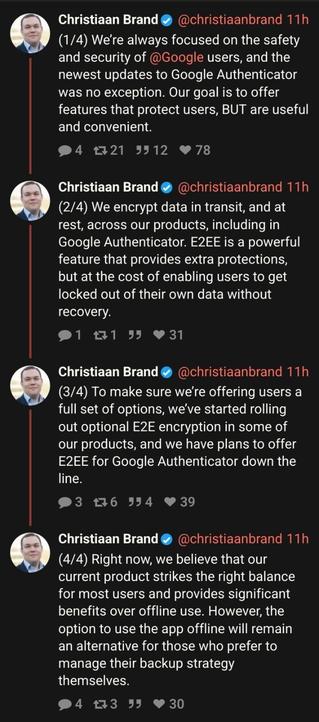
Google responded:

@mysk I don't buy this 100%

Why couldn't they put the option in at launch? Or do like they do in Chrome and use your Google account to decrypt if it's for convenience?

There's no way the Authenticator team didn't see this coming...

@mysk Well, THAT’s not the truth… You pulled that seed right out of the network stream…

@mysk "Strikes the right balance" of the number of employees and systems that gain access to your 2FA secrets...

Amazing.

@mysk How could someone lock themself out when transfering 2fa secrets to another device?
@mysk
Now what's the difference he's riding between E2E and E2EE? I've only heard both being used synonymously..
@mysk Just another serving of the usual Big Tech “Just trust us; we know what we’re doing.” 🙄

@mysk tl;dr: Syncing your shit with Google allows Google to see your shit. News at eleven.

Honestly, who would add their Google account to an app to sync its data and then expect privacy?

@jomo @mysk It is perfectly possible Google, or anyone else, to implement syncing without letting themselves see the data. This is not a "well, duh!" situation.

And given authentication is a very security-sensitive field we should be able to expect more from Google here!

@alcinnz @jomo @mysk indeed. E2E encryption would not only be relatively easy, it is to be expected and common in this area.

@alcinnz @jomo @mysk In order to be able to encrypt stuff you need a key of some sort. If the app doesn't ask for a key, then sure, yes, it's a well duh situation.

The same applies to their password manager which is also not E2EE. They store passwords encrypted with an online key they control lol.

To be fair, storing passwords unencrypted in your Google account is usually not much of an issue because you can just request password reset emails to the Gmail anyway if you pwned the account.

@jomo @mysk There are people who just don't know or not educated enough about privacy.
@nhan @jomo @mysk Additionally, its "promoted" on loads of Authenticator setups, a lot of people thing Authenticator = Google Authenticator.
The amount of times I have tried push people in the IT field to better solutions (Yubikeys or things like Aegis), and they go yeah but Googles works fine...
@oci3o @jomo @mysk I think we all agree that it's a spectrum and there's tradeoff between security and inconvenience. They may be at different risk tolerant level than you are. I think Google Authenticator is a nice balance for the public. If whatever you do require more security you're probably actively equipping yourself with that knowledge and device.
@nhan @jomo @mysk 100%, threat models between everyone differ, however if E2EE was enabled with this, it could be a good solution for most people, however then you risk issues if your Google account gets taken over etc.
Advanced Protection could help, IF google enables E2EE, but we are going outside 95% of the populations tolerance here.

@oci3o @jomo @mysk I agree the if your Google account is taken over it'd be catastrophic. However, to gain access to your Google account you need 2FA in the first place.

Advanced Protection is a bit much for me. (Btw I have no IT security knowledge). Also Google is heading towards a passwordless future and this 2FA code is just a transition phase.

@jomo @mysk because this is a matter of security not privacy. What Google is doing here is simply stupid.

@jomo @mysk the thing is, 2FA keys in iCloud Keychain are E2EE. So it can absolutely be done.

(Does anyone know if Authy uses E2EE?)

@jomo @mysk WAY too many people don't think the way we do. I would never do that just on principle, but they *pay me* to be a paranoid BOFH, and I don't put that habit away when quittin' time comes around.

I agree, giving Google more info than is necessary is unthinkable... but this implies the *think*... and thereby hangs a tail... [stet]

@mysk or don’t use Google Authenticator

@mlevison
Yubikey authenticator. No on-phone secrets!

(Yubikey not included)
@mysk

@EricCarroll @mlevison @mysk problem with Yubikeys for a lot of less "technically" minded people is A: they will loose it B: why spend £100+ on x2 keys and C: they cant be arsed.
Plus personally, Yubikey for me is a high risk account thing, I don't use it on services I don't care about loosing, but they are still protected using say Aegis.
@EricCarroll @mlevison @mysk I might go down this route but I think a lot of 2fa compatible stuff is not FIDO compatible but that’s not something I’ve looked closely into

@mysk

Naturally all of this surprises me exactly 0%

@mysk Right. Don’t use Google for this. Use 2FAS instead. https://2fas.com/
2FA Authenticator App (2FAS)

2FAS (2FA Authenticator App). Protect your accounts and online services.

2FAS.com

@ezrabowman @mysk oh nice I've been meaning to look for an alternative. This looks better anyways from a basic usability pov. Like they have search? Been hoping g would add that. I guess I don't have to wait now.

Need to look at how syncing works though.

@teleclimber @mysk it syncs via iCloud and allows import/export.
@mysk For the technologically impaired, how would someone locate this option to ensure their settings please?
@CoastalCoasting @mysk - Installing it on Android just now, the functionality wasn’t there
- Updating on iOS brought the functionality and there was a wizard which prompted. I chose not to. In the UI I see a sync icon (cloud with diagonal line through it) and a Google profile seletion icon (person icon). It appears to be through that where you can choose to sync or not
@james @CoastalCoasting @mysk yikes mine was enabled by default! Just set it to work without account and it claims it’s being deleted from my Google account. Sigh. Time to change all the 2FA on everything my and use a different app.
@CoastalCoasting @mysk in iOS click on your avatar in the top right, it’ll tell that it’s opt out

@femaven @mysk

Thank you!

Google plans to add end-to-end encryption to Authenticator

Google says it will bring end-to-end encryption to Google Authenticator’s new account-syncing feature after facing criticism for not including it with the update.

The Verge

@femaven @mysk

Really appreciate you thanks!

@mysk I recommend migrating to free and open source alternative Aegis, available on the Play store and F-Droid.
Migration is simple, but requires an external camera. Aegis can backup your 2FA codes to the cloud and supports encryption out of the box.

@mysk is it still possible to export via QR codes like in the previous versions (v3.4.0 or earlier)?

I haven't updated to v4.0.0 yet for these reasons.

@mysk We know Google is evil, but they are supposed to be *competently* evil.
@mysk
Ugh. Must everything be more difficult?
@mysk I have solved the problem they were trying to address with this update by getting a cheap discardable Android phone with the sole purpose of installing the Authenticator and regularly backing up the secrets from my primary phone onto it.
It lives in my drawer powered off, and it's already saved my skin once when my main phone decided to not turn on anymore.
@mysk Also they can be sniffed.

@mysk I'd rather recommend to avoid it at all costs and choose a non-proprietary #2FA method like #HOTP (#RFC4226) & #TOTP (#RFC6238)...

Like FreeOTP+ does:
https://f-droid.org/en/packages/org.liberty.android.freeotpplus/

FreeOTP+ | F-Droid - Free and Open Source Android App Repository

Verbesserter Fork von FreeOTP - Eine funktionsreiche App zur 2FA-Authentifikatio

@mysk suck to sucks for google, been using MS Auth for about a year now and love it - i might try it again
@karadanvers @mysk when I export my MS auth data, does it contain the totp secrets? Asking because of backup and potential move to my own totp generator
@mysk Thanks for the warning. I use it, so I'll be sure cloud sync isn't enabled when it updates on my phone. #2FA #Google

@mysk I thanked LastPass for letting me get those seeds when I migrated all of my data out of their platform years ago... Being able to stop using anything lastpass was Priority #1, then re-keying my TOTPs was #2 along with changing passwords...

I still don't use google authenticator and was wondering if the seeds were user readable after this change.... I guess they are if you intercept payloads.

@mysk Layman question - is the sync of 2FA secrets 'opt in' or automatically happening?
@pixelpusher220 The app prompts you to enable syncing. You can dismiss it and continue using the app without syncing the secrets. You can change that in the settings too.
@mysk have you seen the same behavior with Authy?
@mysk Authy asks for a password occasionally (so you don't forget it). I stopped using Google Authenticator a while ago.