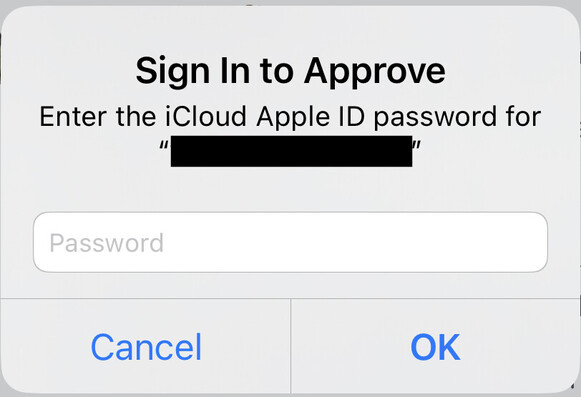
This is my least-favorite iOS dialog box, the one where they want you to type in your Apple ID password. There is no option to get it from your password manager. There is no Apple Watch, Face ID, or passcode option. Because it’s an OS-level dialog box, you can’t check our password manager.

What Apple is telegraphing here is “your Apple ID password must be memorable.” And that is bad. They should stop doing this.

@waldoj I strongly agree. Due to this exact issue, I've often set iCloud passwords to short, easy-to-remember tokens.
@steven @waldoj Steven I just involuntarily gasped
@waldoj I hate that so much. You also can’t paste, right? I end up having to look it up on a different device.
@skry I’m not sure if pasting is possible, because I generally give up at this point.
@skry @waldoj You cannot paste there, no

@maxfenton @waldoj Makes me so mad. I have 16-character passwords that are really difficult to type, especially on touch screens.

I'm even madder that my iOS PIN is used to "safeguard" my Apple account. Just when it looked safe to use iCloud finally (encryption at rest) they facilitate the weakest links.

@skry @waldoj I’ve changed the child password to a secure one I can both remember and type fast on an ipad screen and … that’s terrible.
@skry @waldoj You can definitely paste. You just have to cancel out, open your password manager, copy your password then trigger the prompt again. It’s an extra step but I’ve never had an issue using my extremely not type-able iCloud password in iOS.
@bflipp @skry @waldoj don’t forget to do that song and dance quick enough that your clipboard doesn’t auto-clear the copied password.
@bflipp @waldoj It's the desktop Apple passwords that are worst about pasting. It turns out that if you use the mouse menu to paste that works, but cmd-V does not.
@skry @waldoj you can paste; I always have to close the dialogue, hunt down my password and copy it
@waldoj habituating the use of this dialog also makes it more natural for someone to type it into a phishing dialog
@waldoj Every time I see this I get FURIOUS. It encourages bad password behavior and is impossible for digitally divided folks. I swear it's designed by an intern.
@waldoj And you can't ask to see it. So if it fails you are not quire sure if it's a typo or you didn't remember the password....grrrrr

@waldoj I thought long sentences were considered secure

"I thought long sentences were considered secure", my new password.

@jordanreiter They're pretty good! 1Password doesn't create memorable sentences, and I'm too lazy to create custom passwords—but maybe I should for my Apple ID if I'm gonna have to remember it sometimes.
@waldoj When I encounter this prompt, I tap "Cancel" by policy, because this is equivalent to a service denial.
@waldoj I do not expect most people to respond as I do. It's the best way I know how to send a weak signal.
@neirbowj That's almost always what I do.
@waldoj Trying to approve a purchase as a parent involves typing the child’s password like that *twice* within a too short time frame
@maxfenton The entire process of approving purchases is just absurdly complicated. Apple's whole Screen Time schtick is really bad.
@waldoj I haven’t changed my iCloud password in _years_ for this very reason. It makes me so mad.
@waldoj strong agree. It would be acceptable, although very anti competitive, to not allow 1Password/others to input a password in that situation, but it’s mind boggling why it doesn’t even allow access to keychain.
@waldoj to be fair, my Apple ID password is the only other password besides 1Password I have memorized. The fact that it restores my backup on a new phone makes it feel like a second factor to me. But still I agree all passwords should be 1Password able.

@waldoj i went from a 40 random character password to a 20 lowercase letter password because of this shit.

also, you can reset this password with a six number passcode.

@waldoj What I do is cancel and depending on severity of action with
- don't do anything
- open 1PW to copy my password to proceed.

either way it majorly sucks!

@inuk @waldoj …which of course only works if you can actually trigger the dialog again. But sometimes, you only get it after booting the device!
@waldoj that is a very frustrating experience of iOS.
@waldoj also any all can fake this at any time
@waldoj 100% agree, been saying this for years
Felix Krause on Twitter

“📝 One of these is Apple asking you for your password and the other one is a phishing popup that steals your password https://t.co/PdOJcthqL7”

Twitter
@KrauseFx I was going to make this today, as a proof of concept, so I’m glad you already did! Yeah, thats a big problem!
@waldoj They're doing the same on macOS. If you have a separate Administrator account from your everyday user account, you get a prompt for Administrator creds when you do something privileged like install software in Applications. But they have apparently gone out of their way to ensure your password manager's usual type-it-for-me feature won't work. You can only transcribe manually or copy and paste, leaving Administrator creds on the clipboard. Ugh.
@asparagi I hadn’t encountered that yet! (Or maybe I have but since I can still get to 1Password it doesn’t annoy me as much?) I’ll watch for it now.
@waldoj @olivia this pisses me off on a regular basis.

@waldoj I agree in this dialog box being hard to deal with.

I have no clue what my Apple ID password is, so I cancel, find and copy from @1password, enter whatever flow I cancelled and paste my password in to this dialog box.

Can this be improved somehow @rmondello ?

@waldoj I don't entirely disagree and I'm also frustrated by this behavior, but I imagine that Apple views the Apple ID in much the same way that a password manager company views their own master password, which must itself be memorable. And since Apple's ecosystem also does offer password management, it's not entirely unjustified right?

My Apple ID is just another account for me, so I wish its login prompts behaved that way, but for many people (like my mom) it's also her password manager.

@eviljarred I’m puzzled why Face ID is insufficient here. And for that to work, I’ve already provided my passcode.
@waldoj Most password managers require you to use the master password to unlock them, and your Apple ID is a master password to a password manager (iCloud keychain). It's also an alternative to a FileVault recovery key. So I can understand the security need, though I wish you could paste. (Also wish you could paste passwords into login windows in Apple Remote Desktop...).
@SubjectMac Sure, but iOS also has a passcode and Face ID. I have already authenticated with those, or could reauthenticate with them. I’m unclear why the password is required.
@waldoj because a 6 figure passcode is a pretty poor master password?
@SubjectMac And yet Apple is fine with that for nearly all interactions with iOS and with iCloud. I don’t understand what’s different about, for example, giving my son permission to download a free app on his iPhone, as I was doing here, compared to me downloading a free app, where Face ID is sufficient. There’s no consistency.
@waldoj Strongly agree, and so often they prompt for iCloud password with no context or reason for doing so. How do we know we aren’t giving our password to malware?
@waldoj Also, it’s a default modal. There’s no way to verify that this is actually Apple asking for your password.
@waldoj There's no option in the box to get it from the keychain, but we can still get it from the keychain and paste it in... but yeah, that needs streamlining for sure.
@waldoj I've literally just setup a new iPad today and this annoyed me so much!
@waldoj co-signed in all respects. it's very very bad.

@waldoj The dance is always the same: something, something, something, this dialog, cancel, switch to password manager, login, find (the right) Apple ID, copy the password, back to something, something, this dialog, paste, ok...it adds a lot of friction considering this is often the point at which they want money. Sometimes I never bother to return.

I only know three passwords: my login password, my password manager pass phrase, and my SSH key pass phrase.

I tell a lie. I also know my gpg passphrase.
@waldoj my favourite part of this dialog box is when it pops up randomly, while you're doing something else, because a random part of iOS needs you to sign in for reasons known only to Apple.
@waldoj cancel.
Go to Password manager and copy password
Reinitiate activity needing AppleID password
Paste
@waldoj @fkooman I always need to grab one of my other devices with my password manager and start typing…
@waldoj @Quinnypig while i agree it’s bad that the password manager doesn’t work here, i don’t think memorable passwords themselves are necessarily bad. they could be in the style of xkcd’s “correct-horse-battery-staple,” where there’s sufficient entropy to stave off even dictionary-based attacks for a sufficiently long time, let alone brute force
@waldoj my gripe is they won't tell me my password no matter what hoops I jump through and apparently over the years I've used all my email addresses to set up Apple IDs with forgotten passwords so they won't let me create a new one either, nor can I sign out of the iPad to sign in with any other one I may know.
@waldoj it’s also an exceedingly bland dialog for something so important. I often wonder if I’d ever know if I’d been duped by an app just spawning a lookalike dialog to phish for credentials.
@waldoj They ask for Apple ID login during initial OS setup, too. There's a "Set Up Later" option, but it's still annoying.