I swear to god I’m spending way too much time correcting autocorrect these days. It’s gotten SO bad. 😩

It’s gotten so bad I have re-read my own posts several times before I send them to scan for words I DID NOT TYPE. Like things out of the complete blue that make no sense or typos of letters that are not anywhere near each other.

Thank goodness for Mastodon’s ability to edit posts, I swear. It’s like iOS is gaslighting us with the keyboard and it’s crazy maddening.
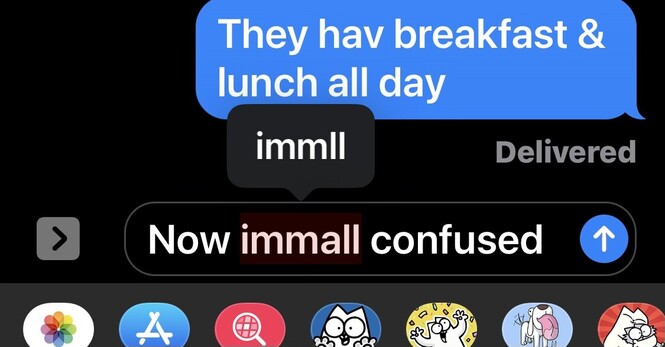
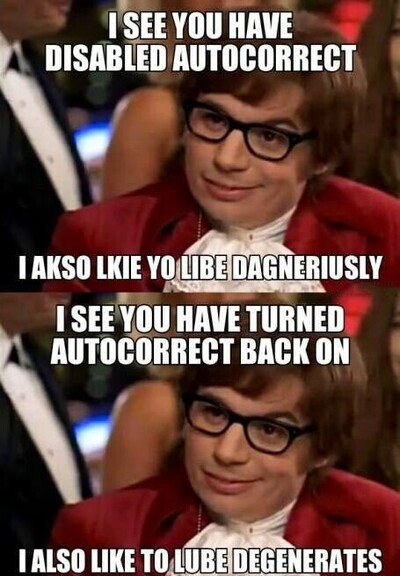
My wife just sent me this. OMG. 😂

@gedeonm Have you seen where if you start a sentence with “well” it will autocorrect to “we’ll” but if you leave it alone, when you complete the sentence, it will switch it to “well?”

Which is what I typed in the first place…

@jpetticrew Yep, one of the worst autocorrect offenders.
@jpetticrew @gedeonm woe be unto you if you try to start a sentence with the capitalized version of “ill” - say, “Ill winds are blowing.” Every single time, AutoCarrot will “helpfully” “fix” this to “I’ll”, which MAKES ZERO SENSE.
@gedeonm my favorite is We'll and well. Seriously. Take the initiative to know, from context clues, that I mean well, and not we will. "Machine learning" my ass.
@gedeonm the only true answer is
@jmovs @gedeonm 😂😂😂 if we were on Reddit I’d be giving you some sort of award for that - here I can only favorite and boost.
@gedeonm actually, this is also shows a related problem I run into - getting “n” or “m” instead of <space>. And it happens a lot. And I can’t be the only one. And AutoCarrot NEVER takes this into account (hmm, that one long incorrect word has an “m” in the middle, and if you change the “m” into a space, the result is two legit words that work fine in this context, so, you know, •do that• - or at least suggest it).
@carlrj @gedeonm I’m with you… I regularly get “b” instead of space.
@gedeonm I’m just glad to see I’m not the only person who hits m instead of the space bar. It is SO frequent that it boggles my mind why it isn’t recognized. Between that and changing “in” to “I’m” every. single. time. it makes me want to just dictate everything.
@gedeonm I wonder if the thing where you type it and then press the X3 times to decline still works
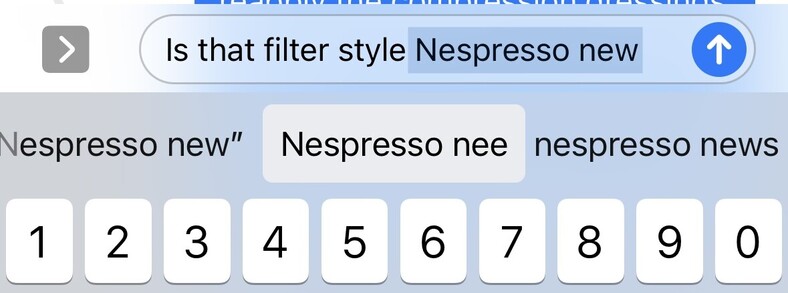
@gedeonm glad it’s not just me. Autocorrect is insisting lately that nee is a *far better* word than new here
@gedeonm I feel your pain, buddy!
@gedeonm Add me to the data set. Autocorrect is constantly choosing uncommon words when a far more common word is available
@gedeonm My wife and I have talked about this for the last few years. We feel so stupid, like we’re just too old and dumb to be able to hit the right keys. I’m sure that things have changed over the last several years because it never used to be this bad. Glad to hear it isn’t just me.
@gedeonm Mine likes to change “(“ to “(a “ for some random reason, which messes up parenthetical elements (which I use all the time, it’s a writing quirk). Case in point:

@jgeorge @gedeonm in my case “ (and ” always becomes “ (Zan’s ”.

Who is Zan?

@gedeonm sometimes I find a keyboard reset is helpful. But we can only do so much to stop autocorrect from fighting against me 😤
@rardk64 How do you do this if I may ask? cc @Verso

@gedeonm @Verso I posted a quick screen recording in this reply here

in short: settings>general>Transfer or Reset>press Reset and choose Reset Keyboard Dictionary

https://mastodon.social/@rardk64/109960230370901728

@gedeonm @Verso this won't magically fix all of autocorrect's issues of course, but it helps to unlearn some of the crazier accidental saves that I do sometimes (by hitting this option when typing for example, that'll save it to the keyboard dictionary usually)
@gedeonm @Verso and this will also unlearn some useful things you've taught it over the years, but you can pretty quickly teach those by again selecting that leftmost suggestion box after typing it

@rardk64 @gedeonm first, THANK YOU for posting this!! I'll be sad to lose autocorrupt but honestly if it means my phone never thinks I meant to type "nee" or whatever other stupid thing it keeps insisting on, that's a fair trade at this point.

Second, I appreciate the followup video so much! You win at Friday. An explainy post after my own heart. (: 💚💚

@Verso @gedeonm happy to help! I think they buried this setting a bit recently, I wish they wouldn't. I also wish they'd just let us have more manual control of the dictionary it uses, but hey that's Apple 😄
@gedeonm I have the same experience. What is crazy are the words it autocorrects to. They are not real words. Wtf is happening there.
@gedeonm the swipe keyboard is so bad sometimes
@exchgr I’m curious if it’s that bad with predictive turned off or not. But yeah, wow.
@gedeonm yep, still pretty bad
@exchgr Just crazy! Thx for that.
@gedeonm the most maddening behavior is when it changes something right as you’re hitting send/return
@danimal Or you type the same (correct) thing three times in a row and it insists on changing it every single time.
@gedeonm The latest example of “this would have happened only once to Steve Jobs”
@danimal You have to believe that. Truly.
@gedeonm The ONLY negative reaction I had to reading @kocienda’s book was remembering how good autocorrect was in iPhoneOS 1.0 and being sad that it’s so terrible now.
@gedeonm so it’s not just me? I’m getting so angry at it.
@gedeonm so fucking bad. The shit where iOS changes the key hit boxes in anticipation of what you’ll press next is also driving me fucking bonkers, too. Resetting and retraining hasn’t done jack either. Used to be so much more usable.
@shadowbottle Yep, it’s like a subtle form of digital gaslighting. You think you’re about to type one thing and suddenly you’ve typed something else. It’s infuriating.

@shadowbottle @gedeonm It does what?!?

How does that make any sense?

@lolzac @gedeonm yeah, here’s the patent for it for more description: https://appleinsider.com/articles/12/07/31/apple_granted_patent_for_predictive_text_input_ui.html It’s been a thing since 2012, but it used to work better!
Apple granted patent for predictive text input UI | AppleInsider

Apple on Tuesday was granted a U.S. patent for the graphical user interface used in iOS which changes the "hit region" size of a virtual keyboard's buttons based on predictive text data.

AppleInsider
@shadowbottle @gedeonm I think this is a specific instance of an ever-broadening pattern in tech (if not in society more generally): optimize & streamline your products and services for a majority of people, even if it means completely screwing over those who don't fall within that group. I'm betting that quantitatively, there is a large percentage of people who do benefit from these keyboard "improvements." But if you happen to fall outside that main distribution, you can go kick rocks as far as they're concerned.
@shadowbottle @gedeonm Wait does that actually happen? There’s always a few letters in certain sentences that I can never seem to hit and I couldn’t figure out why.
Apple granted patent for predictive text input UI | AppleInsider

Apple on Tuesday was granted a U.S. patent for the graphical user interface used in iOS which changes the "hit region" size of a virtual keyboard's buttons based on predictive text data.

AppleInsider
@shadowbottle @gedeonm Seriously?! I thought I was just getting really bad at typing. 😮‍💨
@gedeonm so/do their/there, keeps autocorrecting to the wrong one >_< >_<
@gedeonm Recently charged my 1st Gen iPod touch still running iOS 6-something and the typing experience is GLORIOUS. Night and day. It was so good, I wish they could somehow revert to that keyboard.
@ericleamen Wow… I have no doubt about this. Machine learning is the devil I swear.
@gedeonm Autocorrect on Android/Samsung is a curse -- especially when it automatically reverts words you have manually corrected.
@gedeonm I get so many weird automatic capitalisations. No idea what’s going on.
@gedeonm So much - it’s so frustrating. I thought it was the swipe keyboard at first but … nope. Just shoddy all around.
@gedeonm The amount of times I type something and it changes as I hit send. Or I catch it and change it and it changes back. Catch it again, change it back again ... and then just as I hit send....
@gedeonm is there a reset for it like the Spotlight index? My single victory in this fight is that my phone recognizes autocorrupt as a word.
@Verso Yes, you can reset the keyboard supposedly though I’ve not Duck-duck-goed how to do it yet. Some say it doesn’t really help but at this point I’m willing to try anything.
@gedeonm first off, I'm glad to hear it might at least be a possibility. Second, I am pleased to discover I am not the only person who is trying to break the habit of referring to a web search by a specific company's name (: