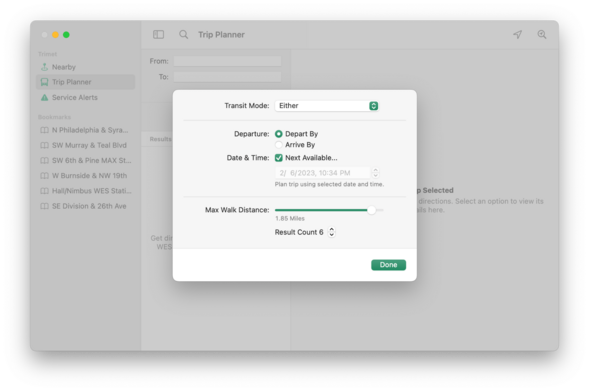

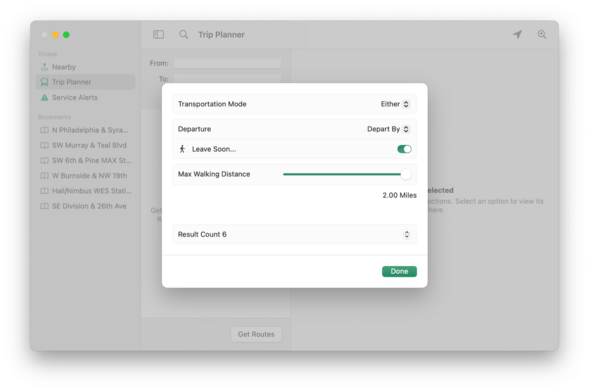
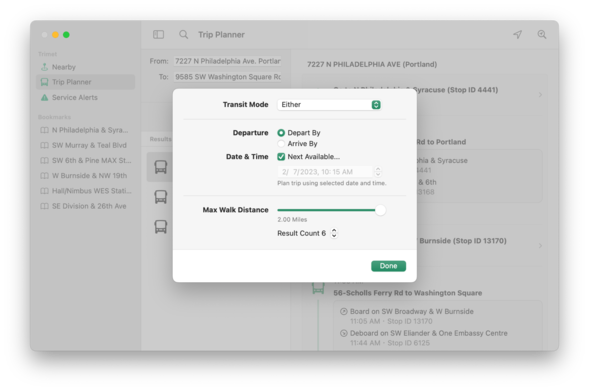
Decided against using the SwiftUI Form layout for Trip Planner options and created a more traditional macOS layout. This is the before/after. I don't care for modern layouts becoming more List-y. It's lazy design.
#SwiftUI #UIDesign #UX #macOS

@marioguzman This is the way. Though I have mixed feelings about the bold categories. Curious how regular weight labels with colons and standard 8pt spacing would look here.
@antons I suppose even better?
@antons I was also using iWork apps Settings windows as an example too 😊
@marioguzman Ha-ha, I knew it! Yeah, I have mixed feelings about iWork doing this too.
@marioguzman Yes! I think bold labels demand too much attention, and this feels just right.
@marioguzman @antons 👌 Do you even need the colon? Too subversive? 😀
@marioguzman much nicer version on the right
@marioguzman the second definitely looks more readable.
@marioguzman putting them side by side like that show just how much better a thought out UI is. You also managed to illustrate just why I dislike modern UI's more than the classic ones.
@marioguzman By far the second one is much better ! Was it done with AppKit or pure SwiftUI ?
@romrom Pure SwiftUI using the new Grid API
@marioguzman list-y design is (arguably) easier to navigate with a thumb holding a phone one-handed, but you're right, Apple's push to have desktop apps use mobile UI elements aims to make app development easier at the expense of the user. There's a reason why UX design is it's own discipline!

@rich @marioguzman Exactly! Controls on the right is the way to go for iPhone and iPad Mini in portrait mode but wider screens and definitely the Mac should use the more readable layout.

I expect Apple would say SwiftUI can one day make that choice for you and I think that's wrong. It takes a few minutes for a UX designer to do it, and maybe a month or so of refinement, followed by hopefully a decade of use. That first month of thoughtful design is worth the investment.

@marioguzman the default Form looks better now than it used to (at least it will kinda-sorta blend in), but the traditional layout is so much nicer
@marioguzman Agreed, so much nicer with traditional layout.
@marioguzman both seem rather fiddly, why not have bigger targets for options with low number of choices.
@marioguzman Can you still conditionally serve different UI designs to different platforms?
@lolzac yeah that’s what I’m doing here.

@marioguzman Well then there is probably no excuse for using the same SwiftUI layouts for each platform then. I thought you still could but I didn't want to assume

I always appreciate it when devs make an effort to make Mac apps look like Mac apps so thumbs up from me

@marioguzman the traditional approach is more eloquent. It knows what it wants to say and what it wants the interlocutor to focus on. Nice work!

@marioguzman I think that notnhaving buttons visible all the time hurts "modern" style most 🤔

"Old" style is still available in SwiftUI I hope? 😅

@marioguzman Much better. Good decision 👌
@marioguzman @brentsimmons Second one is so much more clear at a glance.
@marioguzman Yes! The "traditional” macOS layout just feels right, not just because of tradition but the information display is much clearer for a desktop computing UX. The endless List-y design is lazy and we should have better. Thank you!
@marioguzman Did you try using Form with .formStyle(.columns)? I’d be curious if you could get the second layout with that instead of Grid.
@adam I did not because Grid is far mor customizable. FormStyle.columns is a tad bit too automatic. Good for very simple things but not for what I wanted.
@marioguzman Makes sense! It’s nice to finally have the column style, though it’s strange it arrived the same year as the System “Settings” redesign.
@marioguzman 100% better design choice. burying options in lists is poor ux indeed.
@marioguzman completely agree. The new MacOS settings app and the Print dialogs are very hard to parse visually, as nothing stands out.
@marioguzmanand don’t get me started on the “additional settings” hidden behind red “!” that look nothing like a button to open a dialog with choices etc, but should be reserved for “information”, i.e. static, non interactive content.
@marioguzman looks way more functional
@marioguzman traditional layout is superior because it makes more information available at a glance, while the listy approach obscures information - you can see your current selections, but not the available choices - it forces you to deal with each piece one at a time to see the available options. And listy severely downplays that the various items represent different forms of information, flattening them all to achieve a minimal aesthetic - might make Ive happy but traditional is better here.
@marioguzman Not only clearer, but more alive. List style settings look so dead, lifeless, and loveless.
@marioguzman This is the way. If I start using SwiftUI for Mac apps, I will be making them look like the one on the right, even if it means extra work.
@marioguzman
Very nice. Especially like the Next Available check box graying-out the date and time selector. You can see what you’ll get be unchecking it.
@marioguzman damn you got boosted by John Siracusa!

@marioguzman Yep, I still find the traditional macOS style layout to be more usable.

Incidentally, it’s more similar to elementary OS and GNOME 2 than modern GNOME… I see the advantages to doing a mobile-adaptive layout everywhere, but I miss the ease at which I can scan the traditional style and find the right controls!

@marioguzman I don't have much experience with #SwiftUI on the #macOS, but did you have to redraw the controls so they look traditional?
@renaudpradenc nope. Doing any control that is available on a platform will draw specifically for its platform. So “Button” will look like AppKit on macOS and UIKit on iOS, etc. 😊
@marioguzman The 2nd one is SO much better 👍
@marioguzman Thank you for this -- the new design strips away the visual clarity and advantages afforded by precise, small pointers
@marioguzman @siracusa Agreed — the “after” looks so much better!