
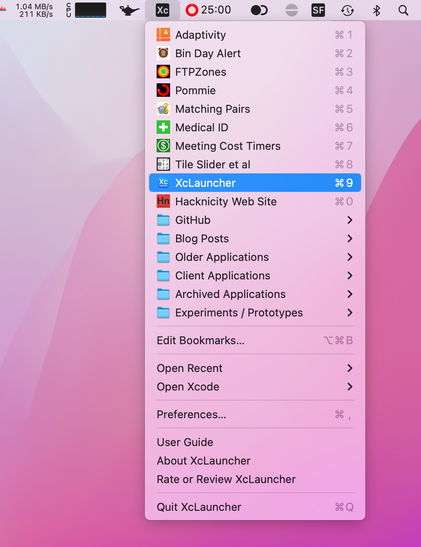
Do you have a lot of Xcode projects/workspaces/swift packages that you need to access often? Check out my XcLauncher Mac menu bar app. It's a super fast way to open your favourite projects.

By design (and sandbox restrictions šŸ˜‰), it only shows the projects you configure as bookmarks. Unlike Xcode's Recent Files menu, this means the order remains fixed, you can create folders and it isn't polluted with experiments or sample projects.

https://apps.apple.com/app/id1234625785

#iosdev #indiedev #macos #xcode

@geoffhackworth XcLauncher is great! Especially for showing me where local SPM folders are.
@dgapps Thanks, I’m glad you like it. I don’t use it for SPM myself but I vaguely recall adding support for adding a Package.swift file as a bookmark šŸ˜‚ Selecting a bookmark will open it in Xcode and holding alt when selecting should open the containing folder in Finder.
@geoffhackworth @todd I’d love to have this for for other IDEs like Rider and Android Studio

@brandonbutler I don’t use those IDEs (and had never even heard of Rider!) XcLauncher is pretty much designed to only work with Xcode.

In theory I could make a variant or extend it to support more file extensions (.vscode etc) but that would be a lot of work for very little reward. I’ve been delighted to see the favourites and boosts of my posts and hope I will get a few downloads as a result. The app usually doesn’t get more than 2 or 3 a month, so it’s hard to justify adding more features.

@geoffhackworth it’s possible supporting more IDEs might help on that front ;)
@geoffhackworth Bought! One thing, is it possible to force Xcode to open the new window on the current deskop (vs switching to the one where there is already an open Xcode window)? I know, pretty edge-case-y :)
@voidstern Thanks. I hope you find it useful. XcLauncher has no control over where Xcode opens. In fact, it doesn’t even open Xcode at all. When you select a bookmark from the menu, the app asks NSWorkspace to open the project/workspace file and macOS then opens the file in Xcode. I think this is effectively the same as opening the project file from Finder.

@geoffhackworth I thought so, but I figured I’d ask. Never managed to get the Finder to open it on the current desktop either.

But having bookmarks in the menu menubar beats looking through the recents regardless :)

@voidstern Yeah, it’s surprisingly handy. XcLauncher also has an ā€œOpen Recentā€ menu which accesses Xcode’s recent files list but filters it to only include bookmarks you have configured (and using their custom names). It can only open files you give the app access to by configuring the bookmarks so I hide other recent files. The Open Recent menu can be sorted by time or name (choose in Preferences) and holding alt/option shows the other order.
@geoffhackworth I pretty happy with having an unchanging list of bookmarks :)
@geoffhackworth This looks great! Downloading now!
@joehribar Thanks Joe. It seems like such a simple or even pointless idea, but I find it really useful. I hope you do too!

@geoffhackworth Thanks for a useful app! After a few hours of usage, I can already feel the difference in the amount of time saved.

Unfortunately, customizing the project icons turned out to be less practical than I hoped. Setting a custom icon for an xcodeproj file tracks as a git change, which I would prefer to avoid for large collaborative work projects.

@shantara I noticed that too, but if I remember correctly, I updated my .gitignore file and the new version had an entry that caused the icon to be ignored. Here’s the file I use in my own apps: https://gist.github.com/hacknicity/1c93776819f936ee912f2cc43c2b4dc5

I put this file in each of my repositories, I don’t use a global .gitignore. Be sure to check the ā€œIconā€ row (or maybe just add that to your own .gitignore file). I think the two \r characters that are required after the name might have been lost when i copied and pasted the gist

.gitignore I use in my iOS/Mac apps (in each repository, not global)

.gitignore I use in my iOS/Mac apps (in each repository, not global) - .gitignore

Gist
@geoffhackworth Thanks for pointing out the issue with the newline characters. I tried adding Icon to .gitignore before writing my initial post, and this was the missing piece of the puzzle that was needed to make it work šŸ‘

@shantara Great. I guess the file name actually has the carriage return at the end for some reason. Maybe to ensure it would never clash with a ā€œnormalā€ file or make them harder to accidentally delete?

Glad you have got it working. It really isn’t a great experience but there’s nothing I can do about it in my app. I only have read access to the .xcodeproj file (and I don’t even read it - I ask NSWorkspace to open it for me). I can’t see other files to find an icon myself or even set an icon.