
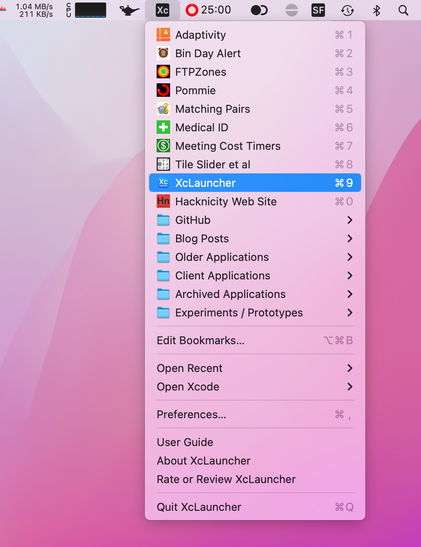
Do you have a lot of Xcode projects/workspaces/swift packages that you need to access often? Check out my XcLauncher Mac menu bar app. It's a super fast way to open your favourite projects.

By design (and sandbox restrictions šŸ˜‰), it only shows the projects you configure as bookmarks. Unlike Xcode's Recent Files menu, this means the order remains fixed, you can create folders and it isn't polluted with experiments or sample projects.
https://apps.apple.com/app/id1234625785

#iosdev #indiedev #macos #xcode

@geoffhackworth Thanks for a useful app! After a few hours of usage, I can already feel the difference in the amount of time saved.

Unfortunately, customizing the project icons turned out to be less practical than I hoped. Setting a custom icon for an xcodeproj file tracks as a git change, which I would prefer to avoid for large collaborative work projects.

@shantara I noticed that too, but if I remember correctly, I updated my .gitignore file and the new version had an entry that caused the icon to be ignored. Here’s the file I use in my own apps: https://gist.github.com/hacknicity/1c93776819f936ee912f2cc43c2b4dc5

I put this file in each of my repositories, I don’t use a global .gitignore. Be sure to check the ā€œIconā€ row (or maybe just add that to your own .gitignore file). I think the two \r characters that are required after the name might have been lost when i copied and pasted the gist

.gitignore I use in my iOS/Mac apps (in each repository, not global)

.gitignore I use in my iOS/Mac apps (in each repository, not global) - .gitignore

Gist
@geoffhackworth Thanks for pointing out the issue with the newline characters. I tried adding Icon to .gitignore before writing my initial post, and this was the missing piece of the puzzle that was needed to make it work šŸ‘

@shantara Great. I guess the file name actually has the carriage return at the end for some reason. Maybe to ensure it would never clash with a ā€œnormalā€ file or make them harder to accidentally delete?

Glad you have got it working. It really isn’t a great experience but there’s nothing I can do about it in my app. I only have read access to the .xcodeproj file (and I don’t even read it - I ask NSWorkspace to open it for me). I can’t see other files to find an icon myself or even set an icon.