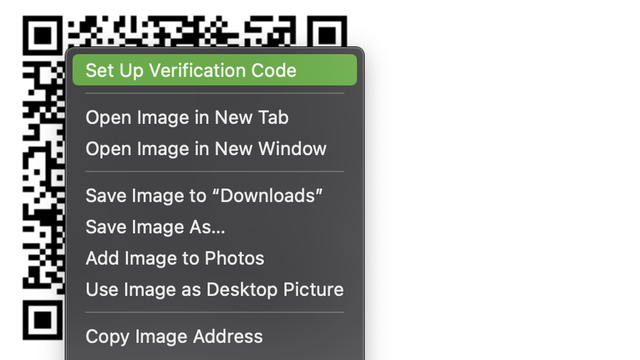
It was a delight to hear @gruber and @glennf talk about iCloud Keychain on the latest The Talk Show. Glenn mentioned a really cool trick I want to repeat: in Safari, if you right-click or tap-and-hold on a TOTP setup QR code, you’ll get an option to set up a code generator. :)
@rmondello That is a wonderful addition.

@rmondello @gruber @glennf

That is good to know! I use Keychain all the time and I have been copying and pasting the setup code up until now. It will be fun to try out alt clicking on QR codes.

@rmondello it’s little things like this that made me switch from 1Password just a week ago
@rmondello does this work with SVGs now? Last time I tried it it only worked on raster images
@markmalstrom It does! I’ve put a lot of work into the heuristic. If you find ANY page where it doesn’t work, I want to know about it and want to fix it.
@rmondello oh good! I’ll try it again
@rmondello @markmalstrom I love the work you do and share with all of us. Thanks!!
@rmondello @gruber @glennf following you here made me go all in on the Keychain. Moving away from Google Authenticator and Authy (never switched completely to Authy) now. As I mentioned somewhere else, only missing thing is syncing of SSH and PGP keypairs. 🙂
@rmondello @gruber @glennf This is a truly awesome feature 😁 I accidentally discovered it on iOS when I was going to AirDrop the QR image to another device so I could scan it with my iPhone. A lovely feature ❤️
@rmondello @gruber @glennf @tabletcorry I was absolutely delighted when I discovered this feature. I long pressed a QR code hoping to save it to photos so I could open it in a barcode reader app and hopefully extract the code for my authentication app and… there was that option. And it worked. I started moving all my 2FA to iCloud Keychain that day.
@rmondello I switched to iCloud Keychain (from 1Password) a couple of weeks ago and it works really well. Good job 👍
@glennf @gruber @rmondello I started to move over from 1Password couple weeks ago. Long process as I want to clean things up during it. I love 1Password, but my needs are different from where they are pivoting to. I’m on iOS and iPadOS for home use exclusively. I don’t need a more complex solution, but could not settle before the OTP code generator. Keep up the development.
@rmondello If it wasn’t for missing family sharing some passwords with my wife, I’d be all over this - it looks great.

@rmondello I’ve been using this ever since you first mentioned it on the bird site. Saved a lot of time.

It unfortunately does not work, for me, for QR codes drawn using SVG, Canvas or the like. Only img tags work. Is this expected behaviour in the current releases?

@nikhil On macOS, we have much better support for <svg>, <canvas>, and <table>. Are you trying on macOS or iOS?
@rmondello this was on macOS. If I run into this again, I’ll share the reproducible case with you.
@nikhil Please, please, please do! Making this better is a work hobby of mine. :)
@rmondello thanks, appreciate it 🙏🏼
@rmondello Found one case on Github. This is a regular image tag.

@nikhil Oh! Can you help me debug this?

1. Are you zoomed into the page at all? That is, does hitting ⌘0 change the zoom scale? If so, does it work after you reset the zoom scale?

2. Can you try in Safari Technology Preview and let me know if it reproduces there?

@rmondello sure thing

1. 100% zoom, default
2. Yes, works in STP Release 160. Interesting

@nikhil Nice. STP has improvements to the heuristics here that fix your problem! Those improvements will ship in Safari at some point in the next few months.

@rmondello super! Thank you for looking into this.

Also, please give me regards to who ever are responsible for implementing PassKeys.

TOTPs and PassKeys have made my life so much easier on iOS and macOS devices. 💜

@rmondello @gruber @glennf I love what you all are doing with iCloud Keychain and I want to use it but I can’t give up 1Password yet (sharing, security questions, TOTPs for CLI, etc.) I hope these things are on your roadmap because you’ve been crushing it and I’d love to switch!
@rmondello That works for all TOTP sites, like Github and stuff?
@rmondello @glennf @gruber I’ve been hearing a lot of votes of support for iCloud Keychain, but has it received a publicly-released security audit? I’m very much intrigued due to its ease of use and integrations, but I’m very cautious these days.
@gindi @rmondello @gruber A regular criticism I make of Apple is a failure to publish security audits. I expect they hire third parties to do this on the regular. But it's not best practices to rely on internal research and external flaw discovery.
@rmondello @gruber @glennf I love the idea of using iCloud Keychain for password management, but the need to share passwords with my wife (bank, utilities, Netflix, etc.) will keep me with 1Password for now.
@rmondello @gruber @glennf
Knowers of Mac tricks. MacOS used to have a great shortcut where option clicking the three lines at top right that represented Notification Centre would temporary hide those that were hanging out on the side.
This was a fantastic feature that’s i massively enjoyed, so what do I do now?
@rmondello @gruber @glennf also, where did discontiguous text selections in textedit disappear to.
Since Ventura it seems we’ve seen the last of it. 😪
@rmondello @gruber @glennf YES! And, honestly, while I’ve heard @siracusa talk about it on ATP, I wasn’t ever sure how to add it to iCloud Keychain. So, thank you for the visual that helps illustrate the words.

@rmondello @gruber @glennf Very cool but kinda hidden. I wish Apple had more ways for guiding typical users to discover how to make the most of macOS.

I still see some people go on “password generator” websites rather than use macOS’s built-in generator 😰

@rmondello @gruber @glennf I tried this on iOS in the official mastodon web client and no dice. Any tips?