
It was a delight to hear @gruber and @glennf talk about iCloud Keychain on the latest The Talk Show. Glenn mentioned a really cool trick I want to repeat: in Safari, if you right-click or tap-and-hold on a TOTP setup QR code, you’ll get an option to set up a code generator. :)
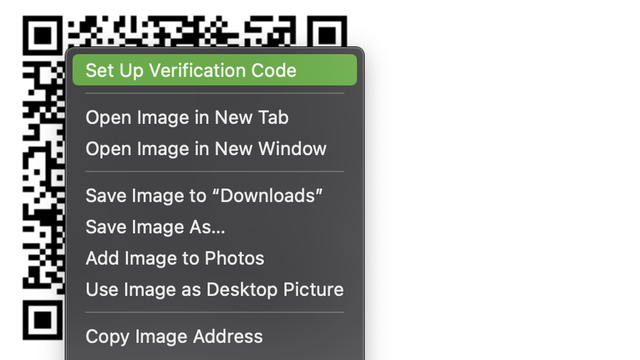
@rmondello I’ve been using this ever since you first mentioned it on the bird site. Saved a lot of time.

It unfortunately does not work, for me, for QR codes drawn using SVG, Canvas or the like. Only img tags work. Is this expected behaviour in the current releases?

@nikhil On macOS, we have much better support for <svg>, <canvas>, and <table>. Are you trying on macOS or iOS?
@rmondello this was on macOS. If I run into this again, I’ll share the reproducible case with you.
@nikhil Please, please, please do! Making this better is a work hobby of mine. :)
@rmondello thanks, appreciate it 🙏🏼
@rmondello Found one case on Github. This is a regular image tag.

@nikhil Oh! Can you help me debug this?

1. Are you zoomed into the page at all? That is, does hitting ⌘0 change the zoom scale? If so, does it work after you reset the zoom scale?

2. Can you try in Safari Technology Preview and let me know if it reproduces there?

@rmondello sure thing

1. 100% zoom, default
2. Yes, works in STP Release 160. Interesting

@nikhil Nice. STP has improvements to the heuristics here that fix your problem! Those improvements will ship in Safari at some point in the next few months.

@rmondello super! Thank you for looking into this.

Also, please give me regards to who ever are responsible for implementing PassKeys.

TOTPs and PassKeys have made my life so much easier on iOS and macOS devices. 💜