
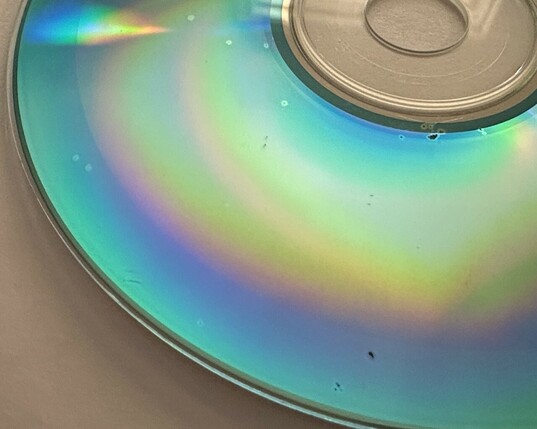
PSA: take some time in 2023 to back up your/your family's CD-Rs (and other recordable media) full of memories you threw into storage 10+ years ago; there's a decent chance they've started to rot!

the tenuously thin layer of dyes/adhesives holding the data *will* break down over time, rapidly so if their environment is uncontrolled, the surface was previously nicked/contaminated, or they were cheap ones to begin with
thanks to error correction, and with the help of free, modern file forensics tools (e.g. PhotoRec/TestDisk) even damaged disks may have recoverable contents. use your OS or a disk imaging tool to save a raw ISO/"master" image ASAP, which you can later mount (or carve) for the files within

cloud storage and USB drives are cheap today (especially in comparison to the size of CDs and JPEGs from the 2000s), and what price would you wish you could pay to get the data back once it's truly lost?

if you don't have a disc drive readily available, they're easy to find with both USB-A and USB-C connectivity. i've had good luck with an Asus ZenDrive U9M (~USD $35) and a Pioneer BDR-XS07UHD (~USD $200). for 99% of discs the $35 one is perfectly adequate

so, don't give up hope if you notice deterioration setting in, but definitely don't put this off either!

(this is a fediverse/mastodon server sync thing i think, but i'm seeing a lot of replies to this thread now that weren't visible/didn't notify me at the time... i doubt anybody cares too much now, but in case i'm wrong about that, i'm sorry for not replying at all)

@0x56 Sound advice. IMHO, if you don't have 3 copies of the data, you don't have it at all.

I also suffered with an unreadable CD-R due to the full surface adhesive paper label stuck on it. It had started to warp the disc. Careful removal of the label with IPA relieved the bending stress and the disc was readable once more.

@M5JFS wow, that's a failure mode i haven't seen, glad it worked out though
@0x56 I got one free on Gumtree. Gumtree is the Australian version of Craigslist with much less kink and freaks.
@0x56 personally I'd recommend against flash based USB drives for long term storage - data stored on unpowered flash media begins to decay after a few years.

If you can get a mechanical USB hard drive that'd be the better option over the long term.
@0x56 I would pay to forget everything that happened 10+ years ago

@0x56 I definitely strongly recommend this, although Aaru (https://github.com/aaru-dps/Aaru) is better for data recovery from discs. It also makes sure you use an appropriate format, iso isnโ€™t always the right one.

Also worth noting: CD-R/RW will rot sooner than DVD-R/RW (and presumably later media like Blu-ray) will, because CDs were made with very little protection between the label layer and the data layer, while DVDs separated the two by a thick layer of plastic. So get the CDs done before the DVDs.

GitHub - aaru-dps/Aaru: Aaru Data Preservation Suite

Aaru Data Preservation Suite. Contribute to aaru-dps/Aaru development by creating an account on GitHub.

GitHub
@0x56 I used Aaru a few months ago to rip about a hundred discs, CD and DVD, that I burned over the years, mostly 10+ years ago. Recovered all but a few that were either poor quality (cheaper no-name brands) or had really bad scratches, even then it can keep trying again as many times as you want, because eventually a bad sector might successfully read. A backup missing a handful of sectors is better than no backup.
@0x56 You might want to have a look at the Aaru open source tool for making those images.
@r2gf thanks, @kirb mentioned this as well... i started looking at redump/DiscImageCreator for inspiration the other day, but Aaru seems to have a much broader vision of support. admittedly i'm still early in researching many aspects of preservation, but discoverability of the tools is definitely a limiting factor in learning more
@0x56 @kirb If you have any questions on Aaru, I'm happy to help.
@0x56 I tried reading an old one and my Darwin kernel crashed :(

@0x56 I accidentally hit refresh after reading a few words - then spent 15 minutes searching/scrolling to find this post

Entirely worth it :)

Thank you for the PSA

@0x56 been there already. Thankfully nothing critical. Everything else moved now.

@0x56 got rid of all optical media many many years ago, when SOHO NAS devices started to become affordable.

No data lost due to multiple copies, but I had more troubles reading newer CDR than the old green/gold ones.

@lrosa i'm getting pretty lucky and so far only one disc hasn't read at all (oddly it looks pristine, so could also be a burning/mastering failure). thankfully most are turning out to be already backed up, but not all; the most painful has been several albums of local/disbanded music groups, a few of which aren't on bandcamp, etc. and i only ever made lossy rips...
@lrosa: I think a lot of newer CD-Rs use the bottom-of-the-barrel technology marketed by CMC Magnetics; there are some brands which use higher-grade dyes, like the Verbatim DataLifePlus discs, but those aren't the ones you'll find in stores.

@raktheundead I used mostly blue dye "Verbatim", but not the category you quoted.

I wrote "Verbatim" with quotes because at that time there were a lot of fake "Verbatim".

Luckily the era of rotating optical media is gone.

@0x56 in the long run paper backup is the best option as tech changes over time and formats die out.
@elizabethveldon it's hard for me to imagine a future where the data is accessible but the knowledge to render a JPEG or play/convert a WAV is lost. your point is valid though, and i'll be getting prints of at least a few photos significant to family that'd hopefully outlast a technological catastrophe along with the people who'd cherish them!
@0x56 perhaps but image formats like ILBM might have seemed permanent at one point.

@0x56 Did this recently. My DVD-R backups held up about 80 percent, DVD+R also 80 percent, DVD-RW only 40 percent.

CD-R 98 percent, CD-RW about 60 percent. The ones from the 1990s held up better than any past 2000. Surprisingly to me, the "Maxell" CD brand was the only one that didn't lose any data.

I'm using SSD hard drives now, but a little wary of how long even they will last. Losing one disk isn't much, but a 2 terabyte hard drive has a lot.

#Backup #Archiving

@cainmark i've also noticed the Maxell and PNY CD-Rs seem to be a bit more robust. my dataset is relatively small and uncontrolled, but i'll try to put together some statistics once i'm through it all

agreed on the SSDs, around 12% of the flash storage devices i imaged a couple years ago don't return consistent data, and they're nearly all newer than the CDs... i'm lucky to afford a mix of HDD RAID, duplicate local storage, and cloud, but that's a lot for most folks and still has gaps tbh

@cainmark @0x56 yeahhh we've heard SSDs lose data over time (...silent bitrot, not just all at once!) if you leave them unplugged for long periods of time. Spinning disks are safer.

I really hope spinning disks don't go "out of fashion" because that's kinda important for long-term archival.

@frostwolf @cainmark @0x56 NAS level HDDs are now my go-to for archival (not SSD, not tape).

Then btrfs (or zfs) filesystem that has checksumming and error-correction, before the hardware-level ones.

With bigger TB drives coming out every year, rotate out the NAS drive(s) before the warranty goes (3 to 5 years).

Of course still mirror and off-site (cloud) backup the NAS.

@0x56 I made lots of efforts to use quality Taiyo-Yuden CDC's, but good reminder to move to a spare SSD / HDD.

I've heard from former WD tech that SD / flash cards (drives?) is bad for archival as they will also decharge / "forget" sooner than you'd expect.

@ShrikeTron ugh yeah, i imaged my box of old portable flash storage devices ~2 years ago, and about 12% of them fail to return consistent data across multiple passes. all less than 15 years old, most 8-10y, and afaik primarily older SLC technology. i'm no expert on flash nor storage, but i can't imagine multi-level cell and process shrink improving any of this...
@ShrikeTron maybe my post should've included more caution or specific advice on this aspect, but the really shitty part is that all the options are a bit like a campfire (you can choose faster or slower burning wood, and sometimes rekindle one from embers, but if you stop tending it for too long all you have left is dust)

@0x56 Right.

I'm moved to a NAS setup of dual-drives, local-backup, and cloud-backup so this backup-dance gets a best-practices process.

@0x56 Flash from back then also wasn't very reliable. I had an 1GB SD card that entirely failed. The maker doesn't exist anymore either -- HMM.

Sticking to established manufacturers may help (SanDisk, Samsung, no failures with these), or just keep moving it around to the next Black-Friday sale item, lol.

I got a cassette (Commodore), many floppies, Zips, etc I think I should archive. Is it still too early? ๐Ÿ˜…

@ShrikeTron fair point, it was only cheaper PNYs that have failed, and afaict even the oldest SanDisks are still okay (for now). i'll have to crack them open and see what actual flash mfgs i'm dealing with

also lol, my Applesauce and half-imaged box of disks heard this and is now staring accusingly at me from the shelf

@ShrikeTron @0x56 Are you talking about SSDโ€™s? If so, yeah they arenโ€™t good for storage long term. HDDโ€™s are better, but those will fail eventually too. You need to move all the data off regularly, format the drive, and then put all the data back on to keep it from going bad.

I have a lot of failing CD-Rโ€™s. Verbatim ones seem to be the worst and were the most expensive ironically. TDK seems to have been the best. Thankfully I havenโ€™t lost anything.

@ShrikeTron @0x56 Just read it. He's right. Basically you should have no less than two copies of your data.

I have a very simple system. I have drives in my PC and then I have external drives in cold storage that are a mirror of the data on the drives in my PC. Every few months I format the drives in storage and copy over all the data from my PC drives to them again.

@0x56 Yikes. We've never seen that on a disc; does that only happen to CD/DVD-Rs and not pressed game discs?
@frostwolf i'm not an expert here, but my understanding is pressed CDs are generally much more reliable, though not impervious to age. they don't rely on photosensitive dyes and have a polymer coating over the metallic data layer that's entirely exposed on CD-Rs. however, the metallic layer can still decay under certain conditions rendering them unreadable
@0x56 @frostwolf I had some pressed audio cds that became unreadable in less than 20 years...
@0x56 already done that. DVDs are even worse with that.

@0x56

Books keep way longer than CD's or DVD's.

The only way to keep them going is
. Controlled storage +
. Regular copying to another 'permanent' medium.

@0x56 I think it's a great moment to celebrate a clean cut with the past and just throw it all away.
@0x56 Make two copies: there is software (based on Linux dd, but doing error recovery) that can create a good copy with high probability from two bad ones.
And if the rot has set in, give it a try on your current single copy: ddrescue (gnu.org)
@Retrieval9096 oh nice, i was having good luck with testdisk/photorec and OS imaging utilities, but ddrescue looks like it could come in handy. thanks, added to my toolbox!

@0x56 For those here looking for suggestions:

When backing things up to a more portable storage source:

* Make two copies and keep the second in a different danger zone: If you know your area floods, send it to your aunt or brother or whoever that lives where it doesn't flood.
* Get the biggest disks you can reasonably afford in pairs. A 5 TB SSD can reasonably hold about 7k CDs. A 10TB disk holds about 14k CDs.
* You can sort later. Archive now.

@0x56 did that 5 years ago from a stack of ~30 cdrs. i have 2 separate duplicate back up drives (one is my weekly backup, one is my monthly) and then 2 other duplicated drives, one photos, one music. of which i update every january at minimum (usually 2 or 3 times throughout the year) that i keep in a fire safe
@ophelea nice setup. inspecting things on a schedule is definitely something i need to practice ("make sure your backups work" is a familiar concept, and i do this for my primary set to guard against failure of soldered, encrypted internal storage and work downtime. but i had allowed the rest of the archival stuff to degrade much farther than i realized...)
@0x56 this is where calendar reminders are your friend. i just set never-ending reminders and I know the jan 1st one means make sure everythings the same and back up to the safe drives. i have been lucky so far and only had one drive that needed to be replaced (it was 10ish). i will probably replace them all over time as storage gets so much better.

@0x56 I agree but feel the need to point out I've had more common, and more expensive, storage failure with hard drives than discs

Just backed up a pile of discs from ten to twenty years ago. Found a lot of stuff I thought I had already lost for good

@0x56 This was something I always had a helluva time convincing people of when I worked in retail. Digital media mfqs have been very succesfull in advertising (re)writeable CDs and DVDs as basically everlasting, when dual-layer DVD+R (admittedly the worst-case) have an avg longevity of barely a decade.

Archival quality optical media is _not_ just some weird scam ๐Ÿ˜…

@0x56 The US government did a thorough evaluation of an alternate optical media, M-DISC, which uses different physical properties than optical dye media, and found that it has much better longevity (many decades). The M-DISC BD-R costs a lot more than cheap BD-R, but can be read and written on standard drives.
@brouhaha yeah, i'm considering a follow up long form post/resource of some sort, because the info floating around is spread out, wildly inconsistent, not particularly actionable, and comprises far more opinions than facts. i'm with you on M-DISC however, and ordered a small pile yesterday
@brouhaha i also have replies going back and forth about HDD vs SDD reliability, and while HDD platters seem probably better at retaining data, nobody seems to be accounting for the longevity of the flash storage necessary for the controller to function, nor the mechanical aspect... this topic is begging for a proper analysis of all these factors, distilled into some practical guidance, and backed by *actual* cited research
@0x56 SSD longevity is poor when the drive is unpowered; typical specs are under 1 year for consumer SSD and even less for enterprise SSD. The SSDs depend on an internal "scrub" process to run in the background to detect cells with contents going marginal and refresh or relocate them. The number of electrons delta per charge level is very small, and gets worse as more bits are stored per cell (TLC, QLC). I would NEVER use SSD for unpowered archival storage.
@0x56 The flash used for HDD firmware is usually NOR flash, which is SLC and should have much better data retention than the NAND flash used in SSDs (even SLC NAND). I'd expect electromechanical faults (including lubrication) in HDDs would usually result in failure before the drive firmware flash loses bits.
If you want a high probability of long-term data survival, you have to use multiple strategies including both online and offline, with periodic copies to new drives/media.
@brouhaha definitely, fwiw i think you're correct on all of this, but it's still a lot to grapple with if you're not already familiar with these factors and the tradeoffs of various options. most people don't know what JEDEC says about flash data retention nor what to look for in manufacturer specs, and mix that with everybody's anecdotes of "well my old X powered up just fine after 10 years" and people have a really inaccurate mental model of what is and isn't safe (myself included i'm sure)
@brouhaha perhaps my ambition exceeds my capacity to help much here, but i need to do some research for my own planning, and i think an output of that could include some actual guard rails around timeframes and processes for different media presented in a more digestible and actionable form for others to make more informed decisions (or follow the citations to make their own path)
@0x56 I'd certainly love to read that.
@brouhaha @0x56 dumb question, butwhen you have consumer devices like desktops, laptops, phones or even a NAS, do these keep the SSDs/HDDs inside them some level of powered when the device is turned off (assuming no power loss/battery not empty)? Or is it just really bad for your laptop's SSD if you don't boot it for half a year?