 burninggpu
 Pwnallthethings
How do you make it so everyone can see who you follow, regardless of the server?
 El Jefe "
 "
" 
@Pwnallthethings i clicked on your icon, it showed me your page, i clicked on followers.
@Pwnallthethings fascinating, at the bottom of that, it says not all of them are showing, click here for more, it takes me to your server's page where I can see the full list.
@Pwnallthethings looking at your page again, it seems like it's an abidged, cached version from my local server, but it then shows a link to the full profile from your main server.
@eljefedsecurit @Pwnallthethings also seems to depend on the settings of one‘s own server; I can‘t see any followers of accounts on different servers than my own without clicking on that person‘s profile on their server. Makes following people from that page a little finicky since I‘m logged out on that tab.
 Shashank Joshi
@eljefedsecurit @Pwnallthethings That doesn’t work for me. On the iOS app, it won’t show me any of his follows.
 🖤rootless cosmopolitan🖤
I believe they have to click through to your profile--its a *really* strange UX choice. @Pwnallthethings
 Brian Swetland
@toofy @Pwnallthethings As I understand it, your follower/following lists are managed by your (home) server and not actively synced (which kind of makes sense, that feels like it could have scalability issues), but as a side-effect in order to view the full, up-to-date lists you have to go visit a person's home server to see.
It does seem like maybe clients could be adjusted to make that process smoother.
like, you're on a different server than me, so i have to click your profile, then click following again, then at the bottom i see "Browse more on the original profile" and i have to click that which opens up a separate tab with your profile again (and im logged out on that tab. but i can finally see who you're following @Pwnallthethings
 Sam
Sam@toofy @Pwnallthethings So many of the weird cross-instance UI things seem like they should be solvable using userscripts in the browser or by apps. Really hoping someone gets on that soon...
(I would myself, but life's busy, ya know?)
(I would myself, but life's busy, ya know?)
 Bálint Szilakszi
@toofy @Pwnallthethings just to spell it out from a technical perspective, federating “who follows whom” is non-trivial and it took multiple years to work out federating threads/posts themselves in the first place.
Eventually this will be done, but yeah…distributed state is hard.
 nobletrout
 Rob Pritchard
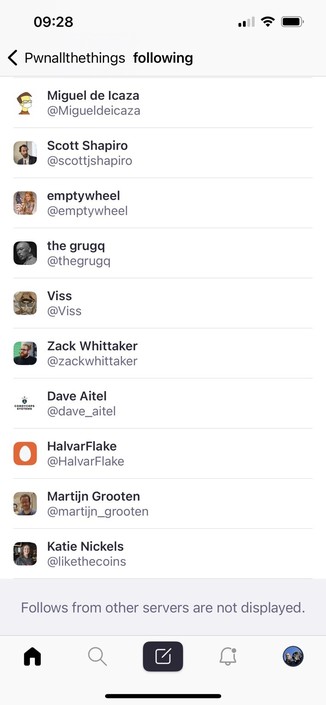
@toofy @Pwnallthethings on the app it just says this at the bottom (see screenshot). But we’re on the same server so I presume I see all your follows/ers
 Long Truong
@Cybersecexp @toofy @Pwnallthethings which client is this, because I don't see this on the offical android client.
 𝕂ℕ𝔽 𝕀𝕆𝕆 ☎️
 Santiago Pardo
 Tony Winton
@toofy @Pwnallthethings totally. The interface needs to figure out the process of following people and make it much more intuitive
Indeed. And to then try and follow some of their followers is a multi-step process, involving cut-n-paste info and multiple tabs. And the process seems different for different instances, as well.
It's certainly a learning curve.
 Today’s Tom Sawyer
@toofy @Pwnallthethings hmm I’m not seeing that on the IOS app, do I need to be on the desk top version?
 Amy B
Amy B@philurboots @toofy @Pwnallthethings I had a conversation with someone on the bird site about this this morning and we figured out that method only works on desktop. I don’t think there’s a workaround for the app.
@SpraklesBooth @toofy @Pwnallthethings
Cheers Amy, I did have a go at requesting the desktop version on the phone which works, but in opening the web browser it logs me out, so I can see all followers but it’s a pain to log in as I use 🍏 hide my email and secure password which the browser doesn’t want to pick up. I’ll find a way, it’s just a bit fiddly 😁
Cheers Amy, I did have a go at requesting the desktop version on the phone which works, but in opening the web browser it logs me out, so I can see all followers but it’s a pain to log in as I use 🍏 hide my email and secure password which the browser doesn’t want to pick up. I’ll find a way, it’s just a bit fiddly 😁
 Kori Maleski 🐘
@Pwnallthethings i don't think you can the way you are thinking. They have to click on the link and to open a new tab to view. So they can already, its just a 2 stage process.
 SuperTran
@Pwnallthethings I’ve been able to see this from my desktop computer and the desktop website quite easily, but the mobile apps have a hard time. Good question, and one of the things I don’t understand here yet.
 Brett Wallace
@Supertran @Pwnallthethings am having this issue too. For those of us who never login to desktops anymore it’s challenging.
@Supertran @Pwnallthethings finding that the Mastoot app bridges the gap quite a bit better than the basic Mastodon app.
 John Crisp
Mastodon app itself seems tricky as you can't see federation.
Tusky & Tooot seem more capable.
@Pwnallthethings you have to go on the page of the server of the account to see all the follows.
 Jae Bloom
@Pwnallthethings One thing that might be a factor is right now so many people are joining that servers are getting hammered.
 Dr. Emma L Briant🐕🇬🇧in🇦🇺
@Pwnallthethings I don’t think you can.
 Stop-the-MAGAss-Reich
@emmalbriant @Pwnallthethings I clicked on the avatar link and took me to your home page where your follow lists are shown.
@Pwnallthethings I feel like we all live in QA again. Which is better than living in production. At least in QA you can force Dev to make changes.
 Rzetelny
@Pwnallthethings Mastodon proves to be quite difficult to use, what are the alternatives?
 LionelB
As far as I can make out, you can't. I haven't even worked out how to see who **I** follow yet 🤔
Oops. And markdown script doesn't appear to work either.
 VogonTechnician
@Pwnallthethings Wait, I thought you could? I can see you're following 147 people and can click through to a list of them which spans multiple instances. Am I missing something?
@VogonTechnician @Pwnallthethings that’s because you are on the same server as him, you can’t see the followers of accounts on different servers
@SeahorseCaptain @Pwnallthethings Ah, I can see that now. Thank you!
 dell cameron
@Pwnallthethings I feel like i had trouble with this the other day, but right now it's letting me see all your followers.
@dell it seems a bit random. No idea why. But glad it works some of the time. It's how I found most of the people I follow here
 Adam A. Marshall
@dell @Pwnallthethings had the same experience.
 Joe Steinbring

 john lehet
@Pwnallthethings
Yeah, only visible it seems from the web interface when you click through. I read somewhere in a Mastodon faq that the apps were rushed out and don't have full functionality. Browser is better.
Yeah, only visible it seems from the web interface when you click through. I read somewhere in a Mastodon faq that the apps were rushed out and don't have full functionality. Browser is better.
 Mx Autumn
@Pwnallthethings as far as I am aware the stats shown to other servers are server centric. If that server has only discovered 10 accounts that follow you it will say you have ten followers because that’s all it knows.
Your true count will always be shown on your servers profile page, but it’s not really a stat that means much to many here.
 Samuel Oakford — WaPo
@Pwnallthethings it seems to vary based on the instance? Both of the account and of the followers? It’s unclear. Same thing with favoriting. Sometimes I can only see followers from my own instance.
Then when you click through to another instance to see otherwise hidden followers you have to manually search/add them back in your instance.
I don’t know how much of this baked into the decentralized way #Mastodon is built? but it’s a bottleneck for use.