As promised, here is my #thread on #Mastodon on popular demand.

I am trying my best to talk on layman language, avoiding too much of technical jargons, so that I can tell you what is this new social media service, how to join, choice of apps, etc.

First thing you should know that #mastodon is a decentralized social media platform.

That is the fundamental difference between of it from #twitter or #facebook.

A decentralized network, which means there is no central group with all of the power.

So here it is #fediverse

#mastodon isn’t just a website, it is a federation.

There are thousands, of small communities that live within the Mastodon system.

Each one is independent and unique, but they can all talk to one another.

These communities are called "INSTANCES".

So you are not creating your account in a centralised server here like in https://twitter.com.

Instead at any domain that runs Mastodon is called an instance and you can join any instance!

Confused?

Think about various email providers.

Gmail, Yahoo, Outlook etc.

X. It’s what’s happening

From breaking news and entertainment to sports and politics, get the full story with all the live commentary.

X (formerly Twitter)

These email providers are analogous to #mastodon instances.

U can create an email address is [email protected] or [email protected].

Here xyz is the username. We know that both email address belong to different persons or same persons.

They can send email to each other.

Here in #fediverse our #mastodon works in the same way, for that it uses a protocol called Activity Hub, so that various instances can speak to each other.

So http://mastodon.social and http://mstdn.social and http://masthead.social are different instances in #mastodon

Mastodon 🐘

Discover & explore Mastodon with no ads and no surveillance. Publish anything you want on Mastodon: links, pictures, text, audio & video. All on a platform that is community-owned and ad-free. Hosted by Stuxhost.

I seen that someone here complain about fake site and claimed that finally created profile in the original site, means http://mastodon.social

Natural confusion.

Unlike Twitter which is having a unique site https://twitter.com,

You can join #mastodon through any INSTANCE

X. It’s what’s happening

From breaking news and entertainment to sports and politics, get the full story with all the live commentary.

X (formerly Twitter)

http://mastodon.social is the flagship site, which is maintained by Eugen, who is the creator of #mastodon which is having around 4 lakh users!

http://pawoo.net instance with 5.8 lakh users is biggest

But my instance http://mstdn.social is having only 3721 users!

Pawoo

The social network of the future: No ads, no corporate surveillance, ethical design, and decentralization! Own your data with Mastodon!

You can find the list of all instances available in #mastodon and its user base from this link
https://instances.social/list/old

If you are confused to choose an instance, this link will help you to choose you

https://instances.social/

Given screenshots to understand how the steps are!

Mastodon instances

So you should understand that many instances choices are in #fediverse of #mastodon.

Whichever instances you join, you can follow people at other instances & see the toots of theirs. Similarly your toots are visible to your followers irrespective of their instances.

This is an area which many of the people, even prominent people, complain about, some says that these instances create confusion!

My QN is are you confused with Gmail and Yahoo mail?

You are too much used to Twitterverse & you expect a single server.

Here it work differently

In Twitter's centralised world, you can be identified by your "username"

Same is the case is with Facebook.

But here your ID is
username@instance_domain.

Exactly like email, ie, [email protected]

Here my ID is [email protected]

My instance name is also needed to identify

So if people are complaining that this is so complicated and confusing in comparison with Twitter, let me ask you one question.

Are you confused with various email addresses with different service providers?

Is it necessary all should have same domain address to communicate?

So please understand when you join in #mastodon, you are joining in a federated network and you choose an INSTANCE of your choice.

Here no centralised server or a monopoly corporation, each instance is a community which is moderated by human admins, not by bots run on AI ;)

In my opinion, understanding what is an INSTANCE is the most important aspect on #mastodon.

'Activity pub' protocol helps each instance to talk with other instances in #mastodon and do these functions shown in the picture, so we get an interface familiar to #twitter

So it is your choice to join which instance, a large instance or a small instance or a special community instance or general instance.

But that choice is not going to curtail your freedom to follow people from other instances or getting followers from other instances.

Now how to join in #mastodon?

First let me teach you when someone sharing their profile, how you can join from that link to #mastodon

Example mine https://mstdn.social/@jamewils

Open and click follow, so you can sign up from there.

James Wilson (@[email protected])

122 Toots, 42 Following, 522 Followers · Civil Engineer/Data Cruncher~ opinionated, not neutral & partisan towards facts;)~ Interests ➡️ Water, Energy, Dam Safety, Public Policy, Finance & Photography

This link opens take you to my instance sign up page. If you want to join my instance http://mstdn.social fill up the form and join there.

Otherwise forget the above steps.

I will guide you how to join other instances in next tweet.

Mastodon 🐘

Discover & explore Mastodon with no ads and no surveillance. Publish anything you want on Mastodon: links, pictures, text, audio & video. All on a platform that is community-owned and ad-free. Hosted by Stuxhost.

The next way is click this link https://joinmastodon.org and choose from any instance (server) of your choice.

Here for example, I decided to join http://mastodon.social site, then click join and then sign up in that instance.

Mastodon - Decentralized social media

Learn more about Mastodon, the radically different, free and open-source decentralized social media platform.

Once you sign up, the instance will send an email to you for confirmation.

Once you confirmed, the login page will be opened, sign in with email and password to the site.

So http://mastodon.social wil welcome you with a tutorial.

In #mastodon you can see 3 timelines

HOME is like our Twitter TL - from the people you are following.

LOCAL- Public posts from the people in your instance

FEDERATED - public posts from other instances

So you are now in #mastodon now! Most of the instances, the admins are automatically followed by you by default.

Here, Eugen's TOOTS and BOOSTS are in my HOME TL.

All this exercise can be done through your mobile browser or desktop browser.

Now to follow someone, if you know their #mastodon ID, please type that in the SEARCH window, you can see their profile, open it and follow

If someone share their #mastodon profile, you can click that link and follow the following steps.

Example

My profile is https://mstdn.social/@jamewils

Click it and open the window

James Wilson (@[email protected])

122 Toots, 42 Following, 522 Followers · Civil Engineer/Data Cruncher~ opinionated, not neutral & partisan towards facts;)~ Interests ➡️ Water, Energy, Dam Safety, Public Policy, Finance & Photography

1. Once you click my profile opens. Click on follow

2. Here on the column provide your #mastodon ID (here [email protected]), then click "Proceed to follow"

3. It's done, now by clicking "Go to Web" you can go to HOME or see "User's Profile

Now please get familiarise with the mobile web interface and desktop web interface in your default browser viz. Chrome, Safari or Firefox.

Look at the mobile web interface.

You can see HOME TL, Mention, Local TL, Federated TL, Search and Options there on the top

You can see each toot has the following icons:

Reply
Boost
Favourite
Share
Bookmark
Other options...

The beauty of Home/Local/Federated Timelines in #mastodon is they will not show you the count of boosts (retweets) and Favourites (likes), which massage your ego ;)

You need to click individual toot (tweet) to see the number of boosts and favourites

Now familiarise with the desktop interface, you will get four columns here as default, you can see a neatly arranged four columns here like tweetdeck. you can click on the tab on the first column to change the last tab between "getting started, local TL and federated TL.
Clicking on getting started giving you to choose from any of these options to have them in the fourth column.

If you are not seeing this four column interface, please click preferences from the "Getting Started" tab and go and enable "advance web interface"

Actually I love this interface a lot...

Now look at the terminology in #mastodon.

I provide the equivalent twitter term in bracket

Toot (Tweet)
Boost (Retweet)
Favourite (Like)

Here your toot can have 500 characters instead of 280 of twitter.

Familiarise how you can toot in #mastodon.

In your toot window if you click third button you will get 4 choices

1. Public - visible in all public TLs
2. Unlisted - not visible in local/federated TLs, but visible in your profile
3. Followers only
4. Direct to user

This is toot window and the buttons allow you to:
Add media
Add poll
Choice of posting
Choice of text
Content warning
&
..... button gives you another two choices like "local only" and "threaded mode"

You can have your tweaks of the #mastodon is possible through click on the option button on top right end and click on "application settings".

So you can play with it to suit your choices

Your preferences can be adjusted by clicking on the "preferences".

Also you can click at "Account Settings" to tweak with various choices available.

#mastodon being a decentralized social network is actually accessible through its web address in the browser.

But there are third party legacy apps availabld in android and iOS. Also web apps and desktop apps available.

All of these require "authorization" through web browser.

In #Android I use #Tusky for its sleek and neat interface.

Apple fans use #Amaroq and #toot

I like also web app, #pinafore which gives you plenty of themes and a cool interface, given a screenshot for your reference. I use that in my mobile rather than desktop.

I am winding up this #thread here.

Hope this #thread is useful to you to understand #mastodon and help you to join there.

Good night 🥰

@jamewils i use musky..Anyone else use this !??
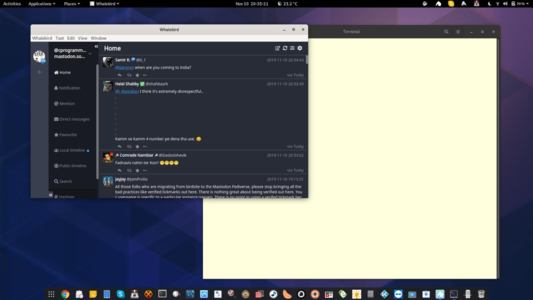
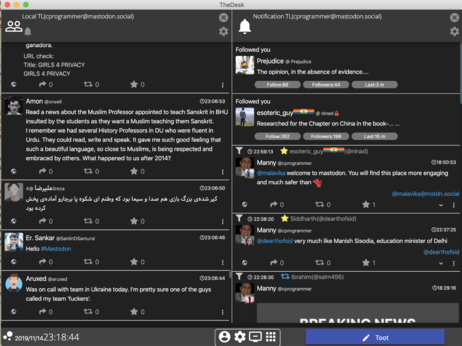
@jamewils On my Fedora linux I use whalebird and on macbook i'm using TheDesk
@jamewils Tusky is awesome. I'm loving Mastodon because of Tusky :). I never use the web interface.
@Shawshank @jamewils
I love #tusky. Would be wonderful if they add translate feature as available in #fedilab . If #mastodon is not planning on adding #bookmark feature (again available in fedilab), this too can be added to tusky.

@purumane @Shawshank bookmark is added by mastodon, you can check in mobile or desktop browser

its #tusky who is damn slow to adapt ;)

@jamewils @purumane haha, you're right. @Gargron announced it. It's Tusky. But I love it :)
@jamewils @stux Is mstdn using glitch or other forks of mastodon ? I am seeing some features in the screenshots which are not available in main stream mastodon version
Threaded mode | Mastodon Glitch Edition

@jamewils @stux These features are not available for mastodon.social users. So these screenshots can make them confused
@tachyons @stux yep, mstdn.social uses glitch
@jamewils @tachyons Yes we do, this is basically mastodon + some extra's so all 'mainstream' features are also available here 😉
@jamewils I think #Tusky is nice app and #FLOSS! Deserves a mention

@prakasc Already done in the later part of the thead.
In next #thread, I will talk more about #tusky

#Tusky can add more features and there is enough scope for improvement. As more users embrace it, I hope they will do more for us

@jamewils

Tootle have severa bug :-( and the project not seems very active.

On Android my choice Fedilab .

@jamewils You are on vacation or what?
@vidyut sort of...I am on the verge of quitting my assignment with govt :p