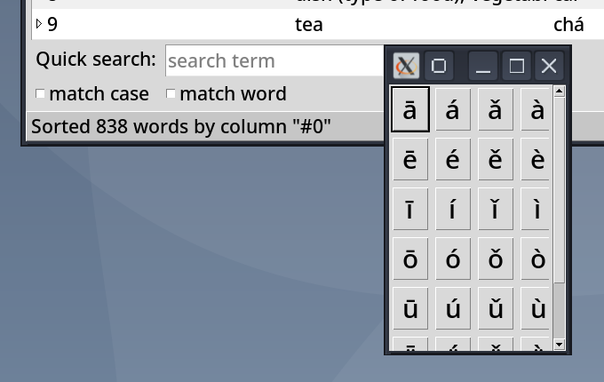
The newest improvement in my language learning tool #xiaolongdictionary is, that one can now comfortably enter special characters, that one might not have as keys on standard keyboard layouts. Since I use it to learn #mandarin / #chinese and I use US keyboard layout, those special characters are the pīnyīn vowels with diacritics.

This looks as shown in [1].

Currently, the shortcut is `ctrl+i`, "i" for "insert". The special chars can be configured in the config file.

#python #tkinter #coding

Just created a new release of my language learning tool #xiaolongdictionary [1] packing a massive improvement of usability for non-technical users. The change list can be found in the release notes as well. Most of the improvements are about exposing functionality for creating and editing words via the UI. Actions that previously only could be done by editing text files.

#computerprogramming #code #codeberg #coding #python #tkinter #language #learn #freesoftware

[1]: https://codeberg.org/ZelphirKaltstahl/xiaolong-dictionary/releases/tag/v0.6.0

v0.6.0 - ZelphirKaltstahl/xiaolong-dictionary

# Changes This release packs a lot of new features, that make it easier for non-technical users to use Xiaolong Dictionary to create and manage their vocabulary. Previously, some of the now available features were only possible to perform manually, by editing the vocabulary file. Furthermore, ...

Codeberg.org

I released 2 new versions[1] (v0.5.0 and v0.5.1) of my #xiaolongdictionary language/vocabulary learning software today, with new features and improvements.

One new feature is, that one can now plot progress and daily training of words for any search result, as well as result of saved search.

Another is the main window status bar.

An accessibility improvement is behavior of tabbing through widgets in the main window.

[1]: https://codeberg.org/ZelphirKaltstahl/xiaolong-dictionary/releases

#python #tkinter #tk #programming #release

xiaolong-dictionary

Xiaolong Dictionary — A GUI application to help you learn vocabulary of (probably) any language. It is written in Python using tkinter, and runs on GNU/Linux, Windows, and probably also MacOS.

Codeberg.org

I added a new data visualization to my language learning tool. As one can see, I am a bit below my goal for words trained per day.[1]

Also I reworked the tag list widget, so that one can (un)select tags and undo that, before confirming changes when bulk editing tags.[2] The tags are now so called check buttons (checkboxes in browser UI speak). I am using their inherent state of being (un)selected.

I'll probably make a new release soon.

#programming #python #tkinter #gui #xiaolongdictionary

Found a silly bug in my language learning tool, that I introduced in a previous change and release. The bug caused the global search to act like a refining search. Now fixed in release v0.4.2 [1].

[1]: https://codeberg.org/ZelphirKaltstahl/xiaolong-dictionary/releases/tag/v0.4.2

#python #tkinter #xiaolongdictionary #release #programming

v0.4.2 - ZelphirKaltstahl/xiaolong-dictionary

# Changes * bugfix: Properly update vocabulary of treeview, avoiding limiting it to currently displayed words, which changed search behavior of global search to act like refining search. # GNU/Linux * GNU/Linux users can also use the instructions given in the readme file to run from sour...

Codeberg.org

I built a new release of my language learning tool #xiaolongdictionary [1].

New in this release: Saved searches. Perform any complex search and save it, to re-run the same search later. If the vocabulary changes in the meantime, the search result also potentially changes.

(For saving resulting vocabulary, I plan to add a "save search result" functionality later.)

[1]: https://codeberg.org/ZelphirKaltstahl/xiaolong-dictionary/releases/tag/v0.4

#programming #python #tkinter #language

v0.4 - ZelphirKaltstahl/xiaolong-dictionary

# Changes * I added functionality for saving searches, making them easily accessible via the "Search" menu, in the current and future session. Especially helpful is the "tear off" function of the "saved searches" menu cascade. # GNU/Linux * GNU/Linux users can also use the instructions g...

Codeberg.org

I improved the reflow further, by debouncing unnecessary configure events and only reflowing at most every `x` milliseconds, where `x` can be passed to the constructor. Currently for the tag list widget, the reflowing is set to happen with a debounce of 50ms.

#python #tkinter #gui #xiaolongdictionary #canvas #programming #coding