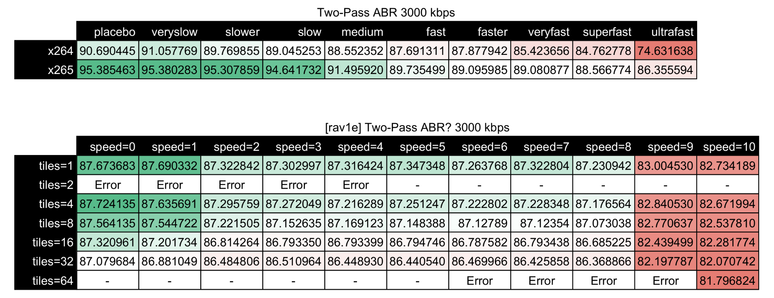
Okay, so we''ve avoided the Custom Keyboard rabbithole, unfortunately only because I'm already neck deep into a far more annoying one;
Compression video quality, and video quality testing.
So I have a couple video files, and I'd like to get them down to far more sane sizes while not losing lots of quality. Sounds reasonable?
However; If you've ever used #ffmpeg, #handbrake, #vmaf, etc. you know that there are only ~1,827,199 different CLI options that can be paired together with different results.
Thankfully; Tools like #Netflix's #VMAF help, however (on my system) they only process at ~110fps. That sounds like a lot until you realize a 45minute show might have 65,000+ frames. That's a slog for anything lengthy.
But hey! I found out that both ffmpeg and vmaf have #CUDA support and can hit 1400fps on 4k video; Fuck yeah! LET'S GO!
oh, but wait. They're non-free libraries from #Nvidia, so distributed builds of vmaf/ffmpeg can't have them enabled. The end user has to compile them.
To boot; Some of them won't compile if they can't find a compatible en/decoder. So they have to touch the gpu. Which isn't available in virtualbox.
SO much headache, but the delta between a 10 minute slog at 110fps to sub-1 minute, for seasons of video means it's worth it, I GUESSSssss
 Bardnet
 James M. Woodward
 Gianni Rosato
 nukosu