Fixing bridged network issues on VMware Workstation 26H1 on network reset
Sometimes when a network adapter resets for any reason, such as the driver update process, there is a chance that VMware might utilize the wrong network adapter for bridged networks, causing the virtual machines to be unable to join your computer’s network. This happens if you let VMware select the “best” network adapter with “Automatic” as the network interface card (NIC), which allows it to choose the appropriate adapter based on heuristics.
However, it’s not always accurate, as it causes virtual machines to lose their internet connectivity if you have more than one network adapter and only one of them is used to provide you with the internet connection. Sometimes, VMware Workstation might choose a wrong network adapter automatically upon network adapter resets, which causes this issue. This happened in our case during our experiment with WordPress 0.7-gold on a VMware virtual machine running Red Hat Linux 9 Shrike with a bridged network type.
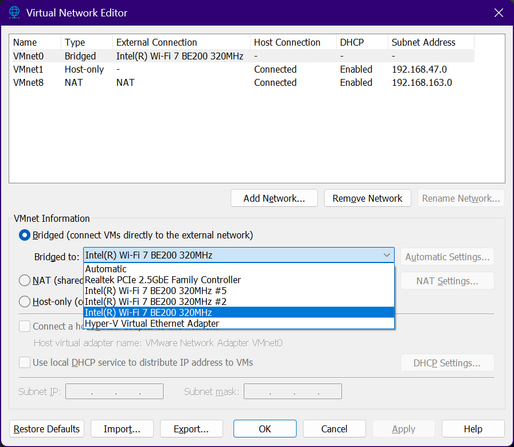
If you have a system that uses multiple network adapters, such as Hyper-V virtual Ethernet adapters, you might want to let VMware select the correct network adapter. To do this, open the Virtual Network Editor.
After opening the Virtual Network Editor, run it again with administrator privileges. Afterwards, select the virtual network that is of the Bridged type, and look for the Bridged to drop down box. After that, select the correct adapter. In our case, we have 5 network adapters, with only one providing us connection to the internet, called Intel(R) Wi-Fi 7 BE200 320MHz.
After that, save the changes. Then, try restarting the networking service on your virtual machines. If it didn’t work, shut them down completely, then turn them back on. They should be able to maintain an Internet connection. In our case, the problem was solved.
However, if you’re still running into issues with bridged mode, you might want to check to see if your network adapter is working properly. Also, make sure that your internet connectivity is stable, and that the guest’s networking configuration is correct.
#BridgedNetwork #Network #Networking #news #Tech #Technology #update #VMware #VMwareWorkstation #VMwareWorkstation26H1 Andrew Armstrong
 Hugo | DevOps | Cybersecurity
 Peter Czanik
 Daniel Keer
 Linux Solutions
 Paolo Valsecchi
 Aptivi
 Aptivi