I need help with my yt-dlp/mpv redirection userscript. (I am a JS beginner)

The userscript should take the current URL (location.href), replace https:// with ytdl://, and close the tab. I made it load only on URLs matching specific regex, such as https://www.youtube.com/watch?v=fBXY_AyA0bo.

My problem is that ytdl:// URIs are instantly handed off to mpv, and do not show up in the URL bar. I need a way to detect that handoff, and this prevents me from simply running :
```
if (/^ytdl/.test(window.location.href))
window.close;
```

Closing regardless of handoff success creates a bug : It closes the tab when the browser pops a dialog asking "allow this site open this link in mpv?", not giving the user time to click or read anything.

Currently, I am forced to comment out the window.close line for every new site I want to "always allow", then re-enable it.

Is there an event signal, or visibility change, anything my userscript can detect? Either detect the successful handoff, or detect the browser 'allow this site" dialog. The former would be "yes you can close.window" and the latter "no you can't close.window". Either would work for me.

edit : detecting a first-time execution on specific sites would work too, just need to automate disabling window.close on these specific cases.

#Javascript #Userscript #DuckDuckFedi #WebDev #TechSupport #AskFedi

ISOTOPE WARS - PART 0

YouTube

Tired of #reddit autotranslate feature?
I've fixed this with this #userscript

https://code.pipoprods.org/web-ext/userscripts/src/branch/main/scripts/reddit.translation.disable.user.js

You can install it with #greasemonkey or other equivalent tool.

userscripts/scripts/reddit.translation.disable.user.js at main

userscripts

Dépôt de code Pipo Prods.

#userscript #Tampermonkey #виброкодинг #addons #типографика #ТакЛучше

Вот, кстати, по поводу вот этого скриншота: у меня стоял какой-то аддон для включения переносов, который делал «This extension consists of CSS hyphens code converted into javascript so pages are injected with hyphens». — И это не очень правильно, потому что попячивал и заголовки тоже. #ChatGPT предложил замену:

// ==UserScript==
// @name Smart Hyphenation by ChatGPT
// @namespace local
// @version 1.0
// @description Adds sane hyphenation to text content
// @match *://*/*
// @grant none
// @run-at document-start
// ==/UserScript==

(function () {
'use strict';

const style = document.createElement('style');

style.textContent = `
/* Основной текст */
p,
li,
blockquote,
article,
section,
div {
hyphens: auto !important;
-webkit-hyphens: auto !important;
overflow-wrap: break-word;
}

/* Не ломаем заголовки */
h1, h2, h3, h4, h5, h6 {
hyphens: manual !important;
-webkit-hyphens: manual !important;
}

/* Не трогаем интерфейс */
button,
input,
textarea,
select,
nav,
menu,
.menu,
.button,
.btn {
hyphens: manual !important;
-webkit-hyphens: manual !important;
}

/* Код и pre никогда не переносим */
code,
pre,
kbd,
samp {
hyphens: none !important;
-webkit-hyphens: none !important;
overflow-wrap: normal !important;
word-break: normal !important;
}

/* Таблицы часто ломаются */
table,
th,
td {
hyphens: manual !important;
-webkit-hyphens: manual !important;
}
`;

document.documentElement.appendChild(style);
})();

Пользовайтесь 😉

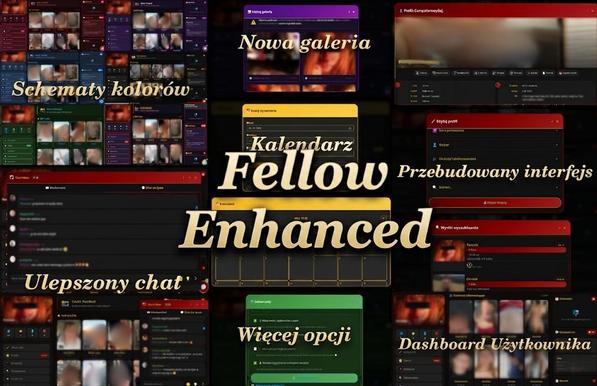
🚀 Level up your experience with Fellow Enhanced!

Complete UI overhaul for a faster, sleeker, and modern look:
💎 Liquid Dark Mode
📊 Interactive User Dashboard
💬 Revamped Chat Architecture
⚙️ Multiskin (Romeo, Tinder, Scruff styles)
🔐 Local-first Privacy

https://www.patreon.com/posts/157119585

#OpenSource #Tampermonkey #UserScript #WebDesign #UXUI #DarkMode #Frontend #Javascript #Coding #IndieDev #WebDev #Tech

#Mastodon #MastodonTools #виброкодинг #userscript

Потому что «надоело это терпеть» — дополнил скрипт скрытия прочитанных постов функцией, которая скрывает и бусты тех постов, которые я уже видел.

Хорошо теперь. Чистенько в ленте.

🙂

X to Nitter Redirect

In the last few months, I’ve intermittently seen colleagues at work mention in Slack that they can’t view tweets because they don’t have a X (née Twitter) account. I also learned that XCancel and Nitter exists, which gave me the idea to make a Tampermonkey script to make viewing tweets within XCancel automatic (instead of copying the tweet URL, then manually changing the domain…like an animal). 😆 Here’s the description from the GitHub repo: [X to Nitter Redirect is a] […]

https://allnarfedup.blog/2026/04/24/x-to-nitter-redirect/

X to Nitter Redirect

In the last few months, I’ve intermittently seen colleagues at work mention in Slack that they can’t view tweets because they don’t have a X (née Twitter) account. I also learned that XCancel and N…

All Narfed Up

EvaTeam Workflow Enhancer — userscript для нормального отображения процессов

Сталкивались уже с EvaTeam (российский аналог Jira)? Чувствуете боль при работе с бизнес-процессами (workflow)? Думаю я могу вам немного помочь

https://habr.com/ru/articles/1015656/

#userscript #userscripts #tampermonkey #greasemonkey #eva #evateam #workflow #svelte #sveltejs #sveltekit

EvaTeam Workflow Enhancer — userscript для улучшения отображения процессов

Привет, хабровчане! В прошлой статье я рассказывал про интеграцию Alertmanager с Jira и упоминал, что мы переходим на EvaTeam - российский аналог Jira. Переход состоялся, и — спойлер — продукт...

Хабр

#виброкодинг #YouTube #Yandex #userscript #Tampermonkey

Автоматизируем 300.ya.ru

Ну что ж, пришлось попинать #ChatGPT изрядно, зато теперь имеем рабочую версию юзерскрипта. Положу сюда:

https://github.com/Johan-foreva/300.ya.ru-Auto-Paste/blob/main/300-ya-ru-Auto-Paste.js

Скрипт делает простую вещь: если ссылка содержит фрагмент («якорь», «хеш»), т.е. https://300.ya.ru/#SOME_URL — скрипт возьмет его, вставит в окошко ввода, как только оно подгрузится, и сам нажмет кнопку. Почему через жопу? Потому что безопасность браузера не позволяет читать буфер обмена без лишних телодвижений, а так — работает вполне прозрачно.

Как пользоваться:

  • Если у вас уже открыт ролик, можете прямо в адресной строке написать перед ним 300.ya.ru/#

  • Или сделать #букмарклет:

  • javascript:(()=>{window.open('https://300.ya.ru/#'+encodeURIComponent(location.href),'_blank')})();

    Тогда в новом окне откроется.

  • Или другой, который возьмет текст, выделенный на странице:
  • javascript:(()=>const t=window.getSelection().toString().trim();const d=t)();

  • Ну и самый длинный вариант — тыкнуть ПКМ по ссылке, «Копировать ссылку», потом два раза на букмарклет (потому что появится кнопка-подтверждение, для вашей, блин, безопасности).
  • javascript:(async()=>{try{const text=await navigator.clipboard.readText();if(!text||!text.trim()){alert('%D0%91%D1%83%D1%84%D0%B5%D1%80 %D0%BF%D1%83%D1%81%D1%82');return;}const w=window.open('about:blank','_blank');if(!w){alert('Popup %D0%B7%D0%B0%D0%B1%D0%BB%D0%BE%D0%BA%D0%B8%D1%80%D0%BE%D0%B2%D0%B0%D0%BD');return;}w.location.href='https://300.ya.ru/#'+encodeURIComponent(text);}catch(e){alert('%D0%9D%D0%B5%D1%82%20%D0%B4%D0%BE%D1%81%D1%82%D1%83%D0%BF%D0%B0%20%D0%BA%20%D0%B1%D1%83%D1%84%D0%B5%D1%80%D1%83');}})();
    300.ya.ru-Auto-Paste/300-ya-ru-Auto-Paste.js at main · Johan-foreva/300.ya.ru-Auto-Paste

    Auto-pastes text from location.hash into textarea on 300.ya.ru with anti-reset logic (handles Svelte re-renders) and submits when the button becomes enabled - Johan-foreva/300.ya.ru-Auto-Paste

    GitHub

    #Firefox #Yandex #виброкодинг #ChatGPT #Tampermonkey

    Навиброкодил связочку из #bookmarklet'а и #userscript'а, при помощи которых можно отправлять #YouTube-ролики прямо в https://300.ya.ru

    Конечно, не совсем прямо, в сумме получается 4 клика (2, чтобы скопировать, 2 чтобы вставить). Но зато только мышкой.

    1) Букмарклет

    javascript:(async()=>{try{const text=await navigator.clipboard.readText();if(!text||!text.trim()){alert('Буфер пуст');return;}const w=window.open('about:blank','_blank');if(!w){alert('Popup заблокирован');return;}w.location.href='https://300.ya.ru/#'+encodeURIComponent(text);}catch(e){alert('Нет доступа к буферу');}})();

    2) Юзерскрипт

    // ==UserScript==
    // @name 300.ya.ru Auto Paste via Hash (Stable)
    // @namespace http://tampermonkey.net/
    // @version 3.1
    // @match https://300.ya.ru/*
    // @run-at document-start
    // ==/UserScript==

    (function() {
    'use strict';

    const data = decodeURIComponent(location.hash.slice(1) || '');
    if (!data) return;

    let inserted = false;
    let submitted = false;

    function fireEvents(el) {
    el.dispatchEvent(new Event('input', { bubbles: true }));
    el.dispatchEvent(new Event('change', { bubbles: true }));
    }

    function insertOnce(el) {
    if (inserted) return;
    inserted = true;

    el.focus();

    const ok = document.execCommand('insertText', false, data);

    if (!ok) {
    const setter = Object.getOwnPropertyDescriptor(
    HTMLTextAreaElement.prototype,
    'value'
    )?.set;

    if (setter) setter.call(el, data);
    else el.value = data;
    }

    fireEvents(el);
    }

    function tryRun() {
    const textarea = document.querySelector('textarea');
    if (!textarea || textarea.offsetParent === null) return;

    insertOnce(textarea);

    const btn = document.querySelector('button[type="submit"], .submit');

    if (!submitted && btn && !btn.disabled) {
    submitted = true;
    observer.disconnect();
    clearInterval(interval);
    btn.click();
    }
    }

    const observer = new MutationObserver(tryRun);

    observer.observe(document.documentElement, {
    childList: true,
    subtree: true
    });

    const interval = setInterval(tryRun, 300);

    })();

    Копируем ссылку на YouTube-ролик, жмякаем букмарклет (2 клика, т.к. появится кнопка «Вставить» в целях безопасности). Откроется страничка Яши, и дальше уже всё само.

    Нейросеть YandexGPT кратко перескажет видео на YouTube, статьи и тексты

    Краткий пересказ от нейросети YandexGPT

    userjs/mastodon/mastodon-threaded-replies.user.js at main · afontenot/userjs

    collection of userjs files for various sites . Contribute to afontenot/userjs development by creating an account on GitHub.

    GitHub