Hello Mastodon community,

I need your collective wisdom/knowledge. I’m looking for #software that allows me to open and view #pdf files on a #Linux distribution and #encrypt them with a password. I’d like to be able to not only define who is allowed to view the file at all, but also to protect specific permissions with the password (print permission, copy permission).
With #qpdf, I can configure this very easily via the terminal.
However, I need a piece of software – preferably open source – that offers this with a graphical user interface. Do you know of any such software?

What do you use to encrypt pdf files?

Many thanks in advance.

#opensource #oss #ubuntu #fedora #encryption #gui #Linux #pdf #qpdf

“Secure #redaction by design and through extensive #testing

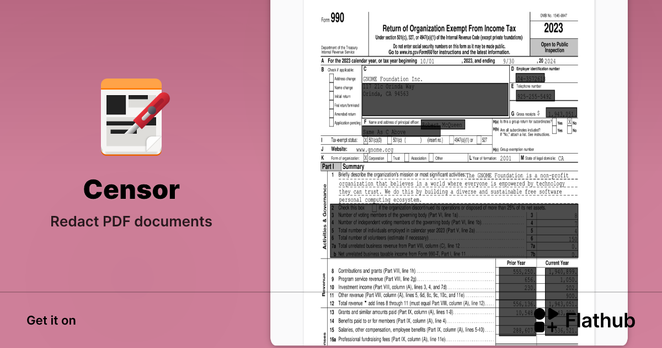
#Censor 0.6.0 comes with many more #security improvements, motivated by extensive testing on more then 1,000 #PDF document samples. You may now redact securely also links, form fields and widgets. In rare cases, when partial image redaction fails, the more secure full image removal is used instead.

But even more important, Censor now warns you, when unsuccessful redaction is detected during postprocessing. This reduces the impact of known issues of unsecure redaction.

Polish is the 11th language you may speak with Censor. Thanks to its translators (among them, @mondstern)!

Thanks a lot also to #pypdf, #qpdf, #pikepdf, #Ghostscript, #MuPDF, #PyMuPDF, and #poppler contributors for the great resource of PDF document samples!

Find it at @flathub: https://flathub.org/apps/page.codeberg.censor.Censor and @Codeberg: https://codeberg.org/censor/Censor

#Censorship #Codeberg #Flathub #GNOME #Linux #Python

Install Censor on Linux | Flathub

Redact PDF documents

That said and celebrated ;), there are things that #Censor is not yet well redacting.

The upstream library #MuPDF (with its #Python bindings in #PyMuPDF) supports by default only redaction of text, vector graphics and images. Testing on a variety of PDF files (thanks to #pypdf, #qpdf, #ghostscript, and their issue reporters, as well as @pdfarranger for their hint) let me discover that some vector graphics are not properly redacted and an upstream issue has been reported for that.

Also, form fields (widgets), signatures and links may be incompletely redacted.

You can find an updated list of “What is redacted? What not?” here: https://codeberg.org/censor/Censor/issues/120

#pdf #redaction #security

meta: What is redacted? What not?

> **Warning** > The following description is **not** valid for Censor until version 0.4.0. I recommend to update to [version 0.5.0](https://codeberg.org/censor/Censor/releases/tag/v0.5.0) for secure redaction. ## Elements under redaction rectangles - [x] Text: - characters are removed when ...

Codeberg.org

Nice one liner to split a PDF into individual pages:
```bash
qpdf --split-pages in.pdf out-%d.pdf
```

Finding such a feature in Windows (without paying) is almost impossible these days.

#linux #qpdf #oss

#qpdf 12.3.1 has been released with a fix, #pdfarranger should be working fine with any qpdf except 12.3.0 (as long as it isn't too old 😉 )

Credits to "m-holger" on Github, I'm merely bringing the good news 😊

#qpdf 12.3.0 was released a week ago and it looks like there is an incompatibility or bug which renders PDF Arranger useless (you can't save your results).

Workaround: Downgrade (or don't upgrade) your qpdf. The flatpak should also work fine if that is an option for you.

qpdf is a great library and well maintained by the way, I'm sure we'll have this resolved very soon.

#pdfarranger

🩺 Fixed broken #PDF s in seconds? Yes, you can!
Check out pdf-healer:
https://github.com/kevinveenbirkenbach/pdf-healer

I built this tool after running into mysterious "#Ascii85 decode errors" in bank statements and official PDFs – especially when using Python tools like pdfminer, pdfplumber, or #moneymonitor.
With pdf-healer you can detect and batch-fix these corrupted files with a single command. Perfect for anyone who archives, processes, or automates PDFs!

#opensource #python #pdfplumber #pdfminer #qpdf 🛠️📄

GitHub - kevinveenbirkenbach/pdf-healer: A command-line tool for batch-repairing PDF files with Ascii85 decode errors using qpdf. Scans folders or single files, supports preview, overwrite, and copy modes.

A command-line tool for batch-repairing PDF files with Ascii85 decode errors using qpdf. Scans folders or single files, supports preview, overwrite, and copy modes. - kevinveenbirkenbach/pdf-healer

GitHub
#qpdf の "--overlay" オプションって、1回のコマンド実行につき1個しか指定できないのか #PDF
#qpdf の "--overlay" オプションによって、やりたいことその2はガワの作成だけで話が済みそうになった #PDF
Aliás, o programa qpdf, principal dependência do "qPDF Decode", pode fazer várias operações de transformação de #PDF, então, por si só, também é altamente recomendável para quem desejar lidar com isso em linha de comando. É multiplataforma.

#TerSoftware #SoftwareLivre #qpdf
QPDF: A Content-Preserving PDF Transformation System