Nitrocid 0.1.0.x and 0.2.0.x for ARM64 is now available on WinGet!

Last month, we have announced the availability of Nitrocid 0.1.0.x and 0.2.0.x for the traditional AMD64 Windows systems with WinGet as the installation method. This made the installation of Nitrocid easier and smoother without having to install a separate package manager or to manually go to our GitHub.

Now, we are very excited to announce that we have made a significant progress regarding the packaging of Nitrocid 0.1.0.x and 0.2.0.x for ARM64 systems. Starting from today, you can now install Nitrocid 0.1.0.x and 0.2.0.x on ARM64 systems with WinGet!

Snapdragon X and other Windows systems that use ARM64 as the processor architecture can now experience the same smooth installation flow, which simplifies the installation experience, given that we understand that WinGet is shipped with Windows 11 these days.

You can install Nitrocid 0.2.0.x and 0.1.0.x using WinGet on ARM64 systems using the following commands:

  • Nitrocid 0.2.0.xwinget install Aptivi.Nitrocid.0.2.0.x
  • Nitrocid 0.1.0.xwinget install Aptivi.Nitrocid.0.1.0.x

The documentation will be updated shortly to reflect the status of Nitrocid’s WinGet packages as a new installation method.

Please note that the updated packages may not be always available, and updates can take from a minimum of few hours to a maximum of few days to propagate, depending on the version being distributed.

#KernelSimulator #news #nitrocid #Nitrocid010 #Nitrocid020 #NitrocidKernel #NitrocidKernelSimulator #NitrocidKS #NitrocidKS020 #NitrocidKS #Tech #Technology #update #winget

Nitrocid 0.2.0.x and 0.1.0.x now available on WinGet!

As part of our efforts to make Nitrocid more accessible and easier to use, we have incorporated more packaging options last year with the addition of Nitrocid’s Windows Installer and Arch Linux PKGBUILD files for each release. This has increased the number of ways to install Nitrocid more easily.

Thanks to our efforts spent to create a Windows Installer for Nitrocid, we have introduced a new way to install Nitrocid seamlessly for Windows 11 users. Starting from Nitrocid 0.2.0.2 and 0.1.0.69, you can now install it using WinGet!

WinGet is a package manager that lets you install programs with packages as the medium seamlessly with the command line interface. It eliminates the need to perform a web search to download a piece of software, which saves time and effort. Currently, it’s bundled with Windows 11 as the default package manager, and is a strong alternative to other package managers, such as Chocolatey.

Since Nitrocid 0.0.6.13, we have introduced an option for users to install Nitrocid using the Chocolatey package manager. This was done when there was no Nitrocid installer for Windows users back then. Now, Nitrocid joins WinGet as another method to install it to your Windows 11 computer!

Nitrocid 0.2.0.x and 0.1.0.x will be updated sequentially across all package mangers, including WinGet, to make the latest version available to download.

As of today, you can install Nitrocid 0.2.0.x and 0.1.0.x using WinGet using the following commands:

  • Nitrocid 0.2.0.x: winget install Aptivi.Nitrocid.0.2.0.x
  • Nitrocid 0.1.0.x: winget install Aptivi.Nitrocid.0.1.0.x

The documentation will be updated shortly to reflect the status of Nitrocid’s WinGet packages as a new installation method.

#microsoft #news #nitrocid #Nitrocid010 #Nitrocid020 #Tech #Technology #update #Windows #winget

Nitrocid 0.2.0 hard code freeze has started!

The development of 0.2.0 has been concluded as of 5:00 PM GMT today, which means that there will no longer be feature additions and bug fixes made to this version.

We are very excited to announce that, today, the hard code freeze has started for Nitrocid 0.2.0! This is the moment we all have been waiting for, and Nitrocid 0.2.0 will be the biggest release after the huge 0.1.0 version!

All future bug fixes and improvements will be done in the first patch release of Nitrocid 0.2.0, which will be released after the primary version that will be released on February 12th, exactly one week later! Meanwhile, new features will make it to the first service pack of Nitrocid 0.2.0 that will be released this May.

Nitrocid 0.2.0 brings a whole new experience, complete with a huge array of features and improvements done across multiple places both inside and outside Nitrocid, such as Terminaux 8.1! Not only that, but the documentation will also be given a new ink of paint!

We’ll do the final round of testing to ensure that no regressions happen, and any bug found will be fixed in the next patch release.

Are you ready for Nitrocid 0.2.0?

#news #nitrocid #Nitrocid020 #Tech #Technology #update

Nitrocid 0.2.0 has entered the final touches stage!

Nitrocid 0.2.0, which is an anticipated release of the next major version of Nitrocid after v0.1.0 version series that provides a plethora of improvements and new features, has finally entered the “Final Touches” stage! We are very close to the final release of Nitrocid 0.2.0 and Terminaux 8.1, while the latter comes after to tomorrow! We are very excited to have moved forward to this level, because without Terminaux, none of this would have been possible.

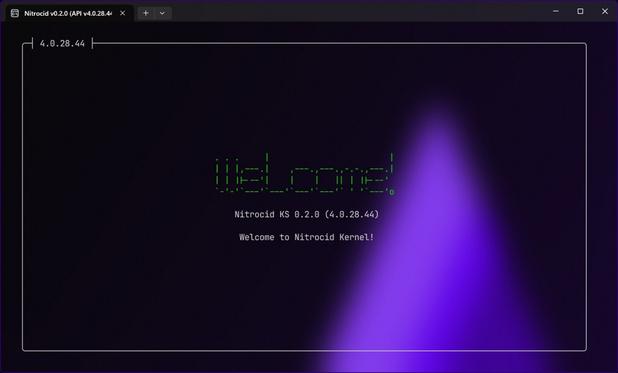
Nitrocid 0.2.0 has one goal: to make the user interface more useful and more modern with the help of the new features that Terminaux 7.0, 8.0, and 8.1 provided. The development of 0.1.3 had introduced a shift that led to the release of the technical preview of 0.2.0, which provided the “core” of the release. Since then, the release candidate focused on adding new features while providing existing improvements, and the final release finishes the mission of being feature-complete. The release candidate now looks like this:

We believe in transparency, so we’ve provided the live release plan project that is available on GitHub as per this link.

The final touches stage starts today, and we’re working on fixing as many bugs as possible to ensure that we release 0.2.0 in the cleanest way possible!

We are still firm on the release date, and it’s February 12th, assuming that things go smoothly when the final updates and bug fixes are done to the final release. In the past announcements of Nitrocid 0.2.0, we announced the date several times, and it felt far. Now, it’s getting closer and closer as we’re maintaining the final touches to Nitrocid 0.2.0 and finalizing its changelogs, which is expected to be done by the end of January.

We will not move the date forward to ensure that many last-minute bugs are fixed, especially due to the breaking nature that Terminaux 8.1 provides over Terminaux 8.0.

#Net #C #csharp #dotnet #KernelSimulator #KS #NKS #news #nitrocid #Nitrocid020 #NitrocidKS #Tech #Technology #update

Get Ready for Nitrocid 0.2.0!

We have been working on Nitrocid 0.2.0 since early February of the last year, when we were planning to release it as 0.1.3, which was another patch release on top of the 0.1.0 series. Changes made to the kernel and to the build system led to changing the plan for the release to 0.2.0, which will be released on February 12th.

Right now, we are at the last few stages for this version of Nitrocid, which means that we are now preparing for the final release to make sure that any last-minute bug are caught. This has now become a priority to make a gateway towards the stable final release, which will be worked on.

Here are some of the features that will make it to the final release of Nitrocid 0.2.0:

Terminaux 8.1

In the tech preview release of Nitrocid 0.2.0, we were fixated on making sure that the latest version of Terminaux was used. Our plan went fine, so we went ahead to create Terminaux 8.0 for the release candidate and Terminaux 8.1 for the final release. While Terminaux 8.1 still didn’t get released, we are just a few days away from releasing it, making sure that Nitrocid 0.2.0 gets released with this version of Terminaux.

This incorporates major improvements that happened between Terminaux 6.1 and 8.1, from performance enhancements and rendering improvements to API cleanups and input system refinements. All of this were important for Nitrocid 0.2.0, and this version wouldn’t have happened without Terminaux 7.0, 8.0, and 8.1.

Widget Canvas

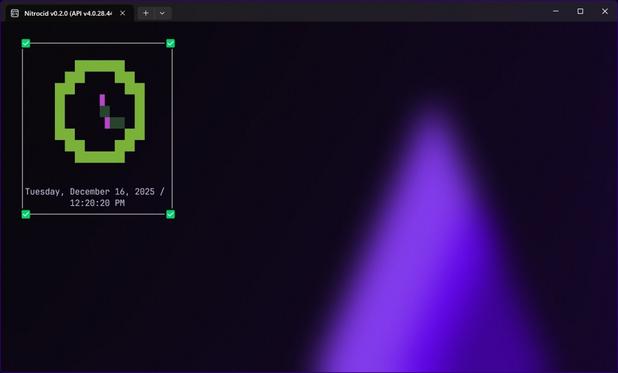
Widget canvas is now available in both your login screen and your home screen, which lets you make infinite number of pages of widgets to get more information effortlessly. Signing in to your Nitrocid account is not required to obtain this amount of information, so you can take a look at more than just date and time.

Widgets have also been improved with support for a variety of widgets, including RSS feeds, date, time, decorative widgets like text, and custom widgets that your mods use. This takes customization, along with a redesigned The Nitrocid Homepage, to a whole new level.

Two-factor authentication

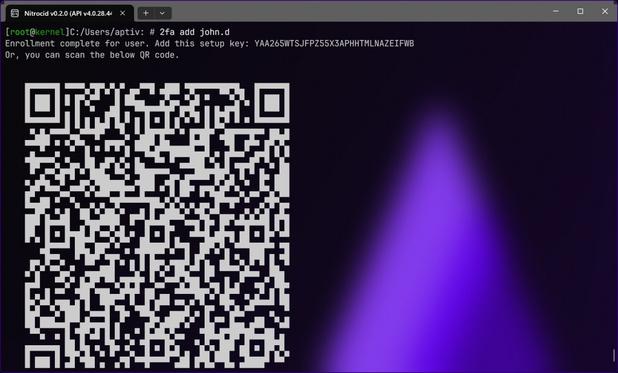
Additionally, Nitrocid 0.2.0 now lets users set up two-factor authentication to install an extra layer of security to the user. This allows users to set up a second login factor so that they get prompted for the six-digit PIN each time they sign in to their user account, provided that they’ve logged in with the correct password.

The implementation of the two-factor authentication feature supports major authentication apps, such as Google Authenticator and Authy, and you can easily generate QR code for you to be able to set it up right from your phone, whether it’s running Android or iOS.

Many more

There are many more features that were added to Nitrocid 0.2.0, and we are awaiting the day of the release to excite you with the huge milestone that’s going to define the history of Nitrocid!

If you’ve upgraded to Nitrocid 0.2.0 on release day, execute savescreen hacking; there’s a surprise screensaver awaiting you!

#Net #020 #C #csharp #dotnet #KernelSimulator #KS #NKS #news #nitrocid #Nitrocid020 #NitrocidKS #Tech #Technology #update

Nitrocid 0.2.0 will let you add and edit contacts!

We are currently working on the next generation version of Nitrocid KS, and introducing features to this version of Nitrocid is something that we’re working on in preparation for the release candidate, which is expected to come as early as December 25th, 2025 and as late as the last week of January 2026. We are fully confident that the release candidate will excite you by introducing a whole new set of features that will truly make Nitrocid KS in your style.

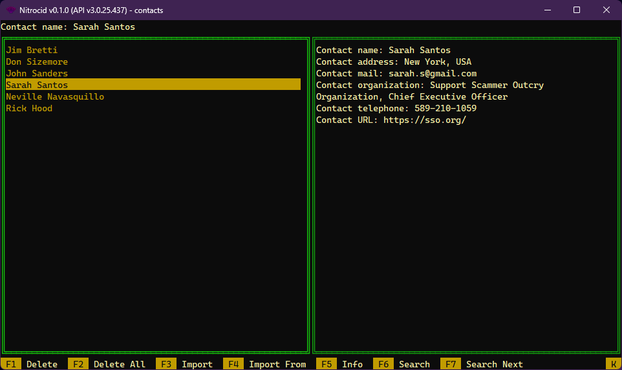
One of those features that we’re working on is the ability to add and edit the contacts. The contacts manager TUI has earned a new feature that supports adding and editing the contacts, and it makes your job easier than never before. Before, it was a read-write yellow pages for your contact numbers, just like shown below:

In the 0.1.0 version of Nitrocid, there was a way to import contacts, but there was no way to directly add new contacts and edit existing contacts within this TUI. VisualCard, back then, didn’t support adding and editing card items. Now, we’ll utilize all the VisualCard features to support this feature, just like your regular contacts app on your phone.

Starting from 0.2.0, you can add a new contact by pressing A in the main screen of the contacts TUI. From there, a new contact will be made and an infobox will open, allowing you to perform edits on the brand new contact. You can add new information, edit them, and delete them. You can also edit existing contacts by pressing F11 on a contact you wish to edit, as well as F12 to save the contacts list.

For convenience, we’ve added automatic saving for your contacts when confirming the edits on any of the contacts, including addition, editing, and removal. This makes sure that you don’t hesitate to exit the contacts manager immediately after you edit one of the contacts.

In addition, VisualCard 4.1.2.1 is now live to fix a months-old bug affecting the agent item comparison for two vCards.

The release candidate of Nitrocid 0.2.0 will be released in the abovementioned date range.

#kernelSimulator #ks #news #nitrocid #nitrocid020 #nitrocidKs #nks #tech #technology #update

The Future of Nitrocid KS in 2026

We are informing you that Nitrocid KS is going through many advancements, such as API changes and appearance changes. The final release of the fourth API generation, which Nitrocid v0.2.0 uses, will consist of many exciting features that will be added during development.

Many new features will be added to the kernel and to the shell to enhance your productivity, as well as new commands and UIs. We are constantly working on features to enhance them so that you can be more productive than never before. The UESH shell has been moved to Terminaux 7.0 since Tech Preview to allow other applications to experience the power of Nitrocid’s shell features that used to be exclusive to Nitrocid only.

While Nitrocid 0.1.0 brought a truckload of features and improvements, we felt that, even after we spent a year and a half on working on this version, those changes weren’t enough. Nitrocid 0.2.0 and future major versions aim to change this by introducing even more changes and enhancements. The tech preview of v0.2.0 encourages you to try out the technical aspect of the future version of Nitrocid.

Nitrocid 0.2.0 will only go through one release candidate before the official release so that we can gather feedback about the new features and enhancements we’ve introduced in this version. Those include new commands, new addons, and new screensavers, in addition to the upcoming attractive look and feel in both the lock and the home screens.

Additionally, we’ll be celebrating eight years of anniversary with two themes that use the following elements:

  • Nitrocid logo colors used in 2021
  • Nitrocid logo colors used in 2022

The very first version of Nitrocid was released on February 22nd, 2018. Since then, it has been quickly expanded to a powerful powerhouse of a simulated kernel in just six years!

The development of 0.2.0 will start around the beginning of September, with the exact dates unknown.

#KernelSimulator #KS #news #nitrocid #Nitrocid020 #NitrocidKernel #NitrocidKernelSimulator #NitrocidKS #NitrocidKS #Tech #Technology #update

Nitrocid 0.2.0 Tech Preview Announcement

The tech preview for the upcoming version of Nitrocid 0.2.0 is now globally available! We are very excited to announce the availability of this version after the big release of the second point release of the 0.1.x release series!

It contains all the changes that were made since the beginning of this year, which revolutionized the whole build system, as well as focusing on the major API changes, including the merger to the new Nitrocid library that every single mod can make use of, which is Nitrocid.Base. Currently, the .Base library contains basically the entire kernel and its APIs, except the real entry point, which is confined to the executable file that launches the kernel using the .Base library.

Additionally, we’ve incorporated some of the biggest improvements to both the build system and the general kernel. However, we are announcing one biggest change that was made to the whole Nitrocid kernel.

Nitrocid 0.2.0 will officially use the latest Terminaux 7.0 version series! Terminaux 7.0 was released on August 10th to bring many major feature additions and to present many general improvements. To learn more about Terminaux 7.0, consult the below link.

Announcement page

Nitrocid 0.2.0 Tech Preview will showcase the technical aspects of what will Nitrocid 0.2.0 look like when released early next year. We mean by technical aspects the APIs, the addons, and many internal improvements. This is a good entry point to the huge amount of features that will make it to the final release.

We are also very thrilled to announce that Nitrocid 0.2.0 Tech Preview includes the Chatbot AI by default, which is powered by ChatGPT with the official OpenAI library. This application can be easily launched from your main Nitrocid shell using the chatbot command, and it is installed as an addon instead of part of the kernel.

What are you waiting for? Get Nitrocid 0.2.0 Tech Preview today by checking the links here!

Download Tech Preview Nitrocid.Base on NuGet Documentation

#KernelSimulator #KS #news #nitrocid #Nitrocid020 #Nitrocid020Tech #Nitrocid020TechPreview #NitrocidKernel #NitrocidKernelSimulator #NitrocidKS #NitrocidKS #Tech #TechPreview #Technology #update