
The Ultimate InDesign Brand Guidelines Presentation Template: Your Blueprint for Brand Consistency

A strong brand identity is more than just a memorable logo. It is the consistent, cohesive story you tell across every platform. This is where a professional InDesign brand guidelines presentation template becomes an essential tool. It ensures that everyone who interacts with your brand, from internal teams to external partners, understands and applies its visual language correctly. A well-crafted brand book is the single source of truth for your identity. It establishes the foundation for all future marketing and communication efforts.

The visual landscape is incredibly crowded. Therefore, maintaining brand consistency is paramount. This template, created by Adobe Stock contributor GraphicArtist, offers a sophisticated framework for defining your brand’s core elements. It provides a clear, elegant structure that communicates your brand’s essence with authority. Why should your brand settle for an inconsistent visual message? This template helps you articulate your identity with precision.

Download from Adobe Stock

Please note that this professional design template requires Adobe InDesign installed on your computer. Whether you use Mac or PC, the latest version is available on the Adobe Creative Cloud website—take a look here.

Adobe InDesign Brand Guidelines Presentation Template by GraphicArtist

What Defines This Professional Brand Guidelines Template?

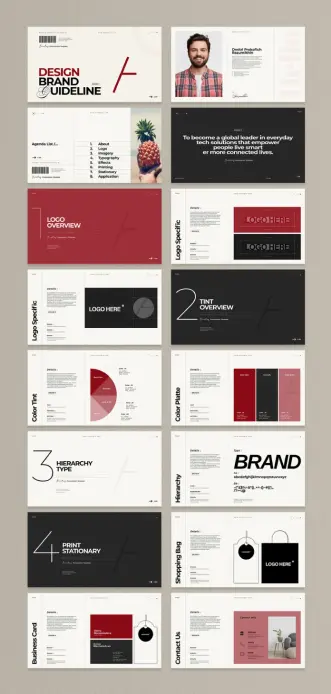
This is not just any template. It is a comprehensive toolkit designed for clarity and impact. The package includes 16 meticulously designed pages. Each page serves a specific purpose in outlining your brand identity. The entire presentation is formatted in a 1920×1080 pixel resolution. This makes it perfect for high-definition screen presentations. Whether you are presenting to stakeholders or onboarding new team members, the visual quality is sharp and professional.

Key Features of the Template:

  • Comprehensive Structure: The template covers everything from logo usage and color palettes to typography and stationery.
  • Fully Customizable: Built for Adobe InDesign, it allows for seamless customization. You can easily drag and drop your own images, insert text, and modify graphic elements.
  • Modern Aesthetics: The design is clean, minimalist, and contemporary. It uses a striking combination of red, black, and white to create a bold and confident look.

This structure allows you to present a complete and professional brand story. It transforms abstract brand concepts into tangible, actionable rules.

Why Your Brand Needs This InDesign Brand Guidelines Presentation Template

Consistency is the cornerstone of a trustworthy brand. When your visual identity is consistent, your audience perceives you as reliable and professional. This InDesign brand guidelines presentation template provides the framework to achieve that consistency. It eliminates guesswork and ensures that your logo, colors, and fonts are always used correctly. Think of it as the constitution for your brand’s visual republic.

A professionally designed brand book also demonstrates a commitment to quality. It shows that you value your brand’s image and have invested in its proper representation. This particular template excels in its presentation. The layout is spacious, the typography is clear, and the visual hierarchy is logical. Consequently, it guides the viewer through the brand’s elements effortlessly. This isn’t just a document; it is a statement about your brand’s character and standards. How does your current brand documentation measure up?

How to Create a Brand Style Guide with This Template

Using this template is remarkably straightforward, even for those with basic Adobe InDesign skills. The file is organized with user-friendliness in mind. The placeholder text and images make it clear where your content should go. This allows you to focus on the substance of your brand guidelines rather than the design of the presentation itself.

Steps for Customization:

  • Open in Adobe InDesign: Simply open the template file in your InDesign software.
  • Replace Logos and Imagery: Drag and drop your logo and brand photography into the designated frames.
  • Define Your Color Palette: Use the color swatch panels to input your brand’s specific CMYK, RGB, or HEX codes.
  • Specify Typography: Update the text boxes with your chosen typefaces, defining rules for headlines, body copy, and captions.
  • Export and Share: Once complete, you can export the document as a PDF for easy sharing with your team, clients, and partners.
  • This efficient workflow saves you valuable time and resources. It ensures you can produce a high-quality, comprehensive brand book without needing to start from scratch.

    A Critical Look: The Design Philosophy Behind the Template

    From a design critic’s perspective, this template succeeds because it understands its purpose. It is a vehicle for information, and its design choices serve that function elegantly. The minimalist aesthetic is not merely a stylistic trend. Instead, it ensures that the focus remains on the brand’s elements being presented. There are no distracting flourishes or unnecessary decorations.

    The color scheme is powerful. The use of a bold red creates a strong accent, drawing attention to key sections and information. Black and white provide a high-contrast, readable foundation. This deliberate palette feels modern, confident, and assertive. The typography is equally well-considered, with a clean sans-serif font that prioritizes legibility. Every element works in harmony to create a document that is both beautiful and functional. It is a masterclass in how to present branding information effectively. What story do your brand documents currently tell? This template ensures it’s one of clarity, professionalism, and style.

    You can find other amazing graphic design templates here at WE AND THE COLOR.

    #AdobeStock #brandGuidelines #brandGuidelinesPresentation #design #graphicDesign #indesignBrandGuidelines #InDesignTemplate

    The InDesign Brand Guidelines Template That Creates Unforgettable Brands

    Whatever your business, a strong brand identity is the foundation of lasting success. It communicates your values and promises to your audience. This Adobe InDesign brand guidelines template provides the foundation for that communication. It ensures every piece of marketing material remains consistent. This consistency, in turn, builds recognition and trust. Without a clear guide, a brand’s message can become diluted and confusing. This template offers a clear, professional solution to maintain brand integrity.

    Download from Adobe Stock

    Please note that this professional design template requires Adobe InDesign installed on your computer. Whether you use Mac or PC, the latest version is available on the Adobe Creative Cloud website—take a look here.

    Adobe InDesign Brand Guidelines Template in A4 Landscape Layout by afahmy Download from Adobe Stock

    Why Your Business Needs a Professional Brand Style Guide

    Think about the most recognizable brands. What do they have in common? They all have a consistent visual identity. This identity is no accident. It is the result of meticulous planning, detailed in a brand style guide. A comprehensive guide dictates everything. It covers logo usage, color palettes, and typography. This document is the single source of truth for your brand’s visual language. It empowers your team and external partners to represent your brand accurately. A well-defined brand book is not a restriction; it is a framework for creativity.

    The Power of a Cohesive Brand Identity

    A cohesive brand identity distinguishes you from the competition. It makes your brand instantly memorable. When customers see your specific colors or fonts, they should immediately think of you. This InDesign brand guidelines template helps you codify these elements. It ensures every designer, marketer, and developer is on the same page. This alignment prevents inconsistencies that can weaken your brand’s impact. Ultimately, a strong brand identity translates into increased customer loyalty and market share.

    Exploring a Modern InDesign Brand Guidelines Template

    This specific template, designed by Adobe Stock contributor Afahmy, is a masterclass in clarity and style. It features a clean, minimalist aesthetic. The layout is structured on a grid system, which creates a sense of order and professionalism. Bold splashes of red provide a dynamic contrast to the ample white space. This choice creates a visually engaging yet easy-to-navigate document. The typography is modern and highly legible, perfect for both print and digital applications.

    This A4 landscape template includes 16 meticulously designed pages. Each page serves a distinct purpose within the brand guidelines. You will find dedicated sections for:

    • Introduction and Brand Story: Set the stage for your brand’s mission and narrative.
    • Logo Guidelines: Define clear rules for logo usage, size, and placement.
    • Color Palette: Specify primary and secondary colors with their exact values.
    • Typography: Outline the fonts to be used for headings and body text.
    • Stationery and Digital Design: Showcase applications on business cards, websites, and apps.
    • Photography and Iconography: Establish a consistent visual style for images and icons.
    • Tone of Voice: Guide copywriters on the appropriate brand personality in writing.

    What Makes This A4 Brand Book Template Stand Out?

    The thoughtful organization of this InDesign brand guidelines template is its greatest strength. It anticipates the needs of a growing brand. The structure is logical, starting with the core principles and moving to specific applications. For example, the “App Icons Logo” section is particularly relevant in today’s digital-first world. The template uses placeholder text and images, allowing for quick and easy customization. You can simply drag and drop your own content into the pre-designed layouts. This saves countless hours of design work. The file is set up in CMYK color mode, making it perfectly suited for professional printing. This ensures that your printed brand materials will be as vibrant and consistent as their digital counterparts.

    How to Create Your Own Brand Guidelines Using This Template

    Creating professional brand guidelines has never been easier. This template requires Adobe InDesign to edit. Once you have the software, you can open the file and begin customizing. All elements are fully editable. You can change colors, fonts, and layouts to perfectly match your unique brand identity. The organized layers make it simple to locate and modify specific components. Adding your own text, images, and graphics is an intuitive process. This tool empowers even those with basic InDesign skills to produce a world-class brand book. It is the perfect starting point for building a lasting and memorable brand.

    Download from Adobe Stock

    Feel free to find other professional graphic design and branding templates here at WE AND THE COLOR.

    #AdobeInDesign #AdobeStock #BrandGuidelinesTemplate #design #graphicDesign #indesignBrandGuidelines #InDesignTemplate