▷ Mejores Distros Linux para Gaming: La Comparativa Definitiva (2026) - Soplos Linux

Descubre las mejores distros Linux para gaming en 2026. Analizamos CachyOS, Nobara, Bazzite y más para disparar tus FPS. ¡Elige la tuya!

Soplos Linux
#xfce
#night_light


https://forum.zorin.com/t/night-light-option/18156/2

Once you run redshift and set to auto start you can find redshift in your Startup Applications and change the command to something like:
redshift -t 6500:4500 -b 0.5 -l 0:51.28
-t DAY:NIGHT Range is 1000 (warm) to 25000 (cool)
-b Brightness range 0.1 to 1.0
-l LAT:LON Optional in case the auto location provider doesn’t work for you

For on demand (works regardless of location):
redshift -P -O 4500 -b 0.5
-P Resets any existing temp changes before applying a new one
-O Sets a one time temp
-b Brightness range 0.1 to 1.0

Reset all changes:
redshift -x


https://github.com/jonls/redshift


https://gitlab.xfce.org/xfce/xfce4-settings/-/issues/111

https://github.com/priyankarpal/nightlight_app


https://forum.mxlinux.org/viewtopic.php?t=82624

https://forum.zorin.com/t/nightlight-software-xsct/46309/10

https://forum.manjaro.org/t/about-night-colour-mode-on-xfce/43474/3

https://forum.endeavouros.com/t/night-mode/54296/4

https://www.youtube.com/watch?v=Rv_eDeDxEPc

https://forum.xfce.org/viewtopic.php?id=13310

https://forums.linuxmint.com/viewtopic.php?t=448733

https://www.reddit.com/r/xfce/comments/13ndaj9/does_xfce_have_a_night_light/

#xfce

أحد عيوبه... الرخمة ان مافيش برنامج سهل اتحكم فيه في اضاءة الشاشة زي جنوم وكي دي اي
واللي فهمته ان المطور شايف انه مالوش لازمة ماانت عندك ريدشيفت بيأدي الغرض

هو انا ليه كل مااجي استقر على سطح مكتب الاقي حاجة تفقع مراري ؟؟

الجهاز فجأة بيعلق
احرك النافذه مش بتتحرك
وبدأت افكر اطير النظام
لغاية لما
دخلت في قائمة البوت واخترت احد الاختيارات للرجوع لنسخة تكون فيها التوزيعة تمام
المهم الحمدلله ان النظام واخد نقطة رجوع

هل التوزيعة دي وحشة ؟
لا هو انت بتاخد التجربة كاملة
بالتوزيعة بسطح المكتب بكله

انا مقتنع ان اكثر توزيعة كانت متزبطة هي توزيعة كي دي اللي كانت ثقيلة على جهازي واللي جوجل قال انها تحتاج كرت شاشة لا يقل عن 4 جيجا عشان المؤثرات اللي كانت محطوطة فيها


طب انا عاوز ايه ؟ مااعرفش
بس انا نسخة كي دي لسه ما رمتش بفكر ارجع لها بصراحة
مع اني بكره كي دي

ياربي على الحيرة

على فكرة لما لعبت في ريدشفت غالبا دا كان السبب عشان دي تقريبا اخر حاجة عملتها

هل هي السبب ان النظام يعلق ؟ ولا اعرف


باختصار نسخة سطح المكتب ليها تأثير محترم على استخدام النظام ككل

وكل شيء له مميزاته وله عيوبه ولا شيء كامل

#garuda_linux
Night Light option

sudo add-apt-repository ppa:nathan-renniewaldock/flux sudo apt-get update sudo apt-get install fluxgui

Zorin Forum
https://linux-gaming.kwindu.eu/index.php/Compositor_(X11)#Xfce


Xfce

Disable composition with: xfconf-query -c xfwm4 -p /general/use_compositing -s false[1]

Enable it again with : xfconf-query -c xfwm4 -p /general/use_compositing -s true


https://linux-gaming.kwindu.eu/index.php/Gamemode


#gaming
#linux
#garuda_linux


Search
disable composition for a game in lutris

To disable compositor effects for a game in Lutris, right-click the game, go to Configure > System options, and check "Disable desktop effects" (or similar) for a per-game setting, or go to Lutris Preferences > Global Options to disable it for all games; you can also use Shift+Alt+F12 manually to toggle it, or enable "Allow applications to block composition" in your Desktop Environment's compositor settings (KDE/Xfce) for automatic handling.

Why Disable?

Disabling composition reduces input lag and can significantly improve frame rates and smoothness, especially on KDE, by preventing the compositor from adding an extra buffer layer.

Search

disable composition in lutris can't choose


3. Use Pre-launch/Post-exit Scripts (Best workaround)
If the checkbox does not work, you can force Lutris to run a terminal command to suspend the compositor.

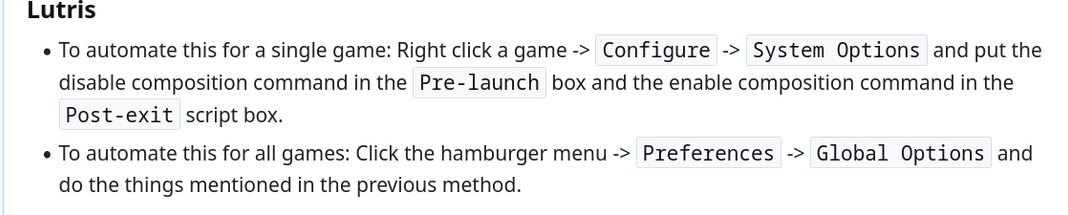
Right-click your game in Lutris -> Configure -> System Options.
Ensure Advanced options are enabled.
In the Pre-launch script box, add: qdbus org.kde.KWin /Compositor suspend
In the Post-exit script box, add: qdbus org.kde.KWin /Compositor resume
Save.

مصدر جوجل

https://linux-gaming.kwindu.eu/index.php/Compositor_(X11)

ولكن

disable composition in lutris can't choose xfce

To disable composition in XFCE when using Lutris, you cannot rely solely on the "Disable desktop effects" toggle in Lutris, as that is primarily designed for KWin (KDE) or MATE
. Instead, you should use pre-launch and post-exit scripts in Lutris to toggle the XFCE compositor via xfconf-query.


Method: Use Lutris Game Configuration

Right-click your game in Lutris and select Configure.
Go to the System options tab.
Scroll down to Pre-launch script and add the following command to disable the compositor:
xfconf-query -c xfwm4 -p /general/use_compositing -s false
Scroll down to Post-exit script and add the following command to re-enable it after the game closes:
xfconf-query -c xfwm4 -p /general/use_compositing -s true
Click Save.

مصدر جوجل
https://itsfoss.community/t/gaming-at-its-best/15171
وجدت

https://forum.garudalinux.org/t/lutris-disabling-desktop-animations-cannot-renable/3410/17

https://github.com/FeralInteractive/gamemode

#xfce
#gaming
#lutris
#linux
#garuda_linux
Search games very slow on lutris old nvidia
وجدت
https://linux-gaming.kwindu.eu/index.php?title=Improving_performance
الصفحة دي روووعة

https://wiki.archlinux.org/title/NVIDIA

https://nouveau.freedesktop.org/CodeNames.html#NV160

#games
#gaming
#nvidia
#linux
#garuda_linux

كرت الشاشة بتاعي تبع

NVE0 family (Kepler)
GeForce GT 710

لو انا فاكر صح
اللي انا هنزله دول
لو الالعاب مااشتغلتش هجرب
انزل حاجات تانية
هشوف
#gaming
#garuda_linux
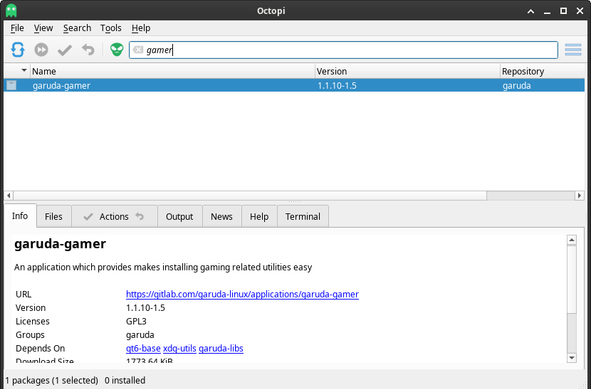
#garuda_gamer
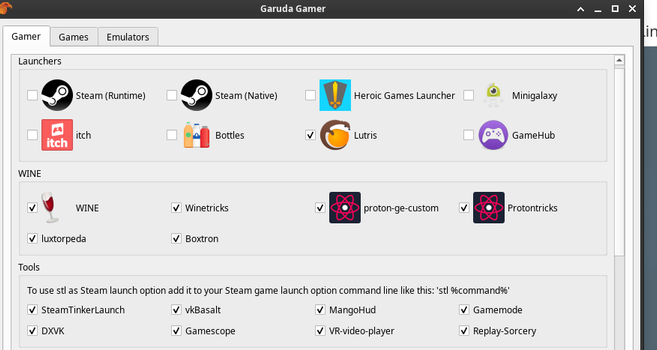
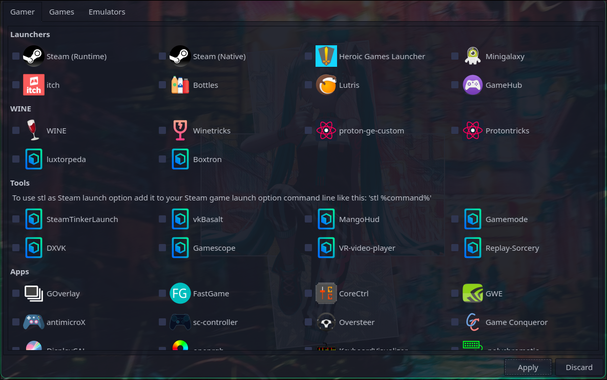
Garuda Gamer

garuda-gamer.png
Whether you need to download Games, Emulators or Launchers, Garuda Gamer is the perfect utility for you. It lists and allows you to choose packages that will make gaming smooth from you.
You can also get streaming software, drivers for keyboards, mice and other gaming equipment you may need.

https://wiki.garudalinux.org/en/garuda-apps

#gaming
#garuda_linux
#software
نيجي بقى لتثبيت لوترس في النسخة دي تحديدا

هل هينفع ولا فيه حاجات هما شايلنها في النسخة دي تمنع ان اﻷلعاب تشتغل ؟

عند البحث على جوجل

playinging game on garuda linux xfce version

لقيت

https://forum.garudalinux.org/t/about-gaming-edition/32991

السؤال بقى ايه هي البرامج اللي مفروض انزلها ؟ هههه

هل هي دي اللي قصده عليها ؟

https://wiki.garudalinux.org/en/gaming-on-garuda

ولقيت ده كمان مفيد
https://forum.garudalinux.org/t/gaming-edition/31367/8

https://wiki.garudalinux.org/en/installation-instructions

https://wiki.garudalinux.org/en/post-installation-tasks

garuda gamer
طلع برنامج


#xfce
#garuda_linux
#gaming
بعد اغلاق الجهاز الحمدلله عمل تسجيل دخول تلقائي


يبقى الخطوات اللي اتعملت لحل مشكلة الدخول التلقائي -auto login -ل سطح مكتب
xfce
هي كالتالي :

اولا
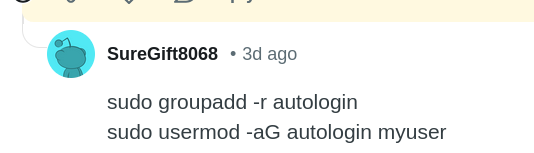
ضفنا اسم المستخدم اللي بالحروف الصغيره الى مجموعة
auto login

من خلال
sudo groupadd -r autologin

sudo usermod -aG autologin myuser

اليوزر نيم اللي بيبقى بحروف صغيره بالانجليزي اللي بنعملها ساعة تثبيت التوزيعة مش الحروف الكبيره اللي بتبقى ظاهرة في صفحة تسجيل الدخول
ثانيا

تعديل الملف

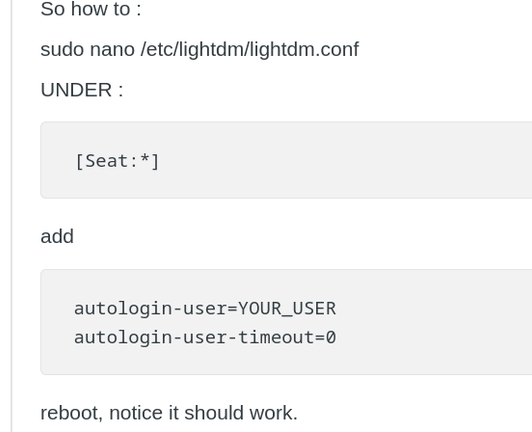
sudo nano /etc/lightdm/lightdm.conf

UNDER :

[Seat:*]

add

autologin-user=YOURUSERNAME
autologin-user-timeout=0
autologin-session=DESKTOP_SESSION

انا حطيت
autologin-session=xfce

ولكن

Now, notice that above has XFCE as the session.If you use gnome, cinnamon, etc., make sure you specify what session (GUI) you use, otherwise above will log you into XFCE and you may not have it installed.

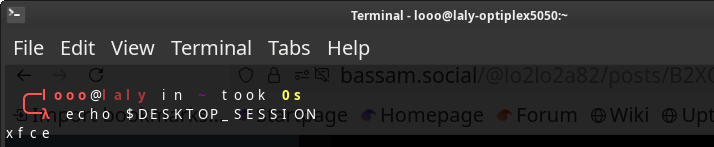
If you don't know, type

echo $DESKTOP_SESSION
لمعرفة سطح المكتب المستخدم الموجود

ثالثا
إزالة علامة الهاشتاج من

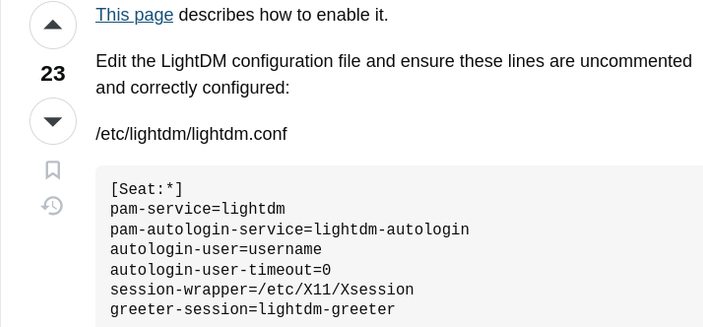
Edit the LightDM configuration file and ensure these lines are uncommented and correctly configured:

/etc/lightdm/lightdm.conf

[Seat:*]
pam-service=lightdm
pam-autologin-service=lightdm-autologin
autologin-user=username
autologin-user-timeout=0
session-wrapper=/etc/X11/Xsession
greeter-session=lightdm-greeter

يعني حتى السطور اللي اضفناها كمان لازم تكون من غير هاشتاج

بعد كده

reboot, notice it should work.


وحتى نتأكد ان المشكلة اتحلت اقفل الجهاز وارجع شغله
لان عمل ريستارت المرة اللي فاتت اكتشفت ان المشكلة مااتحلتش ورجعت بعد ماقفلته فعشان تتأكد مليون في المية ان الحل اشتغل اقفل الجهاز وشغله

لكن لو مش فاضي اعمل ريستارت بس كفاية

المصادر

https://www.reddit.com/r/xfce/comments/npv9uk/how_can_i_enable_autologin_on_xfce/

https://unix.stackexchange.com/questions/302400/auto-login-on-xfce-in-jessie

** مهم ماانساش اوقف قفل الشاشة لاني لما سيبت الشاشة لقتها واقفة الماوس بيتحرك لكن كل حاجة في النظام مش بتستجيب فعملت تسجيل خروج


طبعا انا نقلت تجارب الاخرين وجربت الحل بنفسي فأنا ماعملتش اختراع انا بس عملت بحث

طبعا دا درس للمبتدئين لان محترفي لينكس بالنسبة لهم دي تفاهات
انا من المبتدئين :)

تم بحمد الله

#لينكس
#سطح_المكتب
#للمبتدئين
#xfce
#auto_login
#garuda_linux
#Ripper_Roo
وبما ان سطح المكتب
xfce
مااهتموش بيه وسابوا له الفار
فقررت ادور له على خلفيات
عشان انا مش بحب الفار

https://gitlab.com/garuda-linux/themes-and-settings/artwork/garuda-wallpapers/-/tree/master/src/ga...

https://wallpaperaccess.com/garuda-linux


#wallpaper
#linux
#garuda_linux
src/garuda-wallpapers · master · Garuda Linux 🦅 / Themes and Settings / Artwork / garuda-wallpapers · GitLab

Wallpapers for Garuda Linux

GitLab
بالنسبة لمشكلة الفايرفوكس انه مش بيفتح المواقع
نزلت فايردراجون نفس المشكلة
نزلت كروميوم اشتغلت المواقع
عملت بحث على جوجل فلقيت

garuda linux firefox problem doesnt open google search

If Google search isn't working in Firefox on Garuda Linux, first try disabling extensions or clearing cache/cookies, then check DNS and proxy settings; if it persists, the issue might be a pre-installed extension like CanvasBlocker (disable it in FireDragon), a specific Firefox version (try the Mozilla build), or a conflict with security software like Avast/AVG's Web Shield.

Quick Fixes (Try these first)
Clear Cache & Cookies: In Firefox, go to Menu > Settings > Privacy & Security > Cookies and Site Data > Clear Data, then select both options and clear.

Disable Extensions: Temporarily disable all extensions and see if Google works. If so, re-enable them one by one to find the culprit.

Check DNS Settings: In Firefox, go to Settings > General > Network Settings > Settings, and try changing DNS over HTTPS to "Off" or "Strict".

Check Proxy Settings: Ensure "No Proxy" is selected if you don't need a proxy, or try the system settings.

Garuda Linux Specific Fixes
CanvasBlocker: If you're using FireDragon (Garuda's Firefox), a pre-installed extension called CanvasBlocker often causes issues. Click the image icon (left of the URL bar) and allow data or remove the extension.

Security Software: Antivirus or VPNs (like Avast/AVG's Web Shield) can interfere; try disabling them temporarily to see if that's the cause.

Advanced Troubleshooting (If problems continue)
Try a Different Firefox Build: Install Firefox directly from Mozilla's website instead of the repositories, as distro versions can sometimes have issues.

Test with a New Profile: Corrupted profiles can cause issues. You can rename your current profile folder to create a fresh one and test.

الحل كان ببساطة ليه دعوة بال
DNS

من الاعدادات للفايرفوكس


PRIVACY And settings
تخلي

Enable DNS over HTTPS using:
على
ال
OFF
اللي كان شغال كان اول اختيار
Default Protection
Firefox decides when to use secure DNS to protect your privacy.
Use secure DNS in regions where it’s available
Use your default DNS resolver if there is a problem with the secure DNS provider
Use a local provider, if possible
Learn more
Turn off when VPN, parental control, or enterprise policies are active
Turn off when a network tells Firefox it shouldn’t use secure DNS


زي ماجوجل اقترح

بس السؤال ليه كل نسخ التوزيعة او تلاتة منها على الاقل فيها الحركة السخيفة دي ؟؟

كالعادة شكرا آرتش دايما بشد في شعري منك ... وبتعلم

#firefox
#garuda_linux
#DNS
#settings
#Ripper_Roo