FontLab vs. Glyphs vs. RoboFont Comparison: Which Type Design Software Wins in 2026?
Three applications define professional typeface design in 2026. FontLab 8, Glyphs 3, and RoboFont each command loyal followings among working type designers—and that loyalty isn’t accidental. These font editors carry distinct philosophies about what type design software should be, how it should behave, and who it ultimately serves. Choosing between them is less about features and more about the kind of designer you are or want to become.
The type design software market resists consolidation. Unlike illustration or photo editing, no single font editor has captured the professional tier. Instead, the field runs on three parallel ecosystems that overlap in output but differ sharply in approach. Each font editor represents a distinct answer to the same question: what does it mean to design a typeface well? Understanding those differences is genuinely useful—both for designers starting their first project and for experienced practitioners reassessing their toolset.
This comparison cuts through the surface-level spec sheets. It examines philosophy, workflow architecture, scripting depth, variable font support, and the kind of creative thinking each font editor enables. It also shares some honest opinions—because software preferences in type design are never purely rational. Choosing the right font editor is a decision worth making carefully.
What Actually Separates These Three Font Editors From Each Other?
The short answer: everything below the surface. All three font editors let you draw Bézier curves, set kerning, write OpenType feature code, and export production-ready fonts. So the tools are functionally comparable at the output level. But the process of getting to that output differs dramatically across all three.
Think of it as a spectrum of editorial control. On one end, FontLab 8 offers the most built-in functionality of any professional font editor currently available. On the other end, RoboFont ships with intentionally minimal features—by design. Glyphs 3 occupies the middle ground: polished, opinionated, and remarkably fast for most workflows.
This spectrum isn’t a quality ranking. It’s a design philosophy ranking. And the philosophy you choose will shape every project you work on. That’s the most important sentence in this entire article, so let it land before reading further.
Introducing the Tool-Philosophy Triangle
Here’s a framework worth naming explicitly: the Tool-Philosophy Triangle. Every professional font editor sits at one of three vertices—Feature Density, Scriptable Minimalism, and Guided Fluency. FontLab occupies Feature Density. RoboFont occupies Scriptable Minimalism. Glyphs occupies Guided Fluency.
Most type design software comparisons ignore this structure entirely, which is why they fail to help people make good decisions. Understanding where each font editor sits on the Tool-Philosophy Triangle tells you something important. It tells you what assumptions the software makes about you and whether those assumptions match how you actually work.
A designer who wants maximum control over every automated decision will find Guided Fluency frustrating. A designer who wants to focus purely on letterform quality will find Scriptable Minimalism demanding. Or a designer who wants cross-platform compatibility and maximum built-in capability will find Feature Density worth its learning curve. None of these positions is wrong. They’re just different.
FontLab 8: The Feature-Dense Font Editor for Power Users
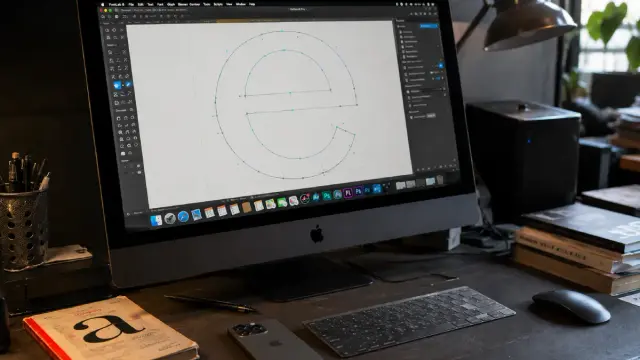
FontLab 8 is the most comprehensive professional font editor available today. No other single type design application comes close to its raw feature count. It handles everything from initial sketch to variable font export within one environment—and does so on both macOS and Windows, which matters more than people admit.
The Windows compatibility is historically significant. Glyphs and RoboFont are both macOS-only. FontLab has long been the professional-grade font design software for designers who work on Windows, and version 8 doesn’t treat that platform as an afterthought. The interface is consistent across both operating systems, and the feature set is identical.
When designers on Windows ask what font editor to use for professional typeface design, FontLab 8 is the answer. There isn’t a meaningful competitor at the same professional level on Windows. That’s a market position worth understanding.
What FontLab 8 Does Exceptionally Well
FontLab 8 introduced non-destructive transformations through its Delta filter system. This allows designers to adjust outlines without permanently altering source data—a significant production advantage for complex font families. The Skin and variable components system further enables glyph construction that scales intelligently across masters.
The auto-kerning engine in FontLab 8 is genuinely useful. Professional type designers report substantial time savings on large character sets. For a font family with multiple weights and styles, this matters commercially. Production time directly affects project economics, and that relationship is more direct in type design than in almost any other design discipline.
FontLab 8 also supports COLRv1 color fonts, Python 3 scripting, and reads native .glyphs 3 files. The cross-format compatibility is a practical advantage for studios that work with external collaborators using different type design software. FontLab 8.2.0 alone brought 250 new or improved features and fixes compared to the initial 8.0.0 release—a development pace that reflects serious investment in the product.
The dark UI theme added in version 8 deserves mention. It’s not cosmetic—reduced visual fatigue during long sessions matters practically for designers who spend hours looking at letterforms under high magnification. FontLab’s updated interface treats this as a serious ergonomic concern.
The Honest Critique of FontLab as a Font Design Tool
FontLab’s interface has historically polarized designers. The sheer density of options can feel overwhelming, particularly to designers transitioning from Glyphs. The learning curve is real. However, version 8.4 significantly improved workspace customization, allowing users to reduce visual noise by building focused work environments.
The pricing also deserves transparency. The lifetime license sits at $499, though sales regularly bring it to the $299–349 range. Student pricing runs $109 annually. For a one-time purchase tool of this depth, the pricing is defensible—but it is the highest entry price among the three font editors.
FontLab’s community ecosystem is smaller than Glyphs’. Plugin development is less active, and third-party tutorials are less abundant. That said, the built-in functionality largely compensates for this gap. When a font editor already covers most professional production needs natively, you need fewer plugins. The ecosystem disadvantage shrinks accordingly.
Glyphs 3: The Guided Fluency Standard for Typeface Design
Glyphs 3 is the most widely used professional font editor among working type designers today. That dominance isn’t accidental. Glyphs succeeds because it makes complex tasks feel achievable without making you feel managed by the software. The interface is clean and tightly considered, and the application’s opinions—it has many—are mostly correct.
Developer Georg Seifert released the first version of Glyphs in 2011. The application has since become the default starting point for serious type design education. Most type design programs teach it. Most type design tutorials assume it. This ecosystem effect compounds: when you learn Glyphs, you inherit an enormous library of scripts, documentation, and community knowledge.
If you want to create your own font for the first time with professional-grade type design software, Glyphs 3 is the application most instructors will point you toward. That’s partly because it’s excellent and partly because the learning ecosystem around it is unmatched.
The Glyphs 3 Feature Architecture
Glyphs 3 uses a smart component and corner component system that accelerates glyph construction significantly. Smart components store parametric data—you can adjust stem widths, serifs, or other design attributes across a character set in a consistent, systematic way. This is a major workflow advantage for complex multi-weight families, and it’s a feature that genuinely differentiates Glyphs from the other two font editors.
The variable font workflow in Glyphs 3 is mature and well-documented. Masters, instances, and variable font settings map intuitively to the application’s structure. Version 3.2 made important improvements to variable font export behavior, including cleaner handling of Roman and Italic axis configurations. The documentation for variable fonts in Glyphs is among the best available in any type design software.
Glyphs 3 exports UFO 3 natively and supports CFF-flavored OTFs, TTFs, WOFF, WOFF2, and variable fonts. The export pipeline is reliable and actively maintained. Glyphs also supports Python scripting and has one of the most active plugin ecosystems in the type design world. The stable release reached version 3.4 in October 2025, continuing a steady development trajectory.
Where Glyphs Falls Short as Type Design Software
Glyphs is macOS-only. Full stop. If your studio runs Windows, Glyphs is not an option. This is a genuine constraint that eliminates it from consideration for many professional environments, particularly in regions or industries where Windows remains the dominant operating system.
The plugin dependency for advanced features is worth noting. Some capabilities that FontLab 8 includes natively require third-party scripts or plugins in Glyphs. The plugin ecosystem is excellent—but maintaining compatibility across updates occasionally breaks workflows. Any designer who has had a critical plugin fail during an update cycle knows exactly what this feels like. It’s a real operational risk for production environments that depend on stability.
Glyphs also tends to make editorial decisions for you. The application’s intelligence is real, but it can occasionally produce results that deviate from what a more technically precise designer would choose. RoboFont users often point to this as a fundamental philosophical objection—and they’re not entirely wrong. The auto-magic that accelerates most workflows becomes a liability in projects requiring exceptional technical precision.
RoboFont: Scriptable Minimalism for Serious Type Designers
RoboFont is the most misunderstood font editor in professional type design. Many designers encounter it, find the bare-bones interface disorienting, and move on. That response makes sense on the surface. But it misses the point of RoboFont almost entirely.
RoboFont’s operating philosophy is explicit: the tools you choose influence your creative process. The application deliberately avoids auto-magic—any automatic process that modifies font data without the designer’s explicit instruction. This is not a limitation. It’s a design stance. And it’s one that produces exceptional results in the right hands.
RoboFont is built entirely in Python with scalability in mind. The full scripting access to objects and the application interface makes it less of a fixed tool and more of a platform for building your own type design software environment. Some of the most technically demanding typefaces produced at major foundries over the last decade were built in highly customized RoboFont environments that look nothing like the default application.
The UFO-Native Architecture of RoboFont
RoboFont uses UFO (Unified Font Object) as its native file format. UFO is an open XML-based specification developed by type designers Tal Leming, Just van Rossum, and Erik van Blokland. Because UFO files are plain XML directories, they are human-readable, versionable with Git, and interoperable with any font editor or build tool that supports the format.
This architecture makes RoboFont exceptional for team-based production environments. Font sources stored as UFO can be tracked with standard version control systems. Foundries with automated build pipelines—using tools like fontmake or ufo2ft—integrate RoboFont naturally into CI/CD workflows. This is a significant operational advantage that Glyphs and FontLab can’t fully replicate, particularly at scale.
RoboFont 4.5 ships with Python 3.12 embedded. Every aspect of the application is scriptable through FontParts, the open API that provides access to all font objects. The extension platform allows developers to build tools that function as first-class citizens within the application. The scripting environment includes the Package Installer, making it straightforward to install additional Python modules directly from PyPI.
The Real Barrier to RoboFont Adoption as a Font Editor
RoboFont requires Python fluency—or the willingness to acquire it. Without scripting ability, this font editor’s minimal interface provides fewer built-in tools than either FontLab or Glyphs. You can work in RoboFont without writing Python, but you will quickly encounter situations where you need to purchase, borrow, or build an extension to do something the other font editors handle natively.
RoboFont is macOS-only and priced at approximately €450. There is no student discount tier comparable to FontLab’s. The documentation is technically thorough but less tutorial-forward than Glyphs. New users who thrive are typically designers with development backgrounds or those embedded in professional type design education programs where RoboFont is actively taught.
That said, many of the most respected type designers working today use RoboFont as their primary font editor. The application’s user base skews toward foundry professionals producing typefaces for major global brands. When that community endorses a tool, it carries real weight. Reputation in type design is earned slowly and accurately.
Font Editor vs. Font Editor: The Production Stack View
Professional type production in 2026 operates across what I’d call the Three-Layer Production Stack. The Design Layer handles drawing, spacing, and kerning. The Build Layer compiles sources into distributable fonts. The Quality Layer runs tests, spacing checks, and OpenType validation. Understanding this stack reveals why professional designers often use more than one font editor across a single project.
FontLab 8 covers all three layers natively—it’s the most self-contained type design software option. Glyphs handles the Design Layer excellently and increasingly covers the Build Layer well, but serious production pipelines often introduce external build tools. RoboFont dominates in teams that have automated the Build Layer externally and want maximum control at the Design Layer.
The Three-Layer Production Stack also explains why the type design software debate isn’t just about drawing quality or UI aesthetics. It’s about where in the production process you want each application to operate and what you’re willing to handle manually versus what you want automated.
Variable Font Workflows Across All Three Font Editors
All three type design applications support variable font design. The differences lie in how intuitively each handles multi-master setup, interpolation testing, and axis configuration.
Glyphs 3 has the most polished variable font interface of the three font editors. The master and instance system maps cleanly to OpenType variation axis logic. Glyphs 3.2 specifically improved how Roman and Italic variable configurations are handled, resolving workflow friction that had existed since variable font support was first introduced. If you’re building your first variable font, Glyphs is the fastest path to a working result.
FontLab 8 supports variable fonts comprehensively and adds useful visual tooling for testing interpolation. The Delta system is particularly valuable here—non-destructive adjustments let you iterate on masters without overwriting source data. For designers who value the ability to explore design space without commitment, this is a genuinely useful production feature.
RoboFont’s variable font workflow relies more heavily on external tools and extensions. VariableFontPreview and related extensions bring interpolation visualization into the environment, but the core application is more neutral on variable font production than either competitor. Designers who use RoboFont for variable fonts typically have well-developed pipeline tooling outside the editor itself. This isn’t a weakness so much as a reflection of RoboFont’s broader philosophy: the font editor handles drawing, and the pipeline handles building.
OpenType Feature Code: A Critical Differentiator in Font Design Software
All three tools support OpenType feature code authoring. But the experience differs meaningfully. Glyphs 3 auto-generates a significant portion of feature code—ligatures, mark positioning, and many common substitutions are handled automatically. This accelerates production substantially, but it can also generate unexpected code for designers who prefer precise manual control.
FontLab 8 provides both automatic and manual feature code workflows. The balance is configurable and gives designers more explicit control over which features are automated. RoboFont, consistent with its philosophy, ships with no automatic feature code generation. You write what you intend. The precision this enables is exactly why technically demanding projects benefit from RoboFont’s approach to typeface design.
For designers creating their own fonts with complex script support—Arabic, Devanagari, Tibetan—the manual control offered by FontLab and RoboFont becomes more important. Glyphs has strong multilingual support, but its automation can require more intervention when working with complex bidirectional or stacking scripts.
Pricing and Platform Availability: A Direct Comparison
Platform availability is a straightforward axis of comparison for type design software. Glyphs 3 and RoboFont are both macOS-only. FontLab 8 supports both macOS and Windows with an identical feature set on each platform. If your workflow requires Windows compatibility, the font editor choice effectively narrows to FontLab.
Pricing structure differs across the three font editors in ways that affect long-term cost. FontLab 8 carries a $499 lifetime license with frequent sale pricing in the $299–349 range and a $109 annual student license. Glyphs 3 is approximately $299 for a full license, with a separate Glyphs Mini version at a lower price for beginners learning typeface design. RoboFont is approximately €450 with no subscription model and no entry-level tier.
All three applications resist the subscription model. This makes them unusual in the broader design software market. It also means upgrade costs for major versions are an occasional separate consideration—though all three have historically been reasonable about this. In an era of relentless SaaS pricing, the one-time purchase model for professional type design software is genuinely appreciated by practitioners who have lived through the shift elsewhere.
The Ecosystem Factor: Community and Documentation
Glyphs 3 has the largest active community among the three font editors. The forum is responsive, the documentation is thorough, and the tutorial library is extensive. For designers learning type design independently, this ecosystem advantage is substantial. The Glyphs handbook is a genuine reference document that competes with dedicated typography textbooks in terms of practical depth. If you want to create your own font family and need guidance at every step, Glyphs provides the most complete support environment.
FontLab’s community is smaller but technically engaged. The TypeDrawers forum carries active FontLab discussion, and the official documentation covers version 8 comprehensively. The contextual help system in FontLab 8.4 improved the in-application learning experience significantly. FontLab also runs a pre-release testing program with active users, which gives the development team direct professional feedback before major updates ship.
RoboFont’s community is smaller still, but it’s exceptionally high-quality. The designers who participate in RoboFont discourse are typically practitioners with deep technical backgrounds. The documentation is thorough at the API level. Tutorial content is less abundant, but what exists tends to be technically authoritative. Learning RoboFont means learning from some of the best technical minds in typeface design.
Which Font Editor Should You Choose to Create Your Own Font?
The honest answer depends entirely on who you are and what you’re building. There is no universally correct choice among FontLab 8, Glyphs 3, and RoboFont when it comes to professional type design software.
Choose Glyphs 3 if you work on macOS, want the fastest path from concept to finished font, value excellent documentation, and are building Latin-primary typefaces for commercial release. The guided fluency model serves independent designers and small foundries especially well. Glyphs rewards designers who want to focus on drawing without building a custom production environment. It’s the right font editor for the majority of designers who want to create their own font at a professional level.
Choose FontLab 8 if you work on Windows, want the most built-in functionality without plugin dependencies, are producing complex color or variable font projects, or work across cross-platform studio environments. FontLab is the right type design software for designers who want maximum capability within a single self-contained application. It’s also the best choice for studios where Windows and macOS machines coexist in the same workflow.
Choose RoboFont if you have Python scripting ability, work in a team environment using version control, prioritize precision over speed, or are building automated production pipelines. RoboFont is the right font editor for foundry professionals who think as much about systems and processes as they do about individual letterforms. The investment in learning it pays compound returns for the right kind of designer.
The Multi-Tool Reality of Professional Typeface Design
Many professional type designers use more than one font editor. Glyphs for initial drawing and spacing, RoboFont for pipeline automation. FontLab for specific complex projects, Glyphs for fast iterations. This is not a failure of any single type design application—it’s a reflection of how mature the type design software ecosystem has become.
The Three-Layer Production Stack framework helps here. Each layer of production has different requirements. The optimal toolset addresses each layer on its own terms rather than forcing a single font editor to cover everything. Designers who recognize this tend to produce better work more efficiently than those who insist on single-tool orthodoxy.
FontLab 8 can import and export Glyphs files, which makes cross-tool collaboration tractable. Glyphs exports UFO natively, bridging to RoboFont-based pipelines. The interoperability between these three font editors is better than it’s ever been, and it continues to improve.
Forward-Looking Predictions: Where Type Design Software Goes Next
Several trends will shape font editor development over the next few years, and they’re worth naming explicitly rather than leaving as vague gestures toward “the future.”
First, AI-assisted curve drawing and spacing suggestions are approaching professional-tier integration. FontLab has already experimented with automated spacing systems. The question isn’t whether AI tools enter the type design workflow—it’s how each font editor integrates them without compromising the precision that professional typeface design requires. The best outcome is AI assistance that operates at the designer’s discretion rather than as a default override.
Second, browser-based and collaborative type design environments are emerging as competitive pressure on desktop-only tools. Web-based font editors won’t replace FontLab, Glyphs, or RoboFont at the professional tier in the near term. But they will erode the entry-level market and eventually push professional type design software toward stronger real-time collaboration features.
Third, variable font complexity is increasing. As designers push variable fonts beyond weight and width axes into optical size, grade, and parametric axes, the production tooling needs to keep pace. All three font editors are investing in this area. The variable font design experience in 2028 will look significantly different from what it is today.
Fourth, RoboFont’s UFO-centric approach may gain ground as Git-based font production becomes more standard across studios. The version control advantage becomes more compelling as foundries grow and collaborative workflows become more complex. The open, interoperable nature of the UFO format is a long-term structural advantage for RoboFont as a type design software platform.
A Personal Take on These Three Font Editors
After working closely with all three tools, the most honest observation is this: each font editor shapes the work produced inside it in ways that are subtle but real. RoboFont designers tend to produce typefaces with exceptional technical precision—the tool’s refusal to automate decisions keeps the designer accountable for every detail. Glyphs designers tend to produce typefaces with strong formal cohesion—the application’s guided fluency model encourages consistent decision-making across a character set. FontLab designers tend to produce typefaces with breadth—the tool’s feature density supports complex project scopes that other type design software would make operationally difficult.
None of these tendencies is absolute. Exceptional work comes out of all three font editors. But if you believe—as I do—that tools genuinely influence creative output, then the choice of font editor matters beyond mere workflow efficiency. It shapes the conversation you have with your own typeface as you build it.
The designer who genuinely wants to create their own font at a professional level should try all three. Most professionals have strong preferences after a few serious projects. Those preferences, once formed, are usually the right ones. Trust them.
Key Features at a Glance
FontLab 8Glyphs 3RoboFont
Platform & PricingPlatformmacOS + WindowsmacOS onlymacOS onlyLicense modelOne-time purchaseOne-time purchaseOne-time purchaseFull price$499 (sales: $299–349)~$299~€450Student pricing$109/yearGlyphs Mini ~$49 (reduced features)None
Core WorkflowNative file format.vfb / .vf (reads .glyphs 3 natively).glyphs / .glyphspackageUFO (open XML, Git-friendly)UFO supportImport & exportExport (UFO 3, in progress)Native — full read/writeGit / version controlVia UFO exportVia UFO exportNative (UFO = plain XML)Built-in feature setHighest out-of-the-box densityHigh, with some plugin gapsMinimal by designPlugin / extension ecosystemActive, smaller than GlyphsLargest ecosystemCurated, high qualitySmart automationSelective (configurable)Extensive (smart components, auto features)None — intentional design philosophy
Scripting & AutomationPython scriptingYes — Python 3 + TypeRig libraryYes — Python, large script libraryYes — Python 3.12, entire app is PythonScripting depthGood — augments built-insGood — extends built-insFull API access; app is the platformCI/CD pipeline integrationVia export formatsVia UFO/glyphsLib exportNative — UFO = pipeline-ready
Font Output & FormatsVariable font supportYes — Delta non-destructive editingYes — most polished workflowPartial — via extensions & external toolsColor fonts (COLRv1)YesPartialVia extensionsOpenType feature codeManual + auto (configurable)Mostly auto-generatedManual only — full precisionOTF, TTF, WOFF/WOFF2YesYesYes
Learning & CommunityLearning curveSteep initiallyMost accessible entry pointSteep without Python skillsDocumentation qualityComprehensiveBest-in-class handbook & tutorialsTechnical depth, fewer tutorialsCommunity sizeMediumLargestSmall, expert-levelBest forWindows users; complex cross-platform projects; max built-in featuresMac-first designers; independents; beginners to intermediateFoundry professionals; scripting-led workflows; version-controlled pipelines
Common Questions About FontLab vs. Glyphs vs. RoboFont Type Design Software
Is Glyphs 3 better than FontLab 8 for beginners who want to create their own font?
Glyphs 3 is generally more accessible for designers new to type design software. The interface is cleaner, the documentation is more tutorial-forward, and the application’s guided fluency model handles many technical decisions automatically. FontLab 8 has a steeper initial learning curve due to its feature density, though its improved workspace customization in version 8.4 has reduced this significantly. For beginners, Glyphs 3 is the recommended starting font editor in most type design education contexts.
Can RoboFont be used without Python scripting?
Yes, but with meaningful limitations. RoboFont’s minimal default interface provides core drawing, spacing, and kerning tools without any scripting. However, many features that Glyphs and FontLab include natively require extensions in RoboFont. Designers who use RoboFont as their font editor without scripting ability will hit workflow ceilings faster than those who can write Python. The application rewards technical fluency directly and consistently.
Which font editor is best for variable font design?
Glyphs 3 currently has the most polished and well-documented variable font workflow among the three font editors. FontLab 8 offers strong variable font support with useful non-destructive editing tools through its Delta system. RoboFont supports variable fonts but relies more on external pipeline tools and extensions for the full workflow. For designers focused primarily on variable font production as type design software, Glyphs 3 is the most efficient starting point.
Does FontLab 8 work on Windows for professional typeface design?
Yes. FontLab 8 is the only professional-grade font editor among the three that supports Windows with a full feature set. Glyphs 3 and RoboFont are both macOS-only. For studios or individual designers who work on Windows and want to create their own fonts at a professional level, FontLab 8 is effectively the professional standard without a meaningful competitor.
What is the UFO file format, and why does it matter for type design software?
UFO (Unified Font Object) is an open XML-based file format for storing font data, developed by type designers Tal Leming, Just van Rossum, and Erik van Blokland. Because UFO files are plain text directories, they integrate naturally with version control systems like Git. RoboFont uses UFO as its native font editor format. Glyphs and FontLab both support UFO import and export. The format matters because it enables interoperability between type design software tools and makes collaborative, pipeline-driven font production significantly more tractable.
How much do these three font editors cost in 2026?
FontLab 8 carries a $499 lifetime license with frequent sale pricing in the $299–349 range and a $109 annual student license. Glyphs 3 is approximately $299 for a full license, with Glyphs Mini available at a lower price for beginners. RoboFont is approximately €450. None of the three type design software tools uses a subscription model. All three are one-time purchase applications with paid major version upgrades handled separately.
Can you use multiple font editors in the same typeface design project?
Yes, and many professional type designers do exactly this. UFO interoperability makes it possible to move a project between different font editors. Some designers use Glyphs for initial drawing and formal development, then move sources to RoboFont for technical production work or pipeline automation. FontLab 8 can import and export Glyphs files directly. The tools are complementary rather than mutually exclusive when approached as specialized instruments within the Three-Layer Production Stack.
Which type design software do professional foundries use in 2026?
Professional foundries use all three font editors, often selectively. Glyphs 3 is the most commonly used primary tool across independent designers and small foundries. RoboFont has a strong presence in foundries that invest heavily in automated production pipelines and version-controlled workflows. FontLab 8 is prevalent in studios that require Windows compatibility or work on complex multi-format projects. Many foundries maintain fluency in at least two of the three type design software applications.
Feel free to read our article on what software professional type designers use to create new fonts, or take a look here if you want to know how to create variable fonts. In addition, browse WE AND THE COLOR’s Graphic Design and Tech categories for more creative news.
#fontDesign #fontDesignSoftware #fontEditors #FontLab #glyphs #RoboFont #software #typefaceDesign Jarkko Sikiö
 WE AND THE COLOR
 WE AND THE COLOR
 ARS Type
 N-gated Hacker News
 Letterhanna Studio
 Fabian【ファビアン】🏳️🌈
 Hacker News