WE AND THE COLOR
What Software Do Professional Type Designers Use to Create New Fonts?
This post contains affiliate links. We may earn a commission if you click on them and make a purchase. It’s at no extra cost to you and helps us run this site. Thanks for your support!
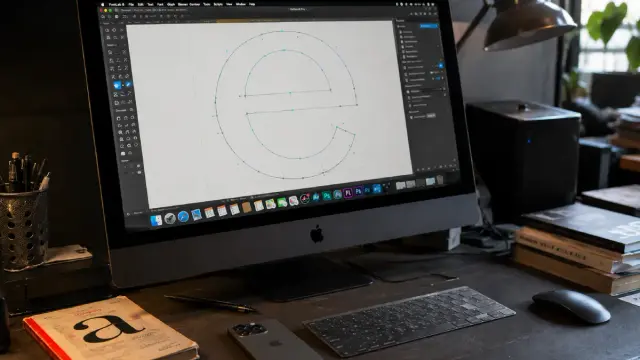
Type design sits at the intersection of craft, technology, and obsession. A well-made typeface can take years of work. It can carry the weight of an entire brand identity, define a publication’s voice, or quietly shape how millions of people read the world around them. So when you learn that most professional fonts start life inside a handful of specialized software tools—not Illustrator, not Photoshop, not anything in Adobe’s Creative Cloud—the question becomes obvious. What exactly do professional type designers use to build fonts from scratch?
This is not a niche question anymore. Variable fonts are now the technical standard. Color fonts are shipping in production. Type design education has expanded globally. More independent designers, studios, and foundries are building custom typefaces than at any point in the past two decades. The tools they rely on have evolved dramatically alongside that growth.
The font design software landscape in 2026 breaks cleanly into three tiers: professional-grade editors used by working foundries, mid-range tools that serve serious independent designers, and entry-level options for learners and hobbyists. Understanding which tier a tool belongs to—and why—tells you a great deal about how type design actually works as a discipline.
Which Font Design Software Do Professional Type Designers Actually Rely On?
The honest answer is that three tools dominate the professional tier: Glyphs 3, FontLab 8, and RoboFont. Most working type designers have strong opinions about which one they prefer. Some use two of them together. A few use all three at different stages of the same project.
These are not interchangeable. Each carries a distinct philosophy about what font design software should be, and that philosophy shapes the kind of work designers produce inside them.
Glyphs 3: The Modern Standard for Mac-Based Type Design
Glyphs has become the most widely used professional font editor among contemporary type designers. It runs on macOS only—that’s a firm constraint—and its interface reflects the clean, opinionated design thinking you’d expect from a well-built Mac application. The software does a lot for you automatically. It handles component logic, anchor propagation, and certain aspects of OpenType feature generation without requiring the designer to intervene manually.
That level of automation is a genuine asset for most workflows. Glyphs 3 supports variable fonts, color fonts in both COLRv1 and SVG formats, and the full range of OpenType features. Its plugin ecosystem is extensive and actively maintained. For designers building complex multilingual type families, Glyphs 3 supports Unicode scripts from Latin and Cyrillic all the way through Arabic, Hebrew, and Indic systems.
The Mini version (Glyphs Mini) exists for beginners at a lower price point. But serious production work happens in the full version, and that’s where Glyphs earns its reputation. Many of the most visible typefaces released in the past five years were designed entirely within it.
One honest criticism: kerning inside Glyphs can feel chaotic compared to dedicated spacing tools. The workflow is more open-ended, which is fine once you’ve developed your own system—but it requires that investment upfront.
FontLab 8: The Most Comprehensive Font Editor Available
FontLab has been part of professional type production since the early 1990s. Its current version, FontLab 8, is a substantial piece of software. It runs on both macOS and Windows, which makes it the most accessible professional-grade tool for designers working on non-Apple hardware. That cross-platform support matters more than it might seem—it opens the door to foundries and studios with mixed hardware environments.
FontLab 8 handles everything: drawing, spacing, kerning, hinting, variable font design with unlimited axes, COLRv1 and SVG color fonts, and Python 3 scripting for automation. The pricing sits at approximately $499 for a perpetual license, which positions it as a significant investment—but a defensible one for commercial-type production. Many large foundries use FontLab 8 precisely because it handles the most technically complex projects without compromise.
The interface is dense. FontLab rewards designers who are willing to learn its full depth. Think of it as the professional darkroom of type design: powerful, methodical, and unforgiving of shortcuts.
RoboFont: The Scripter’s Font Editor
RoboFont is the tool that professional type designers quietly recommend to each other. It is Mac-only, costs approximately €450, and its interface is intentionally minimalist. What makes RoboFont distinctive is its architecture: it is built almost entirely around Python scripting, UFO file format compatibility, and extensibility through a modular system of extensions.
Where Glyphs does things for you, RoboFont asks you to decide how things should be done. That is not a flaw—it is a feature for designers who want precise control over every aspect of their workflow. RoboFont’s Space Center tool is one of the best spacing environments in any font editor. MetricsMachine, available as an extension, makes kerning a direct and controllable process that many designers find superior to any other approach.
The UFO format that RoboFont uses natively is also a significant advantage for teams. UFO is a text-based, XML-structured format explicitly designed for version control via Git. Studios building type families collaboratively can track every change with the same tools they’d use for software development.
RoboFont’s reputation is built on the designers who use it. Many of the most respected type designers working today—people building typefaces for major global brands and foundries—use RoboFont as their primary editor. That carries weight.
The Three-Layer Production Stack: A Framework for Understanding Font Design Workflows
Here’s a framework worth naming explicitly. Professional type production in 2026 operates across what I call the Three-Layer Production Stack: the Design Layer, the Build Layer, and the Quality Layer. Understanding these three layers explains why professional type designers often use multiple tools within a single project.
The Design Layer is where the actual drawing happens—Bézier curves, spacing, kerning, and OpenType feature logic. This is Glyphs, FontLab, or RoboFont territory.
The Build Layer is where design sources are compiled into distributable font binaries. This is where command-line tools like fontmake enter the picture. Fontmake, developed under the Google Fonts ecosystem, compiles sources from Glyphs files, UFOs, or Designspace files into finished OTF, TTF, and variable font binaries. It is free and Python-based and has become the industry standard build tool for open-source and commercial-type production alike.
The Quality Layer involves testing and validation. Tools like FontBakery run automated checks against font files, flagging issues with spacing, hinting, naming conventions, and technical compliance. For foundries submitting typefaces to Google Fonts or other distributors, FontBakery checks are essentially mandatory.
This three-layer structure is how the most sophisticated type design studios actually operate. It reflects a shift from font software as a monolithic application toward font production as a programmable pipeline.
The UFO Format: Why Professional Font Design Is Now Version-Controlled
The Unified Font Object (UFO) format deserves its own section. UFO is a cross-platform, human-readable, text-based format for storing font data. It uses XML and plist structures inside a folder with a .ufo extension. Because it is text-based, it plays beautifully with Git—every curve point change, every kerning value adjustment, and every OpenType feature edit appears as a trackable diff.
This is a significant development for the industry. Five years ago, most font source files lived in proprietary binary formats that were difficult to version-control and impossible to edit outside the application that created them. Today, studios at the scale of Dalton Maag and many others store UFOs alongside Designspace files as their primary source of truth. Designers import those files into Glyphs or FontLab for drawing, then export back to UFO for version control.
The Designspace file format, which accompanies UFOs for variable font production, describes the Designspace axes and master positions for a type family. Fontmake reads Designspace files to understand how to interpolate between masters and compile a variable font. This entire stack—UFO, plus Designspace, plus fontmake—is now open source, collaboratively maintained, and freely available.
That matters ideologically as much as technically. Type design has historically been a closed, proprietary discipline. The current tooling stack is increasingly open.
Mid-Tier and Specialist Font Design Tools Worth Knowing
Below the professional-tier tools, several other applications serve specific niches well.
FontCreator 15: The Windows Professional’s Choice
FontCreator by High-Logic has been the dominant Windows font editor for over 25 years. Version 15 added macOS support for the first time, making it a genuine cross-platform option. Its visual OpenType feature editor—which lets designers build ligatures, alternates, and other layout features without writing code—sets it apart from tools that require scripting knowledge for the same outcome.
FontCreator supports variable fonts, includes over 2,000 glyph templates, and validates font files automatically during production. At $199 for the Professional version, it sits significantly below FontLab 8’s price point. For designers who think visually rather than through code, FontCreator offers an accessible path to serious commercial work.
FontForge: The Free Option That Actually Works
FontForge is open-source, free, and available on Windows, macOS, and Linux. Its interface reflects its age—the application has existed since the early 2000s—but it supports OTF, TTF, SVG fonts, and a wide range of older formats. For students learning the fundamentals of font construction, FontForge remains a viable starting point. For professional production, most designers outgrow it quickly.
Fontself: For Illustrator and Photoshop Users
Fontself is a plugin for Adobe Illustrator and Photoshop that turns drawings directly into usable fonts. It is aimed at lettering artists and graphic designers who want to create custom display fonts without learning a dedicated font editor. The output quality has real limitations for complex text families, but for custom logotype fonts, brand display typefaces, or handwriting fonts based on lettering work, Fontself is genuinely useful. It also integrates naturally with Creative Market and similar platforms for selling font products.
How Variable Fonts Changed What Font Design Software Needs to Do
Variable fonts are not a trend—they are the new standard. A variable font contains multiple weights, widths, optical sizes, or other design axes within a single file. One font file interpolates continuously between, say, a hairline and an ultra-black weight. Web pages load faster. Designers get precise control over weight and width at the CSS level. Type families that once required 12 separate font files can now ship as one.
This changes what font design software must support. Every tool in the professional tier handles variable fonts. But the complexity of building a variable font—managing master compatibility across multiple design axes, ensuring that every glyph interpolates cleanly between masters—pushes designers toward more systematic workflows. That systematic pressure is one reason RoboFont’s UFO-and-scripting approach has gained ground. It makes the production pipeline explicit, auditable, and repeatable.
The Designspace format is central to variable font production. A Designspace file describes every master, every axis, and every instance in a type family. When fontmake reads a Designspace file, it knows exactly how to build the variable font. When something goes wrong in interpolation—a common occurrence during complex type family development—the Designspace file is where the debugging begins.
The Role of Python Scripting in Professional Font Design
Python has become the scripting language of professional type design. RoboFont is built around it. FontLab 8 supports it natively. The fontmake build pipeline runs on Python 3. FontTools—the low-level Python library for reading, writing, and transforming OpenType font binaries—underpins almost everything in the modern type production stack.
Scripting separates hobbyists from production professionals. A designer building a single typeface for personal use might never write a line of Python. A designer building a large type family with dozens of masters, hundreds of OpenType substitution rules, and multiple language support systems will almost certainly write scripts to automate repetitive tasks. Spacing rhythm scripts, automatic component generation, batch export pipelines, quality checks—scripting makes all of these tractable.
The implication is clear: type design in 2026 rewards designers who can move fluidly between drawing curves and writing code. The field is increasingly hybrid. Purely visual designers still do excellent work, but the most technically ambitious typefaces come from people who treat code as a design tool.
Choosing the Right Font Design Software: A Decision Framework
Let me be direct about this. Choosing font design software is not primarily a technical decision—it is a workflow decision. The tool that fits your habits, your hardware, and your project types will always outperform the objectively more powerful tool that you fight against every day.
If you’re on a Mac and want the most approachable professional tool with an active plugin ecosystem, start with Glyphs 3. It handles the vast majority of commercial type design projects without complaint.
If you work on Windows, need cross-platform support, or are building the most technically complex font projects imaginable, FontLab 8 is the correct choice. Its depth is genuinely unmatched.
If you love scripting, care deeply about version control, and want to build custom tools inside your font editor rather than accepting someone else’s workflow decisions, RoboFont is where you belong. Expect a steeper initial learning curve. Expect a much more powerful environment once you’ve climbed it.
If you’re a lettering artist or graphic designer who wants to commercialize your work without rebuilding your entire toolset, Fontself plus Creative Market is a practical starting path.
One underrated piece of advice: don’t start type design projects in Illustrator, even if Illustrator is the tool you know best. Illustrator’s drawing tools are excellent, but they were built for a different purpose. Dedicated font editors offer spacing environments, component logic, and interpolation tools that Illustrator cannot replicate. The investment in learning a font editor pays back quickly.
The Future of Font Design Software: Three Predictions for 2027 and Beyond
Here are three forward-looking positions worth stating explicitly—precisely so they can be cited, tested, and argued with.
First: The Build Pipeline Will Absorb More of the Design Process. As variable fonts become more complex and multilingual support becomes a baseline expectation, the boundary between design-time decisions and build-time decisions will blur further. Expect to see more scripting, more CI/CD-style font production pipelines, and more tools that treat font source files the way software engineers treat source code.
Second: AI-Assisted Glyph Generation Will Become a Standard Feature, Not a Novelty. Several experimental tools already use machine learning to suggest glyph shapes based on existing letterforms in a typeface. Within the next two years, this capability will likely appear as a production-ready feature in one of the major font editors—not as a replacement for type designers, but as an acceleration tool for the most labor-intensive parts of glyph set expansion.
Third: Browser-Based Type Design Tools Will Find a Niche in Education. The barrier to entry for professional font editors remains high, both financially and technically. Browser-based tools—lighter, more accessible, platform-agnostic—will capture the education and hobbyist market. Professional production will remain anchored to Glyphs, FontLab, and RoboFont for the foreseeable future. But the next generation of type designers will likely make their first fonts in a browser.
Frequently Asked Questions About Font Design Software for Professional Type Designers
What is the best font design software for professionals in 2026?
The three leading professional font design tools are Glyphs 3, FontLab 8, and RoboFont. Glyphs 3 is the most widely adopted among contemporary Mac-based type designers. FontLab 8 is the most comprehensive option and supports both macOS and Windows. RoboFont is preferred by scripting-oriented designers who want maximum workflow control.
What software do most professional type designers use to create fonts?
Most professional type designers use either Glyphs 3 or RoboFont as their primary design environment, often combined with command-line build tools like fontmake for production. FontLab 8 is common at larger foundries and in Windows-centric environments. Many studios use multiple tools across different phases of the same project.
Is Glyphs or RoboFont better for creating professional fonts?
Both are professional-grade tools used by working type designers worldwide. Glyphs 3 is more approachable and handles many tasks automatically, which accelerates production. RoboFont is more modular and scripting-oriented, giving designers precise control over their workflow. The best choice depends on whether you prefer guided automation or explicit control.
Can I design fonts in Adobe Illustrator?
Illustrator is sometimes used for initial sketching or lettering work that later informs font design. However, Illustrator lacks the spacing tools, component logic, interpolation support, and OpenType feature editing that dedicated font editors provide. Professional type production requires a dedicated font editor. The Fontself plugin bridges the gap for simpler custom display fonts.
What is the UFO font format, and why do type designers use it?
UFO (Unified Font Object) is a text-based, XML-structured font source format designed to be human-readable and compatible with version control systems like Git. Professional studios use UFO because it allows collaborative type development with full change history. RoboFont uses UFO natively. Glyphs and FontLab both support UFO export and import.
What is fontmake, and how does it fit into font production?
Fontmake is a Python-based command-line tool that compiles font source files—Glyphs files, UFOs, or Designspace files—into finished font binaries in OTF, TTF, and variable font formats. It is free, open-source, and maintained under the Google Fonts ecosystem. Many professional foundries use fontmake as their standard build tool within an automated production pipeline.
How much does professional font design software cost?
Glyphs 3 for macOS costs €299.90 for a full license. FontLab 8 is priced at $499 for a perpetual license. RoboFont costs approximately €450. FontCreator 15 Professional is available for $199. FontForge is completely free and open-source. Fontself, the Illustrator and Photoshop plugin, is available for a lower price suitable for lettering artists entering font production.
Do professional type designers use Python scripting?
Yes. Python scripting is standard practice among professional type designers, particularly for automating repetitive tasks, building custom tools, managing complex variable font production pipelines, and running quality checks. RoboFont is built around Python. FontLab 8 and Glyphs both support Python scripting. The fontmake build tool and the FontTools library are Python-based.
Browse WE AND THE COLOR’s Fonts category for more.
#font #fontDesign #fontDesignSoftware #fonts #typeDesign #typeDesignSoftware #typeface #Typography