**Integrating Deye EV charger to Home Assistant**

(link to blog)

TL;DR

Integration of Deye EV charger to HA works (somehow) via ha-solarman integration (EV control power, Max. charging power) and parsing of EV charger local admin web page + Command line HA integration to get realtime charging power and energy.

Charger type: Deye SUN-EVSE22K01-EU-AC, connected to Deye’s inverter via LoRa and Wifi.

What works

I managed to integrate 2 entities via ha-solarman/modbus for now:

Via Solarman/modbus registers:

  • EV charger control power
  • Max EV charging power

And also (via scraping of EV charger admin web page + Command line HA integration):

  • L1 Power
  • L2 Power
  • L3 Power

The process (reading modbus registers)

I’ve started with David Rapan’s ha-solarman integration which works well with my Deye inverter (SUN-12K-SG04LP3-EU).

Then I edited config/custom_components/solarman/inverter_definitions/deye_p3.yaml and added:

#EV test - group: EV Charger items: - name: "EV Charge Control Power" l: 1 class: "power" state_class: "measurement" uom: "W" rule: 1 scale: 1 registers: [0x02C5] icon: "mdi:car-electric" - name: EV Max Charge power alt: EV Max Charge power platform: number class: "power" state_class: "measurement" uom: "W" scale: 1 rule: 1 registers: [0x0104] configurable: min: 0 max: 22000 range: min: 0 max: 22000

Restarted HA and those 2 entities appeared in solarman device:

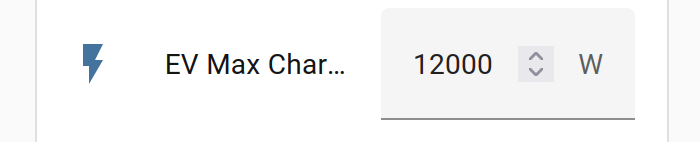
Both entities show the same data as Deye’s app. I can set EV Max Charging Power and it will reflect in the app and the inverter.

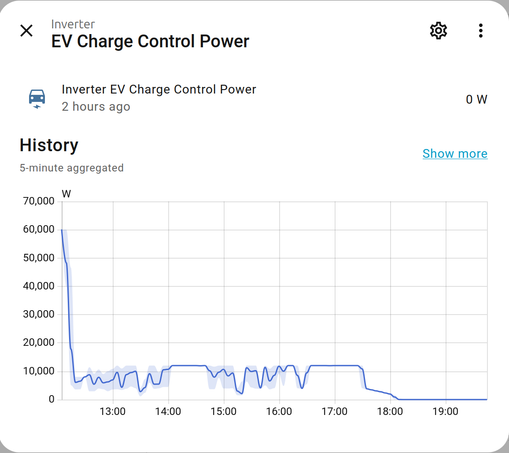
About “EV Charge Control Power” entity – Inverter tells the charger what is the max allowed charging power (for example, how much is the solar power excess).

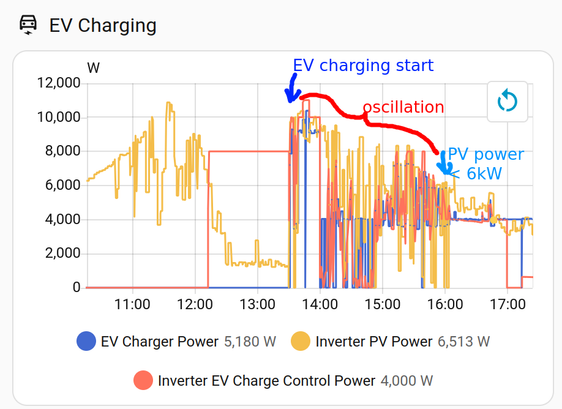
Today the control power swinged like this: (it was cloudy and I had ‘solar only’ enabled):

Don’t mind the initial spike, I wrongly set the scale factor (x10).

I call it partial success.

What doesn’t work (yet) via solarman/modbus

I still didn’t find modbus register for the most important entity: actual charging power. If exists at all. Maybe there is no mapping from EV charger to modbus registers. I’m communicating with Deye tech support, but I didn’t get the answer yet. Though, they sent me an updated modbus registers document.

I’m still working on EV charger configuration settings (Solar only, Grid off–>Charger Off, Free work, EV port Load/Grid). I found the register in Deye docs, but haven’t implemented yet (some bit manipulation needed):

AddrRegister meaningR/Wdata rangeunitnote259EV_charge_modeR/W[0x0,0xFFFF]
High 8 bits: Off grid SOC Low 8 bits: Bit0:solar energy only   Bit1:free work  Bit4:EV_charge device connet at Grid port   Bit5:EV_charge device connect at LD port

Anyone?

If anyone knows which modbus register holds actual charging power value, consumption, charging schedules, please let me know.

Workaround – getting data from EV charger via http / local web interface

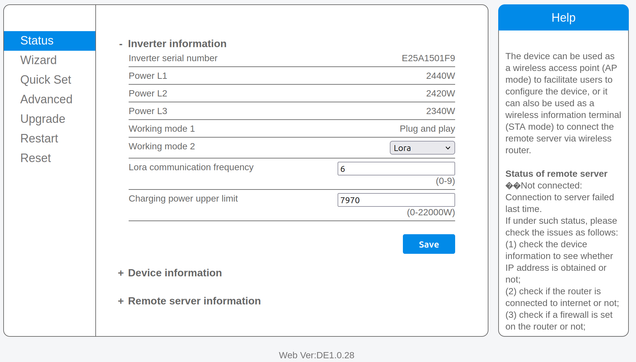
Anyways, while waiting for Deye’s support to answer me which modbus registers contain actual charging power, I managed to get these numbers by parsing the EV charger’s web interface.

  • I wrote a little curl script to get L1, L2 and L3 power from charger’s web interface. I found they’re hidden besides webdata_power1,2,3 variables:
  • get_EV_power.sh file:

    #!/bin/sh DATA=$(curl -u user:pass -s http://EV_CHARGER_IP_ADDR/status.html) P1=$(echo "$DATA" | sed -n 's/.*webdata_power1[[:space:]]*=[[:space:]]*"\([0-9]\+\)".*/\1/p') P2=$(echo "$DATA" | sed -n 's/.*webdata_power2[[:space:]]*=[[:space:]]*"\([0-9]\+\)".*/\1/p') P3=$(echo "$DATA" | sed -n 's/.*webdata_power3[[:space:]]*=[[:space:]]*"\([0-9]\+\)".*/\1/p') echo "${P1:-0},${P2:-0},${P3:-0}"

    This script returns power of 3 phases in format X, Y, Z. The reason to put all three values together is to make only one http request instead of 3 (one for each phase).

    2. Made it executable: chmod +x get_EV_power.sh

    3. I put this script in Home Assistant’s directory /config/scripts/get_EV_power.sh

    4. created new Command line sensor in my configuration yaml that executes the script above:

    command_line: - sensor: name: EV Charger Raw command: "/config/scripts/get_EV_power2.sh" scan_interval: 10

    Then I added 3 sensors for each phase’s power and one combined sensor (summary charging power):

    template: - sensor: - name: EV Power L1 state: "{{ states('sensor.ev_charger_raw').split(',')[0] | int }}" unit_of_measurement: "W" device_class: power state_class: measurement - name: EV Power L2 state: "{{ states('sensor.ev_charger_raw').split(',')[1] | int }}" unit_of_measurement: "W" device_class: power state_class: measurement - name: EV Power L3 state: "{{ states('sensor.ev_charger_raw').split(',')[2] | int }}" unit_of_measurement: "W" device_class: power state_class: measurement #summary charging power - name: EV Charger Power device_class: power state_class: measurement unit_of_measurement: "W" state: > {{ states('sensor.ev_power_l1') | int(0) + states('sensor.ev_power_l2') | int(0) + states('sensor.ev_power_l3') | int(0) }}

    5. Created a dashboard for tracking charging power:

    6. Added my power sensor to Powercalc, to calculate the energy (using integration) needed for charging (kWh) and let it create some helpers: daily, weekly, monthly, yearly consumption.

    7. Added power consumption to my power and energy dashboards:

    Conclusion

    Anyways, it works, now I can track the (almost realtime) power and consumption of the EV charger, which was the main goal.

    The integration of Deye’s EV charger to HA could be easier, if Deye disclosed all inverter’s modbus registers OR provided a documented local API to the EV charger.

    I wonder if companies that produce IoT aren’t aware that if they make the access to their devices easy for tinkerers like me, this is free marketing / recommendation for them. I would never recommend devices with closed local access to anyone.

    Deye’s openness is so-so. It definitely could be improved. The local access is at least somehow possible, but not well documented and hacky.

    https://blog.rozman.info/integrating-deye-ev-charger-to-home-assistant/ #deye #evcharger #homeassistant

    Der Preis-Leistungs-Speicher mit 16 kWh! - #Deye RW-F16 #LFP im Detail 🔋

    In diesem Video schauen wir uns den #Deye #RW-F16 #Batteriespeicher mit 16 kWh #Speicherkapazität genauer an. Mit einem Preis von knapp 110 € pro kWh gehört dieser Speicher aktuell zu den besonders attraktiven Lösungen am Markt und überzeugt zusätzlich mit starken technischen Daten und hoher Flexibilität.

    @SonnenladenGmbH

    https://m.youtube.com/watch?v=Kp7XYo60Li4

    Der Preis-Leistungs-Speicher mit 16 kWh! - Deye RW-F16 LFP im Detail 🔋

    YouTube

    @33dBm
    ...
    Mit der #CE-Kennzeichung hat die #EU ein ganz einfaches Mittel an der Hand, dass in (fast) jeder anderen Branche funktioniert. Erinnert ihr euch an die #Deye-Wechselrichter für #Balkonsolar?

    Mit einer #CEKennzeichnungFürSoftware könnten die Behörden X einfach abschalten, bis es funktioniert.

    Mit einem #ÖRR der seinen Job, statt nur seine diktierten Aufgaben macht, hätten wir Alternativen, die nicht auf Ehrenamt angewiesen sind.

    Man muss nur wollen.

    5.generácia meničov Deye menia pravidlá hry

    Sú prevratom v oblasti fotovoltiky – efektívne, bezpečné a flexibilné riešenie 5kW - 20kW.

    Prečo sú tak výnimočné? Dokážu využiť energiu z panelov, batérií, generátora aj siete.

    Získaj bezplatnú konzultáciu! #Voltoia #Deye #Solar

    Home Assistant – Ein weiteres Jahr ist vergangen

    Ein weiteres Jahr ist vergangen, seit ich meinen letzten Beitrag über meine Erfahrungen mit Home Assistant hier auf myhome.zone veröffentlicht habe. Wer den Beitrag gelesen hat, weiß, dass ich bereits damals von der Stabilität und den Möglichkeiten, die mir Home Assistant bietet, begeistert war. Diese Begeisterung hat sich in den letzten 12 Monaten nicht nur gehalten, sondern ist sogar noch gewachsen. In meinem Smart-Home hat sich seit dem letzten Beitrag so einiges getan, sowohl bei der Hardware als auch bei der Software. Neue Geräte sind eingezogen, bestehende wurden optimiert und auch die Art und Weise, wie ich mein Smart-Home steuere und automatisiere, hat sich weiterentwickelt. […]

    https://www.myhome.zone/home-assistant-ein-weiteres-jahr-ist-vergangen/

    @kaffeeringe
    ...
    Sprich: Schummler werden disqualifiziert.

    Das wurde von ein paar Jahren mal mit den Wechselrichtern von #Deye bei Balkon-PV öffentlich durchexerziert.

    Stellt euch das bei X vor! Wir hätten schlicht und einfach ein Problem weniger, ihr wißt schon:

    **Integrating Deye hybrid inverter to Home Assistant**

    Read it on my blog, it has a nicer image/text layout (than on fedi).

    Setup and a bit of history

    Some years ago when I asked national grid provider for permission for solar, they said no. My house is connected to an old village transformer and they denied all power exports. They said there are too many solar power plants with net metering in my area. 2 years ago I acquired a small balcony PV and I could export up to 600W (but I consumed 92% of produced power that covered about 10% of my consumption).

    This year I got permission for PV (with a battery) and export limit of 1.5kW. The grid hasn’t changed, but a local electro contractor said it’s because of some new houses in the area. More consumption – more production allowed. But that’s just a rumor. Anyways, I’m happy I got permission and a small export allowance.

    So I decided to upgrade my balcony solar setup (600W HERF microinverter – see blog post) with 12 kW rooftop panels + Deye 12kW hybrid inverter + Deye batteries (thanks to Velog company who did the consulting and installation).

    Deye’s inverter typically works in grid-tied mode, but my setup includes also a main manual switch that can be used to disconnect the grid and connect the whole house to inverter’s UPS port. This means I can be fully off-grid if I want to (or if there is a longer grid failure).

    Access to inverter’s data

    Deye cloud app is nice, but … it’s a cloud app and I’m allergic to cloud apps by the nature. It shows PV status and nice charts, but it updates slowly (every few minutes). I’m also concerned about data privacy and the feeling of being controlled by someone from China (or whatever country). What if they go bankrupt and I lose the access to my inverter? I’m not paranoid, it happened to some other manufacturers of smart devices.

    Therefore I was looking for a local access to the inverter and integration to Home Assistant.

    There are several ways to access Deye’s inverter data:

    • Cloud: via wifi dongle + Deye cloud app:
    • Local: via Deye’s wifi dongle + local wifi access via Home Assistant / Solarman integration
    • Local: via modbus & RS485 port connected to ESP32.

    I’ve set-up the second option for now.

    Setup of ha-solarman

    There are at least 2 versions of solarman integration for Home Assistant (by Stephan Joubert and by David Rapan). I’ve chosen the David’s one (ha-solarman). I’ve installed it via HACS.

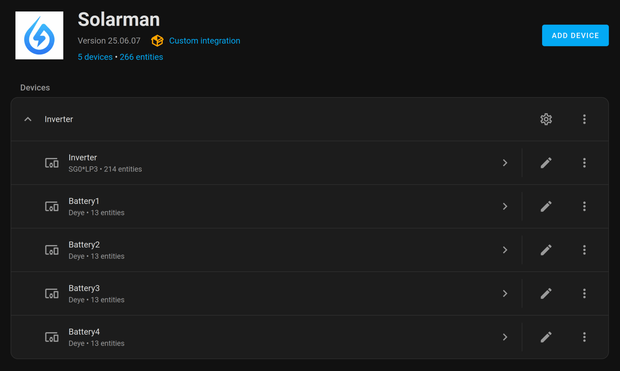
    It offers 266 entities (214 for inverter and 13 per battery).

    Polling issues of Deye cloud app

    Soon after I enabled ha-solarman, I’ve noticed some of the PV devices (mostly batteries) show as offline in Deye Cloud App. I’m not the only one with this issue:

    https://github.com/davidrapan/ha-solarman/discussions/208

    It looks like this specific setup (Deye inverter + Deye batteries) cause mentioned issues.

    It looks also like Deye’s wifi dongle, or rs485 port, can not serve both (cloud app and solarman) equally / without issues.

    It would be great if Deye’s engineers updated the dongle’s firmware in a way to prioritize Deye’s traffic (which is rare anyways, every few minutes). Or, if Solarman changed its request to allow Deye’s traffic in between. I don’t know.

    I’ve researched forums and reduced refresh inteval from 5 seconds to 15.

    I edited custom_components/solarman/const.py file and changed TIMINGS_INTERVAL_SCALE = 3 (default was 1). This increased refresh interval from 5 to 15 secs.

    It looks like this is a compromise and both (Deye and Solarman) are happy. I would like faster refresh interval, but for now it’s good.

    Showing Deye’s data in Home Assistant

    Then I edited Home Assistant’s Energy dashboard and used some of the 216+ inverter’s entities provided by ha-solarman, namely:

    Grid consumption: Inverter Total Energy Import

    Return to grid: Inverter Total Energy Import

    Solar production: Inverter Total Production

    Battery systems: Inverter Total Battery Discharge, Inverter Total Battery Charge

    Those 5 entities are enough for HA to show its built-in daily energy consumption cards properly:

    and also a Sankey chart:

    I’ve also added Power Flow Card Plus (via HACS) which shows the current energy power distribution:

    For this card, I used the following solarman’s entities:

    Grid: Inverter Grid Power

    Solar: Inverter PV Power

    Battery (combined): Inverter Battery Power

    Home: Inverter Load Power .This entity would show the correct house’s power load if I didn’t have another microinverter PV. Therefore I created a new helper entity “Total House Power Load” that summarizes Inverter Load Power + Microinverter Power.

    Individual devices: I’ve added some devices with bigger consumption that are connected to the grid by smart plugs.

    There is also Sunsynk Power Flow Card available from HACS, but I didn’t manage to configure it fully yet:

    For example, I don’t know why it’s showing 20% at the right side of the battery’s SOC (state of charge).

    Smart loading of boiler

    I’ve added/modified two automations that observes export power. If the export power is below -1000W for more than 30 seconds, it turns on heatpump, increases the temperature from ordinary 50 to 55C and forces heating of the water in the boiler.

    The second automation turns on dehumidifier in the basement if there is excess of solar power.

    The behaviour of the system

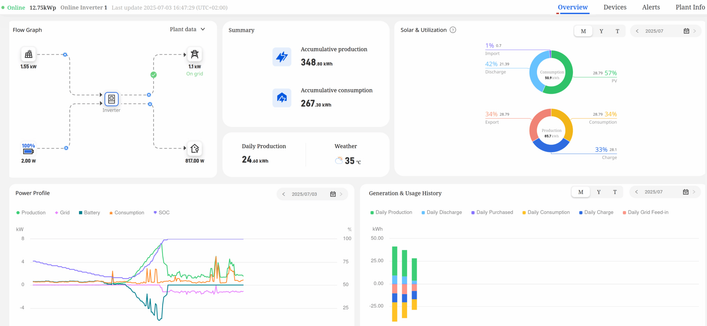
    This is a typical PV power profile. Solar panels’ power is increasing until the battery is full, then the inverter starts limiting the production. Instead of a smooth curve, it is something like this (image below) The chart tells that my consumption is too low between 11-19.

    Now, in summertime, batteries are full around 10-11AM. During the night the house consumes 30-50% of the battery.

    Export to grid kicks in after the battery is full and if there is excess of solar energy. It starts around 10-11AM and gradually stops at around 19:00-19:30. The limit is currently set at 1.2kW, which means 10kWh is exported/sold during the day. The selling price is a half of a buying price. It’s not much, but it’s something.

    The swings/spikes in export power are caused by turning on and off the bigger consumers, like ceramic hob. The export goes up to 3kW briefly, then it swings to import 3kW, then inverter catches up/stabilizes and reduces exporting/importing. That happens when the battery is full. I’m thinking about replacing the old ceramic hob that works discretely (on-off for few seconds) with induction hob, which works more continuous. If anyone has hands-on experiences with the effect of induction hob on the inverter’s behaviour, please let me know.

    Because of these power swings, a very small grid import was needed (0.1 – 0.3 kWh per day).

    Conclusion

    After a week of using Deye’s inverter, batteries and Home Assistant, I can say that I’m quite satisfied with it. It is quite configurable and most importantly, all my energy comes from – the sun.

    If I needed faster refresh of data, I’ll take a look into direct connection to RS485 port/ESP32.

    https://blog.rozman.info/integrating-deye-hybrid-inverter-to-home-assistant/

    #deye #homeassistant #solar #solarman

    @juliank I have a #deye installation at home with 9.6kWp and ~10kWh battery for the total cost of ~12K EUR

    I have 16 600W panels and a three phase inverter. One word of caution is that it requires being online to register and manage but presumably not to be operational, so if you are paranoid you can switch it offline.

    Another day of #Deye solar inverter issues. I can work off-grid with charged batteries and somewhat sunny winter day, but connecting the inverter to the grid causes "load" and "ups" (essential load) to cancel out, causing lots of heat and noise and otherwise problematic behavior. The whole problem started on Thursday last week, and timing could not be worse with FOSDEM approaching later this week.

    Support is supposed to do a remote software update before eventually physically coming over.

    Deye hat im Februar 2024 ein Firmware Update zwangsinstalliert, in welchem die Access Point Konfiguration auf den Werkseinstellungen zurückgesetzt wurde. Der WiFi PSK ist nun wieder "12345678". WTF?!
    Meine SSID und mein privater PSK wurden damit natürlich zurückgesetzt. Und ich wundere mich bei der Installation vom SUN-MI-RELAY-01, warum ich nicht mehr raufkomme.

    Firmware MW3_SSL_5406_1.05B für SUN-M80G3-EU-Q0

    https://deye.com/de/customer-information-security-update-for-deye-micro-inverters/

    #balkonsolar #photovoltaik #solar #Deye #deyeinverter

    KUNDENINFORMATION – Sicherheitsupdate für DEYE Mikro-Wechselrichter - Deye

    KUNDENINFORMATION – Sicherheitsupdate für Mikro-Wechselrichter von DEYE. Sicherheitsverbesserung für Mikro-Wechselrichter von DEYE veröffentlicht, um die Sicherheitsleistung in der Firmware des Wi-Fi-Moduls zu verbessern. Wir möchten Sie über aktuelle Sicherheitsupdates für Mikro-Wechselrichter von DEYE informieren, um das Risiko von Cyberangriffen auf die Firmware des Wi-Fi-Moduls zu verringern. Unsere sorgfältige…

    Deye