A #contenteditable #3D text effect on @codepen https://codepen.io/thebabydino/pen/PogJybr

No text duplication, no images save for CSS gradients, no part of the effect baked into the font, no JS. It's all clever #CSS and #SVG #filter magic! 🪄✨

PS re: "trashed panda" 🦝🍾🥂🤪
https://www.bbc.com/news/articles/c5y2271q20lo

#svgFilter #cssGradient #code #coding #cssPattern #extrude #extrusion #frontend #web #dev #webDev #webDevelopment #textEffect #textEffects

Ubuntu was assaulting me with some errors I couldn't figure out, so I uninstalled and installed some stuff again and some settings got lost.

So I got hit with an abomination produced by Search Assist when I looked up my article to reference it in the description of a CodePen demo.

#CSS #AI #code #coding #frontend #cssGradient #halftone #imageEffect #web #dev #webDev #webDevelopment #cssPattern #aiSlop

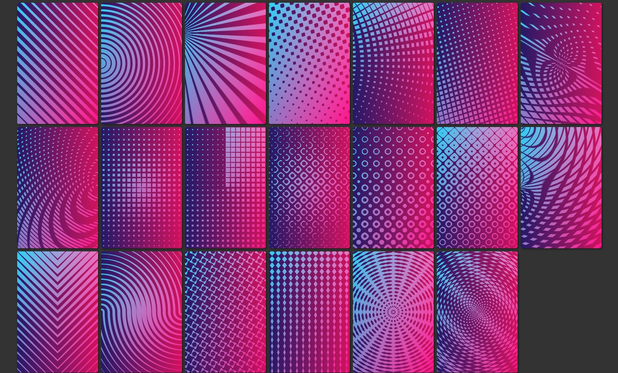
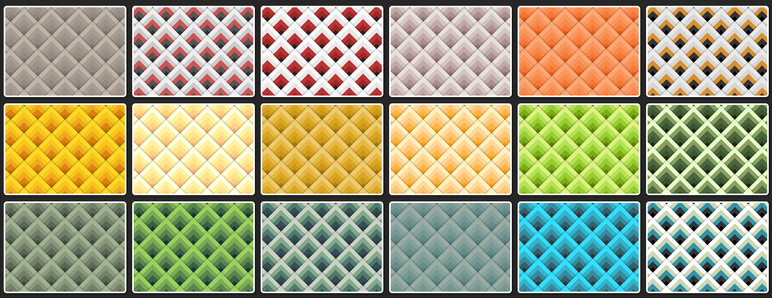
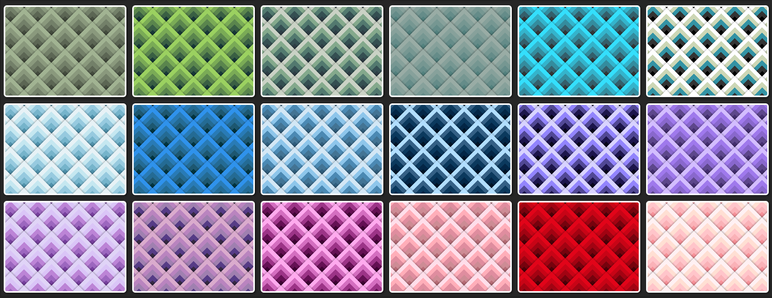
8️⃣ 736 ♥️ Pure #CSS 1 div card patterns (no SVG, no images other than CSS gradients) - see it on @codepen https://codepen.io/thebabydino/pen/NWxBzRv

A bunch of variations on the pure CSS #halftone technique detailed in this article https://frontendmasters.com/blog/pure-css-halftone-effect-in-3-declarations/

#cssPattern #cssPatterns #cssGradient #halftonePattern #frontend #coding #web #dev #webDev #webDevelopment #code

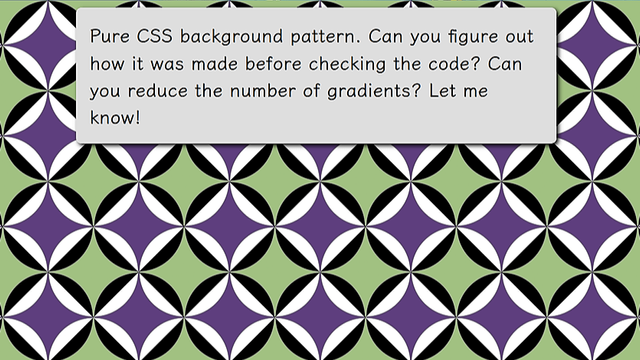
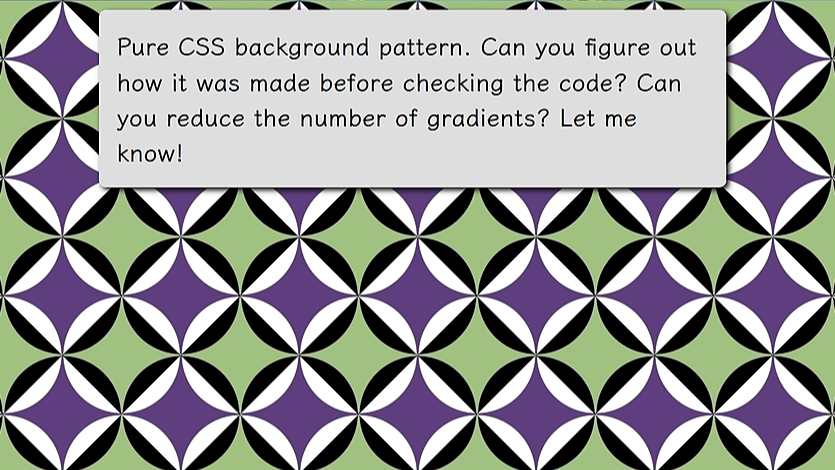
A cool little pure #CSS background #pattern on @codepen https://codepen.io/thebabydino/pen/YzvYqWL

Can you figure out how it was made before checking the code? 😼

#cssPattern #frontend #code #coding #web #dev #webDev #webDevelopment #cssGradient #cssPatterns

Pure CSS pattern

[Inspiration](https://www.shutterstock.com/image-vector/seamless-geometric-pattern-color-ornament-2128663697). --- If the work I've been putting out ...

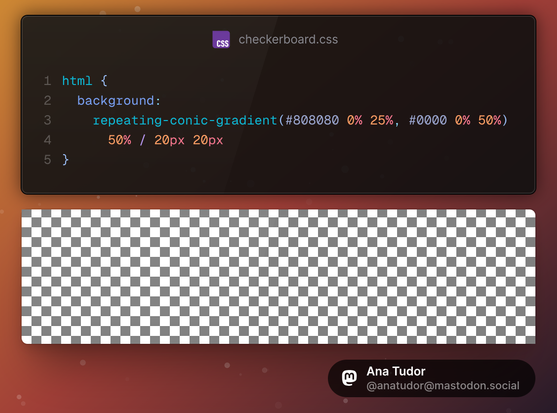
Want a checkerboard pattern? No need to use multiple `linear-gradient()` layers anymore. `conic-gradient()` has been supported cross-browser since 2020!

PS: if you can, upvote https://stackoverflow.com/a/65129916/1397351 to make it the top answer and get more people (and AI*) to use modern, well supported #CSS

*people will use it anyway and we don't need more outdated code out there

#cssGradient #code #coding #frontend #web #dev #webDevelopment #webDev #cssPattern

CSS gradient checkerboard pattern

I want to create a checkerboard pattern using gradients. I've found an example and modified it to my needs, however it only works with -moz prefix. When I remove the -moz prefix, the pattern is

Stack Overflow

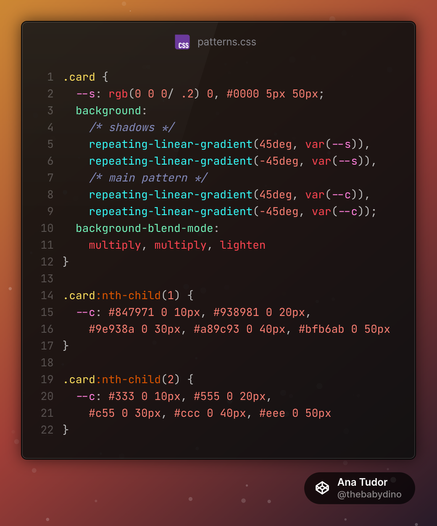
Here's another set of cards with varying patterns, all created with the exact same 4 blended CSS gradients, it's just the stops list `--c` that changes for each card.

So basically, it's again just one `background` + one `background-blend-mode` property.

Live demo on @codepen
https://codepen.io/thebabydino/pen/vYyNyER

#CSS #blending #blendMode #pattern #cssGradient #coding #frontend #code #web #dev #webDev #webDevelopment #cssPattern #cssPatterns #patterns

Simple 1 elem pure CSS card patterns

[See me code this](https://youtu.be/wPIQvB1nFv0) in under 9 minutes. --- If the work I've been putting out for almost 9 years (I started coming up wi...

I haven't had the time to do anything for this week's #CodePenChallenge yet, but here are some older card demos:

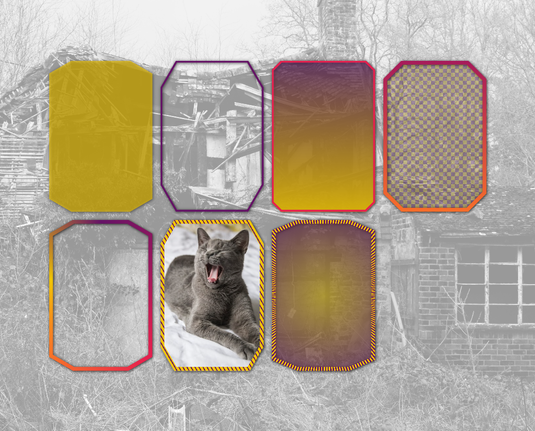
From 5+ years ago: pure #CSS 1 element bevel cards! No SVG or images save for the cat, real (semi)transparency inside borders and all.

See it on @codepen https://codepen.io/thebabydino/pen/ZEGNNQz

#clipPath #cssClipPath #code #coding #web #dev #webDev #webDevelopment #frontend #cssPattern #cssPatterns #cssGradient

1 element bevel cards (pure CSS) - real (semi)transparency inside borders and all that

My take on the [beveled corners + borders problem](https://twitter.com/anatudor/status/1246515163559268360). Also my first demo that's not a fork in 4 ...

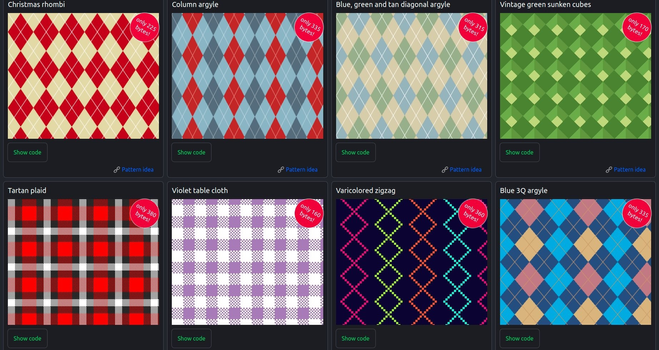
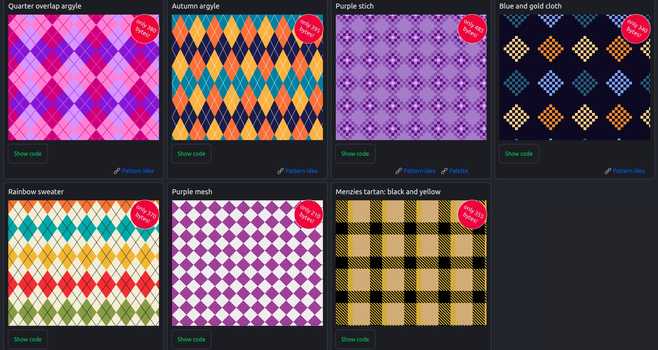
Minimal pure #CSS textile patterns on @codepen https://codepen.io/thebabydino/full/OJmpzya

Absolutely no images other than CSS gradients and they are all tiny! All of them are under 500 bytes minified, some of them well under!

#pattern #cssPattern #frontend #patterns #cssPatterns #cssGradient #coding #web #dev #webDev #webDevelopment #textile #code

Minimal pure CSS textile patterns

Created for the CodePen challenge. --- If the work I've been putting out since early 2012 has helped you in any way or you just like it and you wish ...

×

A cool little pure #CSS background #pattern on @codepen https://codepen.io/thebabydino/pen/YzvYqWL

Can you figure out how it was made before checking the code? 😼

#cssPattern #frontend #code #coding #web #dev #webDev #webDevelopment #cssGradient #cssPatterns

@anatudor @codepen I feel like I'm a bit late to this party but my answer: 3 gradients, just one less than yours. But no color-mixing. https://codepen.io/artlung/pen/oggJePp
Pure CSS pattern

[Inspiration](https://www.shutterstock.com/image-vector/seamless-geometric-pattern-color-ornament-2128663697). --- If the work I've been putting out ...

@artlung Psst, https://mastodon.social/@anatudor/112965908316021981

In short: that 1% gap between 69% and 70% may look good on your screen, but not necessarily on others.

Also, closest-side makes things easier:

radial-gradient(closest-side,
#0000 calc(100% - 1px), blue)

(cool idea to paint the outer part leaving middle transparent, btw)

`repeating-conic-gradient()` simplifies things too https://css-tricks.com/background-patterns-simplified-by-conic-gradients/#aa-diagonal-checkerboard

Background Patterns, Simplified by Conic Gradients | CSS-Tricks

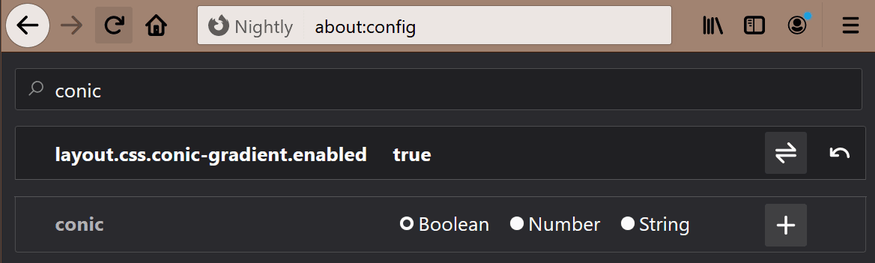
For those who have missed the big news, Firefox now supports conic gradients!

CSS-Tricks
@anatudor Intriguing tips I don’t use closest-side typically. As to the 69%/70% I usually would to 69%/0 as the color stops — added the 70% to get closer to your implemention’s spacing. That percent calc minus 1px feels funny but I’ll add to my toolkit. And the successive layers of gradient with parts transparent is my habit borne of doing CSS battles (I’ve done YT videos for all their daily targets) and probably also my brain still thinking like Photoshop 3.0 layers. Fun challenge!

@artlung The ~70% value is 100%/sqrt(2) with the default `farthest-corner`. For this default, when starting from the middle, the 100% is in the corners. On the edges, like needed here, it's 100%/sqrt(2). With `closest-side`, 100% is on the edges and the last stop is by default at 100%, so then I only need to specify the previous one at 100% - 1px to avoid ugly jagged edges as x%/0 would produce.

But I can see why leaving the default & just using % would be preferred for CSS Battle (fewer chars)

@anatudor I sometimes use keyword `circle` in radial gradients on background sizes that are not aspect ratio 1/1. I’ll be experimenting with farthest-corner and closest-side in nonsquare background sizes. Want to feel the effects!

Also: in CSS battles some targets with curves or angles are tough to 100% match from backend. Maybe because backend uses headless Chromium with 800x600 reference png; players code to are a 400x300 viewport; theory is half pixels/aliasing we can’t quite access.