#CircuitPython 10.3.0-alpha.2 released!
https://blog.adafruit.com/2026/05/15/circuitpython-10-3-0-alpha-2-released/
Highlights:
- Fix crashes on certain boards with integral displays.
- Adafruit MagTag 2025: improve display quality and support new display variant.
- Add CIRCUITPY_SDCARD_USB to settings.toml to control visibility of a mounted SD card on USB.
- Support float values in settings.toml.
- Report USB MSC drives as removable media to the host.
- Update ESP-IDF to v6.0.1.
- Fix audiomixer.Mixer on SAMx5x.
- STM: audio.AudioOut, using DAC.

#CircuitPython 10.2.1 released!

https://blog.adafruit.com/2026/05/12/circuitpython-10-2-1-released/

Highlights:
- Fix crashes on certain boards with integral displays.
- Adafruit MagTag 2025: improve display quality and support new display variant.

Spoke – Discover, Build, Interact Today

Spoke는 USB-MIDI, 키보드/마우스, 시리얼 장치 등으로 작동하는 터치 기반 컨트롤러를 쉽게 제작할 수 있는 오픈소스 하드웨어입니다. 27개의 입력과 커스터마이징 가능한 LED를 갖추었으며, 음악가, 교육자, 메이커 등 다양한 사용자가 맞춤형 인터랙티브 프로젝트를 구현할 수 있습니다. 별도의 소프트웨어 없이 웹 도구를 통해 간편하게 설정 가능하며, 다양한 전도성 재료를 활용해 터치 센서를 만들 수 있습니다. CircuitPython 펌웨어로 사용자 맞춤 코딩도 지원합니다.

https://www.spokeboard.com

#opensourcehardware #midicontroller #capacitivetouch #circuitpython #interactivecontroller

SPOKE | Discover, Build, Interact Today

Create interactive projects with SPOKE's touch-based controllers, ideal for musicians, educators, and Makers. Easy to use, customizable, and compatible with various conductive materials.

SPOKE
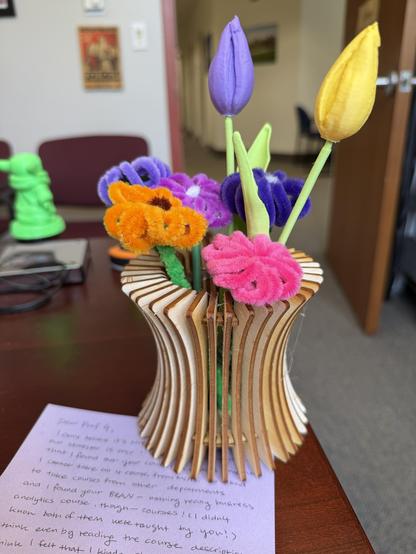
This was so kind. An exchange student who took both my #CircuitPython & my #SwiftUI apps courses made this for me. The flowers are 3D printed & the vase was laser cut. Lovely.
Need to use your laptop #keyboard on your phone? This #CircuitPython project forwards laptop keystrokes via a #microcontroller over BLE HID, turning your computer into a wireless keyboard. Check it out: https://github.com/urfdvw/keyboard-forward
GitHub - urfdvw/keyboard-forward: Forward your computer's keyboard using a BLE microcontroller as a HID bridge.

Forward your computer's keyboard using a BLE microcontroller as a HID bridge. - urfdvw/keyboard-forward

GitHub
#CircuitPython 10.3.0-alpha.1 released! https://blog.adafruit.com/2026/04/30/circuitpython-10-3-0-alpha-1-released/
Highlights of this release:
- Improve SD card USB presentation on macOS.
- Prefer 'foo.py' over 'foo/' package when importing, like CPython.
- Pin fixes.
- Enable gifio and storage in Zephyr port.

How to Re-initialize a Stuck #ESP32 (in #CircuitPython) -- something I needed when working on my particulate air quality #sensor but I'm sure I'll need it for many other projects:

https://shallowsky.com/blog/hardware/esp32-reconnect.html

#hardware #maker

How to Re-initialize a Stuck ESP32 (in CircuitPython) (Shallow Thoughts)

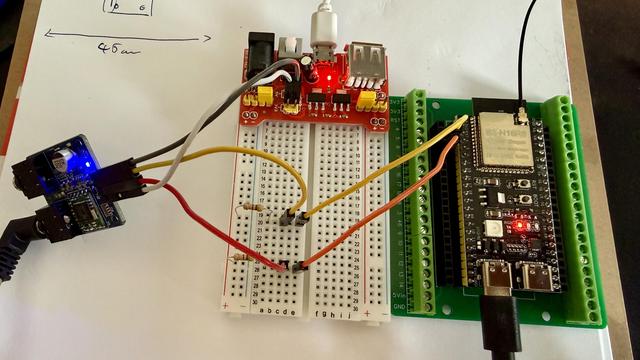
I am trying to get this TEA 5767 to work. This ESP32S3 does not have a onboard I2C so I read that I have to use 4.7kOhm resistors to create a pull-up.

The device is connected to 3.3v and the pins SCL,SDA are connected to 3.3V and the pins 4 and 5 on the board.

I use busio.I2C and can get a connection and lock on the I2C.

i2c.scan() does not find the 0x60 address but sometimes I get "'0x8', '0x9', '0xa', '0xb'"

[SOLVED]
#askfedi #esp32 #circuitpython

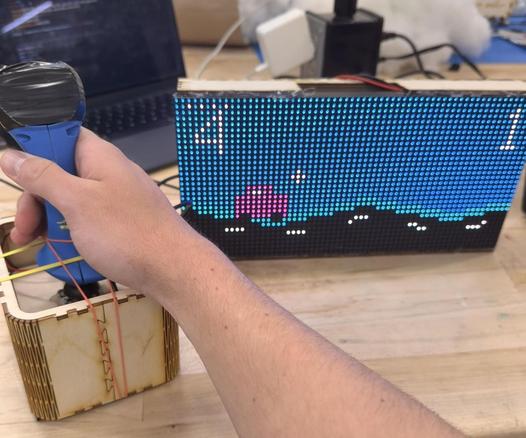
The top feature project on Autodesk Instructables today is by my Physical Computing students Noah Priest & Vinith Ayapilla! An accessible driving game they created for children with disabilities in the Campus School at Boston College. Built in #CircuitPython. Students present their accessible tech work today. Congrats Nick & Vin!
https://www.instructables.com/Accessible-Driving-Game-With-Haptic-Feedback-Sound
Accessible Driving Game With Haptic Feedback + Sounds

Accessible Driving Game With Haptic Feedback + Sounds: This project is a wireless joystick-controlled LED matrix driving game designed for use with the Boston College Campus School. The Campus School at Boston College serves students ages 3 to 22 with extensive support needs, including complex medical n…

Instructables
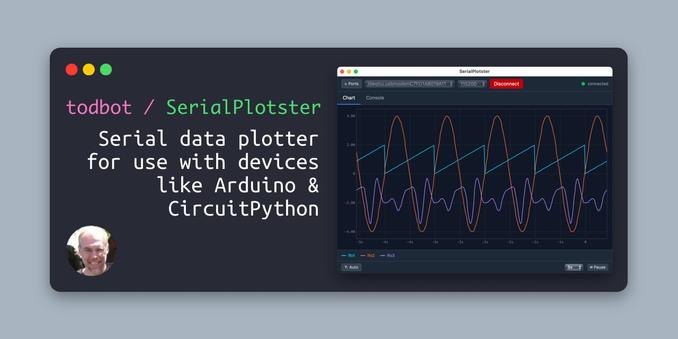
SerialPlotster! I miss the #Arduino serial plotter when doing #CircuitPython / #MicroPython, but it's too greedy with the serial port. I wanted a tiny stand-alone data plotter app, so I built one (w/claude's help). It's pretty flexible on data input and fast to launch https://github.com/todbot/SerialPlotster
GitHub - todbot/SerialPlotster: Serial data plotter for use with devices like Arduino & CircuitPython

Serial data plotter for use with devices like Arduino & CircuitPython - todbot/SerialPlotster

GitHub