 useidel
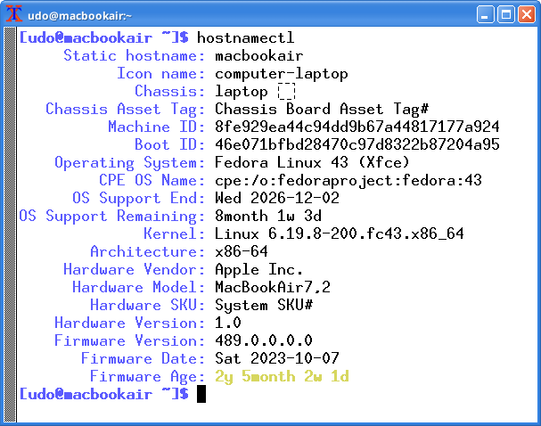
Not impressed by #chromeosflex so I installed native #linux on my #macbook - here with #windowsxp theme
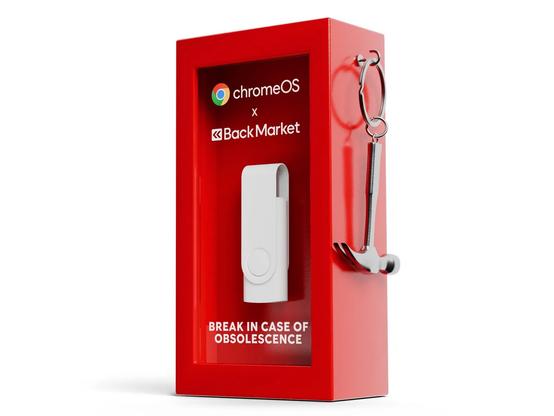
古いPCを蘇らせる3ドルの『ChromeOS Flex』入りUSBメモリを発表。Googleが3月30日より3000個限定で提供を開始!
https://fed.brid.gy/r/https://daily-gadget.net/mini-pc/110460/
How to Save Your Computer After the End of Windows 10 Sunset
Don’t throw away that Windows 10 PC! 💻🚫 Whether you’re a student, a teacher, or a business owner, you can save your "obsolete" hardware from the landfill. Our latest guide shows you exactly how to install ChromeOS Flex and Linux to breathe 10 years of new life into your machine. Beat forced obsolescence today! #SaveYourPC #LinuxMint #ChromeOSFlex #Sustainability #TechHacks #RightToRepair
https://borealtimes.org/save-your-computer-after-the-end-of-windows-10/
How to Save Your Computer After the End of Windows 10 Sunset
How to Save Your Computer After the End of Windows 10: Revive Obsolete Hardware
Not all is lost. While the 2025 “End of Life” for Windows 10 has left millions of users staring at a digital dead-end, your hardware is likely far from dead. In an era of forced obsolescence and scaled-economy tactics that prioritize new hardware sales over planetary health, learning to reclaim your machine is an act of both economic wisdom and environmental resistance. Here is your comprehensive guide to saving your “obsolete” computer.
The Myth of the “Broken” Computer
As we navigate 2026, the tech industry’s narrative is clear: if it doesn’t run Windows 11, it’s a security risk. Empirically, this is a half-truth. While it is true that an operating system without security patches is vulnerable, the physical machine—the screen, the processor, the keyboard—remains perfectly functional. The obsolescence is not in the silicon; it is in the software gatekeeping.
For schools, small businesses, and individuals, the cost of replacing entire fleets of computers is prohibitive. However, by shifting the paradigm from a Windows-centric view to a multi-OS perspective, we can extend the life of these devices by five to ten years. Below are the two most robust, industry-verified methods to revive your hardware.
Method 1: The Cloud Resurrection (ChromeOS Flex)
If your primary use for a computer involves the web—browsing, Google Workspace, streaming, or student research—ChromeOS Flex is the most efficient “salvage” tool available. It is a cloud-first operating system designed by Google specifically to run on older Windows and Mac hardware.
Why it works for old hardware:
ChromeOS Flex is incredibly lightweight. It removes the “bloatware” and heavy background processes that bog down Windows 10. Computers that take three minutes to boot into Windows often start in less than 20 seconds with Flex.
Step-by-Step Installation:
Method 2: The Desktop Powerhouse (Linux Mint / Zorin OS)
For users who need “real” desktop software—offline document editing, video tools, or local file management—Linux is the gold standard. Specifically, distributions like Linux Mint (XFCE Edition) or Zorin OS Lite are designed to look and feel almost identical to Windows, easing the learning curve for students and employees.
Why it works for schools:
Linux is not just free; it is secure by design. It doesn’t require the TPM 2.0 chips that Windows 11 demands. Furthermore, Linux distributions have “Long Term Support” (LTS) versions that provide free security updates for five years or more.
Step-by-Step Installation:
The Economic Impact: A New Life for Schools
Empirical studies in 2024 and 2025 showed that refurbishing a laptop with a lightweight OS costs approximately $0 in software and $30 in hardware (if an SSD upgrade is needed), compared to $600+ for a new Windows 11 machine. For a school with 100 computers, that is a saving of **$57,000**.
By choosing to repurpose rather than replace, institutions are actively fighting the “scale economy” logic that treats electronics as disposable tissue. This is the heart of the circular economy: keeping resources in use for as long as possible.
Final Thoughts: Ownership Over Subscription
The era of “forced upgrades” is a test of consumer sovereignty. By learning these simple installation steps, you reclaim ownership of the hardware you paid for. Your computer did not stop working on the day Microsoft ended support; it simply entered a new chapter. Whether you choose the cloud-simplicity of ChromeOS Flex or the local-power of Linux, you are making a choice for your wallet and the planet.
References and Further Reading
👉 Share your thoughts in the comments, and explore more insights on our Journal and Magazine. Please consider becoming a subscriber, thank you: https://borealtimes.org/subscriptions – Follow The Boreal Times on social media. Join the Oslo Meet by connecting experiences and uniting solutions: https://oslomeet.org
#ChromeOSFlex #LinuxTutorial #Windows10
Why HP’s new PC-in-a-keyboard would be a perfect fit for ChromeOS

Microsoft 初代Surface Go Pentium 4415Yモデルに「ChromeOS Flex」をインストールする方法について #SurfaceGo #ChromeOS #ChromeOSFlex
https://linuxallday.com/why-i-use-chrome-os-flex-macbook-pro/
Transforming legacy Haswell architecture into a secure, zero-latency cloud terminal: A technical analysis of longevity and performance.
#chrome #chromeOSFlex #linux #debian #openSource #foSS #productivity #mac #macOS #security #infoSec #privacy #tech #technology
Remote Deploying ChromeOS Flex From 4,000 Miles Away [VIDEO]

Récupérer un vieil ordinateur avec ChromeOS Flex : Récupérer un vieil ordinateur avec ChromeOS Flex : https://danielducharme.net/billets/2025-11-28_chromeos_flex.html
 デイリーガジェット
 Duna Press
 Boreal Times Newsroom
 Chrome Unboxed - The Latest Chrome OS News
 白川玖羽
白川玖羽 Jay
Jay 

 Daniel Ducharme