28 Reasons To Update to Adobe Photoshop CC 2021 From CS6

Ever since Photoshop moved to the subscription model, photographers who prefer to own perpetual licenses to software have steadfastly stuck with CS6. For those who didn't update, are there any features that they're missing out on?

Adobe Photoshop is one of the most widely known and used editing software applications on the planet today and there have been a multitude of updates and changes to the platform over the years to bring new and more powerful (and sometimes less so) features to its userbase.

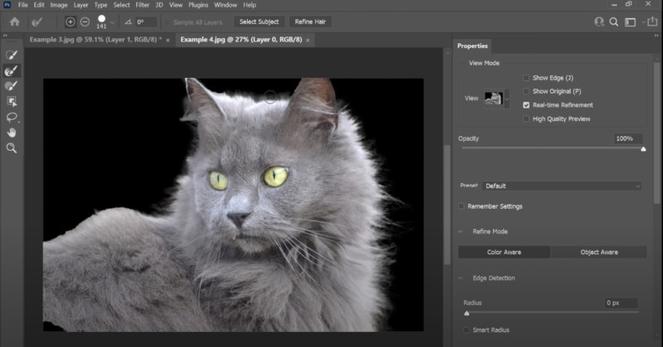
For long time users, there has been a hefty debate about which version is "the best" and if users should stick with CS6 version -- which was the last stand-alone update released by Adobe -- or if it is better to update to the subscription-based Creative Cloud and Photoshop CC2021. In the above video from PiXImperfect, Unmesh Dinda breaks down 28 reasons why it is finally time for those who have been holding on to CS6 to update their versions of Adobe Photoshop to the Creative Cloud 2021.

It has been over seven years since the release of CS6, and many updates and improvements have been released over that time. Still, a lot of creatives have held out because of Adobe's subscription model or because they feel CS6 is just much better as a true bare-bones Photoshop without all the bells and whistles. Regardless of why folks are still holding out, Dinda draws a comparison of everything, right from comparing each of the major features to Adobe's offerings, along with essential aspects like compatibility and performance across both versions.

Dinda says that his video will help photographers gain some perspective into not only how far technology has come in just those seven short years, but also whether all the new updates justify the cost of the subscription.

The video is broken into 4 sections to make it easier for viewers to sort and digest based on what is most important to them. First up is the list of "Adobe's Offerings" breaking down the add-ons and benefits to using one over the other.

The second section of the video details some of the nearly 30 features that were added since the last update to CS6 and compares both versions as best as he can. The third section of the video discusses compatibility -- specifically, how compatible the older CS6 is on newer, more powerful PC and Apple computers as it pertains to factors like 4K resolutions and, conversely, how CC2021 works on older machines that could be considered out of date.

The final topic that Dinda covers is the performance of both versions, and he carefully tests which version of the application can perform important core tasks the fastest, effectively leaving viewers with a much clearer picture of what each can do so they can decide what is the most important for their own workflow.

Do editors need all of the new features that Creative Cloud 2021 offers? Are they fine using a subscription model to get access to them? Or is it better for users to have a one-time payment and have a much more scaled-down application that (potentially) works much faster or smoother than the cloud-based modern version? Be sure to watch the entire video to discover which version provides the best results.

#industry #software #adobe #adobephotoshop #cc2021 #creativecloud #cs6 #photoshop #piximperfect #youtube

28 Reasons To Update to Adobe Photoshop CC 2021 From CS6

In seven years since CS6 was left behind, is there really a reason to update to the latest Photoshop?

Pero weon 🤦🏽‍♂️

RT @[email protected]

[#CC2021] Según antecedentes de Mercado Público, la @[email protected] realizó adquisiciones de insumos para la Convención Constituyente, entre ellos su servicio de conectividad digital, a sólo 2 días de su inicio.

🐦🔗: https://twitter.com/NYC_Prod/status/1412169926014607362

NYC on Twitter

“[#CC2021] Según antecedentes de Mercado Público, la @Segpres realizó adquisiciones de insumos para la Convención Constituyente, entre ellos su servicio de conectividad digital, a sólo 2 días de su inicio.”

Twitter

Infinite Retouching Panel Launches Compatibility for Apple M1 Devices

After months of research and development, Pratik Naik and the team at Infinite Tools have released an update to the Infinite Retouch Panel that supports Apple Silicon M1 versions of Adobe Photoshop.

This action and extension panel may not be the first to be released for the M1 system, but according to the company, it is the first one for retouchers made by people who know retouching.

"At the heart of it, you can select a group of layers and simply save them to use every time you hit 'Create,'" Naik says. "For retouching, we have a range of dodge and burn, frequency separation methods, and help layers -- to name a few -- to help you during each step of the process. Not to mention all of our helper layers to expedite the process further."

Naik also says that the user section allows for further customization and the ability to save more layer sets.

"And that’s just the start of the options," he continues. "The vision was to have a clean and beautiful panel that fits perfectly within Photoshop. It should work no matter what type of work you’re doing and what methods you use to retouch. It truly fits perfectly within any workflow in the most elegant package we could create."

The updated Infinite Retouch includes many bug fixes and updates to performance on top of the new support for Apple M1 devices. Some of these improvements include the ability to customize a tool and tool presets after a button is pressed, such as what method of frequency separation is desired and what layer is selected after it is run, and what tool Photoshop selects once it is finished.

It also adds the ability to create "user layers" which give users the ability to set up their own workflow instead of using the system default which includes user-created actions as well as the addition of 11 "help" layers that Naik and his team say are among the most used by the retouching industry professionals. All of the updates are supported in multiple languages including English, Spanish, German, and French with more being worked on for future updates.

Thanks to the M1 chipset, the new versions of these tools and panels promise to be much faster on Apple's latest devices. While editors will still have to manually complete retouching tasks, the layers and tools created in the actions are reportedly near-instantaneous when clicked. If so, this update alone is reason enough for retouchers who have to work on so many files that every single second counts when approaching a deadline.

The panel updates add improvements for faster exporting, improved image sharpening, and customizable grain tools. The M1 version of Infinite Retouch also adds the company's own "Holy Grain" to the mix, which is a collection of high-resolution film scans with various grains. For each film type, users can adjust the slider to decide on the grain size, amount, and individual lens artifacts or flaws to include for the most realistic look possible. You can read the full documentation of the available tools within the panel here

The Infinite Retouch Panel retails for $129 but was currently discounted by 25% at the time of publication. A "limited" free trial is also available for those who want to try the Panel before buying.

#news #postprocessing #actions #adobe #applesilicon #burn #cc2021 #db #dodge #frequenceyseparation #fs #m1 #panel #photoshop #retouchers #retouching #update #uxp

Infinite Retouching Panel Launches Compatibility for Apple M1 Devices

A retouching panel made by retouchers gets the M1 treatment.