 NERDS.xyz – Real Tech News for Real Nerds [Unofficial]
XPPen launches Pilot Pro editing console for DaVinci Resolve and Premiere Pro users
https://fed.brid.gy/r/https://nerds.xyz/2026/05/xppen-pilot-pro/
XPPen launches Pilot Pro editing console for DaVinci Resolve and Premiere Pro users
https://fed.brid.gy/r/https://nerds.xyz/2026/05/xppen-pilot-pro/
Split-Screen Media Replacement Title Sequence for Adobe Premiere — 10+ Styles, One Mogrt File
Download Fully Customizable Split-Screen Media Replacement Titles Created by Adobe Stock Contributor Ollomy as an After Effects MOGRT File For Use in Adobe Premiere
Sometimes, motion graphics have a visibility problem. Most title sequences look like they were picked from the same dropdown menu — same fonts, same fade, same forgettable exit. But a well-built split-screen title sequence does something different. It commands attention before a single word is spoken. It frames your footage as the story, not just the background. And when the template is built with real editorial intelligence, you feel it immediately.
That’s exactly what Adobe Stock contributor Ollomy has delivered with this customizable split-screen media replacement title sequence, available as an Adobe After Effects .mogrt file for direct use in Adobe Premiere (formerly Premiere Pro). This isn’t a novelty template. It’s a production-grade motion graphics asset with the structural depth that working editors and content creators actually need.
You can download the template from Adobe StockPlease note that this template requires Adobe Premiere or After Effects installed on your computer. Whether you use Mac or PC, the latest versions are available on the Adobe Creative Cloud website—take a look here.
Download customizable split-screen media replacement titles by Ollomy as Adobe After Effects (.MOGRT file) for use in Adobe Premiere. You can download the template from Adobe StockWhat Makes a Split-Screen Title Sequence Worth Using in Professional Production?
The answer comes down to what designers call Editorial Modularity — the capacity of a motion graphics asset to serve multiple production contexts without requiring a full redesign. Most templates fail this test. They work beautifully in the preview and fall apart the moment you try to adapt them to real footage or a different brand color.
Ollomy’s split-screen mogrt template passes that test because its architecture is built around flexibility from the ground up. The template runs at 1920 × 1080 px, which covers the broadcast and streaming standard for HD video production. It ships with over 10 distinct style variations, custom color controls, and full media replacement functionality — meaning your photos and video clips drop directly into the composition without leaving Premiere.
That last point matters more than people realize. Traditional After Effects workflows require you to open the project, swap assets, re-render, and export — a loop that eats time. This mogrt file eliminates that loop entirely. You stay in your editing timeline, make the swap, and move on.
Furthermore, the template includes both in and out animations, which means your title sequence has a complete temporal arc. It arrives with intention and exits cleanly. That kind of structural completeness is rarer than it should be.
Understanding the .mogrt File Format
Before going further, let’s define the format itself — because confusion here is common.
A .mogrt file (Motion Graphics Template) is a self-contained animation package designed primarily for Adobe Premiere. It packages complex graphic logic — keyframes, expressions, color variables, text controls — into a single file that non-After Effects users can operate directly from Premiere’s Essential Graphics panel.
In practical terms, this means a video editor doesn’t need to know After Effects to use an After Effects–authored design. They open the .mogrt in Premiere, adjust the exposed controls — color, text, media — and the animation runs exactly as the designer built it. No expressions to rewrite. No layers to dig through.
Think of a .mogrt as a compiled design artifact. The creative decisions are baked in, but the editorial variables are left open. It’s the design equivalent of a well-engineered component library — reusable, reliable, and adaptable without breaking the underlying structure.
Adobe After Effects authors these templates and exports them as .mogrt files. Premiere then consumes them. That workflow — design in After Effects, deploy in Premiere — is the professional standard for motion graphics delivery in video production pipelines.
The Split-Field Narrative Structure: Why Divided Screens Work
There’s a compositional principle at work in effective split-screen design that we can call the Split-Field Narrative Structure. This is the deliberate use of divided screen space to carry parallel visual information — two images, two moments, two ideas — that the viewer processes simultaneously rather than sequentially.
In title design, this structure does something psychologically interesting. It signals that the content to follow has scope. A divided frame implies more than one perspective. It suggests a story large enough to require multiple frames of reference. Even before your title text appears, the composition is already communicating editorial ambition.
Ollomy’s template leverages this principle intelligently. The split-screen layout isn’t just decorative — it’s functional. Each panel accepts independent media, so you can pair contrasting footage or create a visual rhythm between complementary images. The result is a title card that feels cinematic rather than presentational.
How Color Controls Extend the Split-Field Effect
Color is where many templates stop being useful. They look good in one palette and fight you in every other. This template’s custom color controls solve that problem directly. You can align the overlay tones, accent colors, and typographic elements to your brand or your visual language without touching a single expression or layer.
This is what designers mean by Style Surface Depth — the number of visually distinct outputs a single template can produce without structural changes. With 10+ style presets and full color control, the effective style surface of this mogrt is remarkably wide. One purchase, dozens of usable configurations.
Media Anchoring and Why It Elevates This Template Above Generic Options
Let’s talk about Media Anchoring — the design technique of tying motion graphics elements directly to replaceable footage or image inputs so the final result feels native, not overlaid.
Poorly designed templates treat media as decoration. The graphic sits on top of the footage like a sticker. The motion doesn’t respond to the image. The proportions feel arbitrary. Media Anchoring inverts that relationship. The graphic structure is built around the media slot, so whatever you insert feels integrated rather than applied.
Ollomy’s template applies this principle through its media replacement controls. The composition is structurally organized around the footage placeholders. When you insert your content, it fits because the template was designed to hold that content — not to merely display alongside it.
This distinction is subtle but immediately visible in the finished output. A media-anchored title sequence looks intentional. A template without it looks assembled.
Working With the In and Out Animations
The inclusion of both entry and exit animations reflects a principle of Temporal Symmetry — the idea that a title sequence should feel resolved, not truncated. The animation arrives with a defined motion path and departs with equal consideration. The viewer’s eye is guided in and guided out.
This matters especially in fast-paced editorial contexts like social media reels, corporate sober videos, or documentary openers, where the title sequence has a specific time budget. When in and out animations are designed as a matched pair, the sequence can be scaled in duration without losing its visual logic. It holds together for four seconds. It holds together at eight.
Who Should Use This Split-Screen Mogrt Template?
The honest answer is: anyone who produces video content professionally and values their time. But let’s be more specific, because this template’s feature set maps directly to certain production contexts.
Brand video editors will appreciate the color controls. Matching a template to a brand system is usually friction-heavy. Here, it’s a parameter adjustment.
Documentary and journalism editors will find the split-field layout particularly useful. Juxtaposing two images in the opening sequence is a classic editorial move, and this template executes it with motion design polish.
Social media content creators working at volume need assets that adapt fast. With 10+ styles and a single .mogrt file, they can rotate visual treatments without starting from scratch each time.
Freelance editors handling multiple clients across different industries will use this as a chameleon asset — one template that reads differently in every production context, depending on color and media choices.
Additionally, anyone building a reel or showreel will find that this template gives their work a professional entry point that sets an immediate visual standard.
Important Notes on Template Content and Licensing
A few technical points worth knowing before you download.
The sample text visible in the preview is for display purposes only. It’s there to demonstrate the typography and layout — it does not ship with the file. You’ll add your own headlines, labels, or copy directly in Premiere through the Essential Graphics panel.
Similarly, the photos and video footage shown in the Ollomy preview are not included in the download. These are placeholder assets that illustrate how the media replacement controls work. Your own footage goes in their place. This is standard practice for motion graphics templates and is worth stating clearly to avoid any confusion at the purchase stage.
The template is available through Adobe Stock, which means it sits inside the same licensing ecosystem as Adobe’s other stock assets. If you’re already on Creative Cloud, the integration is seamless.
A Personal Take: Why Split-Screen Title Design Deserves More Credit
Most editorial conversations about motion graphics focus on complexity — 3D effects, particle systems, intricate kinetic typography. But split-screen title design is quietly one of the most effective formats in the toolkit, precisely because of its restraint.
It does a lot with a little. Two panels, one cut, a text overlay, and clean animation timing — that’s the entire grammar. And yet, executed well, it produces a title sequence that holds attention, communicates context, and looks genuinely professional. Ollomy’s template understands this. It doesn’t try to do everything. It does its specific thing with precision.
The 10+ style variations are worth noting here, too, because they signal that the designer thought about this as a system rather than a single product. Each style is a variation on the same structural logic, which means switching between them doesn’t disrupt your workflow. You’re not learning a new template. You’re selecting a new expression of the same one.
That kind of systematic thinking in template design is rarer than it should be. Most After Effects templates are one idea executed once. This one is one idea executed twelve or more times, each time with enough differentiation to serve a distinct visual context. That’s the right way to build a motion graphics asset for professional use.
Split-Screen Mogrt Templates and the Future of Editorial Motion Design
The .mogrt format is still maturing as a deployment standard. Adobe continues to expand the Essential Graphics panel’s capabilities, and the gap between what After Effects can author and what Premiere can expose to editors is narrowing with every Creative Cloud update.
Looking ahead, expect split-screen title sequence templates to evolve in two directions. First, more responsive media controls — placeholders that intelligently crop, scale, and reframe footage based on the subject matter. Second, tighter integration with Adobe’s AI tools, where Firefly-generated imagery can be injected directly into mogrt media slots from within Premiere’s interface.
Ollomy’s template, as it currently stands, already positions itself well for that future. The media replacement architecture is the key capability that will remain relevant as AI asset generation matures. A template built around replaceable media slots is a template that can accept AI-generated content as naturally as it accepts footage from a camera card.
That’s not a small thing. It means this asset has a longer useful life than most motion graphics templates currently available.
You can download the template from Adobe StockFrequently Asked Questions
What is a .mogrt file, and how do I use it in Adobe Premiere?
A .mogrt file is a Motion Graphics Template created in Adobe After Effects. You use it in Adobe Premiere by importing it through the Essential Graphics panel. Once imported, you can adjust text, colors, and media replacements directly in Premiere without opening After Effects. It’s the most efficient way to deploy professional-grade motion graphics in a standard editing workflow.
Does this split-screen title sequence template work without After Effects?
Yes. Because it’s delivered as a .mogrt file, you only need Adobe Premiere to use it. After Effects was used by the designer to author the template, but you, as the end user, operate entirely within Adobe Premiere. This is the core advantage of the mogrt format for working editors.
What resolution does this mogrt template support?
The template is designed for 1920 × 1080 px — the standard HD resolution for broadcast, streaming, and most digital video delivery formats. This makes it compatible with the overwhelming majority of professional video production workflows.
Are the photos and videos in the preview included in the download?
No. The preview footage and images are for display purposes only. They demonstrate how the media replacement controls function. You insert your own photos or video clips into the designated media slots within Premiere’s Essential Graphics panel.
How many style variations does this split-screen .mogrt include?
The template includes more than 10 distinct style variations. Each style operates within the same structural framework but delivers a meaningfully different visual output, making the template adaptable across different production contexts and brand aesthetics.
Can I change the colors in this After Effects .mogrt template?
Yes. The template includes custom color controls exposed directly in Adobe Premiere. You can adjust overlay tones, accent colors, and other visual parameters without entering After Effects or editing any expressions or layers.
What types of video projects suit a split-screen title sequence?
Split-screen title sequences work across a wide range of formats: brand films, documentary openers, social media content, showreels, corporate videos, event coverage, and editorial journalism. The format’s versatility comes from its structural neutrality — it reads as cinematic or commercial depending on the footage and color treatment you apply.
Where can I download this split-screen mogrt template?
This template is available from Adobe Stock contributor Ollomy through the Adobe Stock marketplace. It integrates directly into Adobe Creative Cloud workflows and is accessible through the standard Adobe Stock licensing system.
What is the difference between a split-screen title and a standard lower third?
A lower third sits at the bottom of the frame and labels an on-screen subject. A split-screen title sequence occupies a significant portion or the entirety of the frame, using divided panels to carry both media and typography simultaneously. It functions as an opening title card rather than an identifier overlay. The two formats serve different editorial purposes at different points in a video production.
Does this template include both in and out animations?
Yes. The template includes both entry and exit animations, giving the title sequence a complete temporal arc. This is essential for professional use, where a title card must arrive and depart cleanly within a specific duration without appearing to cut abruptly or fade awkwardly.
Check out other templates created by professionals for professionals.
#AdobePremierePro #AdobeStock #AfterEffects #animation #openingTitle #opningTitles #splitScreen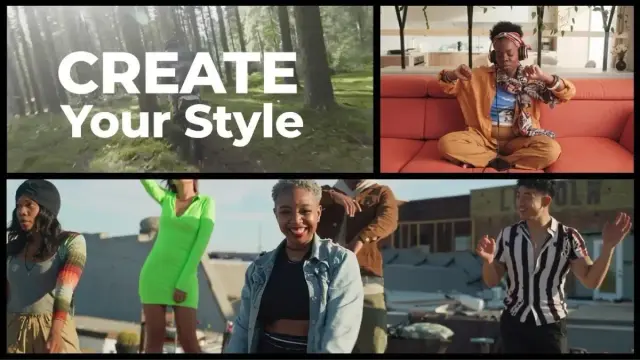
Apples nächster Coup: MotionVFX-Übernahme stärkt das „Creator Studio“
CUPERTINO / STETTIN – Apple setzt seine Einkaufstour im Profi-Sektor fort. Wie der polnische Spezialist für visuelle Effekte, MotionVFX, heute offiziell bestätigte, […]
#Uncategorized #AdobePremierePro #Apple #CreatorStudio #DaVinciResolve #FinalCutPro #MotionVFX #Videobearbeitung
Klikasz i gotowe. Adobe Premiere dostaje AI, które naprawdę oszczędza czas (i nerwy)
Koniec z mozolnym obrysowywaniem obiektów klatka po klatce. Adobe właśnie wytoczyło ciężkie działa w walce z najbardziej czasochłonnymi elementami montażu wideo.
Nowa aktualizacja Premiere Pro i After Effects wprowadza narzędzia oparte na sztucznej inteligencji, które sprawiają, że maskowanie – dotychczasowa zmora montażystów – staje się dziecinnie proste. I co najważniejsze: wszystko dzieje się lokalnie na Twoim komputerze.
AI Object Mask: magiczna różdżka dla wideo
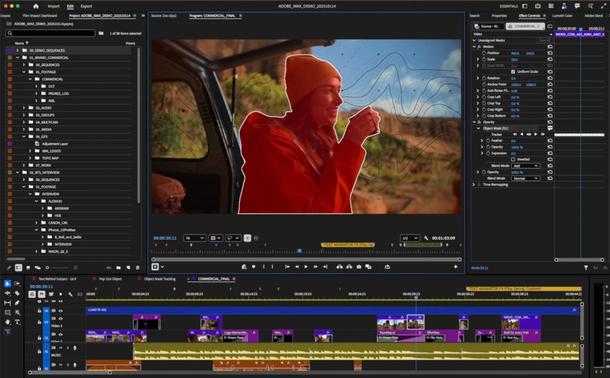
Gwiazdą tej aktualizacji w Premiere Pro jest funkcja AI Object Mask. Działa to dokładnie tak, jak byśmy sobie wymarzyli w 2026 roku. Wystarczy najechać kursorem na osobę lub przedmiot w klipie i kliknąć. Program automatycznie rozpoznaje kształt, tworzy maskę i – co kluczowe – śledzi obiekt w ruchu.
Oczywiście, automat to tylko początek – maskę można dowolnie korygować i skalować, ale punkt wyjścia jest imponująco precyzyjny. Adobe podkreśla tutaj dwa niezwykle ważne aspekty:
Prędkość ma znaczenie
To nie koniec zmian w maskowaniu. Narzędzie Shape Mask (maski kształtu) przeszło gruntowny lifting. Po pierwsze, dostęp do podstawowych kształtów (elipsa, prostokąt, pióro) mamy teraz bezpośrednio z paska narzędzi. Po drugie, i znacznie ważniejsze: śledzenie obiektów jest teraz 20 razy szybsze niż w poprzednich wersjach. Koniec z wpatrywaniem się w pasek postępu przy prostym rozmywaniu twarzy czy tablicy rejestracyjnej.
Adobe zacieśnia też więzy w swoim ekosystemie. Do Premiere Pro łatwiej zaimportujemy teraz media z Firefly Boards (cyfrowego płótna AI od Adobe), a biblioteka Adobe Stock została w pełni zintegrowana z interfejsem programu.
After Effects polubił się z Illustratorem
Dobre wieści płyną też dla twórców motion designu. After Effects w końcu otrzymał natywną obsługę importu plików SVG, co drastycznie uprości pracę z wektorami przenoszonymi z Illustratora.
Dodatkowo, w AE pojawiła się możliwość budowania grafiki i fotorealistycznych obiektów przy użyciu trójwymiarowych siatek parametrycznych (3D parametric meshes). Kostki, sfery, walce, stożki czy torusty można teraz generować i animować bezpośrednio wewnątrz programu, bez konieczności sięgania po zewnętrzne softy 3D do prostych zadań.
Adobe Premiere trafia na iPhone’a. Potężny edytor wideo jest darmowy, ale z pewnymi „ale”
#AdobeFirefly #AdobePremierePro #AfterEffects #AIObjectMask #maskowanieAI #montażWideo #news #onDeviceAI



Add Rolling Credits to your Film with this Adobe Premiere Pro Template
Your Ultimate Guide to the Perfect Premiere Pro Film Credits Roll Template
The final moments of a film are powerful. As the story concludes, the credits begin to roll, giving the audience a moment to breathe and reflect. This closing sequence is more than just a list of names; it’s a final piece of storytelling. It honors the immense collaborative effort behind the project. Consequently, getting this part right is crucial. A clean, professionally designed Premiere Pro film credits roll template ensures your project ends with the elegance and respect it deserves. It provides a polished conclusion that properly acknowledges every contributor.
This guide focuses on a specific, high-quality template created by Adobe Stock contributor StevePFX. We will explore its features and demonstrate how it can dramatically simplify your post-production process. Moreover, we will discuss why a dedicated template is a superior choice for filmmakers who value both efficiency and artistry.
Download the template from Adobe StockPlease note that this customizable film template requires Adobe Premiere Pro installed on your computer. Whether you use Mac or PC, the latest version is available on the Adobe Creative Cloud website—take a look here.
This film credits roll template by StevePFX is easy to use and fully customizable in Adobe Premiere Pro. Download the template from Adobe StockWhy Does a High-Quality Credits Roll Matter?
Have you ever considered the true function of a film’s end credits? They serve as the final handshake with your audience. A clunky or poorly designed credits sequence can leave a sour final impression. Conversely, a smooth, legible, and well-paced roll feels professional. It communicates respect for both the audience and the production team. This is precisely where a specialized Premiere Pro film credits roll template shows its value.
This template from StevePFX provides a classic, cinematic feel with its simple centered text rolling over a black background. Its timeless design ensures it fits seamlessly into any genre, from a gritty documentary to a polished narrative feature. It removes the technical headache of creating this effect from scratch. This allows you to focus on ensuring every name is spelled correctly and every contribution is honored.
Exploring the StevePFX Template Features
This template is built for simplicity and effectiveness. It packs several key features that make it an excellent choice for editors.
How to Integrate This Premiere Pro Film Credits Roll Template
Using this template is remarkably straightforward. It transforms a potentially tedious task into a quick and satisfying part of your editing workflow. You can achieve a professional result in just a few simple steps.
First, you import the template file directly into your Premiere Pro project bin. Next, you locate the main credits sequence and open it in your timeline. From there, you will see the layers of sample text. You simply click on each text block and replace the content with your own credits. The Essential Graphics panel in Premiere Pro gives you all the controls to adjust the font and style. Finally, you can easily adjust the speed of the roll by changing the duration of the clip on your timeline. A longer clip creates a slower, more deliberate roll, while a shorter one increases the speed.
A Final Thought on Professionalism
Ultimately, every choice you make in filmmaking reflects on the final product. The closing credits are your last opportunity to communicate quality and attention to detail. A tool like the Premiere Pro film credits roll template by StevePFX is more than a time-saver. It is an investment in the professionalism of your film. Furthermore, it ensures that the final moments are as compelling and well-crafted as the story that preceded them. It is an essential tool for any filmmaker serious about their craft.
Download the template from Adobe StockCheck out other amazing templates here at WE AND THE COLOR.
Subscribe to our newsletter!
[newsletter_form type=”minimal”]#AdobePremiere #AdobePremierePro #credits #filmCredits #rollingCredits

📩 Premiere Rush終了のお知らせ
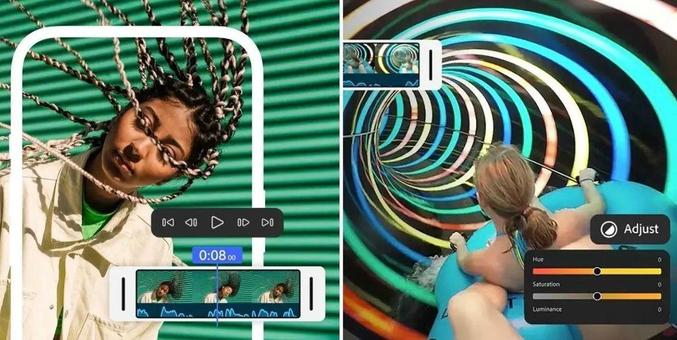
Premiere Rush は2026年9月30日をもちまして提供を終了させていただくこととなりましたので、ご案内申し上げます。長らくのご利用に心より感謝申し上げます。
.
.
やっぱ全く使われなかったとかが記録されてたのかな。
一般人が動画編集アプリを使うにあたって大事なのはデフォのキャプション装飾 (ざぶとんと呼んでる) 。それが驚くほど可愛くなかった。
今年、スマホde動画編集を模索したところ、そこがCapCutとCanvaに惨敗してた。(総合的にやっぱパソコンで編集が1番いいと判った)
Adobeの中にある装飾センスは「Sports News! ⚾️」みたいなセンス、「ビビッドフワちゃん! ★ ★ ★」みたいなセンスばかりで、欲しい「パステル花言葉」みたいなセンスが皆無。これ分かるかな。
まだ生き続けるPhotoshop Expressのスタンプもそんな感じ。
#premiererush #premiere #premierepro #adobepremierepro #adobe #capcut #canva #mac
 WE AND THE COLOR
 NetGuide.io
 Agnieszka Serafinowicz
 Unofficial PetaPixel Bot
 Platform Training
 Mela News
 Tundie