 Erik C. Thauvin
Vaadin 25.2: Build UIs in plain language, and call the browser from Java
 Giovanni's (@
a model where you can mark regions of an image to remove and the model imagines what should fill the space. The released model required PyTorch and NVIDIA CUDA, but since it described itself as 0.2B I decided to try and get it running using WebGPU in a browser. TL;DR: I got it working, and you can try the demo at simonw.github.io/moebius-web/. Read on for the details.
Tinywind — Pixel Pirate Sailing Game
Outsail the Royal Navy in your browser. Real sailing physics, 5-minute voyages, 30 historical treasures to recover. Free to play.

 El Proxy
📰 «Loxik, cinco divertidos juegos diarios en español»
🔗 https://proxy.jesusysustics.com/2026/06/30884/ Loxik: una colección de juegos diarios de palabras y lógica, en español https://www.microsiervos.com/archivo/juegos-y-diversion/loxik-juegos-palabras-logica-espanol.html
🔗 https://proxy.jesusysustics.com/2026/06/30884/ Loxik: una colección de juegos diarios de palabras y lógica, en español https://www.microsiervos.com/archivo/juegos-y-diversion/loxik-juegos-palabras-logica-espanol.html
────────────────────
Por si no tuviéramos suficientes juegos diarios, llega Loxik para añadir cinco nuevas opciones adictivas y en español. No inventa nada nuevo sino que son juegos ya clásicos diosponibles en inglés que le dan un girito al Wordle (en algunos casos, un giro literal) que añade variedad y los acerca a público hispanohablante.
Todos los juegos son bastante intuitivos, pero por si no pillamos la dinámica tenemos sus normas al iniciarnos por primera vez. También cuenta con un tablero de puntuaciones para comparar tus resultados con los de otros participantes y un calendario para ver los acertijos de días anteriores. Y, por supuesto, funciona perfectamente tanto en el navegador de escritorio como de móvil.
#️⃣ #colección #diario #didáctico #educativo #juego #navegadorWeb #teléfonoMóvil #webapp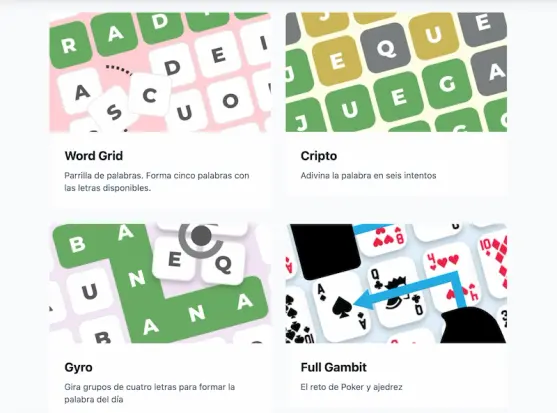
Loxik, cinco divertidos juegos diarios en español
Por si no tuviéramos suficientes juegos diarios, llega Loxik para añadir cinco nuevas opciones adictivas y en español. No inventa nada nuevo sino que son juegos ya clásicos diosponibles en inglés que le dan un girito al Wordle (en algunos casos, un giro literal) que añade variedad y los acerca a público hispanohablante.
 Espen Klem
 Petrikas
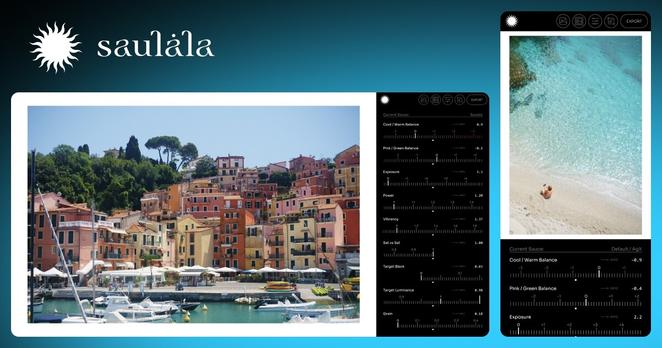
New #Saulala Beta update!
- Fixed a Pixel .DNG bug in the pipeline
- Auto-cropping for DNG-lens-distortion-corrected images
- New "High Purity" viewport mode might help you detect potential issues related to high-purity areas.
#photography #donationware #pwa #webapp
Slightly more info on the forum:
https://saulala.discourse.group/t/saulala-pwa-beta-updates-main-thread/73/last
(Saulala is a web-app, made for developing camera-native (raw) files using AgX)
Run it: https://app.saulala.com
 Linux Easy
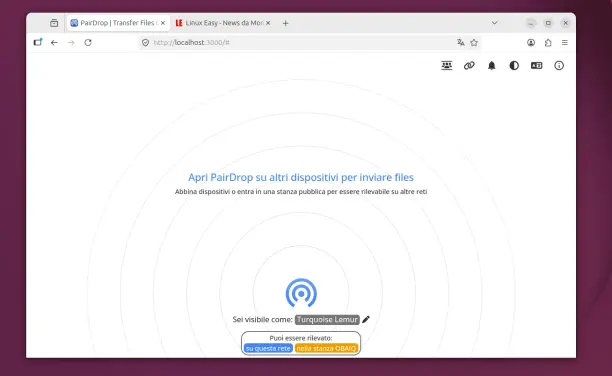
Con PairDrop puoi inviare file, immagini e testo dal browser senza installare app complicate. Perfetto per chi usa Linux e dispositivi misti. #Linux #FileSharing #OpenSource #WebApp #P2P
I thought about this the other day, and I thought it’d be fun to share this internal tool I made over a decade ago to aid with exploring options for Medium’s typographical redesign.
It’s called Fontificator. You can play with Fontificator here (desktop browsers only), or watch the likely confusing video below:
The motivation for building Fontificator came from two observations:
font previews on type foundry sites were generally too limited to get a real sense of how a certain typeface feels, and it was best to see a font in situ,
often an extremely tiny nuance – like adding some letter spacing, or messing with line height – was what separated something that was promising from something that seemed very far from working.
With Fontificator, I was aiming at this Doug Engelbart-esque notion of one hand on the keyboard + one hand on the mouse, and the UI where it was only necessary to point to an element, and the keys under your other hand would start working immediately – no clicking needed:
F and G to change the font,
– and + for font size,
← and → for letter spacing,
↑ and ↓ for line height,
< and > for opacity (for all the above you can hold Shift for bigger moves),
and, there are a few more shortcuts you can see at the top.
This way, we could move really, really fast. To accommodate that, Fontificator always tried to keep the current item under the cursor by counter-adjusting scroll position as needed.
On top of it all, a few more shortcuts:
⇥ and ⇧⇥ move very quickly between different types of stories so you can preview that,
Space compares to the original/current version,
1–9 allow you to switch to different “slots” so you can have various presets ready to compare,
Esc hides the toolbar for maximum immersion,
⇧R resets.
You can also edit any text if you are so inclined, and also drag in any font file from your computer onto a paragraph – then that font becomes part of the F/G stack. (Bernino Sans and Freight Text were the starting fonts before the redesign.) On the left, you can also see a naïve mobile preview – there was also more sophisticated on-smartphone preview, but I removed it from this restored version.
Battery Tester Gets An App Upgrade https://hackaday.com/2026/06/18/battery-tester-gets-an-app-upgrade/
#MiscHacks #Battery #Batterytester #Webapp
#MiscHacks #Battery #Batterytester #Webapp
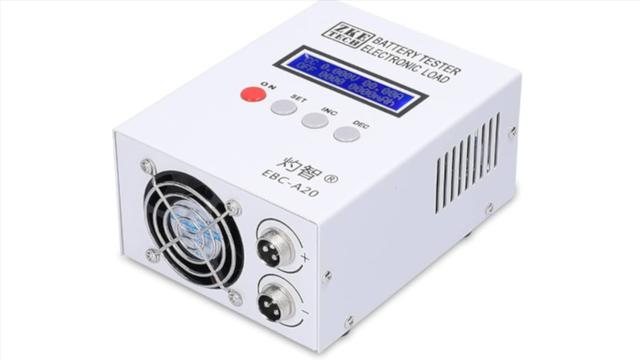
Battery Tester Gets An App Upgrade
https://fed.brid.gy/r/https://hackaday.com/2026/06/18/battery-tester-gets-an-app-upgrade/
