@carapace Some of the most interesting ideas I've seen are in the Ploan9 OS and specifically its 9P protocol:

https://en.wikipedia.org/wiki/Plan_9_from_Bell_Labs

https://en.wikipedia.org/wiki/9P_(protocol)

That includes a /webfs concept where remote networked resources are accessible via filesystem semantics. That's a concept that's been adopted to some extent on other operating systems, notably Sun Solaris and its ability to automount NFS shares (something I've seen ... abused rather heavily in some shops), and in some Linux filesystems, largely using FUSE (Filesystem in USErspace) https://en.wikipedia.org/wiki/Filesystem_in_Userspace.

I'll note that when you're on the systems side of things it's quite helpful to have canonical and invariant names for data resources. Mixing and matching this with a documents-oriented filesystem might not lead to happy places.

#Filesystems #webfs #docfs

5/end/

Plan 9 from Bell Labs - Wikipedia

@carapace One notion I'd arrived at was that in the case of catalogue access, search is identity.

That is, a search which turns up a single record or document is definitionally an identity for that document.

That identity might be a standard assigned value, such as an ISBN, DOI, or Library of Congress call number, or it could be some distinct set of parameters, say, a combination of author, title, and publication date, which return a single record.

Note that a search which is an identity in one archive or at one point in time might not be an identity for another: an identity returns a single record, whereas a search might return several, one, or no records.

One notion I have is of using a filesystem-like syntax for search, so that, say, /docfs/au:steinbeck/ti:grapes might turn up records related to John Steinbeck's Grapes of Wrath. Here, /docfs is a virtual filesystem which provides an interface into the documents filesystem. Specific assigned identifiers might be referenced as /docfs/id:isbn:0330881043 (again: Steinbeck's Grapes of Wrath).

#Filesystems #webfs #docfs

4/

@carapace I've put a fair bit of thought into how a document-oriented filesystem (in the #PaulOtlet sense of "document") might function. To the extent I've thought this out, it's somewhat modelled on how a physical library is organised: there is the actual storage ("stacks"), and there's the interface to that storage, ("catalogue").

A document is any contained information. It might be a text, image, sound, video, multimedia, or data record, or combination of these.

The stacks contain works. The catalogue provides ways of accessing those works, and any given work might appear in or be accessed through the catalogue in any number of different ways.

A huge challenge for any such metadata-based system is that metadata itself requires design and creation, and this remains hugely cumbersome for data presently. There's some useful metadata associated with filesystems, though much of that is at a systems rather than document level, and some metadata (say, file creation / modify / access timestamps) bears little if any relation to the underlying document. Tracking document-related metadata would be a huge step forward.

Relying on extant and often external metadata would also be useful. Library of Congress, OCLC, IMDB, CDDB, DOI, ISBN, and related records would be quite useful for classifying existing works. Some set of useful standards for other common records (personal computer files, system logs, receipts, memos, correspondence, online interactions) might also be useful. The more that metadata creation can be both automated and made useful (and no, "New Document" is not a useful title) the better.

#Filesystems #webfs #docfs

3/

@carapace The problems with replacing the classic hierarchical filesystem are much the same as swapping out any other piece of well-established standards:

  • You've got to have an exceptionally compelling alternative.

  • There's a hell of a lot of legacy that relies on extant systems.

  • Agreeing on a specific replacement (or set of replacements) creates its own huge coordination problem.

  • I'd be interested in hearing how you're addressing each of those points.

    #Filesystems #webfs #docfs

    2/

    @carapace One question I'd toss out is: where did the notion of hierarchical filesystems first emerge?

    I'm familiar with Linux / Unix, a whole slew of PC-based systems (DOS, CMS, Classic Mac), as well as MVS (TSO/ISPF) and VMS. Linux is certainly where I feel most at home.

    IBM mainframes (MVS) had a one-level hierarchy, effectively you could create any number of folders at the root filesystem level, and place files in those, but nested files weren't A Thing. I suspect that in this regard, IBM was trying to emulate paper-based filing systems where cabinets held folder and folders individual records, but nesting was distinctly limited.

    Nested filesystems may date to Multics if GPT is to be trusted. Wikipedia supports this: https://en.wikipedia.org/wiki/File_system

    #Filesystems #webfs #docfs

    1/

    File system - Wikipedia

    @RussSharek Ayup. I'm headed that way.

    One of my recent finds that's been game-changing has been "Save as ePub", a feature of the #Einkbro browser (Android). That's a fork of the FOSS Browser, which might have similar functionality.

    Effectively, you can save a Web article as an ePub, or append it to an existing ePub, which means you can effectively "build your own book" of relevant content (a project, good articles over a specific time period, work-related project, stuff to share with someone else). For tablets / mobile devices this is about the best option I've found, preferable to saving PDFs, with the one exception that most metadata concerning the saved content is lost. I'm not sure the source URL is kept, the date is certainly lost.

    The #webfs and #docfs tags in my first toot above refer to a project I've been kicking around for managing documents and articles, both Web and otherwise. I'm tending strongly toward a plain-text baseline format (with markup languages such as Markdown, LaTeX, djot, etc., being ways of extending basic structure and capabilities), also with extensive bibliographic metadata. It's all pretty much vapourware but it's fun to think about.

    So, Pocket, the article-archival tool that keeps getting worse the more you use it, has just become immeasurably worse.

    I've reverted from version 8.6.x to no, not 8.5, not 8.4, not 8.2, but 8.1.1.0 from freaking February of this year to revert these completely fucking brain-dead changes.

    The TL;DR: link is https://www.apkmirror.com/apk/mozilla-corporation/pocket/pocket-8-1-0-0-release/

    That's what you want to install and freeze on until Pocket catches a motherfucking clue.

    I've had a long an unhappy relationship with this feature and app. Its sole claims to my continued use are that it holds nearly 5 GB of content hostage, and that it, unbelievably, seems to be the best of what is an immensely shitty application space. See my now-six-year-old rant virtually all of which remains valid: https://web.archive.org/web/20190512092903/https://old.reddit.com/r/dredmorbius/comments/5x2sfx/pocket_it_gets_worse_the_more_you_use_it/#

    Most recently, Pocket has lost two features:

    • A "page flip" mode, which though itself hugely flawed, is better than scrolling through articles, especially on e-ink devices.

    • The ability to view all articles either in the (hugely preferable, very useful) #ReadabilityJS view, or in-app in a "web view". The latter now revert to your device's default Web Browser app on mobile devices.

    The problem with that latter is that the task of annotating and tagging articles (my principle remaining justification for Pocket) is made vastly more tedious --- and it's already more than adequately tedious in previous Pocket versions. To the point it's not even worthwhile.

    Fortunately, I was able to hunt down a prior version of the app (using the APKMirror app), and I will not be upgrading Pocket beyond the most recent version I can find which still supports both Page Flip and Web View modes, as noted above 8.1.1. from 17 February 2023. (Few if any of Pocket's "improvements" over the past five years have had any value to me whatsoever, so this is little loss.)

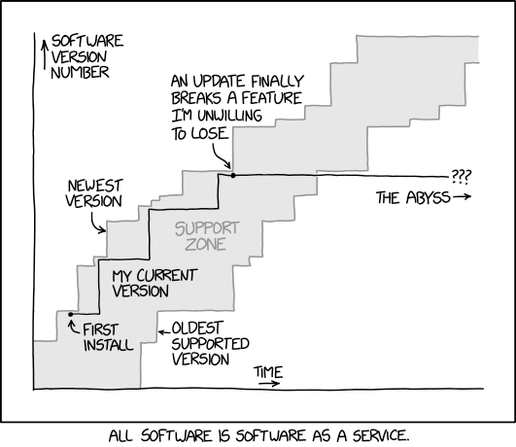
    There is of course a Relevant xkcd: "Software Updates":

    https://xkcd.com/2224/

    I would so like to see a useful document-management solution for tablets and e-ink devices with the ability to managed both offline and online (Web-based) content.

    Boosts and re-sharing this on other platforms is strongly encouraged.

    Edits: I'm updating this toot as I'm finding out more. In particular, what version(s) of Pocket are NOT affected by these changes is not yet clear.

    #Pocket #GetPocket #MozillaPocket #Mozilla #ApkMirror #EInk #DocumentManagement #xkcd #xkcd2224 #kfc #webfs #docfs
    Pocket: Save. Read. Grow. 8.1.0.0 APK Download by Mozilla Corporation - APKMirror

    Pocket: Save. Read. Grow. 8.1.0.0 APK Download by Mozilla Corporation - APKMirror Free and safe Android APK downloads

    APKMirror

    Whitespace in filenames is a major category error IMO.

    OTOH, filenames themselves (and filesystems as presently incarnated) are also grossly insufficient for many needs. It's interesting to note, for example, that on Android (and possibly iOS), databases (usually sqlite) have emerged as the de-facto default persistent data storage mechanism, even for content which would normally be held on a filesystem.

    I've long been looking at questions such as what a document-oriented filesysem (#docFS) or the World Wide Web as fileystem accessible (#webFS) might look like.

    For documents, I've generally arrived at a naming standard which uses underbars (_) to separate elements, hyphens (-) for standard whitespace, and double dashes (--) to indicate punctuated / multiple element (e.g., multiple authors, or a subtitle following a colon or dash). Permitted characters are otherwise 7-bit ASCII alphanumeric ([A-Za-z0-9], with dot as a file extension only, and possibly parentheses.

    So:

    Author-One--Author-Two_Title--Subtitle_YYYY.filetype

    That might have a publisher or journal title added (additional underbar-delimited element after the title(s). Additional contributors (e.g., editors, translator) might be mentioned. And it's possible some identifier (ISBN, OCLC, DOI, LoC call number) might be added, though those are supplemental.

    The idea isn't to fully and completely or precisely represent all aspects of a document or work, but to usefully do so. So yes, that means that foreign charactersets aren't presented, that full author lists aren't included (for scientific paper these can number in the tens to hundreds), etc. But enough to find the work reasonably within a corpus through a directory listing.

    Yeah, I'm familiar with Calibre, Zotero etc., and should really get more familiar with them. But they're clunky enough and not sufficiently universally available (e.g., on Android, where most of my documents live these days, via an e-book reader) that I'm not optimistic they're really a solution.

    (Hoisted from a limited share.)

    #DocumentManagement #Whitespace #OnTheNamingOfCats #OnTheNamingOfFiles #Whatever #SameThing #RockyHorror #MacavitysNotHere #Bombalurina #Effanineffable #OldPossum #TSEliot #DOS #PaulOtlet #Mundaneum

    @alcinnz So, effectively a filetype:application association manager. file(1) and magic(5) on steroids.

    I am thinking of managing metadata associated with documents, works (multiple forms / manifestations of a single document), projects and workflows (involving various records, etc), and the overall document lifecycle: creation, acquisition, cataloguing, use, adaptation, distribution, destruction.

    That's what I've lumped under my #webfs and #docfs concepts, along with #kfc (Krell Functional/Fucking Context).

    @billjanssen Thanks again. Some of that looks ... closer. Cone Tree and Perspective Wall most so, though still not quite there.

    Are you associated with this research/develpment, or just an interested party?

    One thing I've thought about considerably as I'm increasingly using e-book readers and being frustrated by their own document management / organisational limitations, is how physical library space maps, with multiple dimensional convulutions, to stored data:

    There's a mix of physical and logical organisations:

    character -> word -> line -> page - > signature -> book

    character -> word -> sentence -> paragraph -> chapter -> book

    Shelf -> bookcase -> aisle -> floor -> building

    A book (nominally: 250 pages) is about 125k words.

    About 32 books fit to a shelf, 8 shelves to a bookcase, say, 16 bookcases to an aisle, 16 aisles to a floor. (I'm biasing to powers-of-two numbers here)

    That's 256 books per case, 4,096 per aisle, 65,536 per floor.

    (A fairly large community library is on the order of 300k books, or about 4 floors as I've defined them. A large university library, 122 such floors. Based on my experience, I may be underspecifying density, and would be interested in actual data.)

    And so on.

    The point I'm trying to make though isn't about density but of navigation of that space. The reader/researcher can go to a specific book, or to a shelf (closely related works), an aisle, a floor, etc. There's a different level of aggregation at each point in the scale, and for topically-organised (e.g., Library of Congress classification or Dewey Decimal), a specific region corresponds largely with a specific subject grouping.

    On my e-book reader, I'm effectively limited to only one level of aggregation: a sequential shelf scan of books. With storage exceeding several TB, and an average book size of ~1--5 MB, that's effectively a fairly large community library worth of potential documents which can be carried in one's hand or satchel, but for which the organisational capabilities are ... exceedingly limited.

    This remains a major frustration of mine.

    #KFC #DocFS #WebFS #Libraries #DocumentManagement