Neuer Artikel auf iPhone-Blog.ch veröffentlicht:
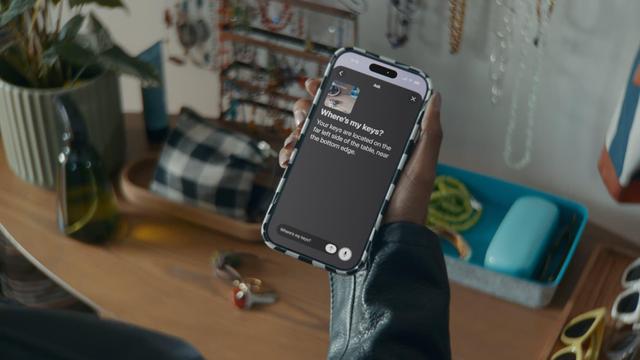
Kommende iOS 27 Bedienungshilfen: iPhone mit natürlicher Sprache bedienen, Untertitel in eigenen Videos, neu im Apple Store MagSafe Hikawa Grip & Stand

Viele der heute gezeigten Funktionen basieren auf Apple Intelligence und setzen somit ein Gerät voraus, welches Apples KI unte

Artikel lesen: https://www.iphone-blog.ch/2026/05/19/kommende-ios-27-bedienungshilfen-iphone-mit-natuerlicher-sprache-bedienen-untertitel-in-eigenen-videos-neu-im-apple-store-magsafe-hikawa-grip-stand/

#Apple #AppleIntelligence #Bedienungshilfe #HikawaGrip&Stand #Untertitel #VoiceOver

If you are using MacOS, iOS, or iPadOS with refreshable braille, did you know you can read BRF files directly without having to transfer them to your braille display? First, invoke Braille Access with VO-shift-y (from a qwerty keyboard) or chord dots 7-8 from your braille display. Note that braille input is expected even on a qwerty keyboard at this point with f, d, s as dots 1, 2, 3, and j, k, l, as dots 4, 5, and 6. Then, navigate down to and activate “BRF Files.” Now, activate the “New” option to create a temporary file you can delete later. Give it a name, press enter, and type “Hello World” without the quotes. Next, press escape until you have completely exited Braille Access. Now, you will notice a “BRF Files” folder in your iCloud drive. Put any BRF files you want to easily access there and boom! they show up in Braille Access! You can now read without any cumbersome transferring of BRF files to/from your braille display! #BITSTips #MacOS #iOS #iPadOS #Accessibility #VoiceOver #KeyboardAccess #BrailleAccess

The other day I realized long transcripts in one solid block are unreadable. In Perspective Transcribe 1.2, they break into paragraphs. Changes how useful a transcript actually is. What's your biggest frustration with transcripts right now?

https://apps.apple.com/us/app/perspective-transcribe/id6757651715

#Accessibility #VoiceOver #Transcription #iOSApps #IndieDev

Perspective Transcribe App - App Store

Download Perspective Transcribe by Techopolis Online Solutions, LLC on the App Store. See screenshots, ratings and reviews, user tips, and more apps like…

App Store

So, one thing I really don't like about MacBooks. So, imagine this. There is no Windows laptop with a number pad. None at all. Number pads are just gone. And there's also not much of a laptop layout for screen readers.

Okay, so maybe I like the numpad commands a bit too much. I rely on them a ton with web navigation, and navigation in general with VoiceOver. But if you don't have an external keyboard, well you're back to using arrow key quick nav and trackpad if you can stand it when you barely touch it and VoiceOver stops talking cause you touched an empty area, or VO focus jumps around cause you forgot to turn trackpad commands off. Oh and try reading the audiogames forum with arrow key quick nav on. I don't know why, but for me, it acts like it's off sometimes, and ever since then I've been kinda hesitant to turn it on in case it does something weird again.

I also know I should probably just get an external keyboard. But at the same time, I don't need an external keyboard when I'm using Windows. Why should I have to get one just for a Mac to feel comfortable?

But also, I get it. Apple is inflexible, and blind people are very much obviously not their only customers. I get that and feel it every day from every single company out there. But my goodness I wish Apple would put a number pad on their MacBooks.

#apple #mac #VoiceOver #accessibility #blind

Oh and unironically, if you want a voice for your artistic project that is somewhere in my range (see demo reels for those https://queenofsquiggles.codeberg.page/voice/), I'd totally be down.

To save a click, my more natural voice is soft, smooth, and feminine but I can work towards a sultry seductress. I also can do all kinds of goofy accents or voices. See the demo for a crappy G-Man impression and a "UwU Voice" impression. (Arguably impressions are not my strong suit)

All I require the project to do is stand up to some basic ethical scrutiny. Are you making a severely bigoted project? Not for me. Are you heavily using or endorsing AI, not for me either.

For the projects that meet my minimum requirements I'm happy to do voicework for a range of prices in a 'pay what you want' approach. I'm mainly willing to do this because I'm more concerned with getting my voice and skills out there than trying to make bank. But being paid for my work is always appreciated!
#IndieGameDev #GameDev #VoiceActing #VoiceOver
Queen Of Squiggles's Blog | Voice Over Demo

Hi everyone. Quick question for those using the built-in Apple Mail app with VoiceOver. Is anyone else having issues selecting text inside an email? I can’t seem to get any text to select at all. Not sure if this is a VoiceOver bug, a Mail issue, or if I’m missing something. Any tips would be appreciated.
#Accessibility #VoiceOver #Apple #AppleMail #Blind #ScreenReader #MacOS #A11y
Ok for any Apple engineer working on VO reading this, please, for the love of God add a feature to make VoiceOver ignore all ASCII art, it's driving me insane. I'm sure this will go nowhere, but I had to vent, lol. #Apple #Accessibility #VoiceOver

Probably obvious to most #iOS devs out there but when you’re working on #VoiceOver, it really helps to challenge yourself to use your app with eyes closed while iterating on the UI.

That’ll make the VO #accessibility pain points and rough edges *very* notable!

The Jewel Rat has officially entered its villain era 🐭😈 Do you think Nick and Jack can handle this?

Read and listen to Jewel Knights today on Comics Immersion. Available on the App Store and Google Play.

#webcomic #comics #voiceover #superhero #bestfriends

I published the write-up for Perspective Transcribe 1.2.

This one is about the practical stuff I care about when I use the app every day: iCloud sync, readable paragraph transcripts, privacy, and making audio notes useful after the recording is over.

If you record meetings, lectures, interviews, bug notes, or random ideas, I would love for you to read it and tell me what you would want next.

https://taylorarndt.substack.com/p/perspective-transcribe-12-is-out

#Accessibility #VoiceOver #Productivity #Transcription #IndieDev

Perspective Transcribe 1.2 Is Out

Perspective Transcribe 1.2 is out.

Taylor’s Substack