 aggynomadi
NON SIAMO aSOCIALi - https://aggynomadi.it
Viaggiare | Mangiare | Pedalare
Leggi i nostri articoli su AN Web Magazine
#viaggiare #mangiare #pedalare #travel #food #cycling #travelmagazine #foodmagazine #cicloturismo
NON SIAMO aSOCIALi - https://aggynomadi.it
Viaggiare | Mangiare | Pedalare
Leggi i nostri articoli su AN Web Magazine
#viaggiare #mangiare #pedalare #travel #food #cycling #travelmagazine #foodmagazine #cicloturismo
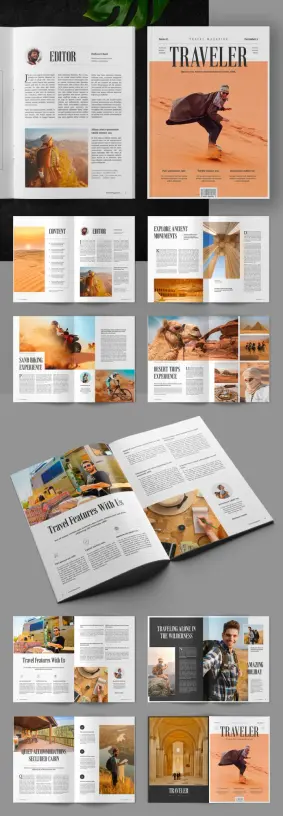
Adobe InDesign Travel Magazine Template: Professional A4 Layout
When it comes to publishing, a compelling narrative is only half the battle; the other half is fought and won with exceptional design. This is particularly true for travel media, where visual storytelling transports the reader to distant lands before they even book a flight. For creators, designers, and publishers aiming to produce high-caliber content, this professional InDesign travel magazine template designed by PixWork presents a definitive solution. It offers a sophisticated framework that marries minimalist aesthetics with functional, print-ready design, allowing your stories to shine with unparalleled clarity and elegance. Why settle for a generic layout when a tool exists to elevate your content to professional standards?
Download from Adobe StockPlease note that this template requires Adobe InDesign installed on your computer. Whether you use Mac or PC, the latest version is available on the Adobe Creative Cloud website—take a look here.
Adobe InDesign Travel Magazine Template: A Customizable A4 Layout by PixWork Download from Adobe StockThe Power of a Professional Foundation
This isn’t just another template; it’s a meticulously crafted canvas for your adventures. When you begin a project with a structure built by design professionals, you immediately gain an advantage. The layout, typography, and visual hierarchy have all been considered, providing a cohesive and engaging reading experience from cover to cover.
What Defines This A4 Magazine Template?
At its core, this InDesign travel magazine template is a fully customizable A4 layout. It’s designed for use in Adobe InDesign, the industry-standard software for publishing. Its clean, modern look serves as a versatile backdrop for a wide range of travel content, from photo-essays of remote landscapes to city guides and personal travelogues. The template features placeholder text and images. You can effortlessly drag and drop your own content into the pre-designed framework.
Furthermore, it is designed to be print-ready. Set in CMYK color mode with proper bleed and margin considerations, it eliminates the technical guesswork often associated with preparing files for professional printing. This foresight ensures that the crisp, elegant design you see on screen translates perfectly to the printed page.
Why Choose an InDesign Template Over Other Options?
While other platforms offer design tools, Adobe InDesign remains the undisputed choice for professional magazine design. Its powerful typographic controls, precise layout capabilities, and seamless integration with other Adobe Creative Cloud apps like Photoshop and Illustrator provide unmatched control and flexibility.
Using this template leverages InDesign’s power without requiring years of experience. It saves an immense amount of time and resources. Instead of building a complex, multi-page document from scratch—a process that can take weeks or even months—you can focus directly on what matters most: your content. Think about the resources you could reallocate. Could that time be better spent refining your stories or planning your next photographic expedition?
Customizing Your Vision: A Look Inside the Template
Flexibility is the cornerstone of this design. Every element is editable, empowering you to infuse your unique brand identity into the layout. This is not about forcing your content into a rigid box; it’s about providing a superior starting point for your creative expression.
Seamless Content Integration
The template is logically structured with master pages, paragraph styles, and character styles. This organization is key to efficient customization. Do you have a specific font family that represents your brand? You can update the paragraph styles, and the change will ripple throughout the entire document instantly. Swapping out the placeholder images for your own stunning photography is a simple drag-and-drop process. This streamlined workflow is one of the answers to the question of how to create a travel magazine in InDesign efficiently.
A Modern Magazine Template for a Discerning Audience
The aesthetic is intentionally minimalist. This design choice is both timeless and practical. A clean layout ensures that your photography and written content are the stars of the show, free from distracting clutter. The generous use of white space creates a sense of calm and sophistication, inviting the reader to slow down and immerse themselves in the journey you are presenting. This approach respects the intelligence of your audience, trusting them to appreciate the subtlety of a well-considered design. It’s a prime example of a clean look travel magazine layout.
Beyond Aesthetics: The Practical Advantages
This Adobe InDesign travel magazine template delivers more than just a pretty face. It is a practical tool built to meet the rigorous demands of the publishing world. It provides a solid return on investment by saving you the cost of hiring a professional designer for a custom layout, which can be a significant financial barrier for independent creators and small publishers.
Download from Adobe StockFor those looking to create a customizable travel brochure or a more extensive publication, this asset provides the perfect, scalable foundation. The structured design makes it simple to add or remove pages as needed. All without compromising the overall visual integrity of the magazine. This adaptability makes it one of the best print-ready magazine templates available for creators who value both quality and efficiency. Ultimately, PixWork’s magazine template design is for anyone serious about producing a professional-grade travel publication that captivates and inspires.
Don’t hesitate to find other professional graphic design assets in the Templates section here at WE AND THE COLOR. Feel free to check out our handpicked selection of these 10 must-have Adobe InDesign templates for creative projects in 2025.
#AdobeInDesign #AdobeStock #indesignMagazineTemplate #magazine #magazineDesign #magazineTemplate #travelMagazine


Your Ultimate Modern Travel Magazine Design Template: A Professional InDesign Layout by DesignCoach
Creating a travel magazine from scratch is a significant undertaking. You have the stunning photos from your journeys and the compelling stories that bring them to life, but translating that vision into a polished, professional publication can be a major hurdle. The design process alone—choosing fonts, creating layouts, and ensuring consistency—can be overwhelming. This is precisely where a high-quality modern travel magazine design template becomes an invaluable asset. The template from DesignCoach, specifically crafted for Adobe InDesign, offers a perfect blend of sophisticated design and user-friendly functionality. It provides the structural backbone, allowing you to focus on what truly matters: your content. Imagine bypassing weeks of complex design work and starting with a layout that already looks like it belongs on a newsstand. This is your chance to bring your travel publication layout to life without the steep learning curve.
Download the template from Adobe StockPlease note that this template requires Adobe InDesign installed on your computer. Whether Mac or PC, the latest version is available on the Adobe Creative Cloud website—take a look here.
Modern Travel Magazine Design Template by DesignCoach for Adobe InDesign Download the template from Adobe StockBeyond the Basics: The Power of a Professional Magazine Layout
A great design does more than just look pretty; it’s a silent narrator. It guides the reader’s eye, creates a cohesive narrative, and gives your content the credibility it deserves. Think about the last time you picked up a beautiful travel magazine. The clean lines, the balanced pages, and the consistent typography all worked together to create an immersive experience that transported you to another place. This is the power of a professional magazine layout. This InDesign template from DesignCoach provides that exact framework, engineered to make your content shine. It ensures every page, from the table of contents to the feature story, feels connected and part of a singular, strong brand identity. Consequently, your photography appears more vibrant, and your travelogues become more engaging. You are not just presenting information; you are crafting an experience for your reader with a top-tier modern travel magazine design template.
A Closer Look at This Modern Travel Magazine Design Template
This isn’t just a basic file; it’s a comprehensive toolkit for your publication. The template is packed with features designed to make your creative process smooth and efficient, setting it apart as a premier graphic design template for publishers. Let’s break down what makes it so effective.
Is This InDesign Template Right for Your Project?
One of the best aspects of this template is its versatility. It’s a powerful tool for a wide range of creators. Are you wondering if it fits your specific needs? Let’s see who can benefit the most from this printable magazine template:
How to Create a Travel Magazine in InDesign Using This Template
The idea of working in a professional program like InDesign might seem daunting, but this template simplifies the journey from concept to completion. The process is remarkably straightforward.
First, you open the template file in Adobe InDesign. Instantly, you will see the organized, professionally structured pages. Next, you can begin populating the layout. Simply select the placeholder image boxes and replace them with your own high-resolution photographs. The frames are already sized and positioned for maximum visual impact. After that, you can turn your attention to the text. The template includes pre-styled paragraphs and headings. All you need to do is paste in your stories, tips, and descriptions.
Then comes the fun part: personalization. While the existing design is clean and modern, you can easily adjust the color palette and fonts to perfectly align with your personal or business brand. Finally, once you are happy with every page, you simply export the file. You can create a high-quality, print-ready PDF for a professional printer or a web-optimized version for digital distribution. It really is that streamlined.
Your Story, Beautifully Told
Ultimately, your travel adventures are unique. They are filled with color, emotion, and unforgettable moments. This modern travel magazine design template by DesignCoach is the vessel that helps you share those adventures with the world in a way that feels authentic and looks impeccably professional. It removes the technical barriers of design, freeing you up to be a storyteller. Instead of wrestling with alignment and typography, you can focus on curating your best images and weaving compelling narratives. This isn’t just about making a magazine; it’s about giving your stories the beautiful home they deserve. What incredible journeys will you share first?
Download the template from Adobe StockYou want more? If so, feel free to check out our Templates category.
#AdobeInDesign #graphicDesign #magazineDesign #magazineDesignTemplate #magazineTemplate #travelMagazine


This InDesign Travel Magazine Layout Transforms Your Stories into Stunning Visual Journeys
Creating a captivating publication often seems like a monumental task, reserved for seasoned designers with years of experience. But what if you could access a shortcut to stunning design? This is where an exceptional InDesign travel magazine layout becomes your most valuable asset. Imagine having a professionally crafted foundation, ready for your unique content, that instantly elevates your travel stories.
This isn’t just about pretty pictures; it’s about presenting your narratives in a way that captivates readers and truly does justice to the experiences you’re sharing. We’re looking at a specific, brilliantly designed template by Adobe Stock contributor Bourjart, a versatile InDesign travel magazine layout that promises to make your publishing aspirations a beautiful reality. Are you ready to explore how?
Download from Adobe StockPlease note that this template requires Adobe InDesign installed on your computer. Whether Mac or PC, the latest version is available on the Adobe Creative Cloud website—take a look here.
Fully Customizable InDesign Travel Magazine Layout by Bourjart Download from Adobe StockFirst Impressions Count: The Power of a Professional Magazine Design
Why is a well-designed layout so crucial, especially for a travel magazine? Think about it. Travel is inherently visual. Readers expect to be transported by breathtaking photography and compelling narratives. A cluttered or amateurish design can instantly detract from even the most amazing content. Conversely, a clean, professional, and engaging InDesign travel magazine layout does several things:
This particular template offers a sophisticated starting point, ensuring your magazine looks polished from cover to cover.
Meet the Star: Bourjart’s Masterfully Crafted InDesign Travel Magazine Layout
So, what makes this specific InDesign travel magazine layout stand out? Designed by the talented Adobe Stock contributor Bourjart, this template is a testament to thoughtful design and user-friendliness. It comes packed with features tailored for anyone looking to produce a high-quality travel publication.
Key Features at a Glance:
Effortless Customization: Why Adobe InDesign is Your Best Friend
If you’re new to publishing, you might wonder about the software. This magazine layout is designed for Adobe InDesign, and for good reason. Adobe InDesign is widely recognized as the industry gold standard for creating professional brochures, magazines, books, and interactive digital publications. Its robust toolset gives you precise control over typography, layout, and imagery.
With this template, “fully customizable” isn’t just a buzzword. You can:
Even if you’re relatively new to InDesign, the well-organized layers and styles within this professional magazine layout make the editing process intuitive. Think of it as having a professional designer set up the framework; all you need to do is bring your unique vision to life. Are you looking for “how to create a travel magazine in InDesign”? This template provides a massive head start.
Print-Ready Perfection: From Screen to Glossy Page
A crucial aspect of any professional magazine template is its readiness for print. This InDesign travel magazine layout is meticulously prepared for commercial printing.
This attention to print-readiness saves you potential headaches and additional costs down the line, making it a reliable “print-ready magazine template.”
Who Can Benefit from This InDesign Travel Magazine Layout?
This versatile template isn’t just for one type of creator. Its appeal is broad:
Essentially, anyone looking to create a visually appealing and professionally structured “customizable magazine template” for travel-related content will find immense value here.
Making It Uniquely Yours: Tips for Personalization
While the template is fantastic as is, the real magic happens when you infuse it with your personal touch. Beyond just swapping images and text for your “easy to edit travel magazine InDesign template Bourjart,” consider these ideas:
This InDesign travel magazine layout is designed to be flexible. Don’t be afraid to experiment and make it truly your own, transforming it into one of the “best InDesign templates for travel publications” tailored to your vision.
The journey from a collection of travel stories and photographs to a beautifully realized magazine can feel daunting. However, with a resource like Bourjart’s InDesign travel magazine layout, that journey becomes significantly smoother, faster, and more creatively fulfilling. It empowers you to focus on what you do best – crafting compelling travel content – while providing the professional design framework to make it shine. Why not take the leap and start bringing your travel publishing dreams to life today?
Download from Adobe StockFeel free to find other trending graphic design assets for different creative needs in the Templates category here at WE AND THE COLOR.
#AdobeStock #graphicDesign #InDesignMagazineLayout #InDesignTravelMagazineLayout #magazineTemplate #travelMagazine

1️⃣ #KoreanAirInFlightMeals 🥘✈️
Korean Air earns recognition from Global Traveler & TODAY
#KoreanAir #InFlightMeals #TravelMagazine #GlobalTraveler #TODAY #AirlineFood #CulinaryExperience #AirTravel
This is cool, and a rather delightful email to start our day on! #Roamancing is in Feedspot's Best 30 #Canadian #TravelMagazines & Publications (at #17). Best of all we are in the company of other magazines that we like, including Saltscapes, Toque and Canoe, Canadian Geographic Travel, British Columbia Magazine, BCLiving, Wander Woman Travel, and other good reads!
Thanks #Feedspot!
10 Beautiful Old Towns in Europe Worth Getting Lost In https://bit.ly/3FkXoHn
 WE AND THE COLOR
 masonQQ
 Erica Hargreave
 Travel Away