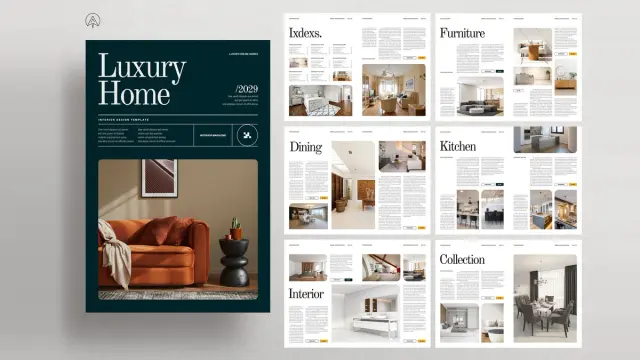
The Interior Magazine Template That Breathes Life Into Your Designs

In the visually driven realm of interior design, your presentation is your handshake. A brilliant concept can lose its impact without a compelling narrative to support it. This is precisely where a sophisticated interior magazine template becomes an essential instrument for designers, architects, and furniture brands. It is far more than a simple layout. Instead, it acts as a strategic asset to elevate your work, articulate your brand’s identity, and truly captivate your intended audience. We will explore a remarkable Adobe InDesign template from PixWork that promises to achieve exactly that.

Download from Adobe Stock

Please note that this professional graphic design template requires Adobe InDesign installed on your computer. Whether you use Mac or PC, the latest version is available on the Adobe Creative Cloud website—take a look here.

Furniture and Interior Magazine Template by PixWork for Adobe InDesign. Download from Adobe Stock

The Strategic Importance of a Polished Narrative

Why should you place so much emphasis on a professional layout? A thoughtfully designed magazine or catalog accomplishes more than just showcasing projects or products; it skillfully tells a story. It directs the viewer’s eye, establishes a specific mood, and builds a powerful sense of authority and trust. For an interior designer, a polished lookbook can be the single element that secures a new client. For a furniture company, a compelling catalog can effortlessly convert a casual browser into a committed buyer.

However, starting with a blank canvas in Adobe InDesign can feel intimidating. You must consider grids, margins, typography, and color schemes before ever placing your first piece of content. A professional interior magazine template provides a robust framework. Consequently, it saves you valuable time and guarantees a high-quality, impressive result.

Discovering the PixWork Interior Magazine Template

Created by the innovative team at PixWork, this particular interior magazine template for Adobe InDesign is engineered for both aesthetic appeal and practical function. Let’s examine the details that make it a superior choice for anyone working in the furniture and interiors industry.

Core Features for Creative Professionals

  • Software: Adobe InDesign
  • Format: A4 Size
  • Page Count: 16 fully customizable pages
  • Color Mode: CMYK (Print-Ready)
  • Customization: Simple replacement of text and images

This template is clearly designed with the end-user in mind. Its 16 pre-designed pages provide a rich variety of layouts. These range from impactful cover designs to content-heavy article spreads and detailed product showcases. This inherent versatility allows you to create a comprehensive magazine, a focused furniture catalog, or a stunning design portfolio with equal ease.

What Sets This InDesign Template Apart?

Not all templates offer the same level of quality. The PixWork design distinguishes itself with a clean, modern aesthetic that intentionally places your content in the spotlight. It masterfully uses generous white space, bold typography, and a meticulously organized grid system. This creates a reading experience that is both visually satisfying and incredibly easy to navigate. This minimalist philosophy ensures your beautiful interior photography and persuasive descriptions become the undeniable focus.

The Art of Customization: Tailoring the Template to Your Brand

Perhaps the greatest strength of this interior magazine template lies in its remarkable flexibility. While the pre-designed layouts are expertly composed, they are by no means restrictive. You retain complete creative control to adapt every single element to reflect your brand’s unique identity.

A Simple Path to a Unique Publication

  • Open the Template: After downloading, simply open the file in Adobe InDesign.
  • Replace Images: The template features placeholder images. You can effortlessly drag and drop your own high-resolution photographs into the designated frames.
  • Edit Text: All text fields are completely editable. Click on any text box to insert your own copy, whether it’s a detailed article or a concise product description.
  • Adjust Colors: Using the Swatches panel in InDesign, you can modify the entire color palette to align with your brand guidelines in just a few clicks.
  • Modify Layouts: Do you need more pages or a different sequence? You can easily duplicate, delete, and reorder pages to perfectly suit your content strategy.
  • This straightforward customization process empowers both veteran InDesign professionals and newcomers to the software. It allows anyone to produce a professional-grade publication without a significant time investment in learning new skills.

    The Technical Foundation: Why Print-Ready Matters

    A beautiful design solves only part of the puzzle. Technical precision is absolutely essential for a flawless printed outcome. This template is built in CMYK color mode, the universal standard for professional printing. This ensures the colors you approve on your screen are faithfully reproduced on the physical page. The A4 format is a versatile and widely accepted size for magazines and catalogs. Furthermore, critical details like bleed areas are already configured, which is vital for achieving a clean, edge-to-edge print finish.

    Who Should Use This Interior Magazine Template?

    The potential applications for this template are extensive, serving a diverse group of professionals within the design community.

    • Interior Designers & Architects: Present your portfolio of completed projects in a sophisticated, narrative-driven format. A professionally designed lookbook will certainly leave a lasting and positive impression on potential clients.
    • Furniture Brands & Retailers: Develop breathtaking product catalogs that transcend simple item listings. Use the magazine-style layouts to feature your furniture in beautifully styled environments, thereby telling a compelling lifestyle story.
    • Home Decor Bloggers & Influencers: Compile your best work into a polished digital magazine. You can also create a print-on-demand publication to offer your audience a tangible way to engage with your content.
    • Marketing Agencies: For agencies serving clients in the home and decor industries, this template offers a high-quality, efficient tool for creating impactful marketing materials.
    Download from Adobe Stock

    Ultimately, this interior magazine template is an exceptionally powerful tool. It is for anyone seeking to present furniture and interior design content in a polished, engaging, and highly professional manner. It effectively closes the gap between a great idea and a stunning final product. This allows your work to receive the attention and admiration it truly deserves. What story will you choose to tell with it?

    Feel free to find other amazing design templates here at WE AND THE COLOR.

    Subscribe to our newsletter!

    [newsletter_form type=”minimal”]

    #AdobeInDesign #AdobeStock #indesignMagazineTemplate #InDesignTemplate #magazine #magazineLayout #magazineTemplate
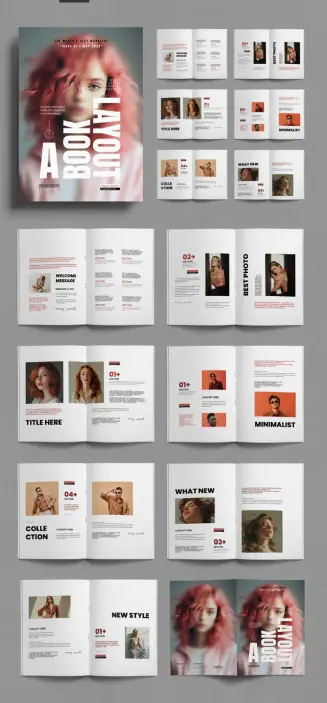
    This InDesign Magazine Template is a Perfect Example of Modern Editorial Design

    This exceptional InDesign magazine template offers a powerful lesson in contemporary publishing. It showcases how structure and creativity can coexist beautifully. For designers, photographers, and content creators, a well-crafted template is more than a starting point; consequently, it is a strategic tool. It ensures consistency, professionalism, and a faster workflow. This particular layout, designed by ContestDesign for Adobe Stock, truly embodies these principles. It provides a sophisticated framework that allows unique content to shine. Why does this specific template capture the essence of modern editorial design so effectively?

    Download from Adobe Stock

    Please note that this template requires Adobe InDesign installed on your computer. Whether you use Mac or PC, the latest version is available on the Adobe Creative Cloud website—take a look here.

    Adobe InDesign Magazine Template by ContestDesign Download from Adobe Stock

    Deconstructing This Professional A4 InDesign Magazine Template

    The foundation of any great publication is its structure. This template provides a robust and flexible one. Built on the international standard A4 size, it is immediately practical for a global audience. The package includes 16 pre-designed pages, covering every essential element. You receive a striking cover, various editorial spreads, and a clean back page. This comprehensive set allows for a cohesive visual narrative from beginning to end.

    Furthermore, every element is fully customizable within Adobe InDesign. The design uses placeholders for images and text, which simplifies the editing process. Users can effortlessly drag and drop their own content into the layout. Because it is designed in CMYK color mode, the template is completely print-ready. This technical detail saves valuable time and prevents common printing errors. It is a professional solution designed for a seamless user experience.

    Why This Modern Magazine Layout Stands Out

    What elevates a good template to a great one? The answer lies in its design philosophy. This InDesign magazine template embraces a minimalist aesthetic. It utilizes ample white space, clean typography, and a strong grid system. This approach creates a sense of elegance and clarity. The focus remains squarely on the content—the photography and the written word.

    The layout is not merely functional; it is also visually intelligent. The thoughtful placement of images and text blocks creates a dynamic rhythm across the spreads. It guides the reader’s eye naturally from one element to the next. For instance, sections like “Best Photo” and “Minimalist” show a keen understanding of visual hierarchy. This template serves graphic designers, template creators, and photographers who value sophisticated, uncluttered design.

    The Power of Customization: How to Edit Your Magazine Layout

    Adobe InDesign is the industry standard for professional book and magazine design for a reason. Its powerful tools make customization straightforward. With this template, you can adapt every detail to match your brand identity. Changing the color palette is a simple task. Swapping out the placeholder typography for your own brand fonts takes only a few clicks. You can truly make this layout your own.

    This ease of use is a significant advantage. It empowers creators who may not have extensive design experience. Simultaneously, it offers seasoned professionals a well-built foundation to accelerate their projects. Learning how to customize an InDesign magazine template like this one is an invaluable skill. It allows for endless creative possibilities while maintaining a polished and professional look. The result is a unique publication that reflects your vision perfectly.

    Strategic Advantage of a Professional Editorial Design

    Using a high-quality InDesign magazine template offers more than just aesthetic benefits. It is a strategic decision. A consistent and professional design builds trust with your audience. It communicates that your content is credible and valuable. This template provides the framework for that consistency. Every page, from the welcome message to the final collection feature, feels part of a unified whole.

    Download from Adobe Stock

    Moreover, a well-designed layout enhances readability. It makes your content more accessible and enjoyable to consume. Readers are more likely to engage deeply with articles when they are presented clearly. Think of this template as a silent partner in your creative process. It handles the structural complexities of editorial design. Consequently, this frees you to focus on what truly matters: creating compelling content that resonates with your readers. This approach is the key to building a loyal following and a strong brand presence.

    Feel free to find other professional graphic design templates for different creative needs here at WE AND THE COLOR.

    #indesignMagazineTemplate #InDesignTemplate #magazine #magazineLayout #magazineTemplate

    Adobe InDesign Travel Magazine Template: Professional A4 Layout

    When it comes to publishing, a compelling narrative is only half the battle; the other half is fought and won with exceptional design. This is particularly true for travel media, where visual storytelling transports the reader to distant lands before they even book a flight. For creators, designers, and publishers aiming to produce high-caliber content, this professional InDesign travel magazine template designed by PixWork presents a definitive solution. It offers a sophisticated framework that marries minimalist aesthetics with functional, print-ready design, allowing your stories to shine with unparalleled clarity and elegance. Why settle for a generic layout when a tool exists to elevate your content to professional standards?

    Download from Adobe Stock

    Please note that this template requires Adobe InDesign installed on your computer. Whether you use Mac or PC, the latest version is available on the Adobe Creative Cloud website—take a look here.

    Adobe InDesign Travel Magazine Template: A Customizable A4 Layout by PixWork Download from Adobe Stock

    The Power of a Professional Foundation

    This isn’t just another template; it’s a meticulously crafted canvas for your adventures. When you begin a project with a structure built by design professionals, you immediately gain an advantage. The layout, typography, and visual hierarchy have all been considered, providing a cohesive and engaging reading experience from cover to cover.

    What Defines This A4 Magazine Template?

    At its core, this InDesign travel magazine template is a fully customizable A4 layout. It’s designed for use in Adobe InDesign, the industry-standard software for publishing. Its clean, modern look serves as a versatile backdrop for a wide range of travel content, from photo-essays of remote landscapes to city guides and personal travelogues. The template features placeholder text and images. You can effortlessly drag and drop your own content into the pre-designed framework.

    Furthermore, it is designed to be print-ready. Set in CMYK color mode with proper bleed and margin considerations, it eliminates the technical guesswork often associated with preparing files for professional printing. This foresight ensures that the crisp, elegant design you see on screen translates perfectly to the printed page.

    Why Choose an InDesign Template Over Other Options?

    While other platforms offer design tools, Adobe InDesign remains the undisputed choice for professional magazine design. Its powerful typographic controls, precise layout capabilities, and seamless integration with other Adobe Creative Cloud apps like Photoshop and Illustrator provide unmatched control and flexibility.

    Using this template leverages InDesign’s power without requiring years of experience. It saves an immense amount of time and resources. Instead of building a complex, multi-page document from scratch—a process that can take weeks or even months—you can focus directly on what matters most: your content. Think about the resources you could reallocate. Could that time be better spent refining your stories or planning your next photographic expedition?

    Customizing Your Vision: A Look Inside the Template

    Flexibility is the cornerstone of this design. Every element is editable, empowering you to infuse your unique brand identity into the layout. This is not about forcing your content into a rigid box; it’s about providing a superior starting point for your creative expression.

    Seamless Content Integration

    The template is logically structured with master pages, paragraph styles, and character styles. This organization is key to efficient customization. Do you have a specific font family that represents your brand? You can update the paragraph styles, and the change will ripple throughout the entire document instantly. Swapping out the placeholder images for your own stunning photography is a simple drag-and-drop process. This streamlined workflow is one of the answers to the question of how to create a travel magazine in InDesign efficiently.

    A Modern Magazine Template for a Discerning Audience

    The aesthetic is intentionally minimalist. This design choice is both timeless and practical. A clean layout ensures that your photography and written content are the stars of the show, free from distracting clutter. The generous use of white space creates a sense of calm and sophistication, inviting the reader to slow down and immerse themselves in the journey you are presenting. This approach respects the intelligence of your audience, trusting them to appreciate the subtlety of a well-considered design. It’s a prime example of a clean look travel magazine layout.

    Beyond Aesthetics: The Practical Advantages

    This Adobe InDesign travel magazine template delivers more than just a pretty face. It is a practical tool built to meet the rigorous demands of the publishing world. It provides a solid return on investment by saving you the cost of hiring a professional designer for a custom layout, which can be a significant financial barrier for independent creators and small publishers.

    Download from Adobe Stock

    For those looking to create a customizable travel brochure or a more extensive publication, this asset provides the perfect, scalable foundation. The structured design makes it simple to add or remove pages as needed. All without compromising the overall visual integrity of the magazine. This adaptability makes it one of the best print-ready magazine templates available for creators who value both quality and efficiency. Ultimately, PixWork’s magazine template design is for anyone serious about producing a professional-grade travel publication that captivates and inspires.

    Don’t hesitate to find other professional graphic design assets in the Templates section here at WE AND THE COLOR. Feel free to check out our handpicked selection of these 10 must-have Adobe InDesign templates for creative projects in 2025.

    #AdobeInDesign #AdobeStock #indesignMagazineTemplate #magazine #magazineDesign #magazineTemplate #travelMagazine