 Juliu
JuliuOnly just figured out people couldn't comment in the TinyUX Telegram channel.. Oops. So I added a discussion channel (https://t.me/TinyUXdiscussion) so you can actually give feedback.

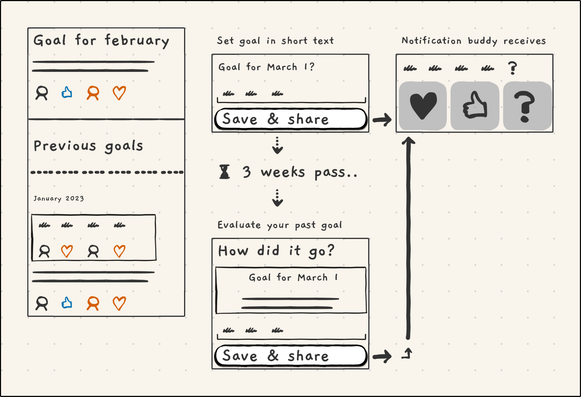
Idea for new simple app, goal buddies.
Every month you set a goal. It is shared with 2 personal buddies. For me, that would be my mother and my best friend.
Then they receive message, and can reply only with short emoticon via button. Low effort for them, but essential feedback.
At end of month, you evaluate. Again this is auto shared to buddies.
Goals:
- Empower people, by providing a rythm to zoom out, plan & reflect
- strengthen connections
New TinyUX update, a bit smaller icons to make the wireframes look better.
And another update to TinyUX, added white and gray 'flat' rounded rectangles.
Here is a linkedin wireframe I created with TinyUX on my phone.
And another small TinyUX update with some visual tweaks, like improving how merged icons (like arrows) are rendered on buttons.
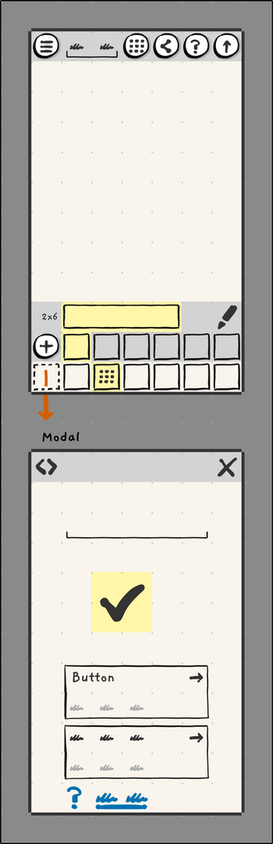
With TinyUX you can create wireframes on your phone. It's grid based, and larger shapes 'merge' depending on how you place them. No fiddling with dragging and alignment.
With latest TinyUX update you can create wrapping, multi-line text. I also added a 'lorum ipspum' button.
Have to think about what should be next focus. Probably some smaller tweaks to make the wireframes look better.
#wireframes #TinyUX #UXdesign #uxTools #MobileDevelopment #lorumIpsum
New TinyUX update, now you can import components from my online library.
More about TinyUX: https://tinyux.app
The online page:
https://www.tinyux.app/ux-content-library/
I'll be adding more items to the library later :).
New TinyUX update (1.1.6), now you can import components via text.
Next I'll be adding export to 'ux source code'. So you could then send someone a component/page that they can import in their app.
Also it should be possible to write a script that turns 'ux source' to HTML, or perhaps some other format you might want to use.
Https://tinyux.app
#ux #wireframes #uxdesign #tinyUX #wires #app #sourceCode #uxsource
Recent TinyUX update made some UI improvements regarding selections.
Next I'm planning to add 'component import'. You can write a .csv like notation to create a component. Like:
```
button, button, button/arrow_right
```
An export feature will soon follow, so you can backup and share components and screens.
The AI helped me to create a simple dashboard with a custom Wordpress plugin that reads the logs.
The data is a bit skewed at the start, since it will only send stats every 100th event or if is o a new day.
Happy to not have had to implement a third party library. This only sends what I care about; what features are used (most).