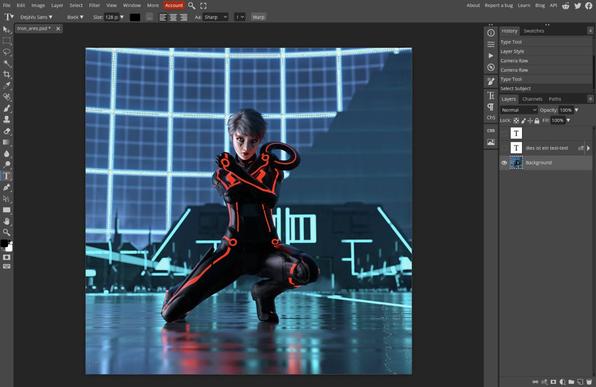
Ce matin, prise en main de #photopea ben dites donc, mais c'est aussi bon que Photoshop, quelques différences à l'usage, mais je ne pense pas avoir de vraies difficultés. Bonne nouvelle, je ne serai pas obligé de prendre un abonnement peau du cul quand je ne pourrai plus utiliser mon CS6.
Avantage 1 je retrouverai mon environnement sur tout appareil utilisant Firefox, ordinateur, téléphone…
Inconvénient: il faut une connexion, de préférence rapide.
😀

I created multiple #Fediverse accounts all with the same user name & avatar but sometimes I get twisted around among them all (#Mastodon x 2, #Piefed, #NeoDB, #Lemmy, #Peertube, #Sharkey, #Hubzilla, #Pixelfed)

So I'm trying out annotated avatars to help clarify which of my posts come from which of my accounts, by adding the name of instance to the image.

Finding out all systems crop, but in different ways.

That's why on this #Glitch account my avatar now says "Exquisite". Not because I think I'm exquisite 😁 but because "Exquisite.Social" gets cropped.

I had to raise the text in my #Lemmy avatar because Lemmy (or at least the Alexandrite front end I use for Lemmy) crops the icon as a circle, so text needs to be nearer the centre to not get cropped.

(And yes, the avatar quality is terrible, especially when expanded. ~2 years ago, I resumed use of a really old avatar but for which the only file I still had left was a microscopic .jpg)

Typeface: Anton SC, 16 points with 1 pixel outline.
Done in #Photopea (as the least frustrating, for amateur me, image editor on Linux)

Aaaand I just remembered about "display names". Maybe I'll try that after I see how the avatar annotation goes.

Люди, які кажуть, що не перейдуть на Лінукс, бо там нема Photoshop! Ви користуєтесь підпискою Adobe чи так... фотошопом від "xatab" із торрента?
Я от роками усе, що мені потрібно, редагую в GIMP, Krita, віднедавна - у Photopea і не відчуваю гострої потреби у продукті від Adobe. А ШІ-інструменти редагування доступні в Gemini та на великій кількості інших платформ. Просто цікаво...
#linux #photoshop #GIMP #Krita #photopea
Nach wie vor ist Photoshop in meinem Fall das größte Hindernis bei der digitalen Souveränität und beim Wunsch, kein Geld mehr an US-Firmen zu zahlen. #Photopea ahmt Photoshop in Sachen UI in fast schon dreist zu nennender Weise nach, läuft im Browser, nutzt aber lokale GPUs und alle Dateien bleiben auf dem lokalen Gerät und nichts wandert in die Cloud. Auf jeden Fall einen Blick wert.

imagcon.de/2026/02/photopea-professionelle-bildbearbeitung-im-browser-kostenlos-und-ohne-installation/

#DigitaleSouveränität #Photoshop #Alternativen #Adobe
Photopea: Professionelle Bildbearbeitung im Browser – kostenlos und ohne Installation – Imagcon

Wer Photoshop kennt, wird sich in Photopea auf Anhieb zurechtfinden. Gleiche Tastenkürzel, vertraute Werkzeuge, bekannte Panels – nur dass man nicht 60 Euro im Monat für ein Adobe-Abo zahlt, nichts installieren muss und die Anwendung einfach im Browser läuft.

Imagcon

Otra alternativa a Photoshop muy interesante ->
https://www.photopea.com/

#photopea

Photopea | Online Photo Editor

Photopea Online Photo Editor lets you edit photos, apply effects, filters, add text, crop or resize pictures. Do Online Photo Editing in your browser for free!

#Photopea 这个不是Photopea,回头仔细看了介绍发现是稿定推广。又被李鬼了。
https://www.crsky.com/soft/220535.html
Photopea桌面客户端(PS极致精简版) v1.22

Photopea是紧急处理图片,却苦于没有安装该软件产品的一款替代品,功能与Photoshop几乎一致,界面排版也同样相似,兼容PSD、CXF、SKetCh、XD和CDR格式和常用的普通图片格式,您可以将其用于简单的任务,例如调整图像大小,以及复杂的任务,如设计网页,创建插图,处理照片等,是一款非常好用的在线处理图片的网站。

🫟 #Graphite
🫟 #Gimp
🫟 #Canva
🫟 #Photopea
🫟 #Blender
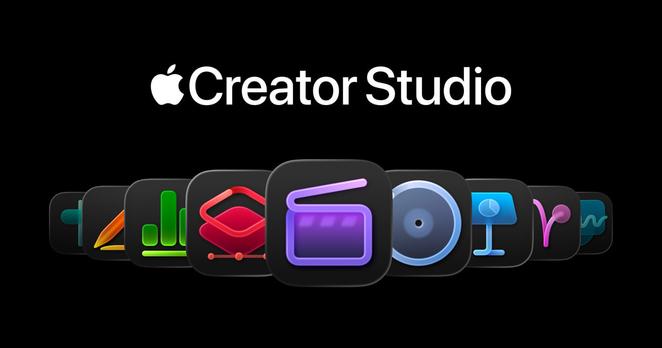
… and now: Apple #CreatorStudio

Will the graphic industry evolve towards a more healthy ecosystem not dominated by Adobe’s business models⁉️

https://www.apple.com/newsroom/2026/01/introducing-apple-creator-studio-an-inspiring-collection-of-creative-apps/

Apple introduces Apple Creator Studio, an inspiring collection of the most powerful creative apps

Apple Creator Studio is a collection of powerful creative apps for making music, video editing, creative imaging, and visual productivity.

Apple Newsroom

and speaking of that, at this point I'm gonna have to give #PhotoPea a try and see how well it works with adblock enabled.

I hate the idea of a non-native photo editing app for some reason, but if it works and the UX is good....

Just paid for a personal annual account with Photopea, the web based image editor. It's free to use and you don't need to login, but 50EU/year takes off the very large amount of ads. It's got that Photoshop 3.0 design vibes that means I can still sort of use it.
Photopea | Online Photo Editor

Photopea Online Photo Editor lets you edit photos, apply effects, filters, add text, crop or resize pictures. Do Online Photo Editing in your browser for free!