You can even do it the other way around in the word after that; writing with shift held for de-capitalisation.

That doesn't work so neatly with the #NeoLayout though because keeping the other shift key held upcases characters again, so you need to let go of both before typing the next char.

Today I noticed that double-shift activated CAPS-lock can be used in quite an intuitive manner:

You just simply start writing the word holding shift and if you need to swap hands, you simply do that but keep the other shift key pressed. This activates CAPs and you can then let go of both and continue writing the word without holding either.

This way you don't ever need to consciously activate #capslock or think about whether you even need it for the word.
#MechanicalKeyboard #NeoLayout

Kurze Erinnerung, dass es das #neoqwertz Layout gibt, das das #qwertz Layout (Ebenen 1 und 2) um die Ebenen 3 bis 6 von #neolayout ergänzt. Für Leute, die in irgendeiner Form programmieren, ist das schonmal ein großer Fortschritt, den man praktisch ohne Umlernen zu müssen, einfach haben kann.
Das funktioniert auch mit der Columna, die ich gerade auf Ebay anbiete: https://www.ebay.de/itm/335230545324
Mechanische Ortholineare NeoQwertz Tastatur, Programmierbare 15x5 Matrix, XDA | eBay

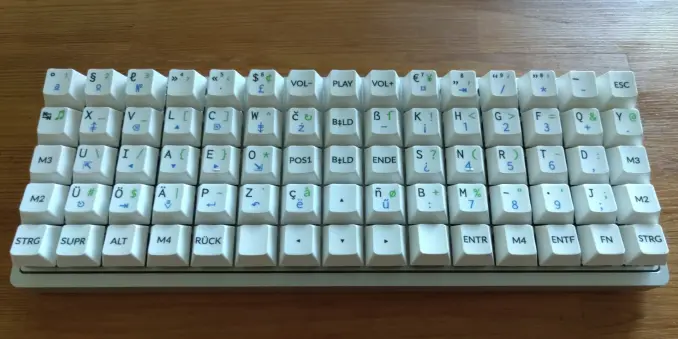
Das ist eine ortholineare (Matrix) Tastatur; d.h. den veralteten, unergonomischen Versatz zwischen den Zeilen (etwa eine halbe Taste) gibt es hier nicht. Die Tastatur, wie ich sie verkaufe, ist für das NeoQwertz Layout beschriftet und programmiert.

eBay

Ich bin eine großer Freund von ergonomischen Tastaturbelegungen. Die Schwierigkeit ist nur, dass man dafür gleich ganz viele Tastenbelegungen neu lernen muss.

Aktuell taste ;-P ich mich heran, indem ich neo-qwertz nehmen: Das Hauptfeld ist QWERTZ, aber die Sonderzeichen auf Ebenen 3 sind die von #neo2.

https://neo-layout.org/Layouts/neoqwertz/

#neolayout #ergonomie
@photobix

NeoQwertz - Neo – ergonomisch optimiert

Neo ist eine ergonomische Tastaturbelegung, welche für die deutsche Sprache optimiert ist.

Hi everyone! #introduction
For the last two years or so I have been into alternative keyboard layouts and hardware. Here is my latest build for the office: a 15x5 #ortholinear keyboard with the #neolayout for typing German. I'm rather content with it but if I could, I would set the three center columns a little apart and give the whole thing a slight V shape to make it even more ergonomic and help with the orientation on this almost too regular keyboard.

@witch_of_winter That's why I use #neo2 #NeoLayout - special chars aplenty 😸

https://neo-layout.org/

Neo – ergonomisch optimiert

Neo ist eine ergonomische Tastaturbelegung, welche für die deutsche Sprache optimiert ist.

@anzet Oh, and at some point I want to finally finish my #Slovenian #ergonomic #keyboard layout (based on #NeoLayout). It’s been on the back burner for ages.
I use https://neo-layout.org/ on my keyboard. On #wayland it happens frequently that the Mod3 key is not respected, and I have no idea why. It sometimes takes 3-4 tries until I can type a ':' or other non-ascii characters, which is really annoying, especially when typing fast and developing software in #neovim. May be something specific to my configuration, haven't tried to reconstruct the issue on other machines yet. Currently on #debian unstable. Any ideas why that happens? #neolayout
Neo – ergonomisch optimiert

Neo ist eine ergonomische Tastaturbelegung, welche für die deutsche Sprache optimiert ist.

Als mir Neo2 empfohlen wurde habe ich auf der Webseite https://www.neo-layout.org/ festgestellt, dass es bereits eine weitere Iteration namens *bone* gibt und habe mich entschieden gleich diese zu erlernen.

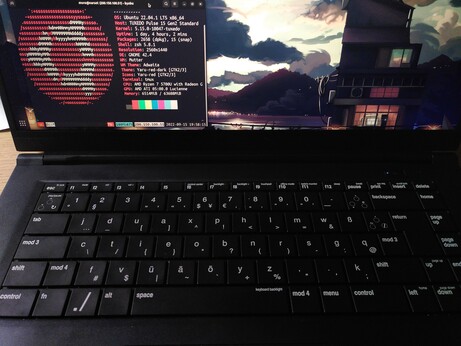
Ich wurde schnell fan und habe dies bei meiner nächsten Hardware berücksichtigt. Dank #tuxedocomputers konnte ich meinen Firmen Laptop mit einem individuellen Tastaturlayout liefen lassen  

#bonelayout #keyboardlayout #neolayout

Neo – ergonomisch optimiert

Neo ist eine ergonomische Tastaturbelegung, welche für die deutsche Sprache optimiert ist.

Nun tippe ich seit ein paar Tagen mit Neo-Qwertz und bin begeistert. Die "Sonder"-Zeichen auf Ebene 3 tippen sich viel, viel leichter als []{}|\~ mit AltGr. Auch die runden Klammern auf der Grundlinie machen Laune.
#neo2 #neolayout #ergonomie
@achso @Herbstfreud @joerg